
PDoomVideo preserves the source of a particular music video
Open src/ch/ and you find chapters of the animated music video "I'm Upping My P(doom)": scenes built around a Clawd character, shared props, lyrics, and a timeline. PDoomVideo is useful if you want to study how that finished project was assembled or change its scenes. I'd choose it as a readable creative example before choosing it as the foundation of a repeatable production service.
Our checkout contained 26 files, about 7,760 source lines, and occupied 4.2 MB before dependencies. That size makes the scene code approachable, but the project is tailored to its song. The README credits Claude Code for generating the repository and includes an animation guide and storyboard. Those documents explain the intended technique. They don't establish that generated scenes are accurate, that exports succeed on every platform, or that a new prompt will produce a comparable result.
What happened when we ran it
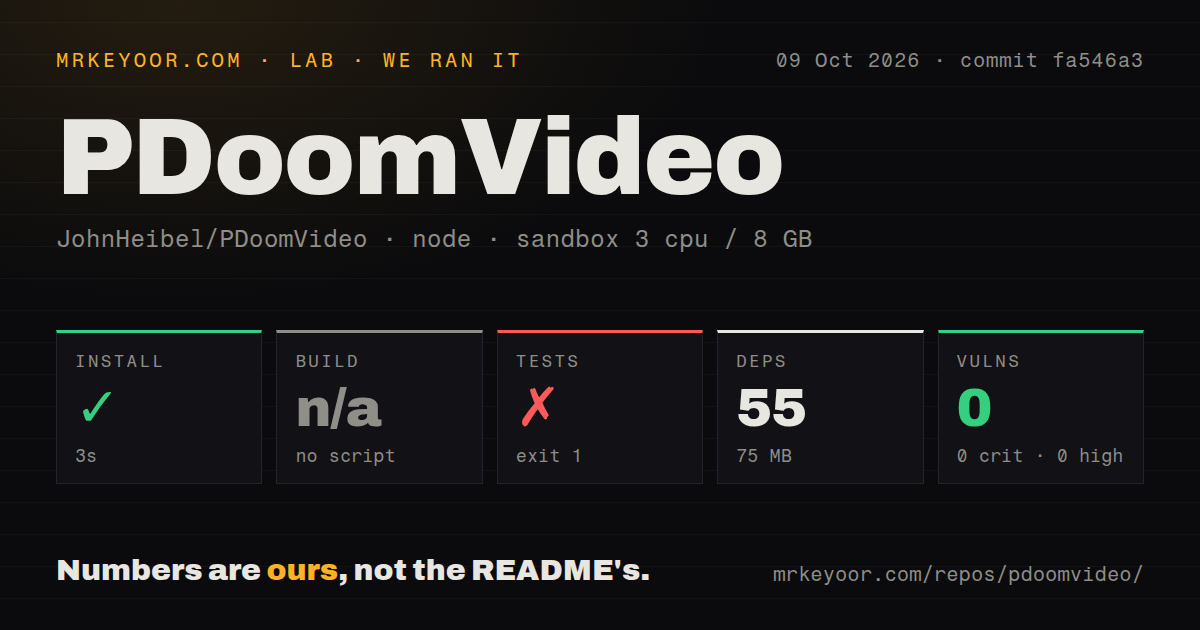
Our run at commit fa546a3 installed 55 npm packages in 3 seconds and used 75 MB on disk. The October 9, 2026 sandbox had 3 CPUs and 8 GB of RAM, used lab-node:22, and ran without secrets or elevated privileges. There was no build script or target, so the build step was skipped. A skipped build is not a compiler success.
The test step failed with exit code 1 after 1 second. Its log showed the package's placeholder command: echo "Error: no test specified" && exit 1. This result reports missing executable test coverage, not a discovered animation defect. The lab found no CI workflow files, Dockerfile, or tests directory. npm audit reported 0 known vulnerabilities, which says nothing about whether frames or the final video render correctly.
Chrome and ffmpeg are separate runtime requirements
The rendering instructions require Node.js, Google Chrome, and ffmpeg. render.mjs drives a local browser page, saves painted frames, and joins them with the bundled song to create an MP4. Its default Chrome executable is a Windows path. On another platform you must pass the browser path yourself, and ffmpeg must be available as an executable command.
The 55 packages our install fetched do not establish that those system tools were present or usable. The script imports puppeteer-core, launches Chrome with GPU-related flags including a D3D11 ANGLE setting, and waits for the page to become ready. The studio also requests Google Fonts. I'd inspect browser startup and font loading on the intended machine before attempting the whole video. No API credential appears in the documented playback or rendering path.
Contact sheets help you inspect edits before a full export
The renderer source supports stills, contact sheets, short clips, standalone loops, and resumable frame output. A sheet combines selected moments into an image, giving you a way to inspect a transition without committing to an entire export. The frame-writing path uses temporary files and renames them after writing. On a rerun it skips files that meet its existing-file check.
Our 3-second installation measured dependency preparation, not frame-generation speed or video-export time. The renderer's own progress estimates are runtime output, and the guide's suggested frame-time budgets are authoring instructions. Neither belongs in a measured performance claim for this review. Use the sheet and short-clip modes to establish that your edited scenes paint correctly, then measure a real render on the graphics setup you expect to keep.
Frames must be independent of the order they render in
The animation guide tells chapter authors that frames can render in parallel and out of order. Each shot must derive its state from its time input instead of carrying state from a previous frame. Stable randomness is part of that contract. A scene that incrementally advances a character's position may look fine during playback yet give inconsistent results when separate worker pages request different frames.
The 1-second failed test command offers no check of that contract. The guide instead asks for visual inspection of shot boundaries, motion, and transitions, including keeping faces above the karaoke band. That's useful direction for an animator comfortable reading JavaScript. For a team expecting automated acceptance checks, it leaves work to do: create checks for the properties that matter to your export and inspect representative frames after changing shared helpers.
Reuse terms need more clarity than the package label provides
GitHub's repository facts identify no license, while package.json declares ISC. Issue 6 explicitly asks for a permissive license to clarify reuse. The README also attributes the song and lyrics to external sources, with uncertainty about the song's origin. Those are distinct pieces of the project. I'd resolve the scope of reuse terms before treating the bundled code, character, and audio as an asset pack for a commercial commission.
The last push was September 25, 2026, and GitHub reported 2,032 stars with 6 open issues and PRs. There is no latest release. Recent activity includes documentation pull requests and questions about prompts and licensing, rather than evidence of a maintained rendering support queue. The README directs readers to the author's newer ClaudeAnimationBase and describes it as more general and reliable. That recommendation carries more weight than the absence of a release tag alone.
Start with the newer base when you want another cartoon
ClaudeAnimationBase is the closest alternative for making a new animation with the author's character and painting approach. p5.js is a lower-level choice if you want your own sketch structure without this song's chapters. The former keeps more of the supplied creative workflow; the latter gives you freedom at the cost of authoring the renderer and timing yourself.
PDoomVideo's 75 MB installed footprint makes it reasonable to explore locally, and the scene guide gives a developer something concrete to learn from. Keep it for studying or modifying this video. For a recurring animation job, begin with the newer base and verify your browser and export path. Before preserving an edited frame directory for resuming, remove stale output from scenes you've changed: an existing frame file cannot tell the renderer that its source is different.