mrkeyoor.com_
Mon 07 Sept 18:01 UTC
Dev Toolsevaluationupdated 07 Sept 2026

openscreen review

OpenScreen is a desktop recorder and editor for turning screen captures into product demos, tutorials, and short walkthroughs. It records the screen, microphone, system audio, and webcam, then adds cursor treatment, zooms, captions, backgrounds, annotations, and MP4 or GIF export on Windows, macOS, and Linux.

trackingstars / 7d
Verdict

Our OpenScreen run passed 2,687 of 2,688 tests, but its 46-second build failed and npm audit found 38 known vulnerabilities. Try the signed release if you want a free desktop demo editor with unusually deep capture and automation options, then run a disposable recording through your exact hardware before important work. Source adopters should budget time for native payloads, platform-specific checks, and dependency triage.

We ran it

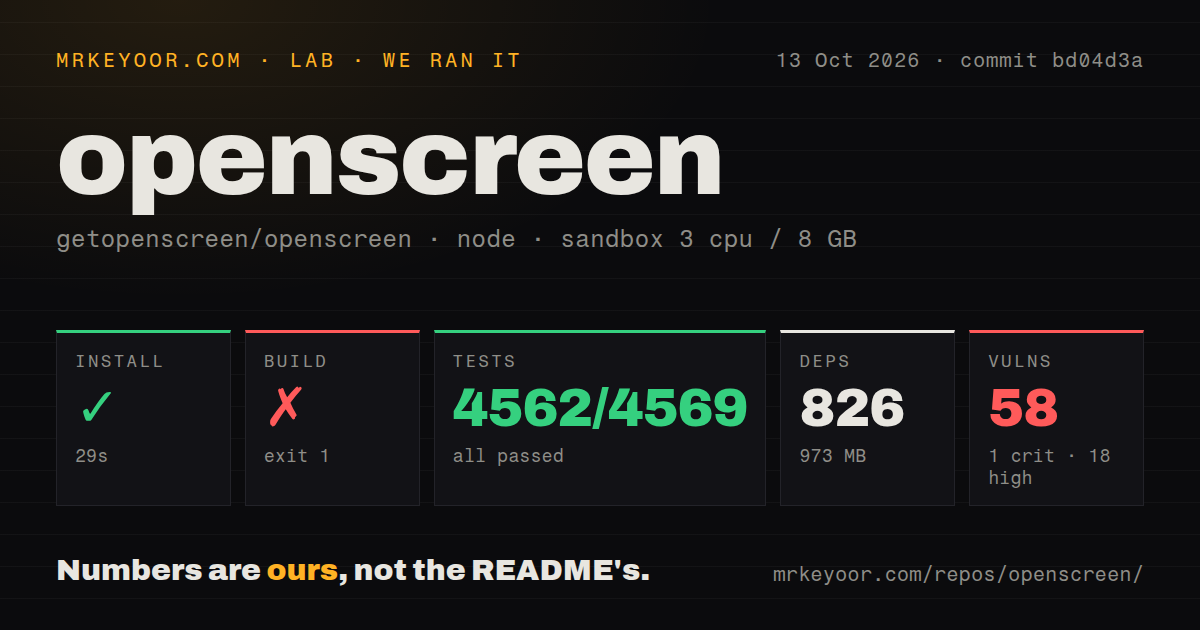
Lab card: what happened when we ran openscreenScreenshot of openscreen (getopenscreen.com)
Install✓ · 33s766 packages · 954 MB
Build✗ · 46s
Tests✓ · 108s2687 passed · 0 failed · 1 skipped of 2688 (vitest)
Known vulns381 critical · 7 high · 28 moderate · 2 low (npm audit)
Repo1278 files~231,713 lines of source · 49.8 MB · 21 CI workflows · tests dir

Answers from our run

Does openscreen build from source?

Dependencies installed in 33 seconds (766 packages), and the build failed. We cloned commit 7d355e7 into a clean Debian container with 3 CPUs and no project-specific setup.

Do openscreen's tests pass?

Yes: 2687 of 2688 passed when we ran the project's own test command (vitest). Some failures need services or credentials a bare container does not have.

Does openscreen have known vulnerabilities in its dependencies?

npm audit flagged 38 known advisories in the dependency tree, including 1 critical at the time of our run.

Who should not use openscreen?

Anyone who cannot risk a silently shortened recording: issue 621 documents a 1.9.6 macOS take whose file stopped while the recording display kept counting, and the reporter could not reproduce it on demand.

What are the alternatives to openscreen?

OBS Studio, Screenity, Cap. Our OpenScreen run passed 2,687 of 2,688 tests, but its 46-second build failed and npm audit found 38 known vulnerabilities.

Setup3/5Install passed, but the 46-second Linux package build failed
Docs5/5Platform limits, permissions, packages, and CLI behavior are explicit
Community5/5Fresh September activity and detailed issue investigation
Maturity4/5v1.10.0 is capable, though capture bugs and breaking changes remain

Who it’s for

Developers making repeatable product demos from a desktop app or command line.
Documentation teams that want on-device captions and editable screen-recording projects.
Creators who want Screen Studio-style polish without a subscription or watermark.
Teams willing to test capture and export on every operating system and GPU they support.

Who it’s NOT for

Anyone who cannot risk a silently shortened recording: issue 621 documents a 1.9.6 macOS take whose file stopped while the recording display kept counting, and the reporter could not reproduce it on demand.
Teams that require a stable project-file or CLI contract: the README warns that both may break during active development.
Windows users who require a signed standalone installer: the README says the .exe is unsigned and directs users to the Microsoft Store for the signed path.
Linux users without a working desktop portal and PipeWire who expect the full native capture path; the fallback has fewer capabilities.
Security-sensitive teams unwilling to triage dependencies: our npm audit found 38 known vulnerabilities, including 1 critical and 7 high severity.

Setup reality

Our sandbox installed 766 packages in 33 seconds and used 954 MB. The build failed after 46 seconds inside electron-builder's Linux before-pack native-payload checks. Tests finished in 108 seconds with 2,687 passed, 0 failed, and 1 skipped out of 2,688. Npm audit reported 38 known vulnerabilities: 1 critical, 7 high, 28 moderate, and 2 low.

Installing a released desktop package needs no account. Local captions use an on-device Whisper model that downloads on first use. The optional editing assistant needs your own Claude, OpenAI, Gemini, Mistral, OpenRouter, MiniMax, or OpenAI-compatible credentials; it is disabled until configured.

Source work pins Node.js 22.22.1 and npm 10.9.4, while platform builds add Rust, native capture helpers, FFmpeg, ONNX Runtime, and operating-system toolchains. macOS needs Screen Recording and Accessibility permission. Linux native capture depends on PipeWire and xdg-desktop-portal; click detection on Wayland also needs access to input devices.

OpenScreen v1.10.0 covers capture, editing, and export

OpenScreen v1.10.0 records a display or window with microphone, system audio, webcam, and cursor data. Its editor adds automatic or manual zooms, click effects, crop and trim controls, speed regions, backgrounds, motion blur, annotations, and captions. Export produces MP4 or GIF through Metal on macOS, D3D11 on Windows, or Vulkan on Linux, with a CPU fallback. That is a serious product-demo toolset rather than a bare screen recorder.

The 49.8 MB checkout also ships a headless CLI. Scripts can list sources, record, inspect or pack a project, add captions, and export through the same pipeline as the desktop editor. Machine-readable NDJSON makes it useful in CI and coding-agent workflows. The .openscreen project is JSON, so a tool can add trims, zooms, and annotations directly. The README warns that this format and the CLI can still change, which matters if automation will outlive one release.

Seven provider choices make AI editing optional

OpenScreen's editing assistant accepts plain-language requests for cuts, zooms, speed changes, annotations, and camera framing. The README lists 7 provider routes: Claude, OpenAI, Gemini, Mistral, OpenRouter, MiniMax, and OpenAI-compatible endpoints. Users bring their own key, and the feature starts disabled. Teams can therefore use the recorder, editor, and export path without sending editing instructions to a model provider.

The 954 MB installed dependency tree includes far more than a React interface. Electron handles the desktop shell, native helpers capture each platform, Rust code composes frames, and FFmpeg plus ONNX components support media work. Local speech recognition uses Whisper and downloads its model on first use. That architecture explains the feature reach and the build burden. Developers changing capture or export need the matching operating-system toolchain, not only Node and npm.

What happened when we ran it

Our sandbox installed 766 npm packages in 33 seconds, leaving 954 MB on disk. The default build ran for 46 seconds and exited with code 1. Its final stack frames came from checkNativePayload, checkLinuxNativePayload, electron-builder's beforePack event, and the Linux packager. The supplied log tail does not name the offending payload, so a claim about which binary or library caused the stop would be guesswork.

Vitest completed in 108 seconds: 2,687 tests passed, 0 failed, and 1 was skipped out of 2,688. That result gives the application logic substantial coverage even though packaging failed. Npm audit reported 38 known vulnerabilities across the installed tree, split into 1 critical, 7 high, 28 moderate, and 2 low. Before distributing a custom build, inspect whether each advisory reaches shipped code and whether dependency updates preserve the native integrations.

Platform support comes with specific permission costs

The README sets Windows 1903, macOS 13, and 8 GB of RAM as minimums, with newer hardware and 16 GB recommended. macOS requires Screen Recording and Accessibility access, and may ask again for recording permission on later system releases. Windows users get the checked signing path through the Microsoft Store. The standalone .exe is unsigned, so SmartScreen reports an unknown publisher. That distinction should be written into internal install instructions.

Across 1,278 repository files, Linux receives the most conditional path. Native recording expects PipeWire and an xdg-desktop-portal backend. A browser capture fallback remains available with fewer capabilities. Wayland exposes cursor position and shape through the portal, while click effects require reading the left button through evdev and membership in the input group. Older PulseAudio-only setups may miss system audio even when microphone capture works.

September activity is fast enough to demand release checks

GitHub showed 2,470 stars and 68 open issues and pull requests when fetched. The last push was September 7, 2026, and the latest tagged release was v1.10.0 from August 24, 2026. The repository contains 21 CI workflow files and an active stream of fixes around capture, packaging, transcripts, editor behavior, and Nix support. The combined open count includes pull requests, so it should not be read as 68 confirmed bugs.

Our scan found 21 workflows, a tests directory, and no Dockerfile. The missing container recipe is unsurprising for a hardware-facing desktop app, but it removes one portable source-build reference. The release route is much friendlier: signed and notarized macOS builds, a signed Microsoft Store package, and Linux packages for Debian, Fedora, Arch, AppImage, and Nix. Users who only need the application should start there instead of reproducing the native toolchain.

Open capture reports justify a disposable first recording

Issue 621 describes a macOS 1.9.6 recording where the output stopped while capture and the on-screen timer continued. The report is unusually detailed and says the event could not be reproduced on demand. Issue 615 describes an Arch Linux GNOME Wayland recording with invalid H.264 access units that external FFmpeg could re-encode, while OpenScreen's own preview failed. Neither report proves that every v1.10.0 installation has the same fault. Both identify failure modes worth testing.

commit 7d355e7 passed 2,687 tests in our sandbox, which makes OpenScreen easier to trust than its active-development warning alone would suggest. The failed 46-second package build and 38 audit findings still prevent a clean source verdict. Use the official signed package where possible, record a short sample with the intended screen, audio, webcam, and GPU path, stop it, preview it, and export it before committing an unreproducible session.

Alternatives

ProjectWhat it isPick it when
OBS Studio gh↗A mature recorder and live-production suite with deep scene and source control.pick this instead when capture reliability, streaming, plugins, and multi-source production matter more than automatic demo polish.
ScreenityA browser extension for quick screen and camera recordings with annotations.pick this instead when a lightweight browser workflow is enough and native desktop capture is unnecessary.
Cap gh↗An open-source Loom-style recorder centered on making recordings easy to share.pick this instead when hosted sharing and async team communication matter more than OpenScreen's timeline effects and local CLI.

What people are saying

  1. [github-trending] getopenscreen/openscreen

Sources

  1. OpenScreen README
  2. OpenScreen v1.10.0 release
  3. OpenScreen command-line documentation
  4. macOS recording writer issue 621
  5. Linux H.264 preview issue 615

More dev tools reviews

vtracer · How-To-Secure-A-Linux-Server · gpuix · awesome-python · Acode · ios-location-spoofer · the whole board →