Choose mpv when the command line suits your viewing habits
mpv is a command-line media player with support for many video formats, audio codecs, and subtitle types. Opening a file does not require signing into a streaming service. Its appeal is direct control: you can choose playback options yourself and extend behavior through the documented scripting facilities. That suits someone who wants to understand and adjust the player they use every day.
The README lists Lua as optional, but required for its on-screen controller and youtube-dl integration. Package choices can therefore change the experience you receive. If you want an application whose settings are primarily presented through a native desktop interface, look closely at IINA on macOS or compare VLC. Being comfortable with a terminal is a useful starting point for choosing mpv.
What happened when we ran it
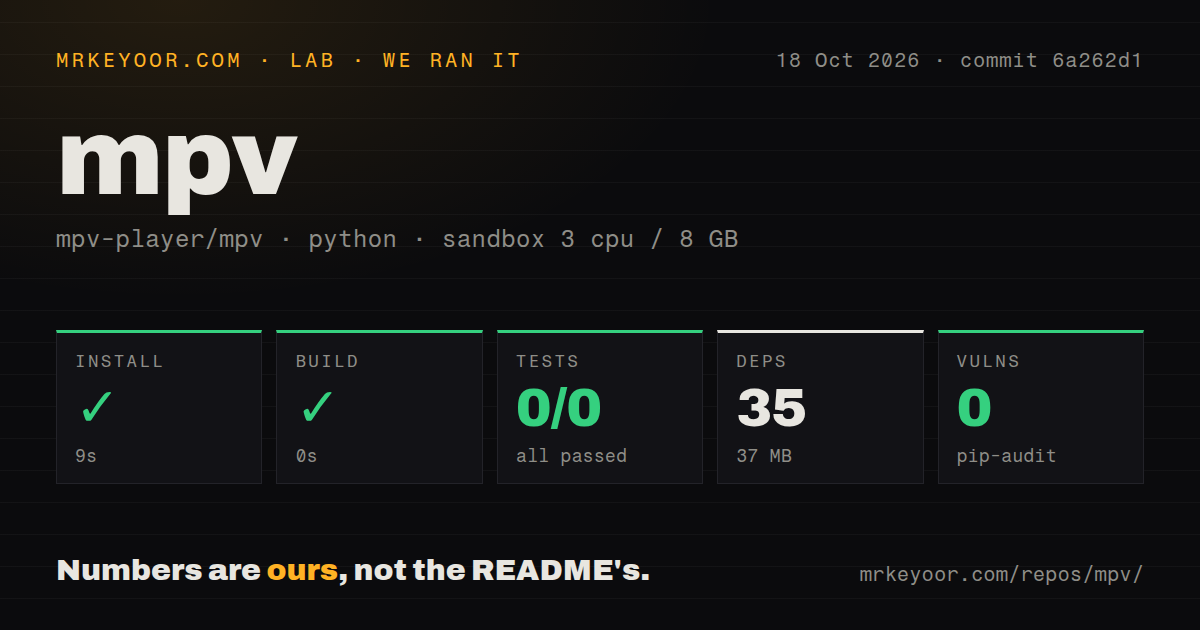
Our mpv sandbox run collected 0 pytest tests and exited 5 after 1 second. The October 18, 2026 run at commit 6a262d1 reported a successful 9-second install with 35 dependencies recorded and 37 MB on disk. Its build step also reported success in 0 seconds. Those are the recorded step results, with an important limit on what they establish.
The log tail says no tests ran in 0.06s. The supplied summary reports 0 passed and 0 failed out of 0. It identifies an empty pytest run, rather than a failing mpv playback case. The evidence does not show why no tests were collected. There is no basis here for diagnosing a missing package or blaming a defect in the player.
The harness classified the checkout as Python and used image ghcr.io/astral-sh/uv:python3.12-bookworm, with 3 CPUs and 8 GB of RAM. Image naming does not verify runtime versions. The checkout contained 974 files, roughly 237,892 source lines, and occupied 15.7 MB. Signals recorded 6 CI workflow files, a tests directory, and no Dockerfile.
Pip-audit reported 0 known vulnerabilities. That result belongs to the recorded Python-oriented environment, and the supplied summary gives no native-library audit coverage. It cannot certify FFmpeg or a packaged mpv player. The run also supplies no playback observations, so we cannot judge picture quality, frame drops, or subtitle rendering from these measurements.
A successful harness step does not establish a native player build
The README requires Meson and lists a C compiler plus media-library development files for compiling mpv. It names FFmpeg, libplacebo, and libass among the requirements. That is a materially different task from obtaining Python packages, even though Meson itself can come from PyPI. The recorded 0-second build step does not show those native compilation steps running.
For everyday use, the project points readers to semi-official builds and third-party packages. Start with the installation route for your operating system unless you need source changes. A package can save you from assembling the graphics and audio development environment, but you should still check which optional features it includes. Our run provides no timing or success claim for that route.
The current README names Windows 10 1607 or later and macOS 10.15 or later, while noting that only recent Linux distribution releases are actively supported. It does not guarantee compatibility with older systems. If you maintain an old machine, confirm the exact package and operating-system combination before adopting mpv as its default player.
Hardware decoding requires an explicit choice
The README says hardware decoding must be enabled through --hwdec. It also warns that power-efficient playback on embedded or integrated GPUs is outside the project's focus, and recommends --profile=fast when low-power graphics struggle. Those are meaningful limits for people choosing a player for an aging laptop or a small media appliance.
Neither option is a promise about your hardware. Driver behavior, the video format, and the chosen output path still need checking on the device where you watch. Try representative files, including the subtitles you actually use, and compare CPU load and smoothness under the settings you intend to keep. These are recommended evaluation steps, not results from our sandbox.
IINA adds a Mac interface, while VLC also covers conversion
IINA builds its macOS player around mpv. Its README documents interactive settings for filters, customizable controls, and support for mpv configuration files and scripts. Choose it when you want mpv underneath a Mac application with those controls exposed through an interface. It is a different presentation of the playback engine, so this is not a claim that one produces better video.
VLC covers discs, streams, and conversion as well as file playback. Choose it when those jobs belong in the same application or you want to compare a different media engine. Its platform list spans desktop and mobile systems. We have no matching playback trial of either alternative, so their documented scope determines this comparison.
Current pushes matter more than the age of the release tag
The latest release endpoint returned v0.41.0, published December 21, 2025. The last repository push was October 22, 2026, and a streaming-seek issue had activity that day. Those dates describe ongoing development alongside an older release tag. They do not support calling mpv abandoned.
Open issue 18658 reports slow seeking within buffered yt-dlp videos on a development build. It is a user report about that integration, not a finding from our run or evidence that local-file seeking is generally slow. If online video is your main use, include seeking in your own evaluation rather than assuming a file-playback check covers it.
Use mpv if choosing playback options and maintaining a small configuration suits you. Before relying on it, open the files and streams you care about on the intended machine. Our pytest result leaves that practical decision untested.