
The 2,115-file repo gives an agent a production manual
OpenMontage turns a coding assistant into the coordinator for a video project. Its 12 pipeline definitions cover formats such as explainers, documentary montages, product work, and character animation. The agent reads YAML manifests and Markdown instructions, calls the registered Python tools, records checkpoints, asks for approvals, and sends the final plan to Remotion, HyperFrames, or FFmpeg. The repository says plainly that there is no code orchestrator. Your assistant owns that job.
That design gives developers far more room than a prompt box. The README lists more than 100 production tools and over 700 skill and production-knowledge files, so provider selection, scene planning, captions, audio, and review rules remain visible. Backlot adds a local board for scripts, scene cards, costs, and approval holds. It still is not a timeline editor. If you want to trim a shot by dragging its edge with a mouse, this project works at the wrong level.
Zero API keys still require 3 parts of a media toolchain
The documented minimum is Python 3.10+, Node.js 18+, and FFmpeg, plus an AI coding assistant that can read files and run commands. make setup creates the Python environment, installs the Remotion package, adds Piper speech, warms the HyperFrames package through npx, and copies the environment template. That is a reasonable one-command route after the host prerequisites exist. It is not a Python-only installation.
A zero-key production can use Piper for speech, open archives or stock sources for footage, and local composition for the final file. Paid keys extend the same system with image, video, voice, and music providers. The selector scores choices across 7 dimensions and records the result. Local video generation is separate again: the README calls for a GPU install, model selection, and enough memory for the chosen model. Free usage avoids API charges, not operational decisions.
What happened when we ran it
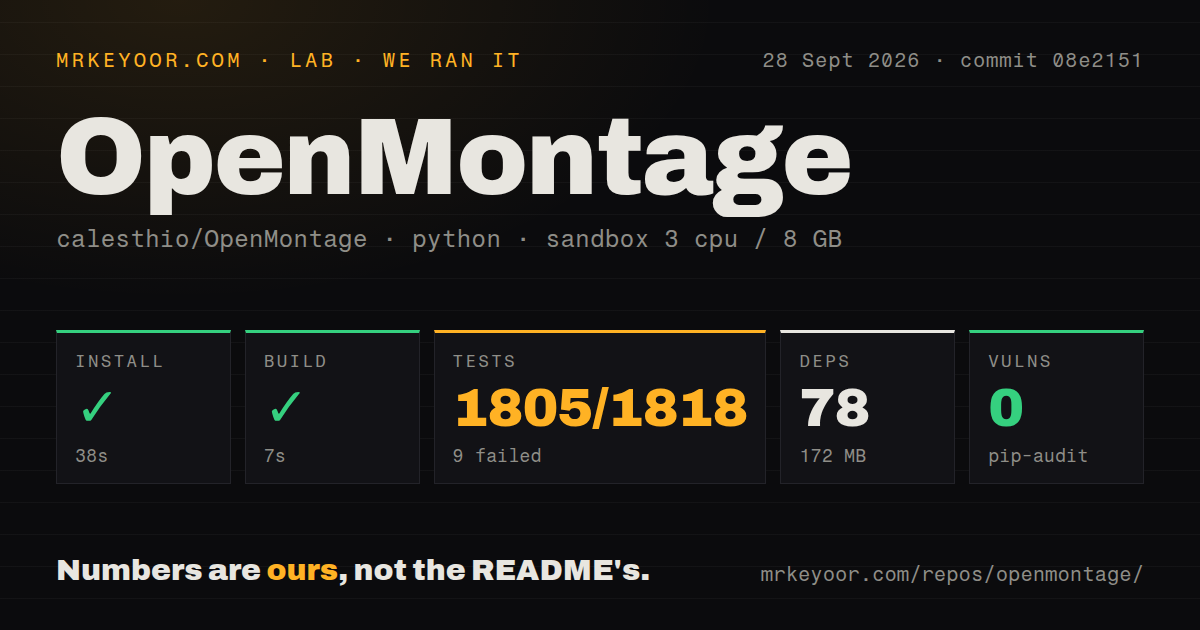
Our sandbox installed commit 08e2151 in 38 seconds, adding 78 packages and 172 MB. The build succeeded in another 7 seconds. We ran this in an unprivileged Debian container with 3 CPUs, 8 GB of RAM, Python 3.12, and no secrets. The checkout contained 2,115 files, roughly 162,247 source lines, and 88.6 MB. Pip-audit found 0 known vulnerabilities.
Pytest failed after 55 seconds. The summary reported 1,805 passed, 9 failed, 26 skipped, 3 xfailed, 4 errors, and 1 subtest passed; the measured suite total was 1,818. Three Remotion adapter tests returned npx not found. Three HyperFrames tests raised FileNotFoundError for ffmpeg. Another HyperFrames assertion wanted the specific npm-resolution failure in its reasons instead of a generic runtime message.
The remaining 2 failures were Seedance audio contract checks. One expected a duration-range message but received an ffprobe requirement; the other expected mocked creation to succeed and received a failed result. Four QA modules then produced collection or setup errors because ffmpeg was absent. The log shows missing host executables and one error-reporting mismatch. It does not prove that installing those executables would make every test pass, so a clean rerun is still part of adoption.
One open PR says the black-frame check could never fire
Open pull request 679 is titled black-frame check could never fire, while issue 637 says the diagram tool can report itself available without Mermaid CLI and then render source text as a card. Neither item proves every current export is broken, and pull requests are proposed changes until merged. They do show why the final MP4 needs human inspection even when the status board reaches its last stage. Media validity is more than a file existing at the expected path.
The intended controls are serious. OpenMontage records approval at proposal, script, scene-plan, asset, and publish stages. Its budget system estimates, reserves, and reconciles provider spending, with documented defaults of $0.50 for per-action approval and $10 for the whole production. Pre-compose checks look for delivery and slideshow problems, while post-render review probes the file, samples frames, checks audio, and verifies subtitles. These checks reduce avoidable waste, but current issue activity says they should not be treated as infallible.
97 issues and 239 pull requests make main hard to pin
GitHub showed 61,888 stars on September 30, 2026. The default branch was last pushed on September 6, yet contributors opened a pull request on September 29 and merged another on September 28. That combination indicates current work around a comparatively quiet main branch. The 336 combined open items split into 97 issues and 239 pull requests, so calling all 336 bugs would badly misread the queue.
There was no latest GitHub release and the tags endpoint returned an empty list. Teams that need a supported version number will have to pin a commit and decide which open changes matter to them. AGPL-3.0 also deserves review before a company modifies the system or offers it as a network service. OpenMontage is easiest to justify for a technical creator who wants the production process exposed and can own the final quality check. Our 1,805 passing tests show substantial engineering; the 9 failures and 4 errors keep it out of set-and-forget territory.