
Opcode 0.2.1 puts Claude Code sessions in a desktop app
Opcode wraps an existing Claude Code installation in a Tauri interface. It reads projects and sessions from ~/.claude, lets you resume old work, and gives custom agents their own prompts, permissions, processes, and run history. The same app has a CLAUDE.md editor, an MCP server registry, usage charts, checkpoints, session forks, and a diff viewer. Its useful idea is simple: keep the CLI's local history, then make it easier to see and manage.
The app does not replace Claude Code. You must install the CLI separately, put claude on your path, and complete whatever account setup that tool requires. Opcode then works with local session files and launches agent processes against a chosen project. Its scope is a companion for an existing workflow. It does not provide a provider-neutral agent or hosted access.
Building needs Rust 1.70, Bun, and desktop libraries
The source instructions require Rust 1.70 or later, a current Bun installation, Git, and the Claude Code CLI. Linux adds WebKitGTK 4.1, GTK 3, OpenSSL headers, AppIndicator, librsvg, libsoup 3, JavaScriptCoreGTK, and build tools. The README budgets at least 4 GB of RAM and 1 GB of free storage, with 8 GB recommended. This is a normal Tauri toolchain, but it is much heavier than installing a web dashboard.
Platform support also differs in practice. The README names Windows 10/11, macOS 11+, and Ubuntu 20.04+, and it documents .msi and .exe artifacts as build outputs. The newest GitHub release, v0.2.0, lists downloadable packages only for macOS and Linux. Developers on Windows can build the project with Microsoft C++ Build Tools and WebView2, but they should not read the generic artifact list as proof of a current signed installer.
What happened when we ran it
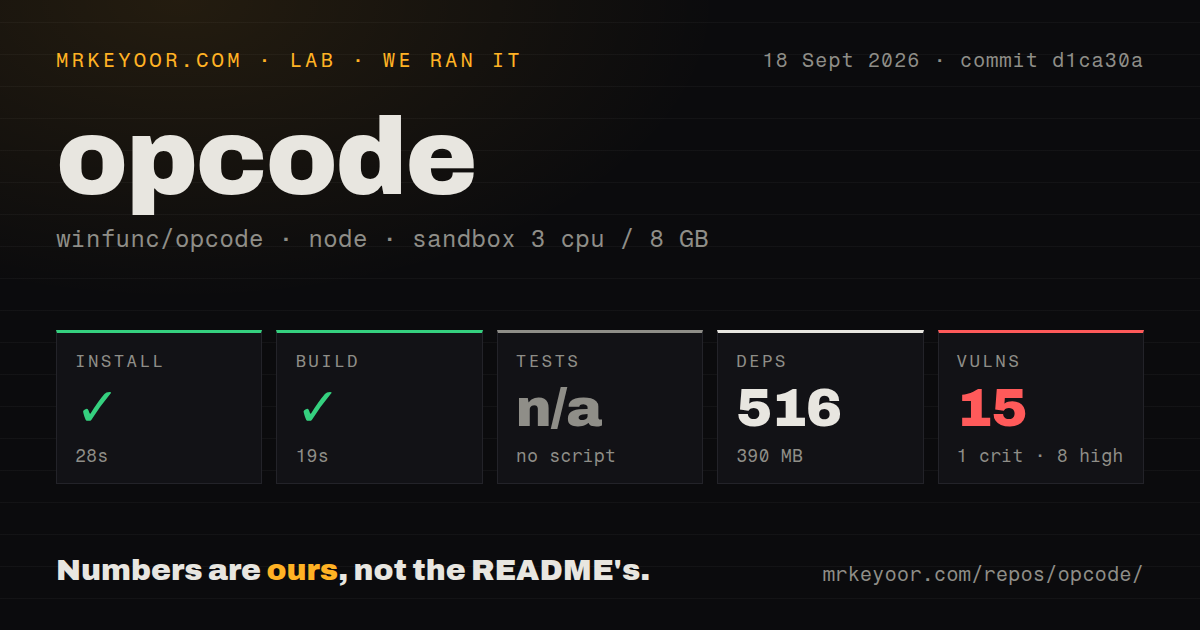
Our measurement setup used commit d1ca30a in an unprivileged Node 22 container with 3 CPUs and 8 GB of RAM. Bun installed 516 packages in 28 seconds and occupied 390 MB. The build succeeded in 19 seconds. For a repository with 234 files and roughly 50,511 lines of source, the frontend setup was straightforward. The checkout itself was 4.5 MB.
Tests were skipped because the repository had no tests script or target, and our scan found no tests directory. That absence matters more than the successful build for an app that edits instruction files and launches background agents. The npm audit also reported 15 known vulnerabilities: 1 critical, 8 high, 4 moderate, and 2 low. Those are dependency findings from our run, not proof that every advisory is reachable through the packaged desktop app.
The no-telemetry line conflicts with the current source
Opcode's README says all data stays on the machine and claims there is no telemetry. Version v0.2.0 says anonymized analytics were added. The current package includes posthog-js, the Tauri content policy allows PostHog domains, and src/main.tsx initializes analytics before rendering the app. Those facts directly contradict a plain reading of the security section.
The consent code deserves closer attention. When no saved setting exists, it creates settings with analytics enabled and hasConsented set to true. The analytics service then sends events to PostHog, while its sanitizers attempt to remove paths, project names, API keys, email addresses, and error text. There is an opt-out function, but the default state and the README cannot both describe "No Telemetry." Privacy-sensitive users should inspect the exact build and network behavior before using it with work repositories.
Opcode v0.2.0 has open path and editor failures
Open issue 465 reports that a username containing _ can be reconstructed as the wrong project path, causing every submitted prompt to fail. Issue 444 describes CLAUDE.md loading failures for iCloud Drive paths containing spaces and special characters. These are ordinary developer-machine paths, so anyone evaluating Opcode should try their real home directory and synced folders instead of a tidy demo repository.
Editing has a separate warning. Open issue 478 says closing a CLAUDE.md tab can discard unsaved changes without showing a confirmation because the editor's dirty state never reaches the tab layer. The report was filed automatically and says it had no human review, so it should not be treated as a maintainer-confirmed diagnosis. The reproducible claim is still serious enough to test before trusting the built-in editor with project instructions.
A September 2026 push did not produce a new release
GitHub showed 22,408 stars and 332 combined open issues and pull requests when fetched. The last push was September 18, 2026, but that commit only removed an image from the README. The previous commit in the recent history was dated October 16, 2025. Issue 478 arrived in August 2026 and a documentation pull request was updated in September, so users are still engaging with the project even though code changes have been sparse.
The latest tagged version remains v0.2.0 from August 31, 2025, while package.json and the Tauri config identify the source as 0.2.1. That gap does not prove the project is abandoned. It does mean the 7 CI workflow files and successful 19-second build are not enough to establish release readiness, especially with no test target and 15 audit findings. Opcode is best treated as an inspectable personal tool until a current package closes that evidence gap.