mrkeyoor.com_
Fri 18 Sept 19:10 UTC
Dev Toolsevaluationupdated 18 Sept 2026

tty7 review

tty7 is a desktop terminal that keeps shells in a background server, so closing the window or rebooting does not end supported sessions. It groups terminal panes by repository, tracks 22 coding-agent CLIs, and adds SSH, Git, file, diff, and worktree controls beside the terminal.

Verdict

Our tty7 build ran for 637 seconds and failed because the linker could not find xkbcommon-x11, so source adopters should prove the full Linux toolchain before committing to it. The prebuilt app is worth a trial for developers supervising several coding agents or remote workspaces, especially if persistent panes can replace a separate tmux layer. Stay with a narrower terminal if native SSH compatibility, accessibility tooling, or predictable source builds matter more than the integrated workspace.

We ran it

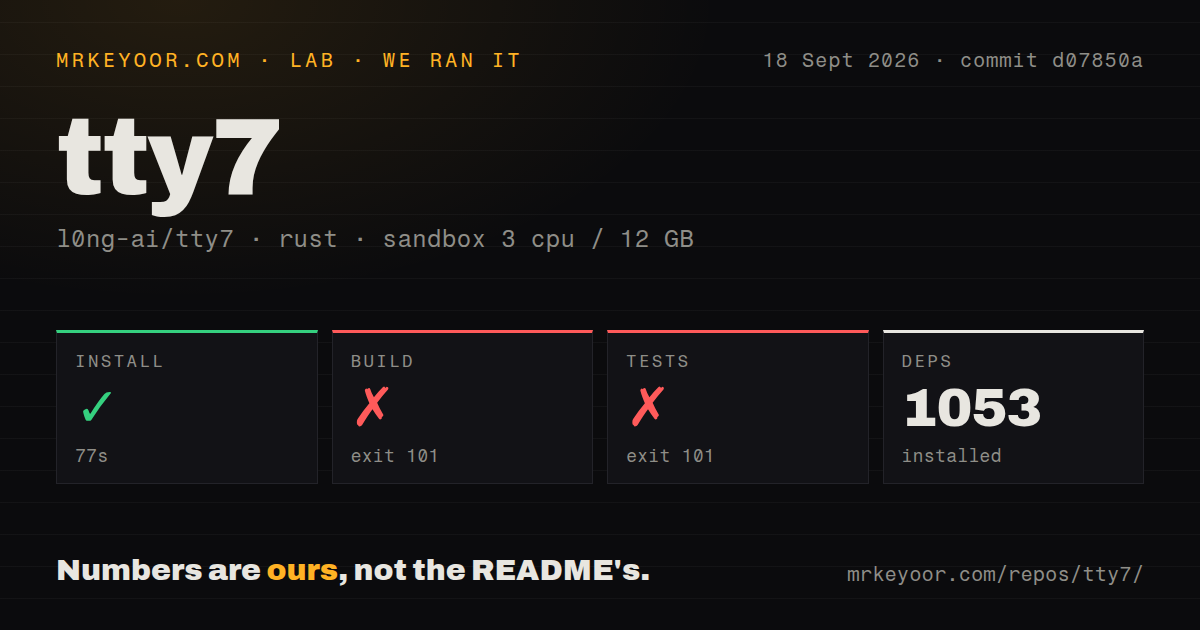
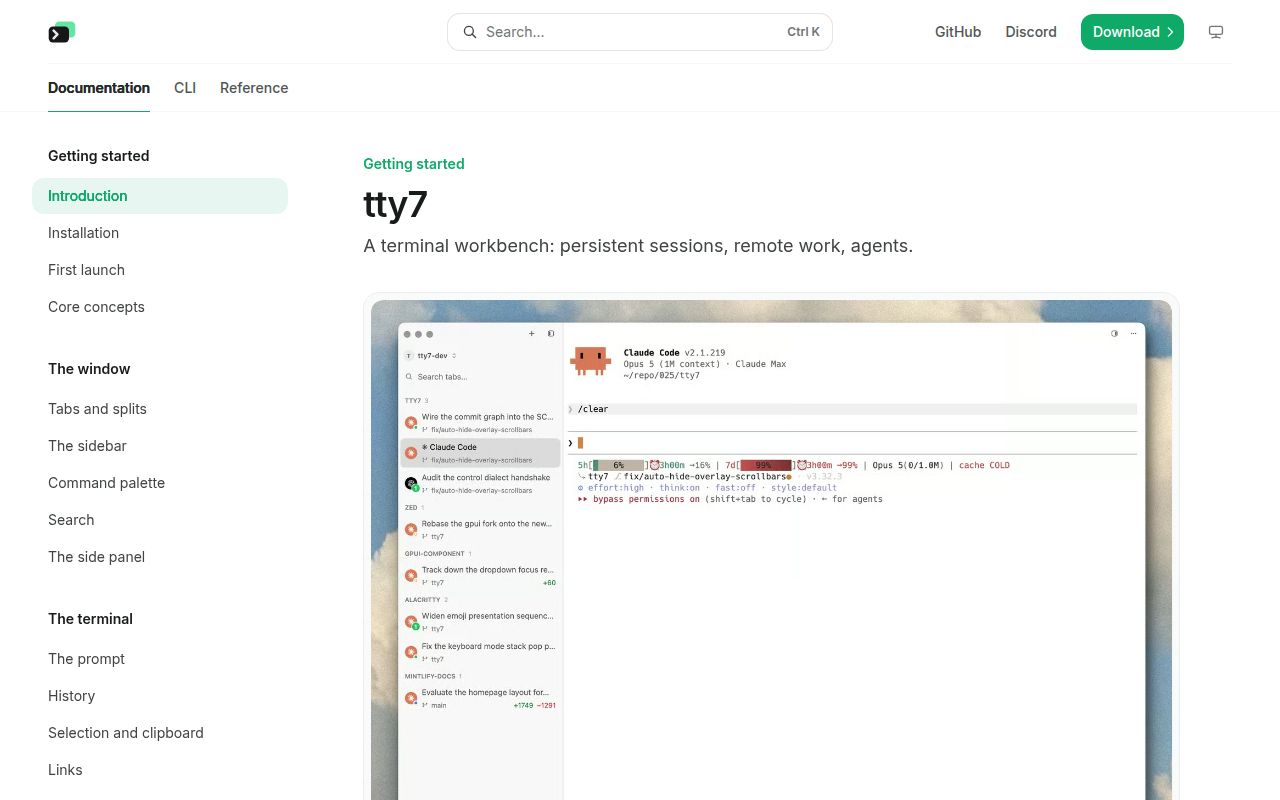
Lab card: what happened when we ran tty7Screenshot of tty7 (tty7.io)
Install✓ · 77s1053 packages
Build✗ · 637s
Tests✗ · 200sran, no count parsed
Repo457 files~249,677 lines of source · 19.3 MB · 3 CI workflows

Answers from our run

Does tty7 build from source?

Dependencies installed in 77 seconds (1053 packages), and the build failed. We cloned commit d07850a into a clean Debian container with 3 CPUs and no project-specific setup.

Do tty7's tests pass?

The test command failed in our container, and its output did not report a pass or fail count.

Who should not use tty7?

Linux developers expecting a generic Rust image to compile the app unaided: our source build stopped because the linker could not find xkbcommon-x11.

What are the alternatives to tty7?

tmux, Zellij, WezTerm. Our tty7 build ran for 637 seconds and failed because the linker could not find xkbcommon-x11, so source adopters should prove the full Linux toolchain before committing to it.

Setup2/5Native packages are simple; our Linux source build failed
Docs5/5Build packages, SSH limits, agents, and CLI behavior are explicit
Community4/51,001 stars and active fixes, with 51 open issues
Maturity3/5Frequent releases, but open input and accessibility defects remain

Who it’s for

Developers juggling Claude Code, Codex, or other coding agents across several repositories.
People who want persistent terminal sessions without putting tmux inside every shell.
Remote developers who prefer SSH, SFTP, port forwarding, Git, and worktrees in one desktop app.
Teams willing to install agent hooks so scripts can wait for a worker, capture its output, and hand work between panes.

Who it’s NOT for

Linux developers expecting a generic Rust image to compile the app unaided: our source build stopped because the linker could not find xkbcommon-x11.
macOS users who depend on dictation or Accessibility API text fields: open issue 899 says the terminal pane is not exposed as an editable accessibility element.
Windows Codex users who require Shift+Enter or Ctrl+J for multiline input today: issue 894 reproduces both chords being ignored in v26.9.2 and gives a Ctrl+Enter workaround.
SSH users who need full OpenSSH configuration behavior: the docs say Match, Canonicalize*, and GSSAPI directives are unsupported, with no fallback to the system ssh.
Anyone who wants a small, conventional terminal with no background server, agent hooks, Git panels, or remote workspace layer.

Setup reality

Our sandbox install succeeded in 77 seconds and pulled 1,053 packages. The build ran for 637 seconds, then failed with exit 101 because rust-lld could not find -lxkbcommon-x11. Tests also failed with exit 101 after 200 seconds at the same missing library; the build emitted 25 warnings and the test target emitted 13.

Prebuilt releases need no separate runtime. A source build needs stable Rust and, on Linux, the documented pkg-config, compiler, X11, Wayland, font, SSL, Kerberos, and xkb development packages. Local panes need no cloud account, while agent status requires hooks and SSH work needs host credentials stored in the OS keychain.

A background server owns panes and sessions. Remote workspaces install an unprivileged tty7-server, and the native SSH stack does not fall back to the system client. The 19.3 MB checkout held 457 files and about 249,677 source lines, with 3 CI workflows but no Dockerfile or tests directory.

The server owns the shell, so the window can disappear

Closing tty7 does not have to kill the work inside it. A background server owns each shell and pane, while the desktop window reconnects to them. Supported coding-agent sessions can resume after a reboot. That is the useful distinction from a normal terminal with extra panels: persistence is part of tty7's process model, and the GUI is one client of that state.

The scope is much larger than a terminal renderer. commit d07850a occupied 19.3 MB and contained 457 files with roughly 249,677 source lines. The app combines a GPUI desktop client, an Alacritty-derived terminal core, a CLI, and a server. Its repository had 3 CI workflow files, though our scan found no Dockerfile or tests directory. This is a young desktop system with several operating parts, not a small Rust utility.

Twenty-two agent CLIs get detection, while live status needs hooks

The README lists 22 recognized agents, including Claude Code, Codex, Gemini, Aider, OpenCode, and several newer CLIs. Basic detection reads the process in a pane and adds its name, repository, branch, and diff to the sidebar. tty7 does not proxy the agent. Each tool keeps its own terminal interface, which reduces the risk of an extra wrapper changing prompts or command behavior.

Working, waiting, and done states require a hook installed from Settings for each supported agent. That state feeds desktop notifications, the tray icon, and tty7 wait. The bundled CLI can split a pane, send a task, wait for a state change, and capture plain output. Those commands make agent handoffs scriptable, but they also add configuration outside tty7 itself. Against a checkout with 1,053 installed packages, hook ownership and upgrade behavior deserve the same attention as the GUI.

What happened when we ran it

Our sandbox installed 1,053 packages in 77 seconds. The build continued for 637 seconds before exiting 101. rust-lld reported that it could not find -lxkbcommon-x11, followed by a compiler error for the tty7-app binary. The log also recorded 25 warnings. We did not get a working binary from commit d07850a in this fresh, unprivileged Debian container.

Tests reached the same link boundary after 200 seconds and exited 101. The failing target was tty7-app in test mode, and the tail again names the missing xkbcommon-x11 library. It also shows 13 warnings. The log does not say why the library was unavailable, and it does not report completed test cases, so the defensible finding is limited: both build and test commands stopped at linking in our stated environment.

Prebuilt Linux packages avoid the source-build dependency list

The installation docs tell Linux source builders to install libxkbcommon-x11-dev alongside pkg-config, cmake, clang, X11, Wayland, font, SSL, zstd, and Kerberos development packages. That documentation is direct, and it names the library our linker could not find. Our run does not establish whether a listed package was missing, misconfigured, or unavailable to the build. It does show that a 637-second compile can end at a host-library check.

Release v26.9.2 supplies signed macOS disk images, Windows installers and ZIPs, plus a Linux AppImage and tarball. The AppImage bundles its X11, Wayland, xkb, and font libraries, so trying the released app is a different proposition from compiling the 249,677-line checkout. Source builds also do not self-update or replace the installed server, a detail that matters if both versions live on one machine.

Native SSH integrates well, with less OpenSSH compatibility

tty7 uses the Rust russh stack instead of launching the system ssh. That enables keychain-backed credentials, SFTP, jump hosts, port forwarding, and remote workspaces whose files and Git state remain on the remote host. The tradeoff is compatibility: the docs call support for ~/.ssh/config best effort, exclude Match, Canonicalize*, and GSSAPI directives, and say there is no system-client fallback.

Current defects touch the workflows tty7 sells most strongly. Issue 894 says Shift+Enter and Ctrl+J are ignored by native Codex on Windows v26.9.2, though it documents a Ctrl+Enter workaround. Issue 899 reports that a macOS pane lacks the editable Accessibility API role expected by dictation tools. Another remote-workspace report describes a server startup timeout after 15 seconds. In a project with 457 files and several platform paths, test your own shell, agent, and remote host before moving daily sessions.

September fixes show speed, while 51 open issues show breadth

GitHub recorded a September 15, 2026 push and 1,001 stars when checked. The tracker held 51 open issues and 2 open pull requests. Release v26.9.2 shipped on September 10 with sidebar groups, path-link handling, remote port work, and fixes for terminal input and display behavior. Recent issue-to-fix pairs also show maintainers closing reported keymap, cursor, theme, and notification defects within days.

That pace is reassuring, though the project was created only in July 2026 and its open reports span Windows input, macOS accessibility, SSH, remote recovery, and terminal rendering. Our 77-second install proves the Rust dependency graph resolves; the 637-second failed build says source readiness is host-sensitive. Try the prebuilt release beside your present terminal first. Move persistent work only after suspend, reboot, agent hooks, and SSH reconnection behave correctly on your machines.

Alternatives

ProjectWhat it isPick it when
tmux gh↗A mature terminal multiplexer built around persistent text sessions and keyboard control.pick this instead when persistence on servers matters more than a desktop GUI, agent status, or integrated Git views.
Zellij gh↗A terminal workspace and multiplexer with layouts, panes, sessions, and plugins.pick this instead when you want a terminal-native workspace that works over an ordinary SSH client.
WezTerm gh↗A cross-platform GPU terminal with multiplexing, SSH domains, and Lua configuration.pick this instead when terminal emulation and deep configuration matter more than coding-agent orchestration.
Wave Terminal gh↗A graphical terminal workspace with files, web content, remote connections, and AI features.pick this instead when you want a broader graphical command workspace rather than tty7's agent-aware pane model.

What people are saying

  1. [github-trending] l0ng-ai/tty7

Sources

  1. tty7 repository
  2. tty7 v26.9.2 release
  3. tty7 installation and source-build requirements
  4. tty7 coding-agent documentation
  5. tty7 SSH compatibility documentation
  6. Windows Codex multiline-input report
  7. macOS accessibility text-input report
  8. Windows SSH remote-workspace report

More dev tools reviews

lore · OhMyKeymint · makepad · Codex-X · gitdiagram · grok-build · the whole board →