Start with Hookshot if you want to play
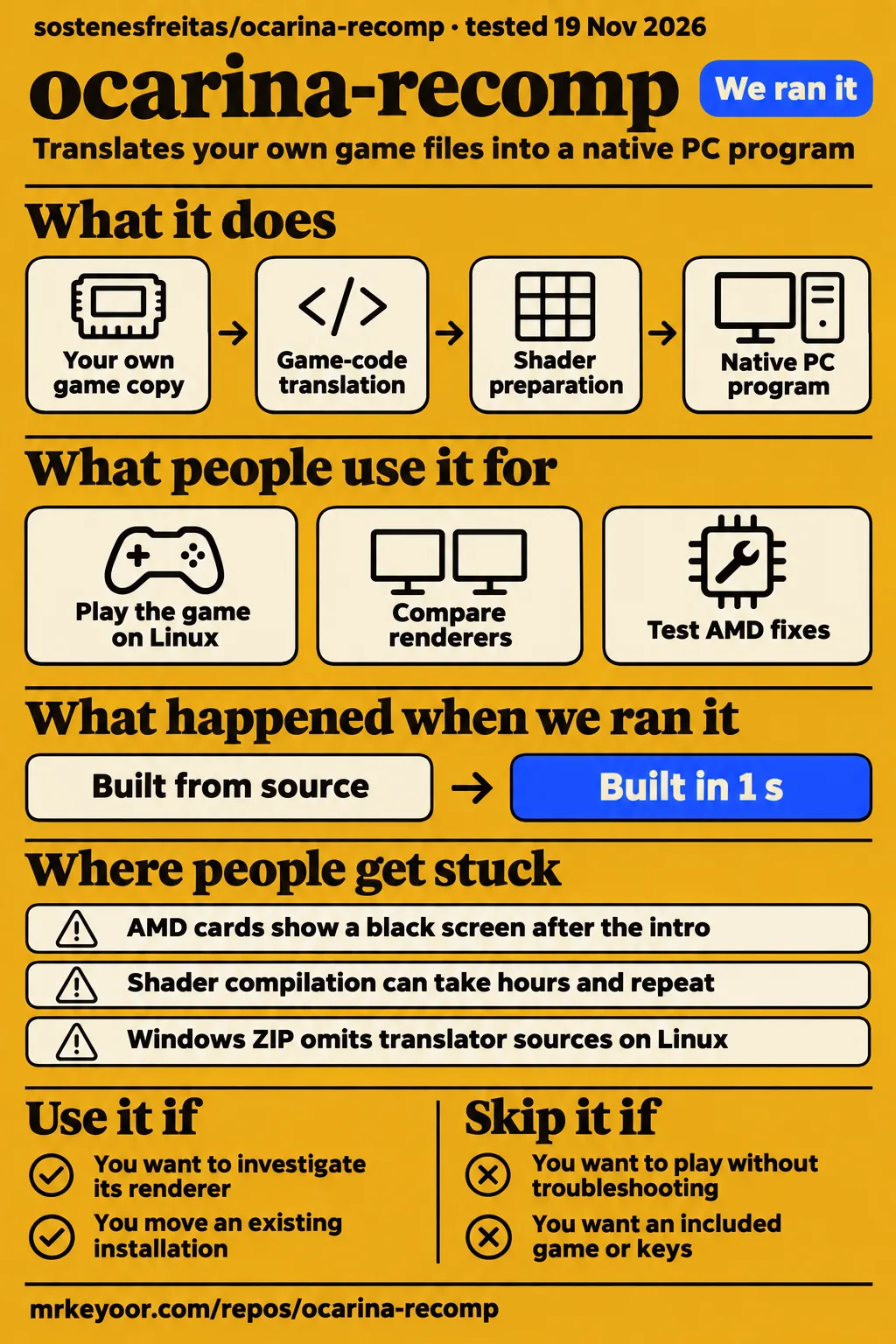
Ocarina Recomp's English README recommends Hookshot for playing and says future fixes will go there as contributions. Use this repository if you want to investigate its renderer, follow Portuguese support discussions or move an existing installation; skip it if you want to start a playthrough without troubleshooting graphics and shader preparation. The maintainer's change-of-direction notice is more consequential than a launch clip.
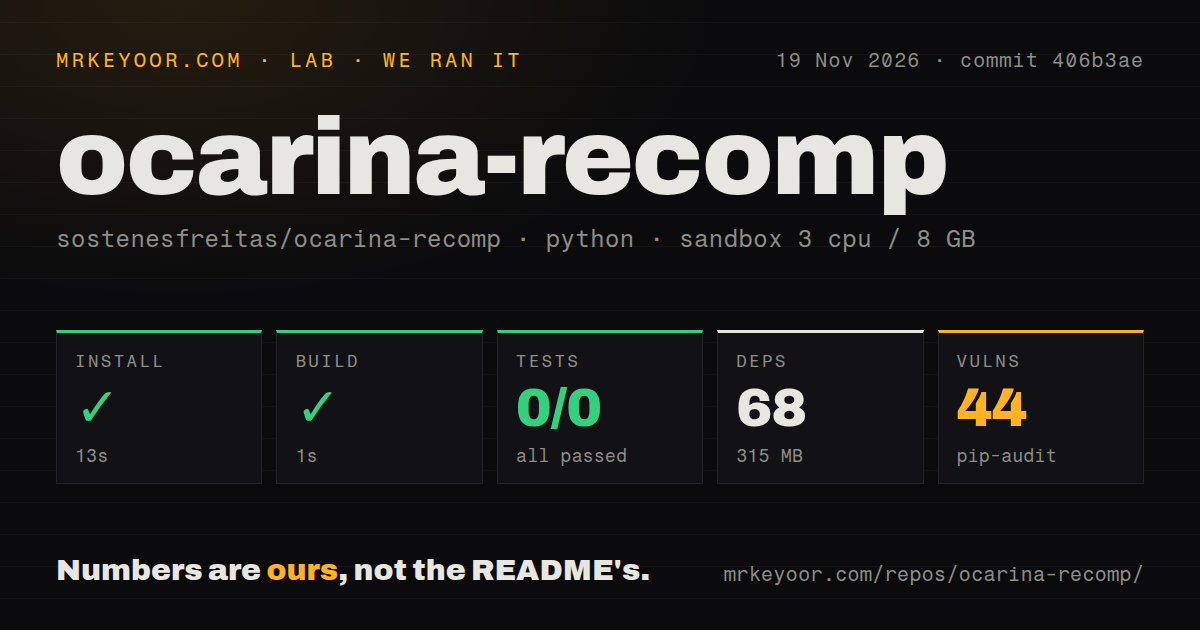
Our sandbox installed the Python tools in 13 seconds and completed its build step in 1 second, but pytest exited 5 after 2 seconds without running any tests. Those are checks of the tools directory at commit 406b3ae, not a successful game session. The reader decision rests on a separate set of attributed gameplay reports: some people got into Kokiri Forest, others fixed one symptom and encountered another.
What people use ocarina-recomp for
Community users have launched the game on Linux, compared renderers on the same save and tested whether AMD fixes improve an actual route through Kokiri Forest. These reports are useful because they describe what happened after an executable opened.
| Who tried it | What they did | Outcome and source |
|---|---|---|
| Project author, reported by Zelda Central | Tested the opening through the Great Deku Tree on an RTX 5090 | Reported about 59 fps standing and 51 to 55 fps walking in Zelda Central's November 8 account. |
| benjdidj | Built from a clone on CachyOS with an RTX 4070 mobile GPU | Reported working sound and menus, uneven motion without the emulator's lag spikes, and a washed-out picture corrected by disabling shadow storage in issue #41. |
| Lu33Y-No-Git | Compared the same Kokiri save and scripted movements on an RX 7800 XT | Reported 42 fps standing in patched Ocarina Recomp versus 60 in Hookshot v2.0.11 in issue #158. |
| arrigowr2 | Walked from Link's house through Kokiri Forest into another house on an RX 580 | Reported no crashes or device loss on v0.3.3, but persistent overexposure in issue #188 and a declining frame rate in issue #158. |
| pcornejov | Used v0.3.3 with a version 1.1.1 game package on a ROG Xbox Ally X | Reported preparation stuck at 590 of 591 pipelines and no game picture in issue #188. |
The handheld report is the practical warning. The installer finished, but the default launcher waited for a pipeline that never finished. A wait override opened a window. That still wasn't a game picture. A screenshot of a launcher or an installation-complete message would miss the failure you actually care about.
What happened when we ran it
Our November 19 sandbox run at commit 406b3ae installed the Python tools in 13 seconds, built in 1 second and failed its test command in 2 seconds with exit 5. The work ran in ./tools/ with a configured 3 CPUs and 8 GB RAM. The image label was ghcr.io/astral-sh/uv:python3.12-bookworm; actual runtime and operating-system versions require the raw toolchain logs.
| Lab step or observation | Recorded result | What you can conclude |
|---|---|---|
| Install | Succeeded in 13 seconds; 68 dependencies; 315 MB on disk | The tools' dependency setup completed. |
| Build | Succeeded in 1 second | The harness build step completed. |
| Tests | Failed, exit 5, in 2 seconds; 0 passed, 0 failed of 0 | No tests ran. |
| Test log | no tests ran in 0.07s |
The log gives no failing test case to diagnose. |
| Dependency audit | pip-audit: 44 known vulnerabilities | The dependency environment needs advisory-level examination. |
| Repository scan | 531 files, approximately 201246 source lines, 11.9 MB checked out | The checkout is larger than the tools environment alone describes. |
| Automation and packaging signals | 1 CI workflow file; tests directory present; no Dockerfile detected | Presence of a tests directory did not result in collected tests in this run. |
First the install succeeded. Then the build returned success. At pytest, the sequence stopped with no tests ran in 0.07s. Calling that a passing suite would erase the finding; calling it a broken game would go beyond the log. The outer test step's 2 seconds and pytest's 0.07 seconds describe different scopes.
A separate November 20 hands-on safety step rejected the repository because no Compose file existed. Its message called the repository unsafe under a rule requiring compose.yaml, compose.yml, docker-compose.yaml or docker-compose.yml. That is a lab workflow requirement for deployment, not a game-security finding. Another November 20 run entry says it was deployed with its own Compose configuration and ports bound to 127.0.0.1, while teardown reports success. The entries don't explain how the failed gate was resolved. None records a playable session.
Where people get stuck: one AMD fix can leave another failure
In issue #153, the maintainer reports a v0.2.9 startup-crash fix, but the reporter still gets a black screen. That distinction is the most useful way to read these threads: a fix has a symptom, hardware and version attached to it.
| Symptom | What the thread actually says | Decision |
|---|---|---|
| Executable crashes before a picture | The maintainer attributes an RX 9070 XT crash to AMD's mesh-pipeline compilation and says v0.2.9 skips that pipeline on the next start; BloodThirstyQ subsequently reports black output in #153. | A boot fix alone doesn't get this reporter playing. |
| Crash at the opening Deku Tree scene | The author says v0.2.2 corrected a task shader built as a vertex shader and got past a reproducible RTX 5090 cold-start crash in #12. | Treat this as the author's result for that crash. |
| White characters and glowing foliage | souk974 reports that v0.3.1 corrected Link but left foliage white in #145. | Character rendering and vegetation need separate checks. |
| Persistent white materials after another change | cat130504 and arrigowr2 report no visual fix from disabling BC3 texture compression in #188. | Don't prescribe that setting as a general AMD cure. |
| Flickering sun shadows | The author attributes a v0.3.3 correction to bitfield translation beyond bit 31 in #132. | This is a maintainer-reported correction after inconsistent earlier retests. |
The RX 580 report goes further than a crash count. arrigowr2 records frame rate falling from 21.8 to 1.8 fps over roughly eight minutes in issue #158, despite reporting no crash or device loss. That would be an unsuccessful playing session even though a stability checklist could mark it as survived. Ask for sustained movement, image quality and frame pacing before accepting an AMD compatibility claim.
Shader preparation can outlast your patience
cat130504 reports roughly three hours of shader compilation and later an hour of repeat compilation on the second boot in issue #188. Shaders are programs the GPU runs to draw the scene; preparing them is separate from installing Python dependencies in our sandbox.
The author's v0.3.2 response says preparation now shows progress and stops starting new large builds after 30 minutes, leaving the rest for gameplay. That caps one preparation stage's new work, not every wait you might encounter. The same thread contains the second-boot complaint and the Ally X pipeline stall. A progress bar moving towards completion and a window appearing are useful observations, but neither tells you that a walk through the next area will stay smooth.
Low CPU utilization also has a specific answer. When cat130504 asked about using more CPU, the maintainer said a few long single steps limit the build and shader preparation and that they would look at parallel work. The thread offers an explanation and an intention, not a shipped switch that makes every core busy. Buying more CPU cores on the strength of that exchange would be a guess.
English instructions exist; the support hub is Portuguese
The default README is Portuguese and links to an English README; the maintainer explicitly describes the repository's continuing role as a Portuguese-language support point. You can read the English build, controls and migration explanation without translating the front page yourself.
The most useful issue exchanges also include English replies: the author walks benjdidj through Linux headers and linking, and gives English explanations for the AMD failures. That makes the tracker usable for an English reader, although copied installer labels such as Montar os shaders grandes still appear. In #188, that label names the large-shader preparation step. Keep the exact label when matching your own error to a thread.
An unsigned installer and 44 audit findings need different checks
Our pip-audit run recorded 44 known vulnerabilities in the sandbox dependency environment. That finding calls for examining package versions and advisories; it supplies no basis for calling the downloaded Windows installer malicious or declaring the game safe.
The English README says the installer executable is unsigned and explains that its adjacent PowerShell script can be read before execution. It says the ZIP route does not request administrator access and that the release page provides SHA-256 checksums, a way to compare a downloaded file's hash with the published one. Those are useful inspection steps. An unsigned-file warning and a dependency advisory answer different questions, so don't use either as an all-purpose security verdict.
The README also says the repository contains no game, keys or ready-made executable and requires your own copy. Generated code, caches and saves come from that copy. When seeking help, follow the maintainer's request in #12 to send logs rather than game files.
Ocarina-recomp vs Hookshot, NX2navi and the 3DS projects
A same-save RX 7800 XT comparison favored Hookshot v2.0.11 over a patched Ocarina Recomp v0.3.2 build. Lu33Y-No-Git used the same Kokiri location, scripted movement, warm caches and a 60 fps cap in issue #158, making this more useful than unrelated launch footage.
| Choice | Why you might choose it | What supports the comparison |
|---|---|---|
| Hookshot | Start here for playing the Switch 2 edition, following Ocarina Recomp's own recommendation. | Lu33Y-No-Git reports 42 versus 60 fps standing and longest moving-test frames of 669 versus 85 ms, favoring Hookshot in #158. |
| NX2navi | Consider another Switch 2 implementation if you want to investigate a different renderer. | Danzan_Katana ranks it behind Hookshot but ahead of Ocarina Recomp, reporting a clear image with artifacts in a November 9 X post; the post gives no hardware or build. |
| Lichii emulation | Compare it on your own machine if sharpness is your priority. | benjdidj prefers the recomp's lack of lag spikes but says Lichii with a resolution mod looks sharper in #41. |
| TriAevum or Ocarina ReTuned | Choose these only if you want the 3DS edition. | KinmoCode's project table identifies both as Ocarina of Time 3D projects and lists Android ARM64 for ReTuned. |
The same-save test also reports 44 fps during Ocarina Recomp camera sweeps and short runs versus 60 for Hookshot, with worst five-second windows of 33 and 59 fps respectively. Frame pacing is how evenly frames arrive; a long pause can spoil motion even when an average looks acceptable. This comparison gives you both kinds of information for one scene.
Don't turn Danzan_Katana's preference into a hardware forecast. Another X post by J describes Hookshot stutter and favors Ocarina Recomp's smoothness, without a controlled matching setup. That disagreement is why the named builds and matched save carry more weight here.
What the other reviews get wrong
Like Do's handheld positioning and the wiki's Linux wording overstate or understate specific forms of support. The correction is to identify the game edition and the actual person who reached gameplay.
Like Do's terms page pitches a helper for Steam Deck or Android users running this recomp. The wiki requirements page calls Steam Deck untested by the developers, while KinmoCode's table assigns Android ARM64 to the separate 3DS project ReTuned. Neither supports treating Android users of sostenesfreitas/ocarina-recomp as an established audience.
The wiki also says Linux gameplay has not been confirmed upstream. Yet benjdidj's upstream issue #41 describes in-game colors, sound, motion and image sharpness, with maintainer assistance. That's a community gameplay report, without turning it into official Linux qualification.
KinmoCode's November 12 release table lists Hookshot v2.1.0 and NX2navi v0.8.0, whereas the requirements page checked November 19 lists v2.3.2 and v0.12.0. Date a download list before using it. Zelda Central's November 8 account describes the author's early hardware testing; later contributor reports broaden that picture without changing who performed the original test.
The project's own architecture page opens by describing Tears of the Kingdom. Its game-specific versions and configuration details shouldn't become Ocarina Recomp facts. Search videos can mislead in a different way: RK Pirate's Triforce setup video describes trying a GTX 1070 Ti and an RTX 3060 Ti, but it names Triforce. The creator's Longshot tutorial uses a portable launcher on an external SSD. Neither demonstrates this repository's installer or GPU compatibility.
Questions people ask
An AMD black screen after the intro has several reported failure paths, including shader work blocking scene pipelines and driver crashes; issue #20 does not show a universal fix. The answer depends on your build and the last useful lines in its logs.
Why does Ocarina Recomp show a black screen after the intro on AMD GPUs?
In #20, the author identifies huge background compute-shader builds delaying scene pipelines. A proposed TOTK_LIB_PREBUILD=0 test did not solve neildagoon-DUB's problem. Later #153 still reports black output after a boot-crash fix. Keep the installer version, driver version and both ultima-partida logs with your report.
Why does the game crash when I open the executable?
One RX 9070 XT case crashed inside AMD's driver while compiling a mesh pipeline. The author says v0.2.9 skips the offending pipeline on the next start in #153. That diagnosis belongs to that case; the same reporter continued to see black output after updating.
Why does Ocarina Recomp crash during the opening Deku Tree scene?
The maintainer says a task shader sometimes compiled as a vertex shader, crashing NVIDIA's compiler, and reports that v0.2.2 passed the previously reproducible RTX 5090 cold-start failure in #12. Other participants report AMD failures in that thread, so the NVIDIA diagnosis doesn't explain every opening-scene crash.
How do I fix white characters, glowing foliage and overexposed scenery on AMD?
v0.3.1 corrected characters for souk974, but left vegetation white in #145. v0.3.3 targeted vegetation, while later #188 reports retained artifacts. Disabling BC3 didn't clear the reported RDNA1 or RX 580 white materials, and the author warns that uncompressed textures can exhaust limited VRAM. Record the exact surface and GPU rather than applying every setting together.
How can I update Ocarina Recomp without doing a fresh installation?
The English README says to run the installer again, and the author repeatedly requests installing a newer build over the old folder in #145. For migration instead, the README identifies perfil\save and the Hookshot preparation and save-copy scripts. Keep a separate save copy before changing installations.
Can the installer and shader compiler use more CPU to finish faster?
The maintainer says a few long single steps limit CPU utilization during much of the process in #188. They say they'll look into more parallel work; the exchange doesn't provide a completed speedup or a general CPU-usage setting. A low utilization reading alone won't identify a safe tuning change.
Why does Ocarina Recomp use so much RAM during the opening?
The author reports about 24 GB for the game on a first run without a shader cache in #15, and v0.2.3 limited buffer copies on cards with 8 GB or less VRAM. The original report's alleged 64 GB game allocation wasn't reproduced: the author asked for the game's own working set because the overlay appeared to show system-wide memory.
How do I build Ocarina Recomp on Linux when the Windows ZIP fails?
Build from a repository clone: the Windows ZIP's projeto folder omits translator sources. In #41, benjdidj then needed CachyOS's vulkan-headers package, followed by the merged #54 correction for a Windows-only crash-logging call. The reporter subsequently launched the game. That sequence gives a specific fix map, rather than treating a failed Windows archive build as the state of Linux support.
Why do sun shadows flicker in Hyrule Field and on the market stairs?
The maintainer attributes the flicker to bitfield operations extending beyond bit 31 and reports a v0.3.3 translator correction in #132. Earlier versions produced inconsistent retests, including a v0.3.2 report where sunlight on characters improved while shadow flicker persisted.
What are the minimum requirements for Ocarina Recomp?
The English README specifies Windows 10 or 11 x64, an AVX2 CPU and Vulkan 1.3 graphics with mesh shaders, which are GPU features used to draw geometry. It recommends at least 16 GB RAM, a larger Windows page file, 40 GB free for the ZIP route, internet during setup and your own game copy at version 1.1.1. These are upstream requirements, not our measured gameplay minimums.
Can I run Ocarina Recomp with 8 GB of RAM?
The README recommends 16 GB or more and says lower-memory configurations were never tested. It warns that the game may reach about 24 GB of memory on the first run and asks you to enlarge the page file with 16 GB RAM. Our 8 GB tools sandbox supplies no answer about playable game memory; don't use the successful dependency setup as permission to buy an 8 GB machine for this.
Does a GTX 1060 or GTX 1080 work?
The requirements page says GTX 10-series cards lack the required Vulkan mesh shaders, including a GTX 1080 failure report. The README's mesh-shader requirement supports excluding those cards from this documented path. A Triforce video using a GTX 1070 Ti doesn't change this project's requirements.
What we have not tested yet
Our lab has no successful gameplay test, full playthrough, save-migration check or matched renderer benchmark for Ocarina Recomp. The tools run lacks exact runtime logs, test-discovery diagnostics and an advisory-by-advisory vulnerability breakdown. The later Compose entries conflict about deployment and include no game task, question-and-answer results or screenshots, so they cannot support a claim of hands-on play.
The GPU reports above belong to their named users, builds and scenes. We have not reproduced the RX 7800 XT comparison, the RX 580 decline, the Ally X stall or the author's v0.3.3 shadow correction. Linux gameplay in one issue is narrower than a supported distribution matrix. Search results include unrelated games and ocarina music on Bilibili, and no transcript there establishes an additional test of this project.
Release identification also needs care. The November 12 guide describes v0.3.4 and the wiki checked November 19 repeats it; the anonymous GitHub latest-release endpoint checked November 21 returns v0.3.0. We cannot reconcile those snapshots from the available records. This review attributes the v0.3.4 migration notes to the guide and uses the live English README for the current recommendation, rather than calling either release number the universal latest version.
Before committing your evening, read the maintainer's Hookshot migration notice and preserve your existing save. For a performance comparison, copy Lu33Y-No-Git's useful method: record the build, GPU and driver, load the same save, repeat the same movement, and keep the longest frame alongside the average rate.