
Docker limits which files a chat agent can reach
NanoClaw gives each active session a Docker container with explicit filesystem mounts. Connect a project folder and its agent can work on those files from chat. A message can also persuade it to do something you didn't intend. The security model treats incoming messages as untrusted and confines agents to containers with explicit mounts. The credential gateway adds authentication to outbound requests without putting raw API keys inside the agent container.
The README's description of a handful of files needs qualification. We measured 1,212 files, roughly 169,615 source lines, and a 17.5 MB checkout at commit c2663b1. Those figures cover the repository, not just its host process. Someone considering a fork should judge the code they'll actually inherit rather than assume the whole project fits into an evening's reading.
Separate conversations can still share an agent's memory
NanoClaw's separate conversations attached to the same agent still share its workspace and memory, as the isolation guide explains. A work chat and a family chat can therefore use different conversation threads while retaining access to the same saved information. Put different audiences in separate agent groups when their information must stay apart. Containers don't make that choice for you.
The 152 MB dependency footprint we measured says nothing about whether those boundaries are correctly wired. Check each group's destinations and allowed folders before adding private documents. The security documentation also acknowledges that an agent can misuse actions it legitimately has permission to perform. Keeping a key outside the container doesn't prevent an authorized API call from spending money or sending the wrong content.
Setup includes Docker and a credential gateway
NanoClaw requires Node.js 22+, pnpm 10+, and Docker. Its quick start runs bash nanoclaw.sh, which bootstraps the runtime, installs a gateway, registers an Anthropic credential, and pairs a messaging channel. Claude Code handles customization and channel skills, and the installer invokes it for error recovery. That asks you to trust both scripted setup and a coding assistant's proposed repairs.
Our lab-node:22 container covered repository installation and compilation, with no secrets or elevated privileges. It doesn't establish that a real chat account, credential gateway, or Docker deployment works. Supported host paths are macOS, Linux, and Windows through WSL2. Local-model providers are available through skills, but the default Claude path still calls Anthropic. Keeping the host on your machine does not make model inference local.
What happened when we ran it
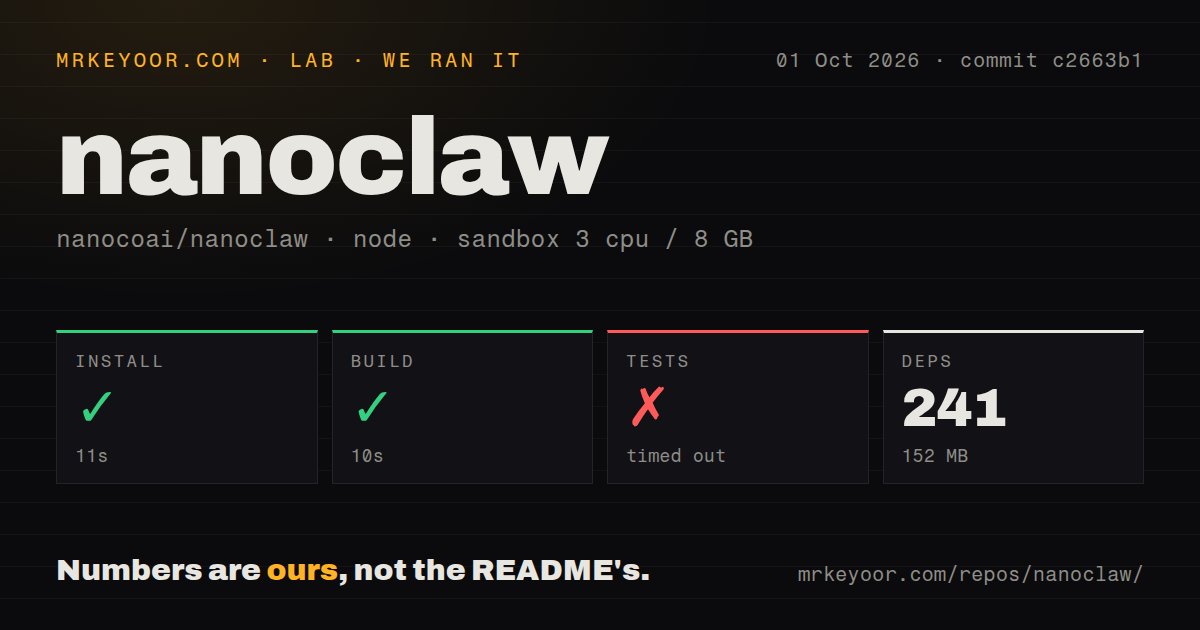
Our sandbox installed NanoClaw commit c2663b1 in 11 seconds, adding 241 packages and occupying 152 MB, then built it successfully in 10 seconds. We ran it on October 1, 2026, in a fresh Debian container with 3 CPUs and 8 GB of RAM using lab-node:22. These are repository setup results. They don't measure response latency, model quality, or scheduled-job reliability.
The test command timed out at 900 seconds. Its final lines show passing channel-wizard hooks, uninstall removal and scanning, and mount-composition tests. A scheduler INFO message then reports inserting the next recurrence, with the timestamp cut off in the supplied tail. There is no complete suite result or explanation for the timeout. We can't identify a hanging test, blame Docker permissions, or infer missing system packages from those lines.
Custom behavior means maintaining your own fork
NanoClaw's /add-<channel> skills copy adapters into your fork. The README directs users to change code for behavior changes. Channels live on a separate registry branch. That can keep unwanted integrations out of an individual installation. It also means your assistant becomes a codebase you maintain. The README explicitly says there is no monitoring dashboard or debugging UI and tells users to ask Claude Code for help.
An unfinished 900-second test run makes that maintenance bargain harder to recommend without qualification. Before depending on a customized scheduler or channel, verify the specific behavior you changed and retain a working copy. The project can suit a developer who wants control over agent instructions and files. Someone who expects every setting and recovery action to live in an admin screen has a concrete reason to choose another assistant.
Telegram delivery and gateway compatibility remain open concerns
Issue 3569, still open on October 11, reports Telegram delivery failures for URLs containing an odd count of unescaped formatting markers, including underscores. Its reproduction concerns the current Chat SDK adapter, not an unrelated older Telegram component. Issue 4068 separately reports that the pinned OneCLI gateway cannot edit existing user-created Google Docs because the connection lacks the required scope. These are reported failures, separate from our sandbox findings.
Neither report was established by our 3-CPU sandbox run. They nevertheless deserve checks if Telegram links or editing existing Docs are your intended job. The latest release requires OneCLI installations to use gateway 1.42.0 and says the NanoClaw updater won't upgrade a running gateway. The release instructions warn that later OneCLI versions are unsupported. Simply installing the newest gateway is therefore the wrong recovery strategy.
October pushes show active maintenance
The last push was October 10, 2026, following the October 9 release of v2026.10.0. GitHub listed 30,915 stars and 1,042 open issues and PRs, with adapter work and gateway requests updated that week. This is active development with unresolved operating problems. OpenClaw offers a Control UI if you want a dashboard. HKUDS's nanobot has Python, terminal and WebUI clients. Hermes has terminal and messaging entry points with persistent memory.
Our scan found 8 CI workflow files and workspace packages, despite finding no Dockerfile or dedicated tests directory at the measured commit. The log's passing test files confirm tests exist outside a dedicated directory. I'd try NanoClaw for a personal assistant whose mounts and integrations I can review myself. Start with a disposable workspace and one channel. Give it access to your working documents only after its actual replies and permissions behave as intended.