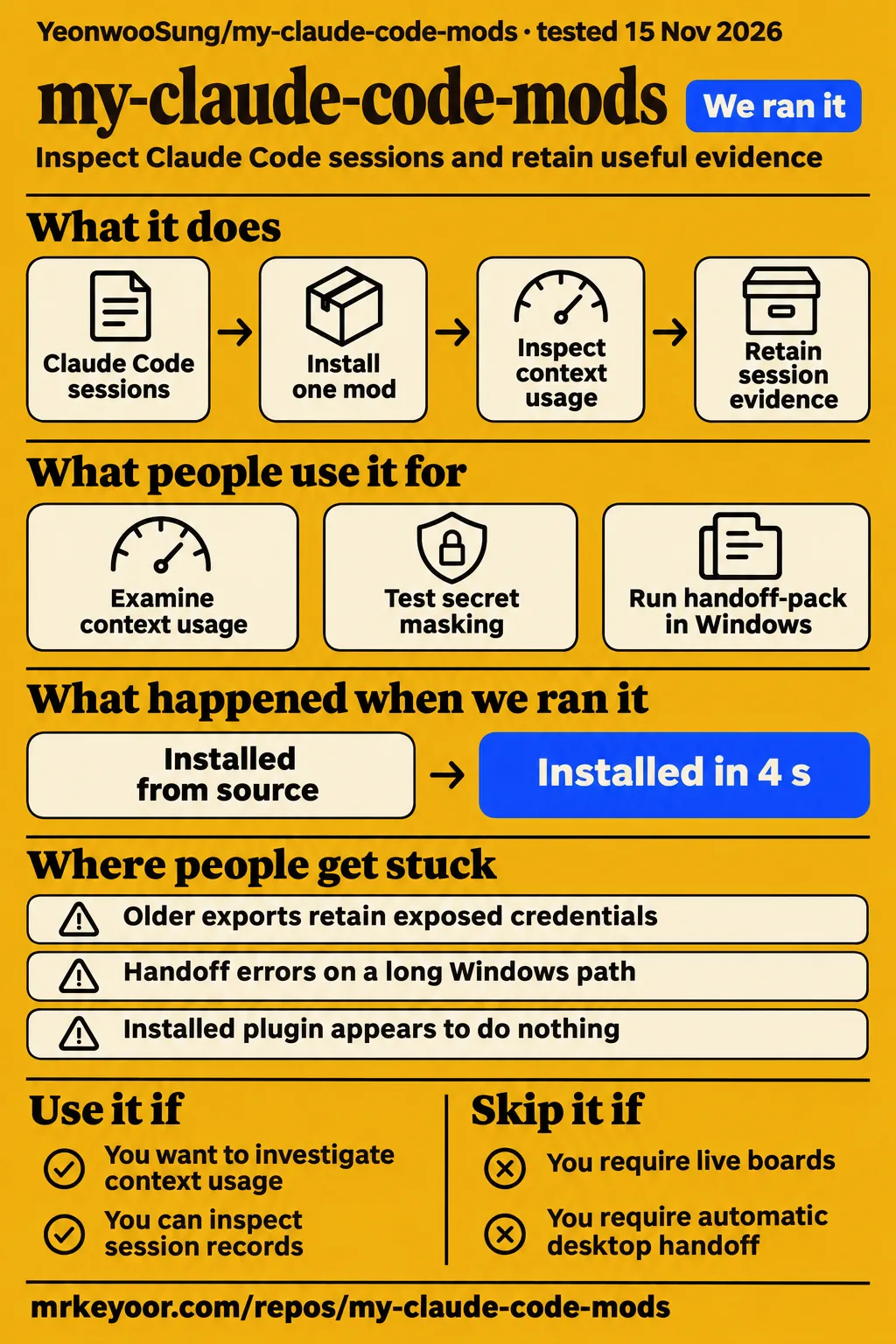
Our sandbox installed the npm dependencies for YeonwooSung/my-claude-code-mods in 4 seconds and passed its test step in 21 seconds. Use this collection if you want to investigate context usage or retain session evidence inside Claude Code. Skip it if you require automatic cross-account desktop handoff or expect the ten initial workflow commands to provide live boards. Start with one mod that answers a recurring question.
Context Inspector supplies a concrete reason to consider the collection: the reporter of issue #1 found its context breakdown useful in personal sessions. That same reporter followed fake credentials into an export and found four formats unchanged. Together, those observations make selective installation a useful approach. Decide which session question you want answered, then examine the relevant mod and the records it produces.
What people use my-claude-code-mods for
A Context Inspector user reported useful context breakdowns, a Windows user exercised handoff-pack, and a gallery operator listed five mods after source review. These encounters give prospective users specific starting points. They distinguish the collection's documented capabilities from what people actually reported doing, while keeping the two repository owners separate when search results use the same project name.
| Who used it | What they did | Outcome |
|---|---|---|
| Reporter of issue #1 | Examined context usage in personal sessions | Reported that the context breakdown was useful. |
| Same reporter, issue #1 | Passed fake credentials through command ingestion and JSONL export | Found four credential formats exported unchanged. |
| Windows reporter of issue #2 | Ran handoff-pack in a deeply nested working directory | Hit a store-key error and lost subsequent observation recording; the author later reported a fix. |
| Operator of statuslin.es, issue #3 | Read source at commit 93fa0f7 and listed five mods | Described demonstrations and installations pinned to a reviewed commit, with review before updates advance. |
The gallery operator named Agent Profiler, Context Inspector, Pin Memo, Time Machine and Token Run. Issue #3 is an open listing announcement. The operator says, "Installs pin the commit I reviewed." That describes a distribution option for those five mods, with source review before installations move to an update. Readers can use the listing to investigate the individual instruments and the gallery's installation process.
What happened when we ran it
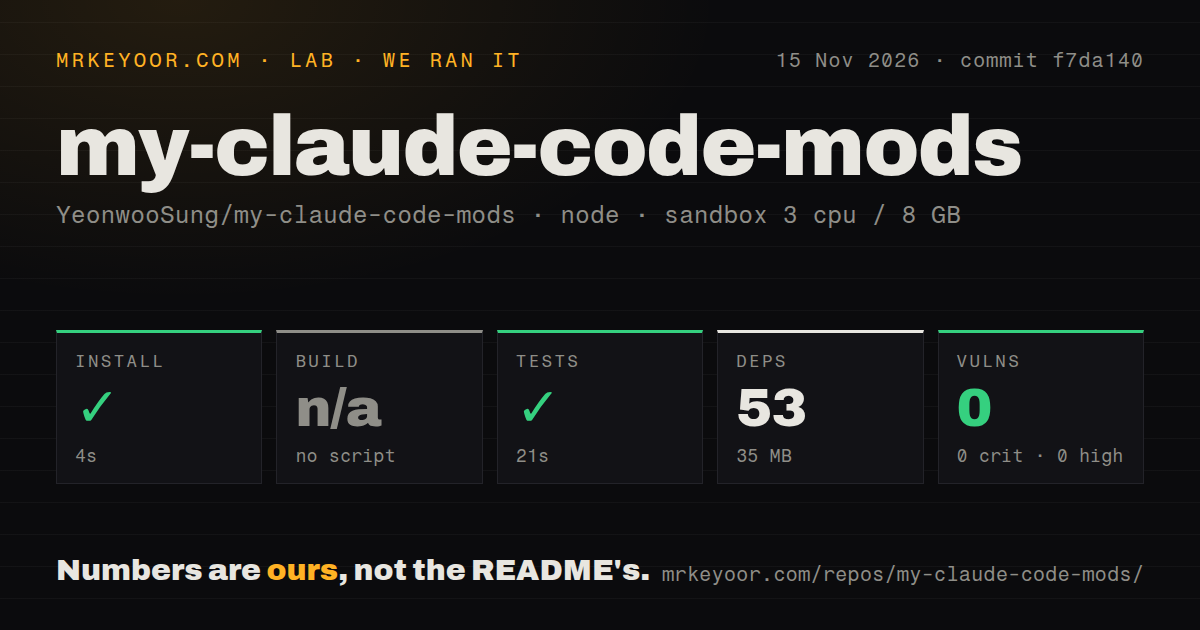
Our November 15, 2026 sandbox run at commit f7da140 installed npm dependencies in 4 seconds and completed the test step successfully in 21 seconds. The configuration recorded 3 CPUs, 8 GB RAM and image label lab-node:22. The measured dependency footprint was 53 dependencies and 35 MB on disk. These figures describe the source-development checkout used in our run.
| Sandbox observation | Recorded result | What it tells a prospective contributor |
|---|---|---|
| npm install step | Succeeded in 4 seconds | The recorded dependency setup completed. |
| Dependencies | 53 recorded, 35 MB on disk | This is the measured development dependency footprint. |
| Build | Skipped: no build script or target | The harness skipped its build step. |
| Tests | Succeeded in 21 seconds | The recorded test command passed. |
| npm audit | 0 known vulnerabilities across critical, high, moderate and low | The audit found no known dependency advisories in that run. |
| Checkout | 343 files, approximately 18,856 source lines, 1.8 MB | These are the recorded checkout dimensions. |
| Repository signals | 1 CI workflow file, no Dockerfile, no tests directory | These are file-scan observations. |
The README explains the source test arrangement: npm test maps the core tests' claude-code/testing import to Node's test runner and Jest's expect. Files run sequentially, and CI runs the independent core suite. A scan finding no directory named tests is therefore compatible with a passing test command. The project also documents separate commands for privacy regressions, adapters, workflow checks and type checking.
The separate November 16 attempt stopped at its safety step. The failed safety record says none of compose.yaml, compose.yml, docker-compose.yaml or docker-compose.yml existed, although the harness required a Compose file. Its label was "unsafe repo"; its stated reason was the missing prerequisite. This is the recorded failed step, rather than a Claude Code runtime error.
The run summary says the project was deployed with its own Docker Compose on the lab server, with every port bound to 127.0.0.1. That conflicts with the detailed safety failure. The teardown record says "teardown: ok". The supported account is a stopped attempt followed by successful teardown; the summary's deployment wording is not a successful deployment finding.
Where people get stuck: exports, long paths and silent hooks
Issue #1 reports unmasked credentials in exports, and issue #2 reports handoff failures caused by oversized store keys. Both threads are closed with author responses. The first concerns information written to an export file; the second concerns observations that failed to reach persistent storage. The symptoms call for different follow-up actions even though both reports concern session records.
| Symptom | Evidence and reported response | Useful action |
|---|---|---|
| Context export contains token flags, sensitive headers, URL passwords or curl user credentials | In issue #1 the author confirmed all four cases, described expanded masking rules and regression coverage, then closed the issue as completed. | Inspect command arguments, headers and URLs before sharing an export. |
| An older export holds a real credential | The author says existing exports are not retroactively sanitized. | Review previously shared exports and rotate exposed real credentials. |
| Handoff errors on a long Windows path | Issue #2 reports a 263-character store key exceeding a 256-character limit. The author replied that the issue was fixed. | Check handoff output and subsequent observation recording in the intended directory. |
| Installed plugin appears to do nothing | The supplied troubleshooting material describes skipped failed hooks and loading diagnostics. | Inspect the loaded-mod list, plugin validation output and debug log. |
The export reporter followed fake credentials through ingestion, JSONL generation and the output file. The examples included a token flag, an x-api-key header, a password in a URL and curl user credentials. An API_KEY assignment was masked successfully. Issue #1 therefore describes incomplete coverage across credential formats, followed by the author's response about expanded rules and regression tests.
The Windows reporter traced the oversized key to the working directory and session identity serialized together. Windows backslashes expanded through JSON escaping, making long paths easier to push over the store limit. After the handoff error, later tool calls raised an "observation not saved" notification. Issue #2 also identifies the same key pattern in nine other workflow mods and contains the author's brief fix response.
The official troubleshooting decision tree distinguishes settings, policy and rollout-switch messages. The official mods overview documents plugin validation for listing a downloaded mod's hooks and calls, and /plugin for seeing which mods a terminal session loaded. Those diagnostics give a concrete next step when installation succeeds but the expected command or interface does not appear.
Seventeen mods offer different kinds of help
The README lists seventeen mods, including session instruments, a local game and ten initial workflow commands that return text rather than live panels. Choose by the question you need answered. Investigating why a context window filled up calls for a different instrument from displaying a reminder above the prompt or retaining a history of successful commands.
Agent Profiler documents session timing for model waiting, tools, subagents and repeated reads, plus OTLP trace export for Jaeger or Tempo. Context Inspector documents context contents, repeated reads, near-duplicate outputs and retained compaction content. Time Machine documents a branching tool-call timeline with shadow-git snapshots, file restoration and run comparisons. These descriptions come from the project README.
Pin Memo puts notes and clickable todos above the input. Loop Detective looks for repeated Bash failures and edit/retry cycles. Model Effort Band displays the selected model and observed main-thread effort, while Token Run is a local ASCII runner. The workflow commands cover verification states, allowed paths, reverse imports, decisions, handoff previews, command history, environment requirements, dependencies, assumptions and file review.
The README explicitly says the ten initial workflow releases return command text and do not add live panels. That distinction matters when selecting verify-board or review-queue: their names describe the workflow they organize, while the documented interface for those releases is a command response. Read the individual mod's description before treating a name as a promise about persistent screen layout.
Installing one mod is a better first decision than installing seventeen
Install one mod first so you can check whether its output answers a recurring session question before adding more. The README provides individual marketplace installs and an all-mods block for Bash or Zsh on macOS/Linux. Its consumer route needs neither a repository clone nor npm dependency installation, so the source-development footprint above is separate from the documented plugin installation path.
The README supplies these shell commands for adding the marketplace and installing Context Inspector:
claude plugin marketplace add YeonwooSung/my-claude-code-mods
claude plugin install context-inspector@my-claude-code-mods --scope user
Start a new Claude Code session or run /reload-plugins in an open session, then use /plugin to inspect the loaded mods and disable individual ones. The README offers user scope across projects, project scope shared through project settings, and local scope for only you in one project. Select the scope that matches where you want the instrument to run.
The README says Mods support is enabled by default in the Claude Code CLI from 2.1.287 and directs readers to each mod's tested-version notes. Time Machine also requires git on PATH. The top-level documentation is in English and links Korean translations for many mod READMEs. Those are useful installation facts to check before choosing a mod or following a translated walkthrough.
Security: mods run with your user permissions
Anthropic's documentation says mods run inside Claude Code with the installing user's permissions and are not sandboxed. A mod can read and write files, start processes and make network requests. The official trust guidance recommends inspecting a mod's hooks and calls before loading it, including when its visible interface is only a small status display.
Use plugin validation on downloaded plugin files to list handled events and requested calls without running the mod. This makes the recorded behavior part of the installation decision: a context recorder, file-history tool and local game have different reasons to access session information. The project's export incident also gives readers a concrete reason to inspect generated records before sending them to another person or service.
The administration documentation describes managed settings and the built-in guard. Under the documented guard rules, particular hooks registered by user mods never run, while an organization's own plugins can receive different treatment. A team deployment therefore involves both installation scope and organization policy. Have the administrator review the selected mod's events against the policy used on those machines.
my-claude-code-mods vs OpenMythos, rea, ponytail and the namesake
Ponytail documents both an instruction core and Claude Code instruments: a band above the prompt and a local board showing task information. Its band includes cost, tokens, agent time and test status; its board covers tasks across projects. That creates real overlap with session instrumentation, so choosing between these projects requires a more specific question than whether you want instructions or an interface.
| Search comparison | What the supplied evidence says | How to use it |
|---|---|---|
| OpenMythos comparison | SkillsLLM reports stronger star and fork signals for OpenMythos. | Use it for discovery, then examine the required workflow. |
| rea comparison | SkillsLLM reports stronger star and fork signals for rea. | Read the project capabilities relevant to your task. |
| Ponytail README | Documents coding instructions, a Claude Code task band and a local board. | Consider it for coding guidance plus task cost, tokens, agent time and test status. |
| YeonwooSung README | Documents context analysis, OTLP traces and a branching tool-call timeline with shadow-git snapshots. | Choose the relevant mod for context contents, repeated reads, compaction retention, tracing or file history. |
Ponytail's README describes its core as one prompt distributed through a skill or rules file, alongside the documented band and board. YeonwooSung's README provides more specific instruments for examining context contents, near-duplicate outputs and what compaction retained. Agent Profiler's OTLP export and Time Machine's shadow-git timeline supply other concrete selection criteria. Match those documented outputs to the session question you need answered.
The supplied SkillsLLM comparisons concern popularity, forks and available metadata. The pages themselves tell readers to treat those signals as community interest rather than an objective quality measure. Their summaries can help identify projects to investigate, while the primary READMEs give a more useful basis for deciding whether the task involves coding instructions, task accounting, context analysis or file-history inspection.
Also distinguish mustafa89/my-claude-code-mods. Its supplied README describes ten mods, including a status bar, pasted-image previews, boxed tool-call cards and a session sidebar. Those features belong to that repository. Check the owner before copying a command or assuming that a tutorial about a namesake collection describes YeonwooSung's marketplace and mod inventory.
What the other reviews get wrong
The gallery operator documents reviewed-commit installations for five mods, providing another distribution option alongside forking. That corrects the supplied Hysen Labs advice that forking is the available mitigation for depending on this personal collection. In issue #3, the operator describes reviewing source at 93fa0f7, pinning installations and reviewing updates before installations advance.
CCMods Hub treats the generic turned-off-in-this-process message as a remote shutdown with no local remedy. The official troubleshooting page distinguishes a rollout switch served off remotely from a saved-off value left by an earlier session. For the saved-value case, the documented action is to start Claude once to refresh it and then try the command again.
The supplied transcript for video #4 says VS Code availability appeared absent at recording time. The official overview explicitly includes the CLI, Desktop Code tab and VS Code extension. Its platform table adds the relevant extension versions: 2.1.299 or later for drawing in the VS Code chat panel, or 2.1.304 or later for sessions that do not fetch feature flags.
The video #3 transcript calls its demonstrations animated recreations based on project descriptions. Treat those scenes as illustrations of described behavior. Separately, the X search record contains raroque's request for context handoff between coding accounts while retaining native desktop applications. That question identifies a requested workflow; the project's README describes handoff-pack's output as resumable Markdown previews.
Questions people ask
The README documents an all-seventeen installation block for macOS/Linux Bash or Zsh, with user scope and a stop on the first failed command. That answers the supplied installation question directly. The other questions concern licence, maintenance, reported failures and the difference between mods and adjacent customization mechanisms. Their answers below use the supplied project documentation, metadata and attributed reports.
How do I install all mods from my-claude-code-mods at once?
Use the complete all-mods block in the upstream README. It adds YeonwooSung's marketplace and installs all seventeen mods at user scope using Bash or Zsh on macOS/Linux. If the marketplace is already added, omit its add line as directed. The block stops at the first error; resolve that error before continuing with the remaining mod names.
Can I use my-claude-code-mods commercially?
The supplied repository metadata identifies the licence as Apache-2.0. Read the project licence for the conditions relevant to your intended use and redistribution. The mod installation instructions separately require Claude Code with Mods support. Trace export is an optional documented capability of Agent Profiler, aimed at Jaeger or Tempo rather than a prerequisite for installing every mod.
Is my-claude-code-mods still maintained?
The supplied GitHub metadata records a last push on November 1, 2026, and the sampled issue threads contain author replies addressing the export and Windows reports. The supplied metadata contains no verified latest-release result. For this review dated November 16, 2026, the push and replies are concrete activity signals; the latest-release field is null and its supplied scope note warns about failed lookups.
Why does Context Inspector export some secret formats without masking them?
Issue #1 describes four credential formats outside the masking coverage exercised by the reporter. The author confirmed the cases, described expanded rules and regression coverage, and later closed the issue as completed. The detailed symptom table above identifies the formats and the action for older exports. Read the issue thread for the reporter's fake inputs and the author's response.
Why does handoff-pack fail in long Windows working directories?
Issue #2 reports a 263-character store key exceeding the 256-character limit after the working directory and session identity were serialized together. Windows path escaping contributed to the key length, and subsequent tool calls produced observation-saving errors. The author later replied that the issue was fixed. The report supplies the reproduction environment, diagnosis and suggested hashing approach.
How can I quickly hand off context between AI coding accounts while keeping the native Claude Code and Codex desktop apps?
The README describes handoff-pack as producing resumable Markdown previews of goals, tasks, changes and evidence. That output is a candidate for a summary you inspect and move yourself. The question from raroque asks specifically about cross-account continuity while retaining native apps. Use the documented Markdown output as the basis for evaluating whether it fits that manual handoff workflow.
What is a Claude Code mod?
A mod is a plugin with JavaScript or TypeScript event handlers running inside Claude Code, according to the official overview. Claude Code calls a handler when an event occurs, and the handler can observe, change or handle that event. This mechanism supports commands, session observers and interface elements such as panes or bands above the prompt.
How are Claude Code mods different from skills and MCP connectors?
Skills supply instructions, MCP servers provide external tools, and mods run event handlers inside Claude Code. The official comparison explains the resulting capabilities, including drawing interfaces and intervening in events. A plugin can contain these mechanisms together. Ponytail's supplied README is also a useful reminder to examine the whole project rather than infer its capabilities solely from an instruction core.
What are the best practices for installing Claude Code mods and arranging their interface?
The official guidance documents plugin validation for inspecting hooks and calls before loading a downloaded mod, while the project README documents installation scopes and /plugin for managing loaded plugins. Our recommendation is to add one instrument first, then keep it if its output answers a recurring session question. Choose subsequent mods by the additional information they provide rather than by filling every available interface position.
What we have not tested yet
Our measurements cover the npm sandbox run at f7da140; the later hands-on attempt stopped at its Compose prerequisite. We did not execute the installation example in this revision or reproduce interactive panes, Time Machine restoration, recorder overhead or sustained multi-mod loading. The configured image label lab-node:22 does not identify the exact runtime or operating-system version. The supplied pack has no screenshot records or known-answer interactive task results.
The source test result does not establish live interface compatibility. The README says its core runner does not emulate engine events and calls for separate interactive integration checks. Our evidence also leaves long-session storage growth and organization-specific hook behavior unresolved. The zero-advisory npm audit addresses known dependency advisories in that run, rather than command-string redaction behavior or the permissions exercised by a mod.
The issue closures are author-reported resolutions, without an independent retest here. Issue #2 supplies no implemented key strategy, migration behavior or inventory of changes to the nine other flagged workflow mods. Issue #1 explicitly calls redaction best-effort and says older exports stay unchanged. The gallery's reviewed-commit route describes distribution controls, without establishing an ongoing project support commitment.
Automatic handoff between native Claude Code and Codex desktop accounts, comparative performance against OpenMythos, rea or Ponytail, and productivity gains remain outside the recorded evaluation. The records also contain no measured best interface arrangement. Rendered layout, resolved links, accessibility, automatic related links, recommendation modules and template content were outside this text-and-evidence review. A useful next evaluation is one selected mod in a disposable project, checked against a session question with a known answer.