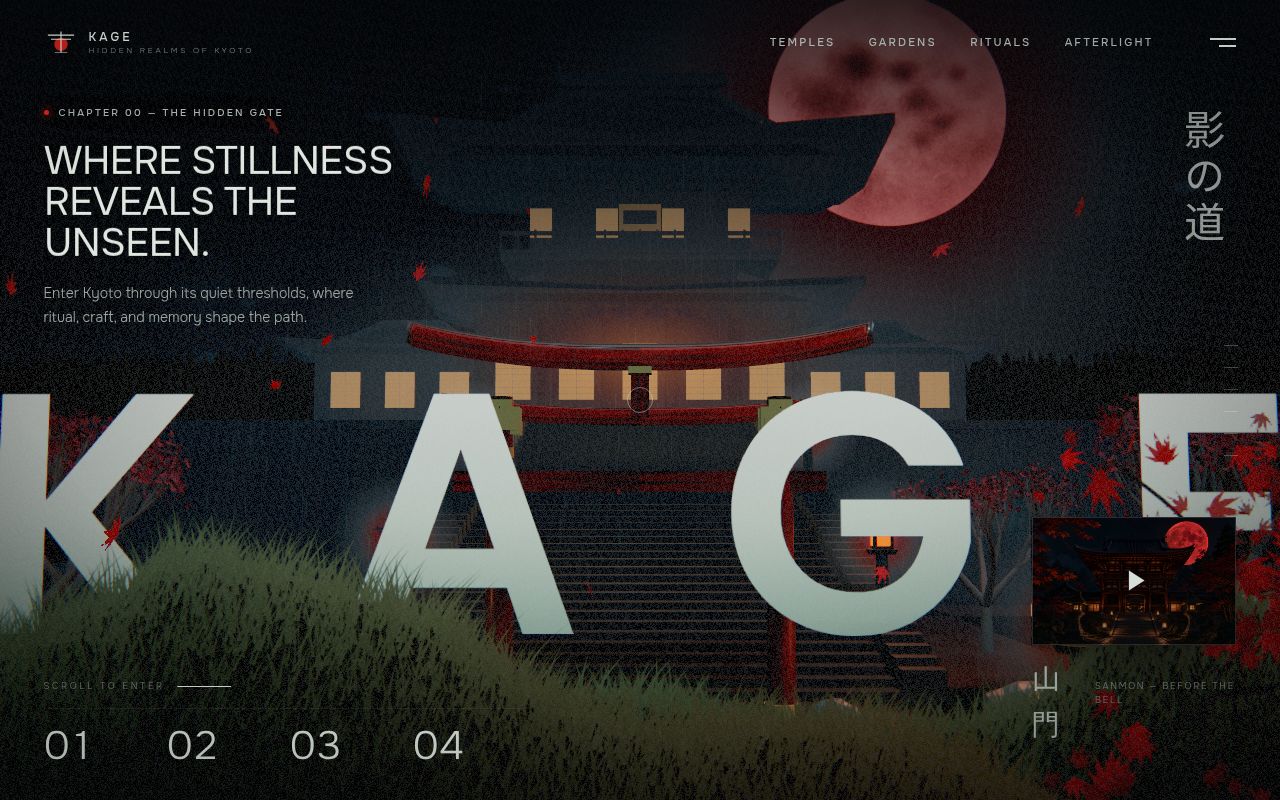
What Kage is trying to do
Kage is not a starter kit disguised as a showcase. It is a finished creative-web experiment: a five-chapter night walk through a fictional mountain temple in Kyoto, controlled by scrolling and rendered partly in real time. That distinction matters. The repository is most useful when you approach it as an annotated object to inspect, learn from, and reinterpret, rather than a library you install and call from an application.
The project sits in a familiar corner of the modern web where editorial design, WebGL, and cinematic compositing meet. A live Three.js camera moves through procedural temple architecture while lanterns, rain, leaves, fog, terrain, bloom, and a vermilion moon establish the atmosphere. Generated scene plates and transparent foreground images then sit in ordinary HTML layers around that 3D canvas. This hybrid approach solves a practical creative problem: not every visually rich element needs to be modeled and rendered in WebGL. Static artwork can carry detail, while the live scene supplies parallax, lighting, weather, and spatial continuity.
The strongest design decisions
The clearest strength is scope discipline. Kage is a static site, and the repository avoids a package manager, framework, application server, environment variables, analytics, and runtime network calls. Three.js r149 is vendored, as are the relevant assets and font styling. To run it locally, the README asks for a Python static server on port 4173, though any equivalent server should work. That makes the result unusually easy to inspect. You are not forced to reconstruct an old dependency tree before seeing the page.
The layering strategy is also worth studying. Procedural geometry handles the temple, torii, lanterns, moon, terrain, rain, leaves, fog, and post-processing. Optimized WebP plates and alpha-preserving foreground elements add the sort of painterly detail that would be expensive to reproduce as geometry. Section-specific fades and blur transitions bind those layers together. This is a sensible lesson for creative developers: choose the rendering method per element rather than demanding that one technology do everything.
The README also claims several details that often get ignored in portfolio experiments: chapter navigation, a responsive mobile layout, reduced-motion behavior, and a custom cursor limited to precise pointing devices. Those choices suggest the page was treated as an interface, not merely as a desktop demo. The separate PROMPT.md is potentially useful too, because it describes the scene structure, layout system, motion language, and quality constraints for rebuilding or reinterpreting the experience.
Where it gets difficult
The small footprint has a cost. The document structure, CSS, procedural scene construction, scroll choreography, and interactions are concentrated in index.html. That is convenient for reading the complete idea in one place, but it becomes harder to reason about once you start changing chapters, adding reusable effects, or sharing work across a team. There are no components, public APIs, tests, typed boundaries, or build-time checks described in the README. A production adaptation would probably need to separate rendering, asset loading, animation state, layout, and accessibility behavior.
Performance is the other open question. Kage combines WebGL, post-processing, layered imagery, fog, rain, leaves, blur, and scroll-linked changes. The README calls out an optimized format and responsive behavior, but it provides no measured loading, frame-rate, memory, or device-support results. That is not a fault in an art study, but it means teams cannot assume that the same composition will meet their performance budget. Test the live page on representative phones, integrated GPUs, high-density displays, reduced-motion settings, and slow connections before borrowing the approach. Graceful behavior when WebGL fails is not documented either.
The biggest practical restriction is legal rather than technical. The repository says no license is granted for reuse or redistribution of the original code or artwork. The included Three.js runtime keeps its MIT notice, but that does not make the rest of Kage reusable. You can view and study the source, yet copying it into a commercial site would require permission. For a project whose README explicitly discusses remixing, that boundary needs to stay front and center.
Community and maturity
Kage had 1,226 stars at review time, a striking amount of attention for a repository created on August 8, 2026. Its latest push was August 9, 2026, only ten days before this review, and it had one open issue. Those signals describe a new project with early interest, not an established community. The low issue count could mean a polished release, limited usage time, or both. There are no listed releases, so there is no version history, upgrade policy, or evidence of maintained compatibility across tagged builds.
That makes the project active but immature. The recent push weighs against calling it stale, while the short history makes response patterns and maintenance commitment impossible to judge. The star count is evidence that the presentation resonated, not proof of production reliability.
Where it fits in a real stack
Kage fits best at the research and prototype stage of a campaign page, digital feature, portfolio, or brand experience. A creative developer can inspect its source to understand camera choreography, HTML-over-WebGL compositing, atmospheric effects, and chapter transitions. A design team can use the live project as a shared reference for how typography and image plates can frame a moving 3D world.
It is less convincing as the foundation of a frequently updated product. If React already owns the page, React Three Fiber offers a component-oriented route into the Three.js ecosystem. If the problem is mainly timed and scroll-linked motion, GSAP may be a more direct fit. If you need full control and a reusable architecture, start with Three.js itself and treat Kage as visual research. Kage earns attention by being specific, coherent, and easy to launch, but its license and single-file construction keep it firmly in reference-project territory.