Jellyfin Web supplies the browser UI and client wrappers
Jellyfin Web is the official frontend for the Jellyfin media server. Desktop browsers use it directly, while Android and iOS clients reuse much of the same interface. The repository includes the user application, administration dashboard, metadata editor, first-run wizard, playback modules, themes, translations, and compatibility code. It solves the client side of a self-hosted media system; it does not scan libraries, manage storage, or transcode video by itself.
That distinction should shape any trial. You can start webpack locally after installing dependencies, but useful browsing and playback require a Jellyfin server with media and user configuration. Contributors are told to use the Jellyfin TypeScript SDK for API calls. Translation changes, except the source English file, go through Weblate rather than ordinary pull requests. This is a coordinated project component, not a standalone gallery template.
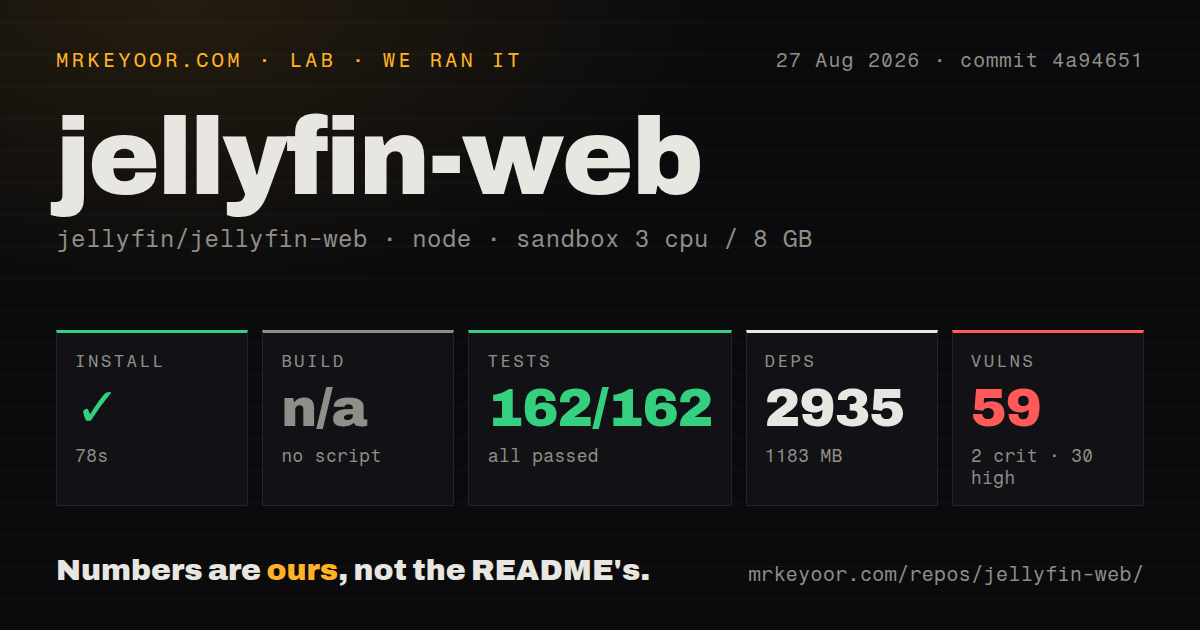
The install used 1,183 MB before media playback
Our commit 4a94651 checkout installed 2,935 npm packages in 78 seconds and occupied 1,183 MB. The repository itself had 1,224 files, about 121,041 lines of source, and used 16.5 MB. Most of the local cost arrived with development and runtime dependencies, before a browser connected to a server or loaded one item of media.
The package requires Node.js 24 or newer and npm 11 or newer. Its scripts name separate development, production, analysis, type-check, compatibility-check, lint, style, and test jobs. There is no generic build target, which is why our harness skipped that step. The README's documented command is npm run build:development; production users need the explicitly named production script rather than assuming the common npm convention.
What happened when we ran it
Our sandbox completed installation in 78 seconds with 3 CPUs and 8 GB of RAM. The test command then finished in 18 seconds, and Vitest reported 162 passed with 0 failed out of 162. That is a clean result for the supplied test target at commit 4a94651. We did not run a build because the harness found no standard build script or target.
Npm audit reported 59 known vulnerabilities in the installed tree: 2 critical, 30 high, 26 moderate, and 1 low. The number is an inventory, not proof that all 59 are reachable through a production Jellyfin deployment. It is still too large to wave away. A maintainer should map each advisory to the locked package, determine whether it ships to browsers or stays in tooling, and record why any accepted item is not exploitable.
Our repository scan found 10 CI workflow files, no Dockerfile, and no directory literally named tests. Tests can live beside source files, so the missing directory name does not conflict with the 162 passing Vitest cases. The visible CI definitions are a useful contrast with the audit result: automation exists, but dependency risk still needs product-specific triage rather than assuming a green test run covers it.
Four application layers are moving at different speeds
The contributing guide divides the code into modern, legacy, dashboard, and wizard apps. New pages must use React, and new files must be TypeScript. The dashboard is almost entirely on MUI, while the modern user interface is still being rewritten and reuses legacy content for feature parity. The legacy app remains the main TV-capable interface because the modern layout does not support televisions.
The older layer is more than leftover naming. The guide lists jQuery, the old app router, a view manager, Emby WebComponents, and a deprecated API client alongside their intended replacements. It also labels one scripts directory a serious mess. Teams proposing broad refactors must preserve playback and navigation across browsers that include Chrome 27 and other old engines in the package's support list. New syntax must be compiled or polyfilled when those engines cannot run it.
This coexistence explains why a 162-test pass is encouraging but incomplete. The project itself says some legacy component and view code is considered untestable. Native wrappers may override dynamically loaded client modules, and all media-player implementations live in a directory named plugins that is unrelated to Jellyfin server plugins. A browser-only change can therefore behave differently inside a mobile wrapper or on a television.
Playback compatibility is a release-level concern
Release 10.11.11 arrived on June 6, 2026 with 2 listed changes. One fixed a branding-page loader crash. The other disabled a known broken fMP4 HLS container on Firefox 149. That small release is a useful reminder that playback depends on browser behavior, container formats, codecs, server decisions, and client capability detection, not only React rendering.
Issue 8394, opened on August 27, reports that external changelog links in Android can open inside the app without a route back, forcing a restart. Issue 8355 discusses a remote HLS source being transcoded when the reporter expected direct handling. Neither report proves a general failure across all clients. Both show why browser, wrapper, server, and media-source combinations need targeted acceptance tests.
August activity is strong, and the queue is large
GitHub showed 3,798 stars, 487 combined issues and pull requests, and a last push on August 27, 2026. Current activity included subtitle synchronization, dependency updates, remote-source handling, and playback-interface bugs. The open count combines code proposals with issue reports, so it should not be read as 487 defects. The same-day push and updates show an active project with a substantial maintenance surface.
Jellyfin Web is the right client for Jellyfin because it carries the server's concepts, compatibility work, translations, and wrapper hooks in one upstream project. It is much harder to justify as a base for an unrelated media product. The 1,183 MB install, 59 advisories, dual UI generations, and old-browser obligations would all come along. Jellyfin operators should use it, pin web and server versions together, and treat audit review plus device playback checks as release requirements.