Runtime discovery saves you from writing another API wrapper
Before you let an agent send a Gmail message, gws can show the request with --dry-run. That makes Google Workspace CLI worth considering for scripts that cross Google services: list a Drive file, append a spreadsheet row, then post a Chat message. Its commands come from Google's Discovery documents, and responses arrive as JSON. The tool saves you from assembling each HTTP call yourself.
Our checkout occupied 2.4 MB before installation, with 222 files and roughly 32,493 source lines. Alongside generated API commands, helpers such as gmail +reply handle a specific workflow. Agent skills describe those operations to assistants. I would start with a narrow, repeatable task whose output you can check, such as reading spreadsheet values, before granting permission to change mail or calendars.
What happened when we ran it
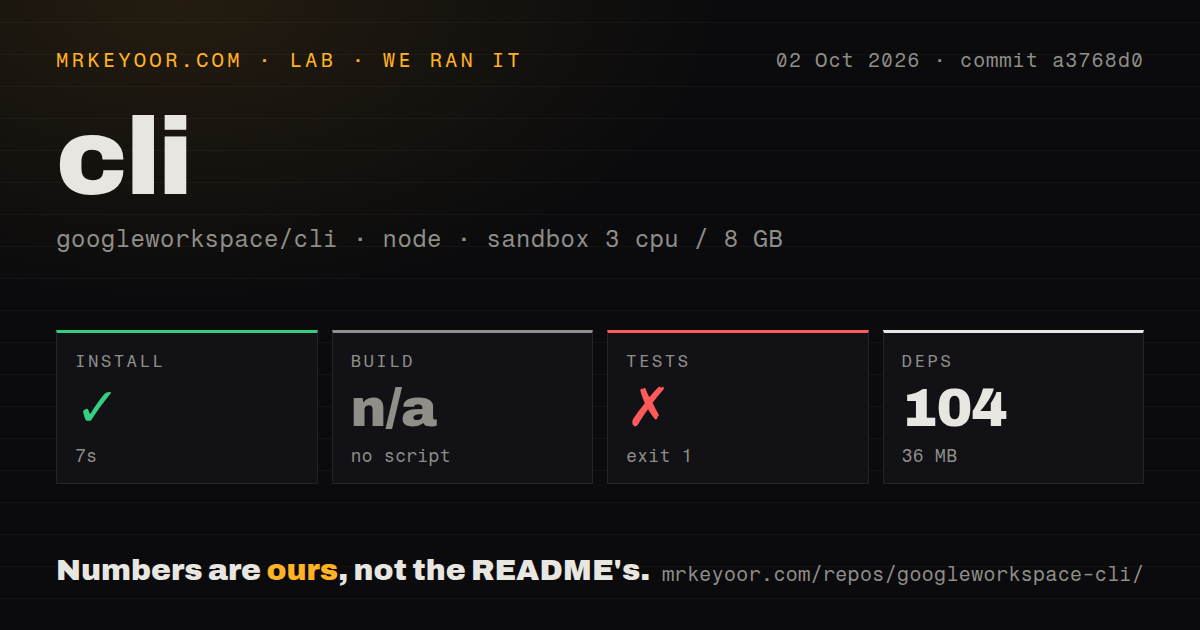
Our sandbox installed commit a3768d0 in 7 seconds, adding 104 pnpm packages and using 36 MB on disk. We ran it on October 2, 2026, in a fresh, unprivileged Debian container with 3 CPUs, 8 GB of RAM, the lab-node:22 image, and no secrets. The install succeeded. The harness found no build script or target, so it skipped that step. No build was measured.
The test command failed after 2 seconds with exit code 1. The log identifies @googleworkspace/cli@0.22.5, then shows the package invoking cargo test. The shell answered cargo: not found, followed by pnpm's lifecycle failure. Cargo was unavailable in that environment, so the command stopped before it could establish whether the Rust tests pass. Calling this a failed assertion would misread the evidence.
The scan found 11 CI workflow files, no Dockerfile, and no tests directory. They don't establish test counts or passing upstream checks. Our measurement method covered the supplied install and test commands without Google credentials. Authenticated Workspace operations remain unverified. A successful package install alone cannot tell you whether a Gmail or Drive request will work.
OAuth setup requires a Cloud project and deliberate scope choices
The README requires a Google Cloud project for OAuth credentials and an account with Workspace access. Its guided gws auth setup route also requires gcloud; the alternative is manual console configuration with a Desktop app OAuth client and your account added as a test user. If your organization controls project creation or application consent, involve its administrator before choosing this CLI for a scheduled job.
The 7-second install in our sandbox excludes that credential work. Headless use can take exported credentials through GOOGLE_WORKSPACE_CLI_CREDENTIALS_FILE, while an existing access token can come through GOOGLE_WORKSPACE_CLI_TOKEN. The README warns that the recommended scope preset exceeds the consent limit for unverified apps. Select the services you actually need. Exported credentials belong in your secret-handling process, and a login that succeeds still needs a representative API request to confirm access.
The npm entry point wraps a Rust program
The 104 packages installed in our run do not describe a JavaScript-only contributor environment. GitHub identifies Rust as the primary language, and the README's development commands use Cargo. For ordinary use, the documented default is a platform-specific release binary; npm automates downloading that binary. The source checkout and the packaged application are different routes. Choose the release artifact if your goal is running Workspace commands rather than editing the CLI.
The release page lists v0.22.5 and describes checksum verification in the npm download path. That is useful distribution detail, but it does not turn our missing-Cargo result into a passing suite. A contributor should read the Rust development instructions before reproducing the repository checks. The README does mention Cargo, so this failure is a mismatch between our Node sandbox and the source test command, rather than an undocumented tool requirement.
Calendar edits and contacts writes have specific open reports
In Calendar issue 951, a user of 0.22.5 reports that schema validation rejects JSON null when converting an all-day event into a timed event. The report includes a dry-run reproduction and suggests a full update as a workaround. This matters if your integration edits existing events: a generated command surface does not guarantee that every valid API operation survives local validation. We did not reproduce this report in our sandbox.
Contacts issue 673 also names 0.22.5 and reports that the People service login omits the scope needed to create contacts. The author's workaround uses a separate contacts-only token with direct API calls. These reports give calendar and contacts developers concrete cases to check before adoption. If those writes are central to your application, I would keep the existing API integration until the exact operations work with your credential configuration.
An October push shows activity despite the March release
The repository's last push was October 6, 2026; the latest release was v0.22.5, published March 31. GitHub listed 31,325 stars and 134 open issues and PRs on October 11, with recent Calendar and authentication reports among the activity. That supports an active-project judgment, not an abandonment claim based on the release date. Still, the README explicitly warns of breaking changes before v1.0 and disclaims official Google product support. Pin the version for recurring jobs.
GAM and rclone are better picks for narrower jobs
GAM targets Workspace administrators managing domain and user settings. rclone handles cloud file transfers and supports Google Drive. Pick the tool whose purpose matches the job before choosing gws for its service coverage. For an application written in Node, the Google APIs client keeps requests inside your program instead of passing them through a subprocess.
Google Workspace CLI earned a trial with its 36 MB installed footprint, but our source checks stopped at missing Cargo. I'd use it for inspectable scripts with limited permissions and pinned versions. If your first task is changing an all-day Calendar event or creating a contact, use those open reports as your acceptance cases. Do that before the script gets its schedule and write access.