E2B Embed's adoption question starts with the host
E2B Embed puts the E2B stack on one machine. Its guide says the SDK and API match E2B Cloud, but the operator must provide Linux hardware virtualization and a suitable network boundary. Embed answers over HTTP at the machine's own address, with no TLS of its own.
This review asks whether those deployment boundaries fit your environment. For the broader product description, see the existing E2B Runtime page. The focus here is narrower: what a single-machine Embed installation asks you to operate, and what the supplied measurements leave unanswered.
What happened when we ran it
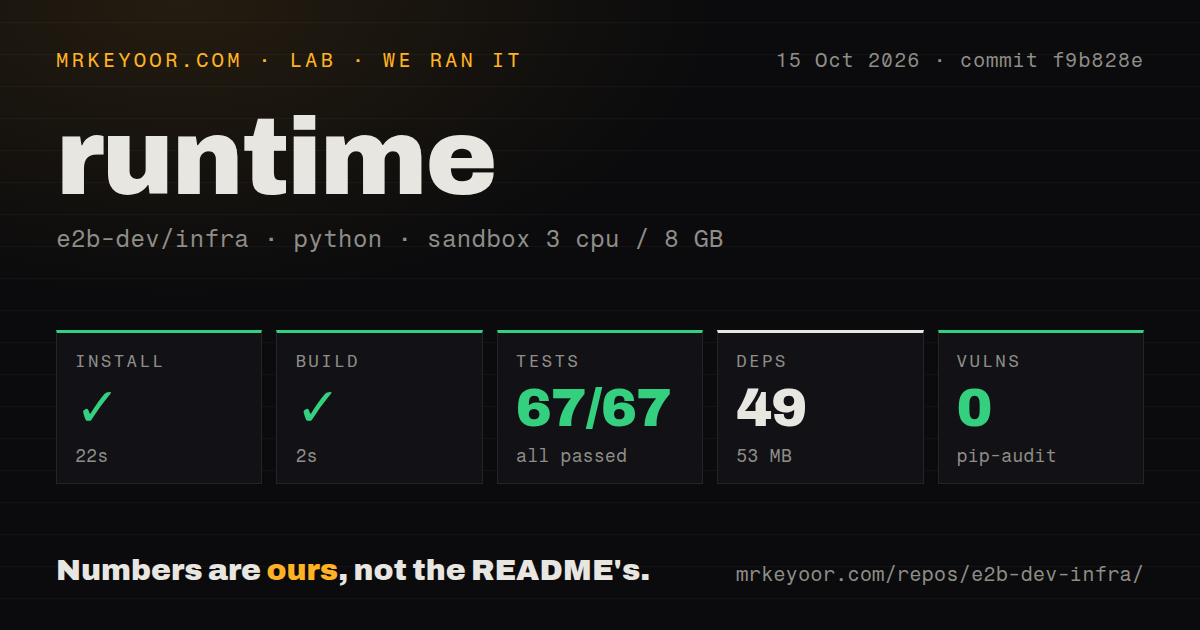
Our sandbox installed the Python project in firecracker/fc-versions at commit f9b828e in 22 seconds, recording 49 dependencies and 53 MB on disk. The build succeeded in 2 seconds. Pytest completed in 3 seconds with 67 passed and 0 failed of 67. Pip-audit reported 0 known vulnerabilities.
The October 15, 2026 run recorded 3 CPUs, 8 GB RAM, and image ghcr.io/astral-sh/uv:python3.12-bookworm. That image label is configuration evidence; actual runtime and operating-system versions require the raw toolchain logs. The checkout contained 2,917 files, roughly 524,201 source lines, and occupied 21.8 MB. The scan recorded 12 CI workflow files, no Dockerfile, and a tests directory.
These results cover the Python subproject. The supplied run does not record an Embed deployment, a running Firecracker guest, or a sandbox API request. It provides no sandbox-start latency, isolation assessment, or host-recovery result. The audit result applies to the measured Python environment.
Choose a deployment route, then verify the machine
The Embed guide offers Docker Compose on a Linux host, Terraform on GCP, AWS or Azure, and Kubernetes on one cluster node. These are different installation routes to the same single-machine topology. The guide says no E2B account or license key is needed.
Embed needs a Linux machine with hardware virtualization. The guide also describes running it inside a Linux virtual machine on a Mac under specified platform conditions. Ordinary container support alone does not establish that a host meets the virtualization requirement. Check that requirement before choosing an installation route.
HTTP and local storage define the operating boundary
Embed serves plain HTTP without its own TLS. The guide therefore places it inside your network. If your deployment requires encrypted connections, providing and checking that access path is part of your deployment work; it was not assessed by the supplied run.
Templates, sandbox logs and data live on the machine's disk. From that documented topology, host and data recovery belong in the adoption decision. This is an operational inference, not a failure observed in the sandbox. Decide how you will recover the node and its data before relying on it for agent sessions.
One node is a limit, not a scaling plan
Embed is one machine by design. The guide lists E2B Cloud and Bring Your Own Cloud as other arrangements, with E2B operating the latter inside the customer's cloud account. It labels private cloud as in development and invites design partners. Do not treat those options as evidence that Embed supplies a finished, independently operated multi-node package.
The supplied activity extract also records open issue 3693 requesting configurable per-node sandbox limits without LaunchDarkly, alongside related open pull request 3654. These are an operator report and a proposed change, not proof that a fix shipped. Check concurrency on the deployment you intend to use before committing capacity to another team.
Alternatives depend on what you need to operate
Coder is a self-hosted platform for cloud development environments and AI coding agents. Its workspaces are defined with Terraform. Evaluate it when development workspaces are the main requirement.
Firecracker supplies a virtual machine monitor that uses Linux KVM to create and run microVMs. Evaluate it when you intend to build the surrounding sandbox service yourself. Its README also says overall microVM security depends on a well-configured Linux host. Neither alternative was tested in the supplied run.
What to verify next
On the intended virtualization-capable Linux host, check sandbox creation, file access, pause and resume, concurrent sessions, and access through your intended network boundary. Then check recovery of the host and its stored data. These are proposed evaluation steps, not completed tests.
The supplied documentation establishes concrete hosting limits, and the activity extract shows current reports and proposed changes. Numerical documentation and community ratings remain unassessed because no calibrated scoring rubric was supplied. Setup ease and production maturity also remain unassessed because the run stopped at the Python subproject.