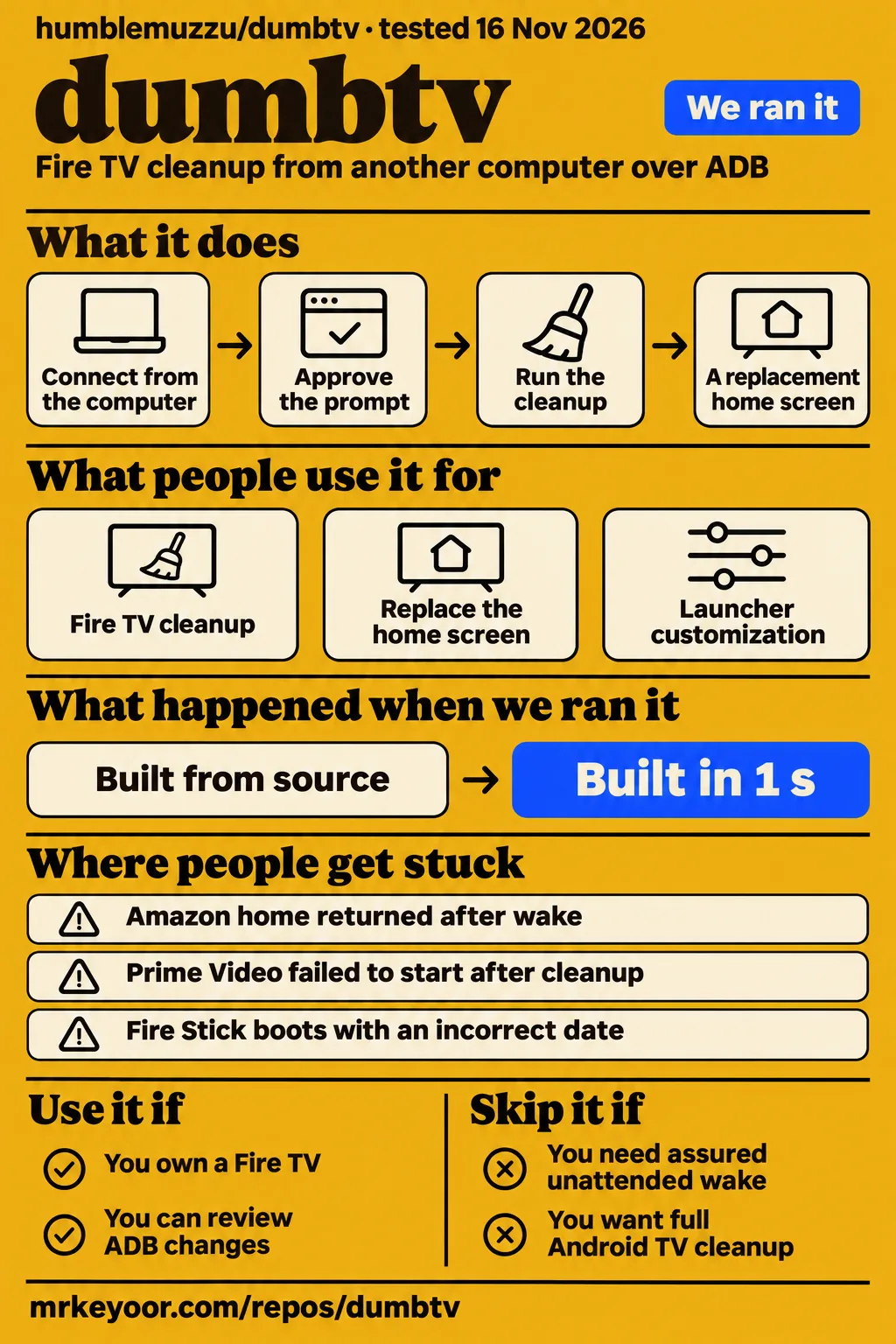
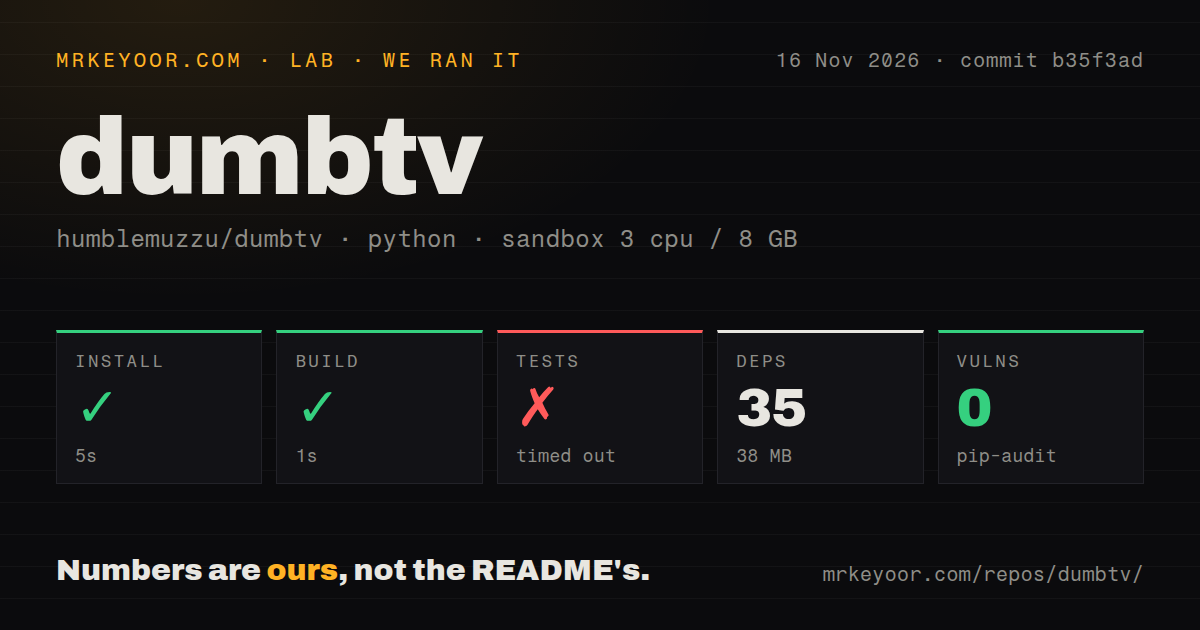
Our sandbox installed dumbtv in 5 seconds and built it in 1 second, but the tests timed out after 900 seconds. Use it if you own a Fire TV and are comfortable reviewing ADB changes and recovery steps. Skip it if your household requires assured unattended wake and cold-boot behavior. The owner reports make a case for trying it on a spare stick before changing the television everyone watches.
What people use dumbtv for
Owners use dumbtv for Fire TV cleanup, a replacement home screen and launcher customization, including a contributor's modified installation across seven household TVs.
The GitHub project is humblemuzzu/dumbtv. Its scripts run from another computer over ADB without root, changing package states and settings and adding an on-device DNS filter. The replacement launcher also works separately. That gives an owner with a home-screen complaint a smaller starting point: installing the launcher is a different choice from running the whole cleanup. The project README documents both routes and the configuration questions that precede package changes.
| Who used it | What they did | What the report tells you |
|---|---|---|
| Project author humblemuzzu | Cleaned up a sluggish, ad-heavy Fire TV Edition television over ADB and published the workflow. | The project began with the author's television and expanded through owner reports. Author's account. |
| X user Nitin_wysiwyg | Customized a 2018 Fire TV Stick with three launcher skins and used SmartTube alongside dumbtv. | This describes a customized household installation. Nitin's post. |
| GitHub contributor leonardopieralli | Ran modified dumbtv home across seven TVs and offered bottom-positioned app rows, Italian translation and Continue watching upstream. | Home position and Italian shipped in 1.10; Continue watching stayed in the fork. Contributor discussion. |
| X user simoxenham | Replaced a Fire Stick launcher using Codex, then requested personalized wallpapers and speed tweaks. | The account describes agent-assisted customization. Simoxenham's account. |
The seven-TV account helps explain the difference between a fork and the official release. The contributor proposed features already used at home, and upstream accepted some of them. Continue watching took a different path: reading other apps' Watch Next rows requires listing access, while proposed cover-art support adds network permission. The maintainer kept that feature in the fork. A screenshot of a customized launcher therefore needs its own provenance before it can describe the release you download. Feature discussion.
What happened when we ran it
Our November 16, 2026 sandbox run at commit b35f3ad recorded a successful 5-second install and 1-second build, followed by a test timeout at 900 seconds.
| Recorded check | Our result | How to read it |
|---|---|---|
| Install | Succeeded in 5 seconds | The harness recorded 35 dependencies and 38 MB on disk. |
| Build | Succeeded in 1 second | The recorded build step completed. |
| Tests | Timed out in 900 seconds | The command reached the time cap without a final summary. |
| Dependency audit | pip-audit: 0 known vulnerabilities | The audit recorded 35 scanned packages. |
| Repository scan | 222 files, about 11,750 source lines, 1.8 MB checked out | The harness classified the ecosystem as Python. |
| Project signals | One CI workflow, a tests directory, no Dockerfile | These are checkout observations. |
The final test-log lines show progress dots, a 33% marker, then a 60% marker and more dots. There is no final summary or exception in that tail. The recorded sandbox configuration was 3 CPUs, 8 GB RAM and image ghcr.io/astral-sh/uv:python3.12-bookworm. These figures describe our repository run; the television workflow instead involves connecting ADB, approving the connection on screen and exercising the installed software with the remote.
A separate lab attempt stopped at its safety step because no Compose file existed. The runner required one of compose.yaml, compose.yml, docker-compose.yaml or docker-compose.yml. Its failed safety record conflicts with a run header claiming deployment through the project's own Docker Compose on November 16, 2026, with every port bound to 127.0.0.1. The failed prerequisite is the recorded outcome of that attempt.
Where people get stuck: HOME, Prime Video and DNS
Owner threads identify separate HOME takeover, package-state and DNS configuration failures, with repairs tied to particular launcher versions.
| Symptom and reporter | What the thread found | Resolution recorded in the pack |
|---|---|---|
| jt-at-home: Android 14 HOME returned to Amazon | The launch happened before the cover window counted as visible. | Launcher 1.6 added an Android 14 delay; the reporter confirmed repeated HOME trials and a power cycle. Issue #57. |
| Anny0nn and rixialmenar: Amazon home returned after wake | Repeated HOME events and standby behavior produced different takeover failures. | Version 1.7 improved repeated-event handling; the maintainer reports a standby fix in 1.10. The issue remains open. Issue #153. |
| Dlay2017: Prime Video disappeared or would not open | An older cleanup left a now-protected package disabled. | The owner used a factory reset and reinstall. Main subsequently gained repair for required packages disabled by older runs. Issue #175. |
| MisterKOak: telemetry and update hosts still resolved | Fire OS 8 app-file restrictions, difficult remote navigation and a disabled backup service blocked configuration routes. | The script gained configuration-editor input using keyboard navigation; the owner reported all checks passed. Issue #89. |
| FerrisYJ: Fire Stick started with the wrong date | Turning DNS filtering off restored the correct time for this owner. | The clock issue remains open; the maintainer found no time-related blocklist entry. Issue #196. |
The Prime Video thread explains why protecting a package and repairing an existing installation are different jobs. Dlay2017 chose to keep Prime, yet its tile vanished and the app returned to Amazon's home after a grey screen. The disabled-package list included com.amazon.firebat. The maintainer acknowledged that older dumbtv runs had disabled it; putting it on the protected list afterward left that state unchanged. Main now includes repair for required packages disabled by earlier runs. Prime Video diagnosis.
HOME reports also need their device and sequence attached. In #57, jt-at-home confirmed launcher 1.6 on AFTCU9343B through three consecutive YouTube-to-HOME trials, physical-remote checks and a power cycle. In #153, Anny0nn reported 31 successful automated sleep/wake cycles with the official 1.7 APK on a rooted AFTKM stick. Those cycles used 2-, 10- and 60-second sleep intervals; thirteen included a timed HOME-key pair. The later Fire OS 7 standby report led to the maintainer's 1.10 fix. Android 14 report, wake discussion.
Settings and input fixes depend on the launcher version
Launcher 1.7 changed Fire OS 6 Settings access, while 1.2 introduced an input-screen fallback for televisions that opened a chooser instead of HDMI.
On Toshiba Fire OS 6 sets, the Settings grid slid upward until Network and the rest of its first row were unreachable. One reporter said the cleanup checks passed while that screen still failed. The merged 1.7 fix opens a list of settings sections an ordinary app can launch directly, followed by All settings for the rest. Network access belongs in an owner's post-installation checks alongside the script's result. Settings discussion #77.
Input tiles had a different failure. In #51, PWannop reported that Composite and HDMI opened a Freeview/Live TV chooser on a TCL. Another owner saw "Could not open that." The maintainer says launcher 1.2 uses its own Android TvView input screen when the television's app cannot show the input, under the Automatic option. PWannop separately reported that restore failed and used a factory reset. Input and recovery discussion #51.
The Appstore tile can flash even when its hosts resolve. In #133, the investigation traced the tile to Amazon's apps-grid entry, which opened Amazon's launcher and triggered dumbtv's Guard. Opening the store activity directly shipped for Fire OS 8 in 1.7. A later Cube 3rd-generation report led to the Fire OS 7 extension in 1.10. Domain resolution and launcher routing answer different questions about the same visible failure. Appstore investigation #133.
Security and undo: keep the recovery distinction
Restoring package states and settings does not automatically reinstall deleted apps.
The documented restore script re-enables packages, clears app and network rules, restores saved settings, removes the filter and returns HOME to Amazon. The older detailed README expressly excludes deleted apps stored in /data and apps removed manually afterward: those need store reinstalls. Keep the preflight snapshot and choose app removals conservatively. For a shared television, that choice should reflect what other household members use as well as what the person running cleanup recognizes. Current restore description, documented exclusions.
The boot-hang report in #57 followed an AI-assisted first pass that disabled com.amazon.device.messaging. The owner reported a boot-animation hang and factory-reset recovery. The maintainer says dumbtv's shipped lists never targeted that package and added it to the never-disable list. That distinction assigns the failure to the described agent session rather than silently attributing it to the distributed package lists. It also gives an owner a concrete reason to review proposed package changes. Owner report and maintainer response.
The README describes a launcher with no internet permission and a run-at-startup permission on Fire OS 7 and 8, used to restart the DNS filter after Android kills it. The filter also blocks Fire OS updates while running. For an intentional update, the project's FAQ documents restoring normal operation, allowing the update and applying cleanup again. Keeping the filter enabled therefore includes a decision about the update workflow. Launcher permissions, update instructions.
English controls and upstream features have moved on
The maintainer records Spanish in launcher 1.8, German in 1.9 and Italian in 1.10, following reports of English controls in 1.7.
In #170, gnacho described a television whose date appeared in Spanish while launcher controls remained English. The maintainer explained that Android string resources replaced hard-coded UI text in 1.8. Italian and bottom-positioned app rows then landed in 1.10, while Continue watching stayed in leonardopieralli's fork. For a household choosing local-language menus or a layout seen online, the useful distinction is which features reached upstream and which belong to the contributor's version. Language and feature decisions.
The supplied GitHub metadata records the last push on November 14, 2026, and launcher release launcher-v1.10 on the same day. Its release page identifies commit b35f3ad, the commit used by our repository run. The sampled threads show specific reports becoming targeted fixes, including standby handling and Prime Video migration repair. The repository explicitly licenses scripts, documentation and launcher under MIT, with separate CC BY-SA 4.0 terms for the device catalog. Launcher 1.10 release, licence statement.
dumbtv vs cleanyourtv, Pi-hole and launcher replacements
For a full Android TV or Google TV cleanup tool, dumbtv's repository directs readers to cleanyourtv.
| Option | Why choose it | What changes your decision |
|---|---|---|
| dumbtv | You want Fire OS package cleanup, settings changes, an on-TV filter and a launcher in one workflow. | Match the device and symptoms to the catalog and issue history. Project README. |
| cleanyourtv | Your television runs Android TV or Google TV and you want the full cleanup workflow. | This is the separate project upstream recommends for those platforms. Upstream recommendation. |
| Pi-hole or router DNS blocking | Your router permits DNS configuration and network blocking is the job you want. | dumbtv's FAQ contrasts a network blocker with its on-TV filter, package changes, settings and home screen. Project comparison. |
| ATV Launcher, Projectivy or FLauncher | You primarily want another home screen. | TechCrunch names these home-screen replacements. TechCrunch coverage. |
| An offline display with a separate streaming device | You prefer experimenting on a replaceable stick. | How-To Geek recommends separating the display from the streaming device. How-To Geek advice. |
A smart-home Reddit thread adds a household preference: Dunnowhathatis said they used an Apple TV on every television and preferred that arrangement. The comment describes an alternative to the built-in smart-TV experience. Its thread title does not make it a trial of humblemuzzu/dumbtv. Hardware separation is another purchase decision for an owner weighing cleanup against replacing the streaming interface. Dunnowhathatis's comment.
What the other reviews get wrong
The supplied repository distinguishes full Fire TV passes from manually run Android TV lists, while TechCrunch describes broader end-to-end Android/Google TV testing.
TechCrunch names Sony, TCL, Philips, Hisense, Xiaomi and Shield Android/Google TV devices; the research synthesis records AI Weekly repeating that breadth. Upstream instead labels its Android/Google TV reports as manual runs from separate lists and directs readers to cleanyourtv for a full tool. That distinction gives readers a more useful compatibility description than treating launcher installations and complete cleanup passes as the same result. TechCrunch account, AI Weekly account, repository scope.
The supplied research records Repolode retaining an older one-Fire-OS-7-device description and labelling the licence Other, while HotRepo uses NOASSERTION. The current repository lists multiple owner-reported full passes and states the licence terms explicitly. Older descriptions of mandatory Alexa removal and zero launcher permissions also differ from the current defaults and permission explanation. SiliconSnark's 45-kilobyte description belongs to its snapshot; the supplied README and 1.10 release describe 116 KB. Repolode, HotRepo, SiliconSnark, current README.
CleanYourTV.com's comparison makes categorical no-brick and untouched-input assurances. The TCL thread documents input switching that opened a chooser, followed by a launcher 1.2 repair, and an owner reporting factory-reset recovery after restore failed. The #57 boot hang has a different provenance: the agent session disabled a package the maintainer says was outside dumbtv's lists. Keeping those accounts separate avoids both blanket reassurance and blaming the shipped scripts for an action the source assigns elsewhere. Comparison page, input report, boot-hang account.
Search results also contain different projects with similar names. dumbtv.app describes a Plex library presented as television-style channels. dirk-makerhafen/DumbTV creates channels from Kodi plugins. Identifying the repository as humblemuzzu/dumbtv prevents either project's capabilities or installation instructions from entering this Fire TV review. The project name alone is insufficient to distinguish them. Plex-based dumbTV, Kodi-based DumbTV.
Questions people ask
The documented Fire TV setup uses ADB from a computer, an on-screen connection approval and the repository scripts; a coding agent is optional.
How do I set up dumbtv on a Fire TV Stick?
Enable ADB debugging by pressing the device name seven times under Settings > My Fire TV > About, then opening Developer Options. Connect from the computer with adb connect <tv-ip>:5555 and approve the prompt. The README's manual sequence is preflight.sh, configure.sh, all.sh, then verify.sh, under scripts/. Preflight records the initial state, configuration asks what to keep, and cleanup asks before each step. README setup sequence, setup guide.
Can dumbtv brick my TV, and what recovery options exist?
The project documents scripts that avoid /system and the bootloader, and its recovery route starts with restore.sh. The owner records also contain factory-reset recovery, including #51 after a reported restore failure and #57 after an agent disabled com.amazon.device.messaging. The security and undo section above separates that agent-session report from the shipped lists and explains why deleted apps require a store reinstall. Safety documentation, input recovery report, agent-session report.
Does dumbtv work on Android TV and Google TV, or only Fire TV?
The scripts target Fire OS sticks, Cubes and Fire TV Edition televisions. Upstream lists manual Android/Google TV reports separately and points to cleanyourtv for a full cleanup tool on those platforms. Choose between installing dumbtv home and running the cleanup workflow by reading those separate instructions; an owner's launcher installation answers a different question from a full package-and-settings pass. Repository platform guidance.
Can I replace the TV's operating system?
dumbtv leaves Fire OS installed. The repository explains that Amazon locks the boot chain, while the toolkit changes package states, settings and the home screen through ADB. Its purpose is to alter the existing system's behavior. An owner looking for another operating system needs to distinguish that objective from replacing the launcher that appears when HOME is pressed. Operating-system explanation, project FAQ.
Why does Prime Video stop opening after installing dumbtv?
Issue #175 traced one installation's failure to com.amazon.firebat remaining disabled from an earlier cleanup. The maintainer's repair re-enables required packages disabled by old runs, and the 1.10 release documents ./scripts/debloat.sh -y for that migration. The reporter had already used a factory reset and reinstall. The package-state diagnosis and release history are detailed above. Prime Video thread, 1.10 migration instructions.
Why does Amazon's home screen return after standby or repeated HOME presses?
Issue #153 records repeated HOME events and standby sequences leaving Amazon's launcher in front while Guard remained enabled. The maintainer reports repeated-event improvements in 1.7 and a standby fix in 1.10; the supplied issue is open. Match the version and sequence to the HOME discussion above, rather than treating an enabled accessibility service as the whole diagnosis. Wake and HOME thread.
Why does verify.sh say telemetry and update hosts are not blocked?
MisterKOak's Fire OS 8 report involved filter configuration that had not taken effect. The thread identifies inaccurate instructions, difficult remote navigation and a backup service that made adb restore ineffective. The script gained a configuration-editor route using keyboard navigation, after which the reporter obtained all checks passed. The relevant change concerns entering the filter settings on that build. DNS configuration thread.
Why is the Fire Stick clock wrong with DNS filtering enabled, and can I use a local NTP server?
Issue #196 reports that disabling DNS filtering restored correct time on one Fire Stick 4K Max. The maintainer checked the HaGeZi feed and additional hosts and found nothing time-related on the blocklist; the maintainer's Fire OS 7 television kept correct time with filtering enabled. That contrast directs the investigation toward the reported device and build rather than an assumed blocked NTP hostname. Clock investigation.
How do I add wallpaper without granting storage permissions?
The launcher reads its own app folder without a storage-permission grant. In #28, the owner confirmed that renaming an image to wallpaper.jpg made it display. Launcher 1.2 clarified that a single wallpaper uses that name or a supported alternative extension, while files inside the wallpapers/ folder can have other names. Choose Background > Image file and follow those naming instructions. Wallpaper discussion.
Why do input tiles open a Freeview or Live TV chooser instead of switching HDMI?
Issue #51 records the television's input app opening a chooser instead of displaying the selected input. Launcher 1.2 added its own Android TvView screen as the Automatic fallback when the TV app cannot show it. The settings and input section above separates this launcher repair from the same thread's report of failed restore and factory-reset recovery. Input issue and 1.2 fix.
How do I reach Network settings when the Fire OS 6 Settings grid is cut off?
Launcher 1.7 gives Fire OS 6 a list of settings sections an ordinary app may open directly, followed by All settings. The earlier workaround was Options > Open Amazon's home screen, then Amazon's gear icon. The thread concerns Toshiba sets whose Settings grid shifted upward, including a report where cleanup checks passed despite the inaccessible first row. Settings thread and 1.7 change.
Why does the Appstore tile flash without opening the store?
Issue #133 traced the flashing tile to Amazon's apps-grid entry opening its launcher, which Guard intercepted. The direct-store fix shipped for Fire OS 8 in 1.7 and Fire OS 7 in 1.10, following a Cube 3rd-generation report. Use that routing history alongside the DNS result when diagnosing the symptom; allowing the store's hosts addresses only the network part. Appstore routing fix.
What we have not tested yet
Our evidence contains repository checks and attributed owner reports, rather than a completed physical-TV installation or remote-control trial by us.
We have not measured before-and-after TV responsiveness, memory savings, streaming playback, overnight wake reliability, cold-boot clock recovery or restore success on physical hardware. The 31-cycle owner report excludes overnight idle and proof that the original spontaneous failure was fixed. The 1.10 standby repair is the maintainer's result. Issue #196 supplies neither a confirmed cause nor a confirmed local-NTP remedy; disabling filtering helped one owner. The input report supplies no diagnosis of its separate restore failure or evidence of soundbar or Bluetooth failure.
The raw toolchain logs are needed to identify actual sandbox runtime and operating-system versions and investigate the 900-second test timeout. Progress dots supply no passing-test count. The conflicting Compose header supplies no usable deployment result, and the dependency audit is separate from TV security. Passing domain checks and the launcher's permission declaration are not an independent network-traffic audit or complete privacy assessment. The supplied video results add no usable project walkthrough, and the pack contains no lab television screenshot records.
We have not run the alternatives side by side, measured adoption beyond the named accounts or established a speed improvement from the customization posts. Broad Android/Google TV end-to-end compatibility and categorical no-brick assurances exceed this evidence. This review concerns the supplied text and records; rendered layout, related links, recommendation modules and other template elements are outside that examination. Start with the documented preflight and a device-specific recovery plan before changing the screen your household relies on.