Deno 2.9.5 gives TypeScript a direct runtime path
Deno runs JavaScript, TypeScript, and WebAssembly on V8, with Rust and Tokio underneath. The README's first program is a complete HTTP server using Deno.serve; one command starts it with the explicit --allow-net permission. There is no separate transpiler command in that route. For a new TypeScript service, that removes setup work before the first request can be served.
Permissions remain visible after the demo. A production command must grant the network, file, process, or environment access the program uses. That is useful for downloaded scripts and internal automation because access is not silently assumed. It also means deployment manifests need the correct flags, and a missing grant can be an operational error rather than an application bug.
Deno 2.9.5 also shows how much compatibility work comes with being a second JavaScript runtime. Its release notes include fixes for Node Web Streams, DNS, HTTP/2, file-system behavior, npm metadata, and package resolution. Teams can use npm packages, but they should read that support as an actively maintained compatibility layer rather than a promise that every Node edge case behaves identically.
What happened when we ran it
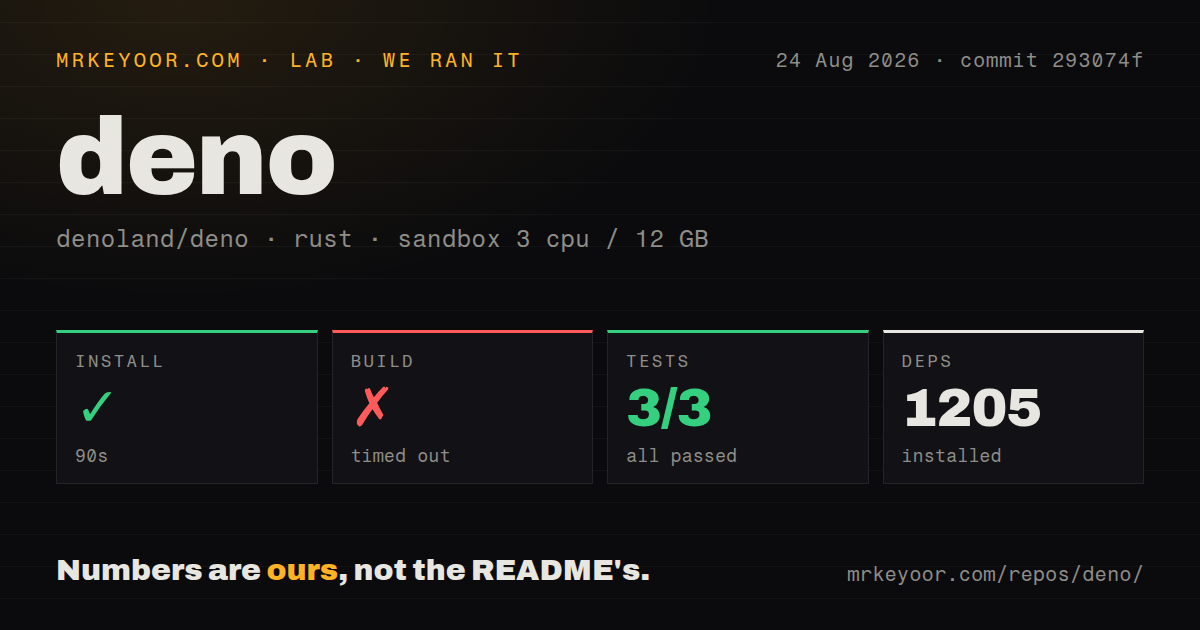
Our sandbox installed 1,205 packages in 90 seconds from commit 293074f. The checkout held 189,363 files, about 6,139,296 source lines, and 664.9 MB before the build. Those figures describe contributor setup, not the much smaller job of obtaining a released Deno binary.
The build did not finish before the 900-second limit. The separate test command also reached 900 seconds and was stopped. Its parsed result reported 3 passed and 0 failed out of 3, but that does not make the suite a pass because the process never completed. We have no basis for saying the build was close to finishing or that the remaining tests would pass.
The test log gives one useful clue without establishing a cause. Several cache tests printed ok, then file_fetcher::tests::request_error, server_error, and test_fetch_accept had each been running for more than 60 seconds. That is all the log proves. The repository has 11 CI workflow files and a tests directory, but no Dockerfile, so contributors need to follow the project build instructions rather than expect a ready container recipe.
Released installation is far easier than the 664.9 MB checkout
The README documents shell and PowerShell installers, plus Homebrew, Chocolatey, WinGet, and Scoop. Once installed, the basic server is unusually short: TypeScript is the input file, Deno.serve supplies the HTTP entry point, and one permission flag allows the port binding. The official docs then cover the runtime, Deno Deploy, the standard library, and JSR.
That experience makes Deno attractive for a fresh service or command-line tool. Release 2.9.5 added a workspace-member option for tasks and an unscoped alias option for packages, alongside many fixes. Those conveniences reduce the number of separate tools a team must choose. They do not reduce the need to test an established Node application against Deno's implementations of Node APIs and npm behavior.
Issue #36670 provides a focused example. In the reporter's Deno 2.9.5 reproduction, Node-style exit and before-exit handlers run under deno run but not under deno test. Cleanup registered through those hooks can therefore be skipped during tests. Any suite that removes temporary files or closes resources through process lifecycle handlers should exercise those cases before changing its CI runtime.
Deno 2.9.5 migrations still need release-specific tests
Issue #36657 documented an HTTP/1.1 regression across Deno 2.8.3 through 2.9.5. In the supplied reproduction, requests with bodies around 500 B and larger caused Deno.serve to close the connection even after the handler consumed the body. The issue is now closed, which changes the buying advice: verify the fix in the exact release you deploy instead of treating the report as an unresolved defect on the main branch.
Generated tooling state is a smaller but persistent concern. Issue #36376 says deno check and deno sync-types can create a project-local .deno/ directory with generated configuration and machine-specific paths. The reporter found no documented way to relocate or disable it. Teams with clean-tree checks, broad file watchers, or editor indexing may need an ignore rule while that behavior remains open.
Runtime upgrades deserve the same discipline as Node major upgrades. Deno sits below every request handler and dependency, so differences in exit hooks, connection reuse, or generated files can affect otherwise correct code. Pin the deployed version, exercise representative network traffic, run application tests, and read the release notes for the compatibility areas your code touches.
An August 26 push confirms active work, not automatic compatibility
GitHub recorded Deno's latest push on August 26, 2026. Release v2.9.5 arrived on August 6, and recently updated issues and pull requests were active on August 26. The repository showed 108,309 stars and 1,529 open issues and PRs together when fetched. That combined count includes proposed changes as well as problem reports, so it should not be read as a bug total.
The project is clearly maintained, and its documentation works well for both first-time users and contributors. The harder decision is compatibility. Deno is a sensible first choice for new TypeScript servers that fit Web APIs and can make permissions part of deployment. Node.js remains safer when an existing system depends on exact Node semantics or a package graph the team cannot afford to retest.