Node.js is the safe runtime choice, source work is the expensive part
Node.js runs JavaScript outside the browser and gives applications access to files, networking, processes, cryptography, and other operating-system facilities. The repository combines JavaScript with native code and pulls together V8 and libuv. That scope explains why installing Node.js for an application feels ordinary while changing Node.js itself resembles browser-engine work. Most readers should download a signed release rather than compile this tree.
The project publishes Current and LTS lines on a defined schedule. A new major arrives every 6 months, in April and October. Even-numbered releases move to LTS, with 12 months of Active LTS followed by 18 months of Maintenance. October Current lines that do not follow that path receive 8 months of support. For a production team, choosing the release line is part of setup, not a detail to settle after deployment.
A source checkout starts at 673.7 MB
Our commit aa1bf2c checkout contained 51,976 files, about 9,294,554 lines of source, and occupied 673.7 MB. It had 45 CI workflow files and a tests directory, but no Dockerfile. That is a serious contributor workspace before generated output or compiler artifacts appear. A narrow documentation fix can still sit beside V8, OpenSSL, ICU, libuv, platform ports, test fixtures, and release tooling.
The build guide asks Linux contributors for GNU Make, Python, and either GCC 13.2 or newer or Clang 19.1 or newer. It says 8 GB of RAM is typically needed when compiling with 4 parallel jobs. Temporal support adds a Rust toolchain. Coverage needs pip. Those requirements are clearly documented, though they make the source repository a poor first stop for someone who only wants to run a JavaScript service.
What happened when we ran it
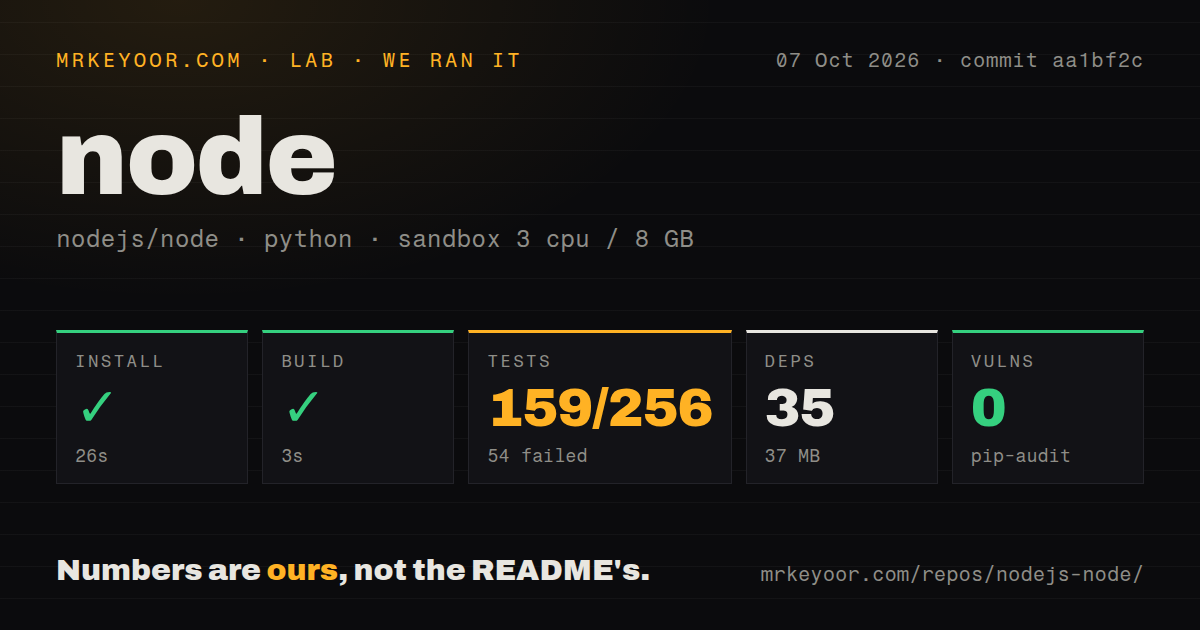
Our sandbox installed 35 Python packages in 26 seconds and added 37 MB on disk. The measured build succeeded in 3 seconds. We ran commit aa1bf2c in an unprivileged Debian container with 3 CPUs, 8 GB of RAM, Python 3.12, and no secrets. Pip-audit reported 0 known vulnerabilities. These figures describe the automation path we ran, not the time required to compile a release binary or the speed of Node.js applications.
The test command failed with exit 1 after 24 seconds. Pytest reported 159 passed, 54 failed, 5 skipped, and 43 collection/setup errors out of 256, plus 8 passing subtests and 20 warnings. The final log lines repeatedly came from V8 debug-helper tests and said RuntimeError: Missing required environment variable: LLDB. That is enough to say our fresh container lacked required debugger configuration. The tail does not explain every failed case, so assigning all 54 failures to LLDB would go beyond the evidence.
Platform support has hard floors
The current build document sorts platforms into Tier 1, Tier 2, and Experimental groups. Release-blocking test coverage applies to the first 2 tiers, while Experimental targets may fail to compile or pass the suite. Production use is limited to Tier 1 or Tier 2. The documented Linux x64 floor is kernel 5.14 with glibc 2.34 for Tier 1, and official binaries beginning with Node.js 25 also need the libatomic runtime.
WSL has a sharper boundary. The GNU/Linux build and binaries may work there, but WSL itself is not supported, and the project asks users to report WSL-only defects to Microsoft's tracker. macOS x64 is Experimental while arm64 is Tier 1 in the current table. These details matter more than a generic cross-platform label because they decide whether a regression can block a release or receive upstream attention.
Signed binaries are easier to trust than a casual source build
Current and LTS release directories include SHA-256 checksums and a releaser signature. The README documents a maintained keyring and a gpgv verification path. That gives operators a direct chain from downloaded archive to release team. The repository is MIT-licensed, while bundled external libraries can carry other open-source licenses, so redistributors still need to read the included license inventory.
GitHub showed 122,431 stars and a last push on October 8, 2026. The latest release, v26.11.1, was published on October 7. Separate issue searches returned 604 open issues and 568 open pull requests during our check. That queue is large, but it is paired with same-day code and release activity. A stale tag would have been a warning; these dates show a project moving quickly enough that contributors must keep their local branch and build guide current.
Choose LTS binaries unless the runtime itself is your job
For application developers, Node.js remains the conservative pick among JavaScript runtimes because its support policy, signed artifacts, platform matrix, and npm compatibility reduce adoption surprises. None of that makes the source tree casual. Our run found a fast 26-second dependency install and 3-second measured build, then hit a failed test command because the generic container did not provide the debugger environment expected by part of V8's tests.
That split should decide the route. Install an LTS binary when you need to ship a service or tool. Build from source when you are patching the runtime, producing a downstream distribution, or validating a specific platform. In the latter cases, reproduce the documented compiler and debugger setup first. Otherwise, the first red suite may tell you more about the container than about the change you came to test.