An 8-second build does not establish a working Slack assistant
Company Brain built in 8 seconds in our sandbox, then its standard test command failed. That split matters more than the README's quick-deployment promise. The project lets you run a Slack assistant on your own Cloudflare account, but a useful deployment still depends on Slack credentials, a memory service, and a model provider. The local build proves the packaging step worked. It does not show that a real teammate received the right answer or that a private channel stayed private.
The appeal is easy to recognize. A decision made in a Slack thread disappears from everyday view, and someone later asks who owns it. Company Brain records context from channels it joins and retrieves that context for answers. Connected MCP tools extend the assistant into services such as GitHub and Linear. Opening an issue is part of its documented job, so choosing it means deciding how an assistant should act as well as what it should remember.
What happened when we ran it
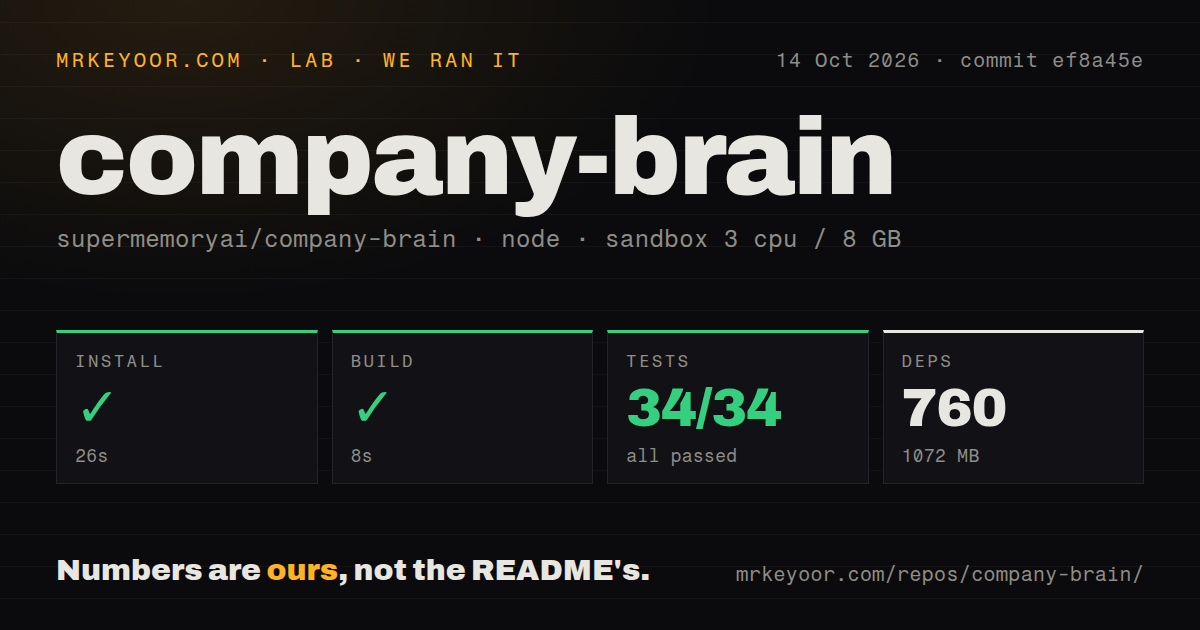
Our run of commit ef8a45e installed 760 packages in 26 seconds and occupied 1,072 MB on disk. The build passed in 8 seconds. We used a fresh Debian sandbox with the lab-node:22 image, 3 CPUs, and 8 GB of RAM, without secrets or elevated privileges. The checkout itself was 6.9 MB across 423 files and roughly 98,464 source lines. Dependencies are a substantial local cost relative to that checkout.
The test step exited 1 after 7 seconds. Vitest reported 34 passed tests, none failed, with two failed test files and ten passed files. The log says it could not load @repo/lib/connector-availability from src/brain/tools/mcp/catalog.ts. A file that cannot load does not get to report passing assertions. The result is a failed overall command despite the passing collected tests, and the log does not establish why that import was unresolved.
Our scan found 0 CI workflow files, no Dockerfile, and a tests directory. Those observations do not establish whether hosted deployment succeeds. The sandbox had no Slack app or provider credentials, so we did not measure answer quality, live permissions, scheduled delivery, or tool actions. Treat the passing build and failed suite as repository findings. Neither substitutes for a trial using accounts with deliberately different access to the same organization.
Cloudflare hosts the worker, Supermemory holds the memory
The deployment instructions ask for a Supermemory key and a model-provider key before Slack setup. The permissions guide says memory uses container tags within the Supermemory account attached to that deployment key. Cloudflare supplies the worker and its associated storage and coordination services. This arrangement gives you control over the worker deployment, while retaining external dependencies for the information the assistant remembers and the model it calls.
The 26-second install says little about the work of maintaining those connections. Local development needs Slack to reach the machine through a tunnel, with the tunnel address set as PUBLIC_URL. A full code sandbox follows another service path: Daytona on the free Workers route, or an enabled Cloudflare container on Workers Paid. The container route requires Docker during local development. Choose the runtime deliberately if shell execution is a reason you want this assistant.
Private-channel answers depend on the asker and destination
The permissions guide separates personal, private-channel, and organization-visible memory. A public-channel question reads shared memory. A private-channel question can also read that channel's history, while a DM can include private channels the asker belongs to. This is a sensible documented model: answering in a public room should not expose the broader set of information available in a private DM.
The 34 passing tests do not certify that model across live Slack membership changes. Tool connections have their own rules: shared connections are documented as read-only, while writes use personal connections. An open approval-policy PR reports that free-form SQL writes through a tool named query could be treated as reads. That report concerns this project's MCP policy, and its open status means the proposed protection cannot be assumed present in the reviewed code.
Proactive replies and scheduled digests need separate trials
The automation guide documents scheduled prompts and unrequested replies in invited channels. Proactivity can be restricted by channel, and channel digests use shared tool connections rather than the creator's personal credentials. Start with a digest whose source material you already know. That gives you a concrete way to judge omissions, attribution, and whether the bot's interruptions earn their place in the conversation.
An open DM-digest fix reports a mismatch between Slack identifiers and internal member identifiers when constructing memory scope. Our 7-second failed test step did not exercise a live digest, and the proposed change is not a demonstrated result from our lab. Administration has another practical gap: the permissions guide says there is no screen for promoting admins. Someone maintaining the deployment must change roles in the D1 member table.
October work is visible, but the open fixes matter
The last push was October 2, 2026. GitHub reported 1,000 stars and 16 open issues and PRs, with activity on documentation in October and open proposals addressing memory scope and tool approvals. The latest-release endpoint returned no release. Taken together, those facts show recent attention without providing a tagged release to use as a stability signal. Microsoft Teams support remains a contributor proposal, rather than a feature you can deploy today.
Company Brain earns a controlled Slack trial when recovering team context is worth operating this service arrangement. Onyx is worth comparing for broader indexed company knowledge, while Khoj fits personal documents and research. For Company Brain itself, make the unresolved test import and the open tool-policy reports part of the adoption decision. A bot that can open an issue deserves more scrutiny than one that only retrieves yesterday's discussion.