
Short answer: keep the scene code if you expect revisions
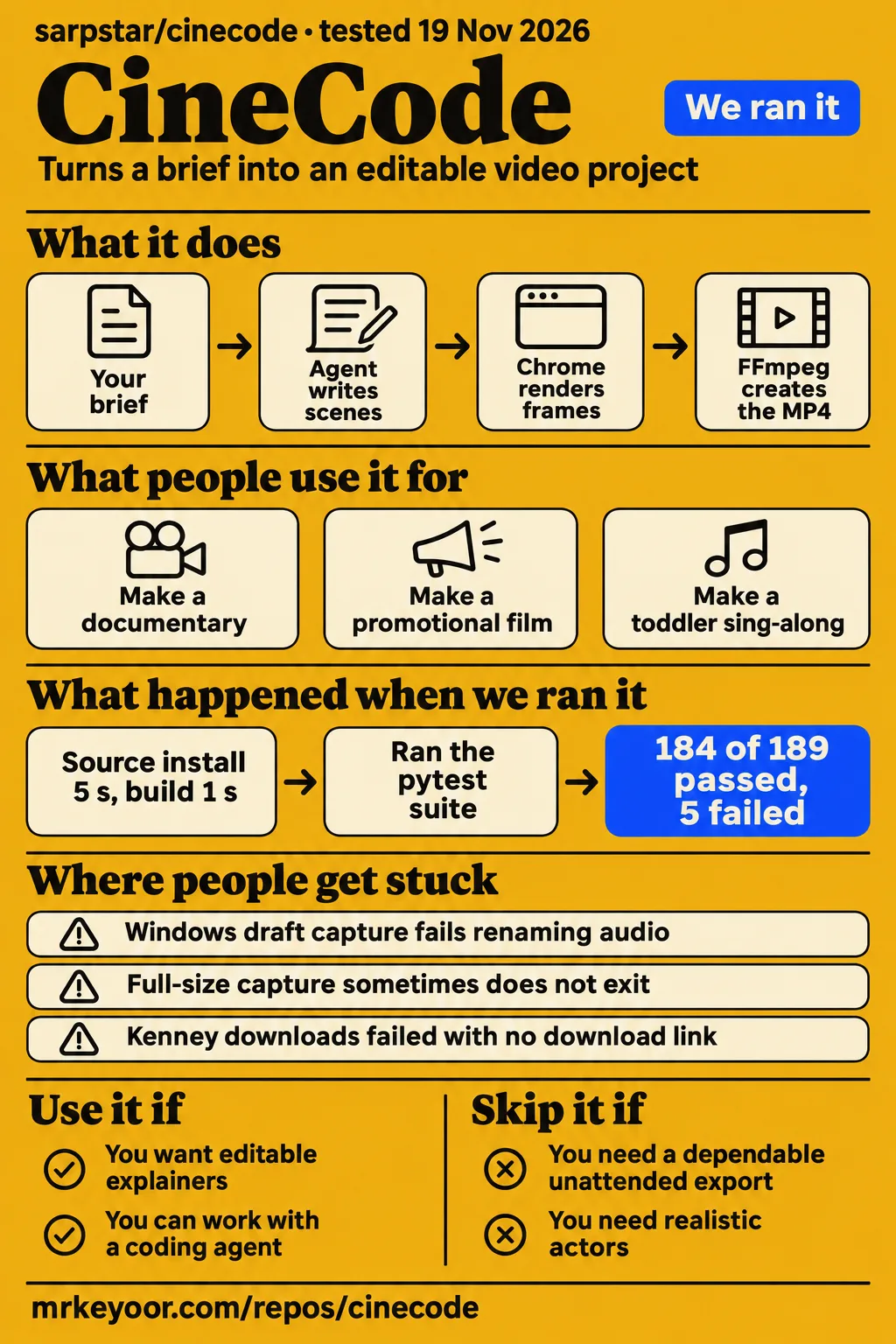
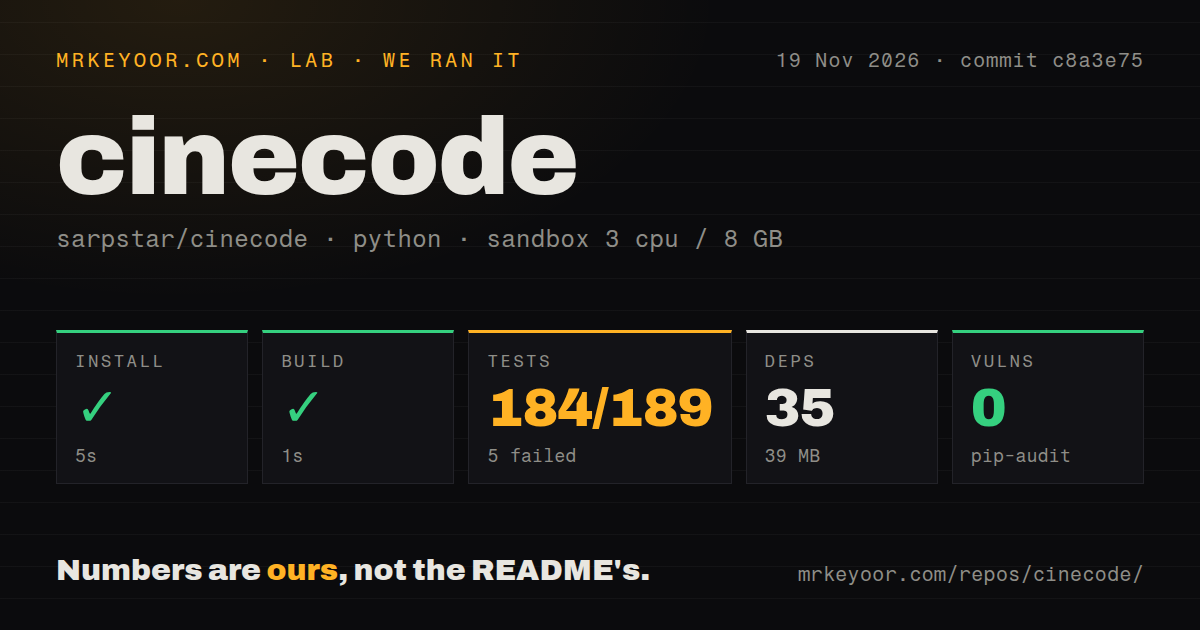
Our CineCode sandbox run reached a successful install and build, then the test command exited 1 with 184 passed, 5 failed and 42 skipped. Use it if you want editable explainers, product clips or stylised films and can work with a coding agent. Skip it if you need a dependable unattended export for a deadline: reporters describe both a mastering process that keeps running and a capture process that prints done without exiting.
CineCode uses a coding agent, Chrome and FFmpeg to turn scene code into a local MP4. A coding agent is an AI assistant that can write files and run tools on your computer; FFmpeg assembles and processes media. The useful artifact is the project folder: you can change the scene, timing or sound and export again. CineCode.video describes that revision path explicitly. That makes it worth considering when a client will ask for another version of the same film.
This review covers sarpstar/cinecode, whose main README is Turkish and has an English edition. The film-analysis site at cinecode.app, zakariaf's separate JSON-storyboard engine and deanthecoder's watch-while-you-code app are different projects. So is the Rust engine discussed by Busy_Cucumber_6499 on r/rust: that post links to Fanaperana's documentation and says its core engine was still private. None of those projects' features or complaints belongs on this one's scorecard.
What people use cinecode for
Sarp Yıldız reports completing an eight-minute Bermuda documentary after an overnight draft and one detailed revision; other users describe first films, a Turkish explainer and specialised music projects. These are creator and user reports, rather than a production-quality score from our lab.
| Who used it | What they made | What happened |
|---|---|---|
| Sarp Yıldız, CineCode's creator | Eight-minute Bermuda documentary | Reports waking to an almost finished draft, then obtaining the final version after one detailed revision. His X post describes the sequence. |
| Sarp Yıldız | CineCode's own promotional film | Shared the result with the launch post after asking the tool to make its own promo. The launch post includes the video. |
| @iosdevgulzade | First video, followed by a second attempt | Shared the first attempt and said the second pleased them more. The post reports personal satisfaction, without a production-time measurement. |
| Reporter of GitHub issue #7 | A 60-second, 16:9 Quick mode film with three.js and Turkish narration | Says the problems cost time or misled checks, but none stopped the work. The issue names each problem. |
| Reporter and collaborators in issue #19 | Long toddler sing-along | Overrode the default pacing rules with slower shots and simpler action. Their requested calm profile comes from that project. |
For your own brief, the strongest starting point is something you can describe as scenes and timed changes: a product screen, an animated diagram, a documentary map or a title sequence. The Quick-versus-Film guide recommends Quick mode for a focused teaser or explainer and Film mode for researched work with chapters. It gives you a practical distinction: agree on the structure before asking the agent to build a larger production.
The YouTube video cinecode Explained: Is It Right for You? describes the same approval sequence: idea, questions, plan, two stills, draft, revisions and final MP4. Its transcript explains the workflow and warns about realistic faces. It is useful for understanding the intended process; the transcript's feature tour is a different kind of evidence from a user's account of finishing a specific film.
What happened when we ran it
Our November 20 hands-on attempt failed its safety prerequisite because no Compose file existed; the November 19 source run had succeeded at install and build before failing tests. The later attempt stopped before a film-production task, so the earlier source checks carry the useful execution results here.
The November 20 run description says the project was deployed with its own Docker Compose and ports bound to 127.0.0.1. That conflicts with the failed prerequisite, which names all four missing Compose filenames. We treat the specific failed step as the stopping point, rather than call the run description proof of a working deployment. The word “unsafe” in the prerequisite error describes our harness's Compose requirement, not a discovered security flaw in CineCode.
| Source-run check, November 19 at c8a3e75 | Result |
|---|---|
| Dependency installation | Succeeded in 5 seconds; 35 dependencies recorded, 39 MB on disk |
| Build | Succeeded in 1 second |
| Test command | Exit 1 after 88 seconds |
| Pytest log summary | 184 passed, 5 failed, 42 skipped in 85.55 seconds |
| Dependency audit | pip-audit reported 0 known vulnerabilities |
| Repository scan | 168 files, about 18,614 source lines, 15.9 MB checked out; one CI workflow, a tests directory, no Dockerfile |
Those are our sandbox measurements, with 3 CPUs, 8 GB RAM and image label ghcr.io/astral-sh/uv:python3.12-bookworm. The label identifies the configured image; the actual runtime and operating-system versions require the raw toolchain logs. The harness summary lists a total of 189 while also listing 42 skipped. We retain the separate outcomes from the pytest tail and avoid turning that inconsistent total into a pass percentage.
The source run first cleared installation and build. Then pytest hit four tests with FileNotFoundError: [Errno 2] No such file or directory: 'ffmpeg': the dark-film check, blank-frames check, music-without-a-beat check and null-music check. The fifth failure, test_loop_then_trim_is_one_trimmed_stretch, instead reported 5.0 != 1.0 and “without a loop the file ends first.” The missing executable is explicit; the assertion's underlying cause is not. Installing FFmpeg would not, by itself, explain away that assertion.
Where people get stuck: exports, Windows paths and missing sounds
Reporters describe local workarounds for Windows initialization, locked audio files and an FFmpeg mastering hang, but the sampled issues show proposals rather than merged upstream fixes. Start with the exact failing command: issue #12 concerns mastering, while issue #20 concerns capture completion and page paths.
| Reported environment or step | What the reporter saw | What helped, and its status |
|---|---|---|
| Windows initialization, issue #4 | PermissionError while inspecting the protected Application Data junction from the user directory |
Creating the film directory manually and running inside it without --films-folder worked for the reporter. Junction-handling changes are suggestions. Issue #4 is open. |
| Windows draft capture, issue #5 | EBUSY renaming film.wav.part to film.wav |
A local retry loop for EBUSY, EPERM and EACCES made the same command succeed. This is a reporter's patch. Issue #5 is open. |
| macOS with FFmpeg 7.1, issue #12 | master_audio.py kept running with unbounded apad audio padding |
Adding -t with the video's duration succeeded in the reproduction. The reporter proposes bounding both mastering call sites. Issue #12 is open. |
| Full-size capture, issue #20 | capture.mjs --video sometimes printed done but did not exit |
The reporter checked frame count and stopped the process manually; encoder-aware exit is requested. Issue #20 is open. |
| Kenney effects search, issue #6 | All seven sound-pack downloads failed with “no download link,” leaving searches empty | The reporter continued through asset_search.py search --type sound, using Wikimedia and Freesound recordings. Automatic fallback is proposed. Issue #6 is open. |
The page-path report is especially useful because the reporter corrected their first diagnosis. A film kept at engine/film.html initially appeared incompatible with make.py. After investigating, they found that the existing --film option made stills work from that subfolder. The remaining complaints concern missing help text, errors when the expected page is absent and the title's report that check ignores the option. Don't rewrite your project layout just because the first command fails.
For the mastering hang, the distinction is between an FFmpeg process that stays alive and a missing FFmpeg executable. Our sandbox saw the latter. Issue #12 describes the former on FFmpeg 7.1, with a reproduction that succeeds when output duration is bounded. They need different investigations. The Windows file-lock report also offers only a possible explanation involving a scanner or indexer, so it doesn't justify blaming Defender on every Windows machine.
Music retakes hurt when timing is hard-coded
The issue #21 collaborators replaced repeated edits to hard-coded seconds with a cue file per recording, allowing the page to stay unchanged when the song changed. Their music-video account gives a more useful buying criterion than a general promise that cuts follow the beat: can your film survive the next take?
One part had been retimed five times. Their working approach stored section downbeats, bar length and line starts outside the page, then described choreography as a section plus a beat. They report beat_grid.py drifting about 0.4 seconds across a three-minute song and using outside beat analysis and lyric alignment instead. Spoken lines needed a separate approach because lyric alignment garbled them. Those figures describe their project, not our timing benchmark.
Unusual meter needs attention too. The same reporter says some analyses represent 6/8 songs as three beats per bar with eighth-note BPM, so the clock must know which convention it receives. Their proposed shared cue format and clock helper are requests for the starter kit. If you expect repeated recordings, preserve timing separately from scene drawing at the start; their account shows the cost of coupling the two.
Calm content needs a different editing policy. In issue #19, the toddler sing-along team used a continuous shot per verse, soft dissolves and one main action at a time, overriding defaults that demand immediate motion and changing beats. A built-in calm profile is requested. Choose the audience's pace before approving the storyboard, rather than let a social-clip rule decide how a sleep film cuts.
Turkish narration exposed gaps in the checks
Issue #7 reports an unsupported ellipsis in League Mono and narration timing stored in two places, despite the workflow's typography and timing checks. The Turkish Quick mode film finished, but its checks missed details you would notice in the output.
The reporter moved a narration line earlier in film.html; the mix still read the old position from audio/mix.json, and make.py kept warning ENDING SHORT. They propose deriving dialogue timing from the voiceover table or warning about disagreement. The same issue says the typography check tested its configured strings and a Turkish sample, missing the ellipsis actually shown in the film. English documentation helps you operate the tool; it cannot substitute for watching your own punctuation and listening to the final narration.
That film also needed a local readiness-chain change to load three.js before window.READY. For music search, short genre terms worked better for the reporter than long descriptive prompts. When their recording ended before the film, they repeated a middle section with a crossfade. Issue #7 records these workarounds and proposed improvements, with no implemented fix shown for the duplicated timing or missing glyph check.
Local rendering still leaves model calls and permissions to manage
The skill is free and rendering has no separate fee, while your coding agent and optional voice services can charge for use. CineCode.video separates those costs: your own narration is an option, and services such as Gemini TTS or ElevenLabs need their own credentials.
The English README documents Node.js, Python, FFmpeg and Chrome as prerequisites. It says rendering, mixing and checks work offline, while asset searches and first downloads need a network. The README's usage discussion also explains that a growing chat increases the context read on each step and offers a Claude Code token-reporting tool. Keep the billing question attached to the whole production conversation, including revisions and checks. Free scene rendering doesn't make those agent calls free.
Cinecode Studio is a separate desktop wrapper, not a replacement rendering engine. Its README says productions use --permission-mode bypassPermissions so they can run unattended. It also identifies model calls, connected stock and TTS APIs, and HyperFrames usage telemetry as traffic leaving the machine. Local MP4 output is compatible with those network calls. If your workplace requires command approval, that wrapper setting is a concrete reason to choose another operating path.
Agent compatibility has another boundary: CineCode.video says Claude Code, Cursor and Codex can run the workflow, but the hooks that enforce review steps run only in Claude Code. A hook is code triggered by an agent action to enforce a rule. Tool availability and enforced checkpoints are separate decisions when you choose an agent.
CineCode vs Remotion, text-to-video models and cameras
Choose CineCode for an agent-led film workflow with editable scenes; compare Remotion if you want to build the video system yourself. The CineCode FAQ says Remotion is not required. That answers a dependency question, not which system produces a better film.
| Option | Reason to choose it | What the comparison actually supports |
|---|---|---|
| CineCode | You want the agent to take a brief through script, scene construction, review and local export | CineCode.video documents that workflow and the saved-project revision path. Its FAQ describes the pipeline. |
| Remotion | You want programmatic video, interactive editing or an agent workflow around your own video system | Remotion's README lists all three approaches. CineCode's FAQ says its browser-and-FFmpeg path does not require Remotion. Remotion's own project describes its scope. |
| Text-to-video models | Your brief prioritises imagery or performances that are difficult to construct as browser scenes | @riabcevv's X commentary favours scene edits for targeted camera changes but cautions about convincing character performances. That is commentary, not a controlled comparison. |
| Cameras and generative live action | You need realistic actors, expressions and live-action scenes | Tokenstrom gives these approaches the advantage for those subjects while favouring CineCode for explainers and repeatable product clips. The review states that judgment. |
For mathematical teaching, Manim is another concrete candidate: its README describes an animation engine for explanatory math videos. It is worth considering when precise mathematical animation is the whole job. CineCode's broader script, narration and asset workflow answers a different production need. Decide whether you are choosing a film-making process or a library around which you will build one.
What the other reviews get wrong
Tokenstrom overstates repeatability and restricts agent support too narrowly, while the YouTube Cinecode GitHub Overview describes external-asset restrictions that do not apply to the project generally. Those claims can change your purchase decision, so they need specific corrections.
Tokenstrom says identical code always gives an identical video. AlphaSignal qualifies that claim: the browser, fonts, assets and dependencies must stay fixed, and pixels can vary across operating systems or toolchains. Re-rendering a saved project also differs from asking an agent to write it again. Keep the scene code and its assets together if repeatability is why you chose this workflow.
Tokenstrom's cost section says it works only in Claude Code or Cursor. The CineCode guides list direct Codex installation, and Semen's issue #3 describes an independently maintained Codex adapter. Sarp acknowledged that adapter and thanked its author for retaining attribution and licensing. The adapter's existence supports compatibility work, not identical enforcement of agent hooks.
The overview video's transcript describes no external searching and only the user's recorded narration as an outside asset. Those may be restrictions chosen for that presentation. CineCode generally supports archival footage, photography and personal media. Its rendering method also cannot guarantee rights to every asset in a finished film: even Tokenstrom assigns responsibility for imported logos, footage and music to the user. Treat a licence record as something to inspect before publication, rather than a blanket clearance.
Questions people ask
CineCode suits editable explainers, ads and stylised films, with a coding agent building scenes and Chrome rendering them into an MP4. The project showcase and FAQ describe those uses.
Is CineCode right for my video project?
CineCode is a sensible candidate when your video can be built from animated scenes, diagrams, typography or archival material and you expect revisions. Realistic actors and facial expressions are a weaker fit in Tokenstrom's assessment. Start with the hardest scene in your brief, rather than the easiest title card.
What kinds of videos can CineCode create?
The project and creator examples cover animated shorts, product films, vertical explainers and documentaries. CineCode.video names those categories and examples. Music-video users also report working through repeated recordings with external cue files, as described in issue #21.
Who is CineCode for?
CineCode is for creators, small brands and musicians willing to direct an agent and review drafts, according to the YouTube fit-check explanation. Our recommendation narrows that audience to people comfortable dealing with the concrete command failures in the fix map above.
Is CineCode free, and do I need an API key?
The MIT-licensed skill is free, and local rendering has no separate rendering charge. Agent usage can have fees or limits. Your own recorded voice is an option; connected voice services need credentials. CineCode.video's cost answer makes those distinctions.
Does CineCode require an AI video model or Remotion?
No. The agent writes scenes, Chrome renders frames and FFmpeg creates the MP4. You can combine those scenes with footage, photos or recordings. The CineCode FAQ describes this pipeline. A video-generation service is not a prerequisite for that path.
Can I use CineCode with Claude Code, Cursor or Codex?
Yes. CineCode recommends Claude Code, supports Cursor and documents other agents including Codex. The FAQ distinguishes those options from Claude Code-only review hooks. Semen also reports a separate community Codex adapter in issue #3.
Should I choose Quick mode or Film mode?
Choose Quick mode for a focused teaser, social clip or simple explainer. Choose Film mode for chapters, research and staged picture-and-sound review. The workflow guide bases the choice on structure and review needs, rather than requiring you to treat running time as the only criterion.
Can CineCode make longer YouTube videos?
Yes, Film mode supports chapters, and the creator reports an eight-minute documentary combining coded scenes, archives and narration. CineCode.video describes both the workflow and that example. Creator completion is the evidence here, rather than a lab measurement of long-film cost.
Can I change a CineCode video after exporting it?
Yes, if you keep the project folder with its scene code and assets. Reopen it in your agent, give a specific revision note, preview and render a new MP4. The FAQ describes that process. Keeping only the exported file discards the working material that makes this approach useful.
Can someone without editing skills make a film from a single sentence with CineCode?
A sentence can start the workflow; the agent then asks questions and presents a plan, stills and a draft for approval. The English README explains those checkpoints. You still choose the direction and decide whether the result communicates your idea. A short prompt starts the process; it doesn't remove those decisions.
What are CineCode's practical limits when making videos without a video model?
Photoreal faces and convincing performances are a weaker fit than explainers and stylised scenes. AlphaSignal identifies that distinction. For a real person or event, the workflow can incorporate archival material rather than require a coded reconstruction of everything on screen.
Can the entire CineCode workflow run locally?
Rendering, mixing and checks can work offline, according to the English README. Searches and initial downloads need the network, and connected model or voice services make their own calls. Studio's README explicitly lists those outgoing service categories. A local output file doesn't mean an entirely offline production.
What we have not tested yet
Our execution evidence stops at a failed test suite and a later blocked hands-on prerequisite; we have no completed lab film, measured agent bill or scored visual result. The November 20 deployment description conflicts with its own safety step. There are no task timings, answer checks or screenshots from a completed film run to use as production evidence.
We have not tested the proposed export bounds, Windows retry patch, alternate page layout, Codex adapter, Studio permissions, multilingual punctuation or per-take music cues ourselves. The open issues describe particular machines and projects, not a compatibility matrix. Actual runtime versions for the source sandbox, the inconsistent test denominator and the loop/trim assertion need raw-log follow-up. The dependency audit is not an application security assessment.
A useful next evaluation is one representative scene with narration, your actual punctuation and a changed recording, followed by a full export on the machine you intend to use. Record the agent's usage alongside the finished file. That is the evidence needed before putting CineCode on a delivery deadline.