Short answer
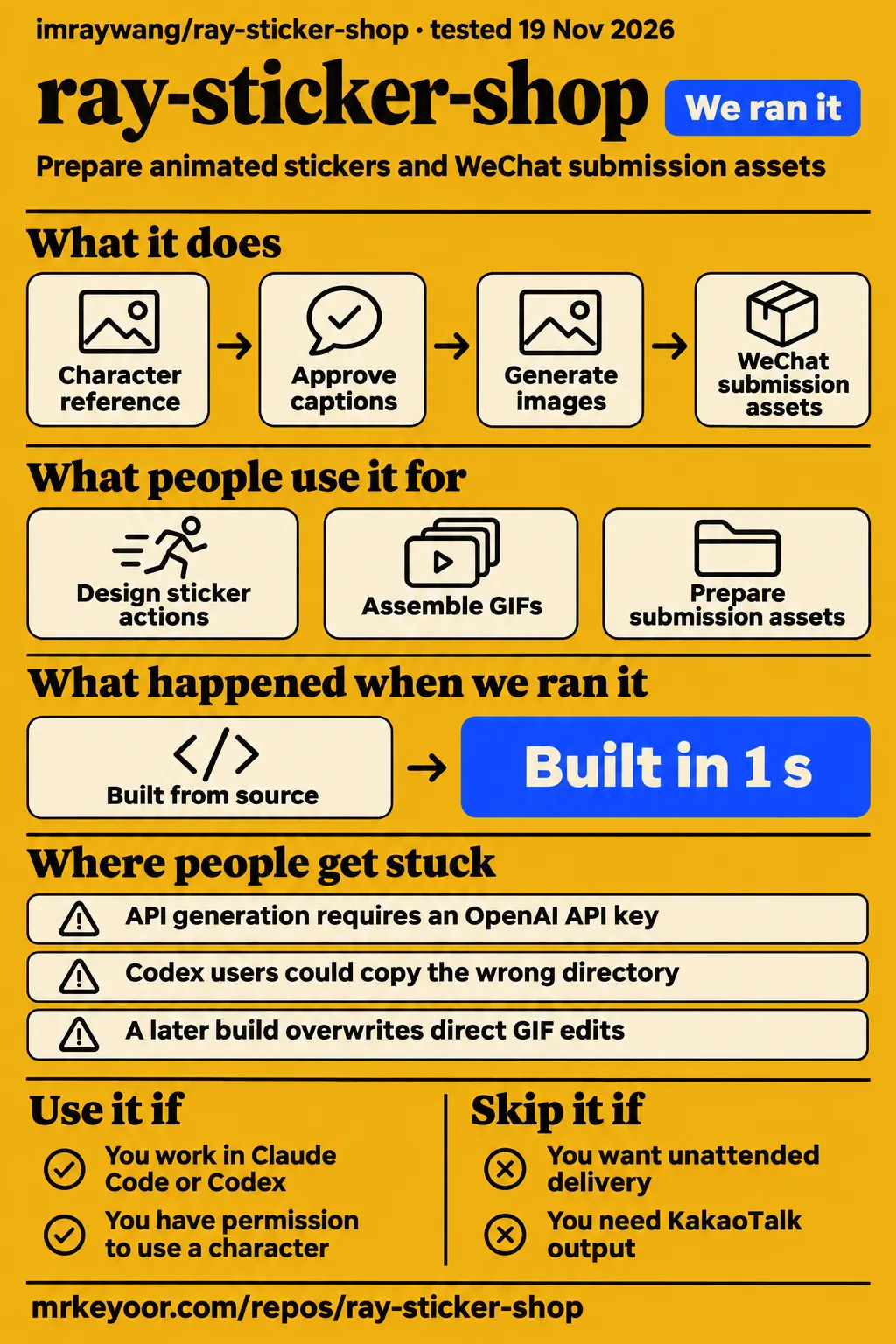
ray-sticker-shop is aimed at Claude Code or Codex users preparing animated stickers and WeChat submission assets. Use it if you have a character reference, permission to use it and time to inspect the results. Choose another workflow if you want unattended delivery or a KakaoTalk-specific package. The README describes GIFs, companion images, checks and listing copy, which makes packaging the clearest reason to consider this project.
An agent skill is a folder of instructions and supporting scripts that a coding assistant follows. Here, you bring the character, approve the captions and review the animations. The distinction is how much work happens after an image looks acceptable: the README includes covers, icons, banners, appreciation images and customer delivery materials. That makes this a review of a WeChat preparation workflow, with the setup results and the documented production steps considered separately.
What you can do with ray-sticker-shop
The README targets 240×240 GIFs under 500KB, plus covers, icons, banners, appreciation images and listing copy. Its output list brings those tasks into the same workflow. If you already have a few animations, the relevant question is how to turn them into the collection of files and text needed for submission and delivery. The project treats those companion materials as part of the job rather than leaving them as an unrelated finishing task.
The instructions begin with a character reference and ask for approval before continuing. They then ask the user to approve eight captions before generation. These are useful decision points: a character reference determines the appearance the workflow will try to carry through the set, while captions determine what each sticker communicates. SKILL.md also calls for different actions and poses, rather than changing only the text across otherwise identical images.
The documented delivery folder separates submission files, previews, listing copy, a customer ZIP and the call-cost log. That organization suits an original mascot or a pet character because the editable project, customer review and platform submission have different roles. The delivery instructions name submit/, 预览.html, 预览.png, 上架文案.md, 交付给客户.zip and costs.jsonl. Keeping those roles clear helps a creator decide what a customer receives and what the submitter still needs to do.
What people use ray-sticker-shop for
PamelaAI·H reports using Codex for action design, GIF assembly and submission assets while reviewing the results and requesting changes. In her November 13 post, she describes giving reference articles to Codex and judging the resulting work. She also suggests using a personal avatar to design a character when someone has neither a pet nor an existing character. The reported workflow keeps creative approval with the person requesting the stickers.
RLJC0212's secondary account names ray-sticker-shop among the tools associated with that workflow and reports 16 workplace-themed animations submitted to WeChat, awaiting review. The account describes an original animal character and workplace captions, connecting the tool to a specific proposed sticker set. PamelaAI·H's own post establishes her account of using Codex; the repository connection and the 16-animation submission detail come from RLJC0212's retelling.
The practical use case is a division of labor: Codex handles action design and assembly, while the creator judges expressions, wording and revisions. That division also appears in the repository's preview instructions, which ask the user to look for spelling mistakes, distorted characters, jumping loops and white edges against a dark background. The reported workflow therefore matches a project that expects human inspection between generation and delivery.
What happened when we ran it
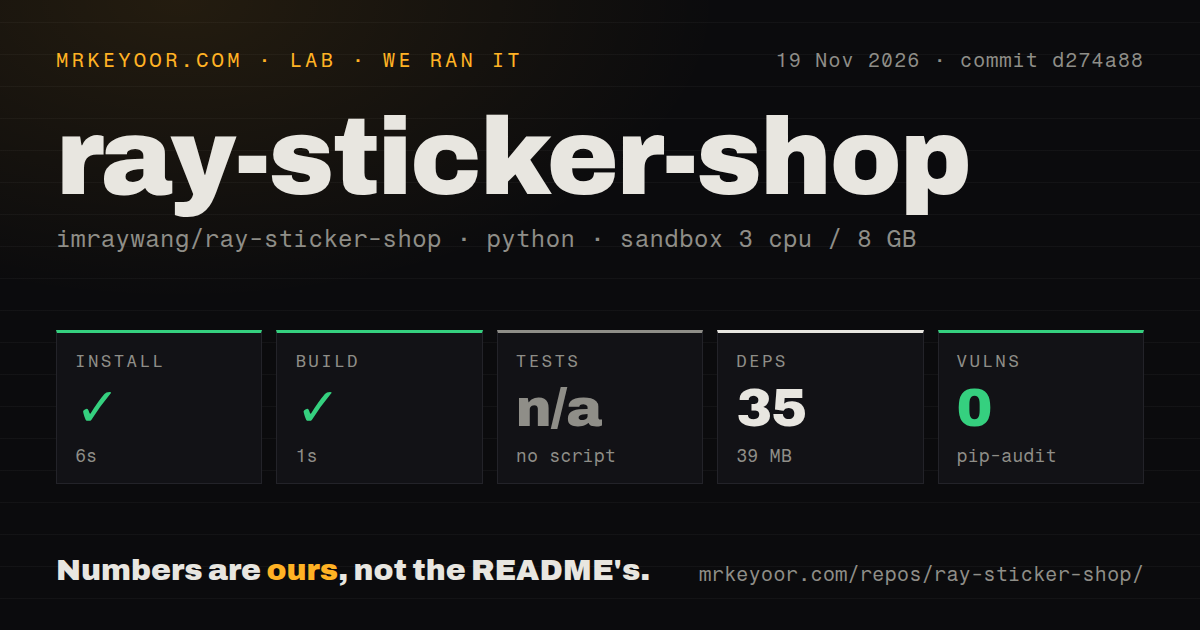
Our November 19, 2026 run at commit d274a88 installed successfully in 6 seconds and built successfully in 1 second. We measured those repository checks in a sandbox configured with 3 CPUs and 8 GB RAM, using the image label ghcr.io/astral-sh/uv:python3.12-bookworm. The scan recorded 9 files and approximately 532 source lines. These timings describe install and build operations; the functional attempt has its own separate history below.
| Repository check | Our recorded result |
|---|---|
| Install | Succeeded in 6 seconds |
| Dependencies | 35 recorded; 39 MB on disk |
| Build | Succeeded in 1 second |
| Tests | Skipped because there was no tests script or target |
| pip-audit | 0 known vulnerabilities |
| Repository scan | 9 files, approximately 532 source lines |
| Automation and packaging signals | 0 CI workflow files, no Dockerfile, no tests directory |
The November 20 attempt failed at its safety step because none of compose.yaml, compose.yml, docker-compose.yaml or docker-compose.yml existed. The failed prerequisite record contains the diagnostic unsafe repo and the rule a compose file is required. The README describes a Python agent skill and names Python 3.9+ and Pillow as requirements; the Compose requirement belongs to the lab harness used for that attempt.
The separate November 20 summary says the repository was deployed with its own Docker Compose, with every port bound to 127.0.0.1. That deployment summary conflicts with the prerequisite record stating that no Compose file existed. Both records belong in the run history rather than silently treating the summary as a completed sticker task. The final teardown record says teardown: ok.
Where people get stuck: agent paths, missing keys and repeat edits
The README's installation example uses ~/.claude/skills/ray-sticker-shop while naming both Claude Code and Codex. The example path is therefore specific to Claude. In the X discussion, ganfanren_ai tells Codex users to use their own assistant's skills directory. For a first-time user, selecting the assistant and its installation directory comes before asking it to create a sticker set.
| Obstacle | Documented route or reported status | What that means for you |
|---|---|---|
| No OpenAI API key | Generate prompts, make images manually in ChatGPT or Codex, then save them in the expected folders | Assembly continues after you place the image files |
| Wrong agent directory | Use the skills directory for the assistant you selected | The README example uses a Claude path |
| A few unsatisfactory images | Use gen with --redo and the selected sticker numbers | Select individual images for regeneration |
| A loop jumps between frames | Set keep_frames in pack.json and rebuild | Store the edit in the project configuration |
| You need KakaoTalk output | PJG0012e says its specifications need separate adjustment | The documented workflow targets WeChat |
The manual-image instructions name sheets/01.png and assets_raw/cover.png as example destinations. The assistant first produces prompts, the user makes images interactively, and the files return to the project for assembly. This route changes the handoff between generation and packaging: rather than receiving images through the API path, the project receives files placed in the expected locations.
For animation edits, SKILL.md directs users toward regeneration or the keep_frames field in pack.json. It warns that a later build overwrites direct edits to a generated GIF. The instructions describe rebuilding after the configuration change, so retaining the editable project matters when revisions are part of a customer order. PJG0012e's Korean-language post identifies the separate KakaoTalk specification work.
Costs grow when you regenerate images
The README estimates $0.70 for eight stickers and five companion assets, with regeneration charged separately. It says actual call costs are recorded in costs.jsonl. That estimate and logging arrangement gives a creator two different numbers to work with: an estimate before generation and the recorded charges afterward. A custom-order price also has to account for the person's work reviewing characters, captions and animations.
SKILL.md estimates about $0.65 for the same default eight stickers and five companion assets. The two files therefore give slightly different author estimates. Before generation, the instructions show a dry-run quote and require user agreement. They also describe selective regeneration, which lets the user request replacement images rather than automatically discarding the whole set after finding a problem with one sticker.
For paid custom work, the character and caption approvals define what the user has agreed to before image calls begin. A change to the reference character affects a different part of the workflow from replacing one caption or regenerating one unsatisfactory image. The documented sequence gives those decisions an order: approve the reference, approve the captions, review the quote, generate, then inspect the assembled results. The cost log records image calls rather than the creator's time.
Rights checks come before generation
SKILL.md requires the agent to establish permission to use the reference before continuing. Its examples include the user's original character, their own pet and an adult's likeness used with consent and turned into a clear cartoon. The instructions exclude celebrities, entertainment characters, online derivative characters and other people's artwork. They also distinguish private family use of a child's photograph from submission to the platform.
Registration and submission remain the user's own real-name tasks under the skill instructions. The delivery guidance tells custom-order creators to remind customers that rights and identity responsibilities belong to the submitter. A customer ZIP and a platform submission therefore represent different stages. For an order, the intended use of the files should be clear before treating delivery as the end of the job.
The API route uses OPENAI_API_KEY and optionally OPENAI_BASE_URL for an intermediary endpoint. Those environment variables are named in SKILL.md, alongside the manual-image route. The choice determines where generation requests go, while the rights check determines whether the reference belongs in the workflow at all. The repository's dependency audit result is a separate finding from either of those decisions.
Chinese instructions and named delivery files
The README and SKILL.md extracts are Chinese, including the workflow instructions and several delivery filenames. SKILL.md names 上架文案.md for listing copy, 预览.html and 预览.png for review, and 交付给客户.zip for customer delivery. These file roles help an English-speaking reader understand the expected outputs without inferring a translated interface or a separate documentation set.
The workflow also specifies short Chinese labels: SKILL.md gives a four-character limit for meaning words and an eight-character limit for names. Its examples and delivery text are aimed at a WeChat submission. An English-speaking creator should distinguish understanding those instructions from choosing the actual captions and listing text that belong in the finished set. Character approval, caption approval and visual inspection each involve reviewing content, rather than merely running the assembly commands.
ray-sticker-shop vs gif-factory, snow-meme and sprite-gen
xueyu1125's roundup describes gif-factory with ten styles and 75 examples, snow-meme with a three-sticker trial, and sprite-gen with transparent action loops. The roundup presents these alongside ray-sticker-shop and AYi's tutorial. Its descriptions support a comparison of intended tasks: style exploration, staged sticker creation, action loops, learning the assembly process, or gathering WeChat submission materials.
| Option | What xueyu1125 describes | Consider it when |
|---|---|---|
| ray-sticker-shop | GIF compression plus covers, icons, banners and appreciation images | You want WeChat submission materials gathered together |
| AYi's GIF tutorial | Six prompts and a frame-cutting script | You want to follow the character-to-GIF process yourself |
| gif-factory | Ten styles and 75 examples | You want style references before choosing a direction |
| snow-meme | Sixteen animated Chinese stickers, starting with a three-sticker trial | You want to review a small sample before completing a set |
| sprite-gen | Transparent action loops for game characters and action stickers | The animation loop is your main deliverable |
For ray-sticker-shop, the README's companion-asset list supports the packaging distinction directly. The alternative descriptions come from the roundup author, so the choice here follows the stated job rather than an image-quality ranking. A creator who wants to learn frame assembly has a different reason to choose AYi's tutorial from someone who already has a character and needs covers, icons, banners and listing copy.
Questions people ask
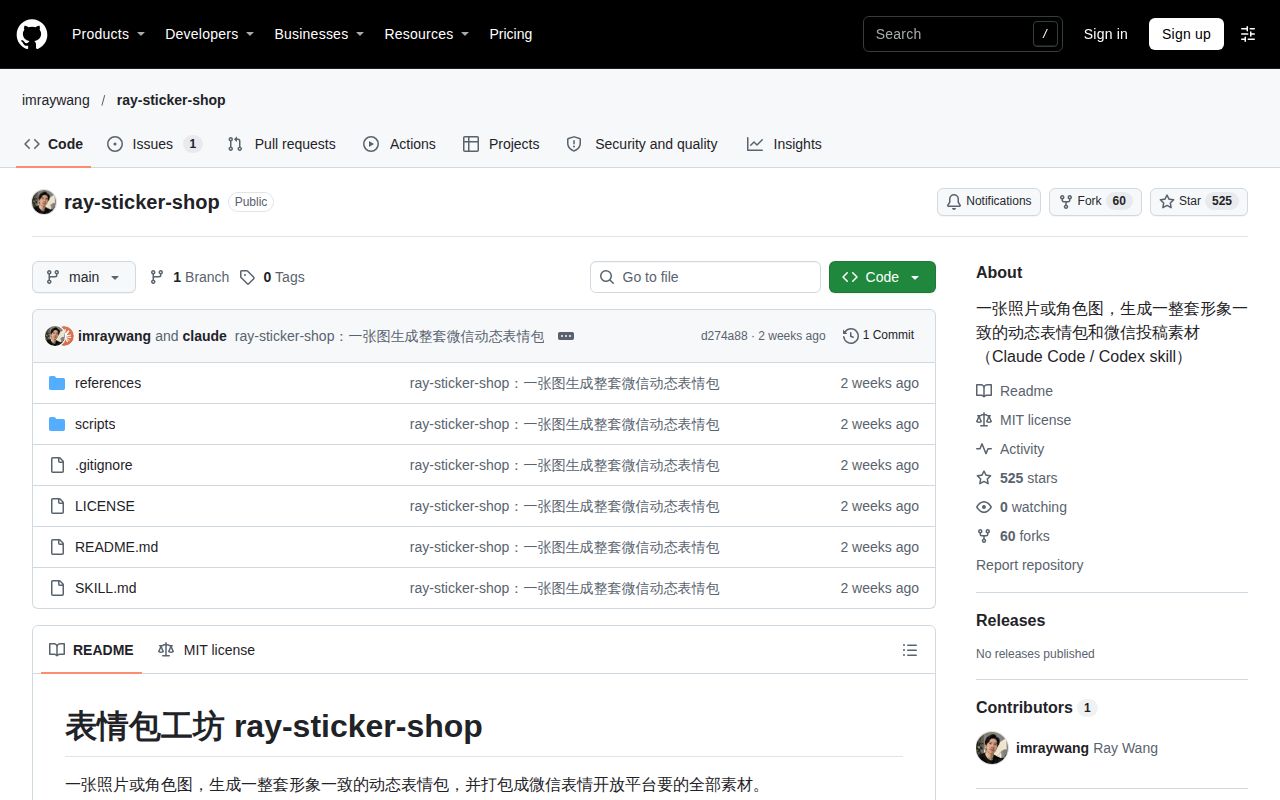
SKILL.md names GPT Image 2.6, and GitHub issue #1 asks about the latest gpt2.6 model and faster direct animation output. The issue is open with 0 comments. Other questions in the X discussion concern who pays for custom stickers, what separates a few GIFs from a submission package, and how the free skill relates to image-generation charges.
Does ray-sticker-shop support the latest gpt2.6 image model?
SKILL.md names GPT Image 2.6 in its description, while issue #1 asks whether the latest gpt2.6 model is supported. The same question asks whether direct animation output would be faster. The thread has 0 comments. The instruction file's named model and the issue's request are separate facts: one describes the author's intended workflow, and the other records a user's request for clarification.
Who pays for custom WeChat sticker packs?
RLJC0212 describes custom pet-sticker customers and users sending appreciation payments as two possible payers. The secondary account proposes that earning model while discussing PamelaAI·H's reported workflow. It connects commissions to people wanting their pets made into stickers and appreciation payments to people using the set in conversation. Those are the proposed payment routes, rather than charges imposed by ray-sticker-shop itself.
What remains to be done after making a few animated GIFs before they become a complete WeChat sticker pack?
The README lists companion images, file checks, listing copy and a customer delivery package alongside the GIFs. SKILL.md adds visual inspection and the user's own registration and submission. The assembly instructions require clearing check failures, then opening the preview to inspect captions, character shape, loops and edges. Making the animations is therefore one stage in the documented sequence leading to submission materials.
Is ray-sticker-shop free, and what does image generation cost?
The code is MIT licensed, and the README estimates $0.70 for eight stickers plus five companion assets, excluding regeneration. Its cost section names costs.jsonl for actual charges. The manual route lets users obtain prompts and make images in ChatGPT before returning them for assembly. That changes how images enter the workflow; the API route separately uses the configured image-generation credentials.
What we have not tested yet
The November 19 checks measured setup, and the November 20 attempt failed before a sticker task. There is no completed functional result measuring character consistency, animation quality, generation speed, actual package cost or retry count. The conflicting Compose records do not resolve deployment, and the unsafe repo diagnostic does not establish a security defect. The configured image label also does not establish actual Python or operating-system versions.
English documentation coverage and English-output usability were not assessed. The README and SKILL.md extracts establish their Chinese text, but the file-count scan does not establish whether another README exists. The marketplace extract establishes activity controls rather than an English project description. There are also no dated YouTube or Bilibili search records supporting a finding about walkthrough coverage. No video-search inspection is claimed in this review.
Direct animation support and a speed advantage remain unanswered in issue #1. The alternatives table reflects a roundup rather than comparative execution. KakaoTalk export, privacy, customer delivery and the complete accuracy of the documented commands also lack functional evaluation here. The commands and configuration fields discussed above describe the instructions; they are not newly executed examples, and no product rating has been inferred from them.
RLJC0212 explicitly says the secondary account was not independently checked and that the creator had shared no income figures. The Collab.Market page shows no posts and says Ray has not joined; that describes one marketplace rather than total adoption. There is no independently checked approval, paying-customer or earnings result here. The README leaves approval to WeChat and guarantees neither approval nor income.