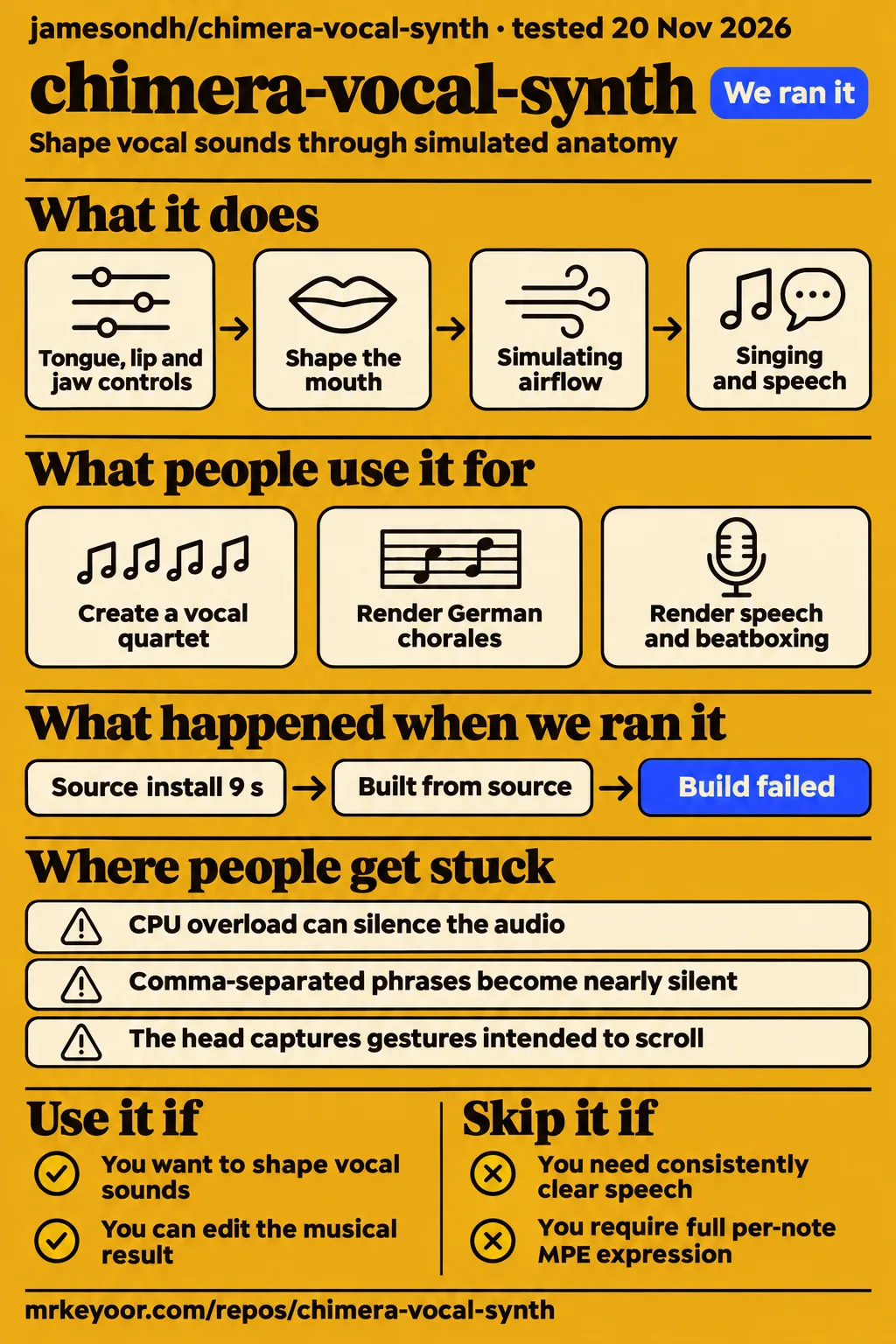
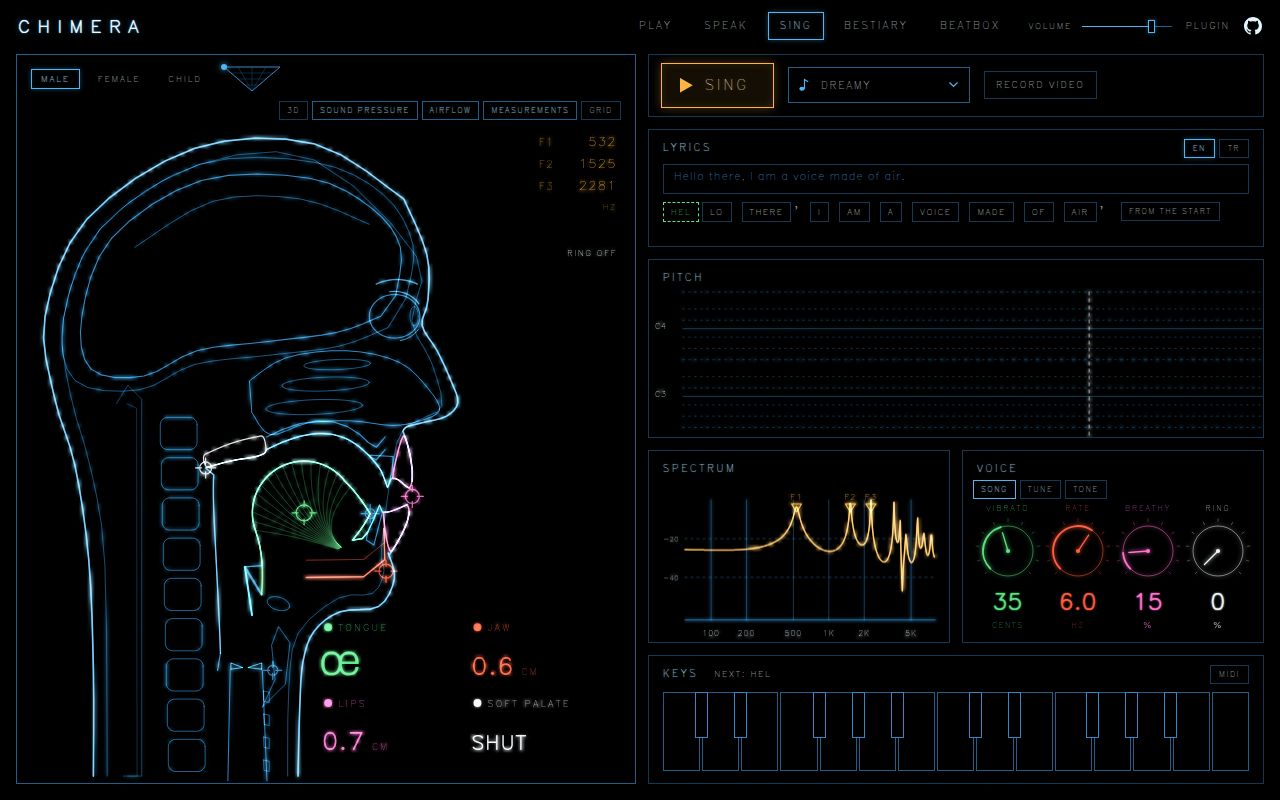
Chimera Vocal Synth suits musicians who want to shape a voice by moving its simulated mouth. Our November 20 run installed its dependencies in 9 seconds, then both build and test commands stopped at a missing WebAssembly standard library. The MIT-licensed project's README describes browser playing, offline rendering and early plugins. Those routes serve different working habits: playing an articulator live, rendering a planned phrase or bringing the instrument into a digital audio workstation.
What people use chimera-vocal-synth for
Users have reported quartets, German chorales and a hardware port, giving Chimera concrete uses beyond a general promise of synthesized speech.
| Person or project | What they made | What you can learn from it |
|---|---|---|
| X user klausbrave | A Mr. Sandman quartet with synthesized singing voices | The post describes a multi-part musical performance. |
| Hacker News user muglug | A performance based on a PDF arrangement read by Claude | They spent several hours adjusting the result to match the arrangement. |
| GitHub user skydam | Four-part Bach chorales in German | Explicit IPA syllables and a small local patch produced the chorales without changing the engine. |
| GitHub user shan-sherif | Standalone firmware for the M-VAVE FM-1 keyboard | They reported syllable-per-key singing and gestures matching Chimera to rounding, then shared a public project and emulator. |
| lowmagic/chimera-tts | An agent speech command and browser voice-chat interface | The wrapper adds timing, pitch and text handling around an unpatched Chimera engine. |
The creator of CHIMERA: A Voice You Can See reports using Chimera for every voice and instrument. Their workflow saves parts separately and mixes them, adding telemetry so the head can replay the articulation. That gives an arranger a practical division of work: create each sound, assemble the parts and then produce the visualization. It also offers a useful model for interpreting a multi-voice video alongside the single-voice behavior described in issue #25.
For stranger sounds, Hacker News user EA-3167 reported a Khoomei overtone and a decent Sygyt after changing anatomy and false vocal folds, while failing to find the Kargyraa range. The German chorale project took a different route through phonetic control: skydam used eSpeak NG for pronunciation, then divided words according to the score's syllables. They also reported a pronunciation error in “höchster,” which came out with a k.
What happened when we ran it
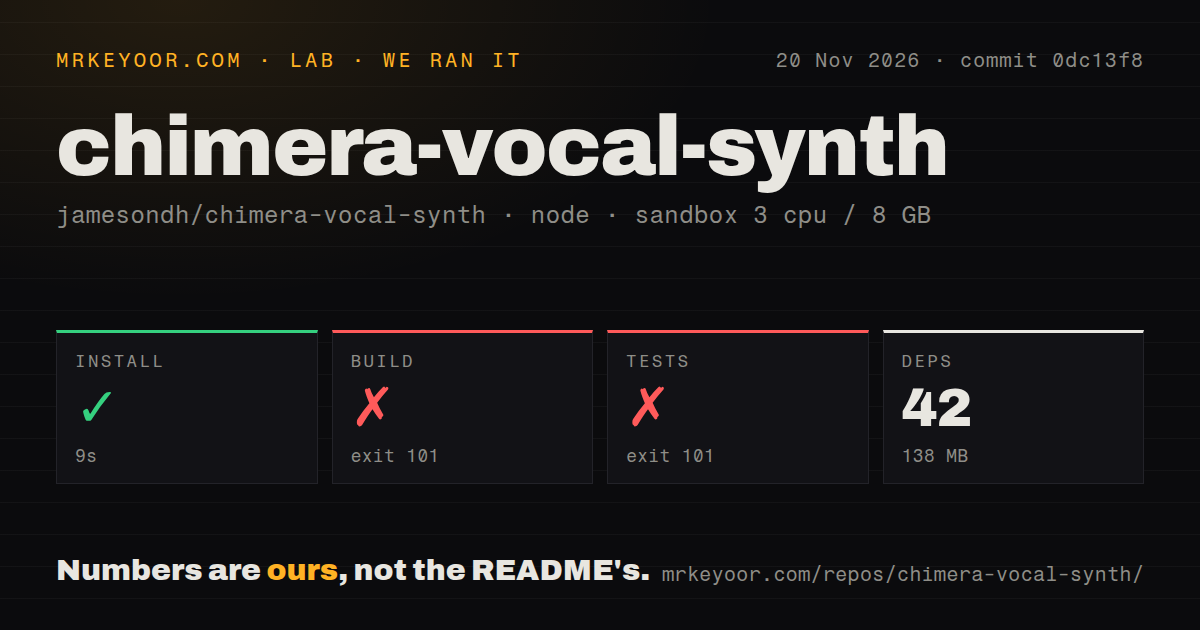
Our November 20 sandbox run at commit 0dc13f8 installed dependencies in 9 seconds; the build failed in 3 seconds and the test command failed in 2 seconds, both with exit 101.
| Recorded step | Result | Consequence |
|---|---|---|
| Dependency installation | Succeeded in 9 seconds; 42 dependencies recorded, 138 MB on disk | Package installation completed. |
| Build | Failed, exit 101, in 3 seconds | Rust could not find the standard library for the WebAssembly target. |
| Tests | Failed, exit 101, in 2 seconds | The command stopped in the WebAssembly build stage; there is no passing test count. |
| Repository scan | 315 files, approximately 46,884 source lines, 11.2 MB checked out | The scan found a tests directory, zero CI workflow files and no Dockerfile. |
Rust printed error[E0463]: can't find crate for std, followed by a note that the wasm32-unknown-unknown target may not be installed. It suggested rustup target add wasm32-unknown-unknown. Both command tails end with the wasm script exiting 101, followed by the parent build or test script exiting 101. The recorded build and test logs therefore locate the failure in compilation of the WebAssembly prerequisite, before an audio playback result.
The sandbox configuration was 3 CPUs, 8 GB RAM and image label lab-node:22. The README requires Rust with the WebAssembly target and Bun, matching the prerequisite named in the failure. Its development command builds the WebAssembly code and starts Vite on 127.0.0.1:5317; its test command includes a WebAssembly build before the Rust workspace and Bun tests. This explains why the same missing library stopped both commands.
The separate playback attempt recorded a failed safety step because no Compose file existed. Its run note nevertheless says it deployed with its own Docker Compose on November 20, with every port bound to 127.0.0.1, and its teardown reports success. These are conflicting records of that attempt. Compose was the harness requirement; the upstream browser instructions use Bun and Rust.
Where people get stuck: silence has several causes
Issue #33 records repaired sample-rate bugs, while #86 records CPU overload and a fallback that helped one laptop user in Chrome.
| Symptom and attribution | Reported response | Status in the thread |
|---|---|---|
| Issue #33: audio crackles, cuts out or stays silent | The maintainer's agent links low-rate fixes to #61 and #70; the voice runs at 48 kHz and the browser converts to the output rate. Its-Kath reports clean playback afterward. | Closed after the confirmation. |
| Issue #86: the interface works without sound | #121 adds a lighter 32 kHz mode and an overload warning. unreal79 reports sound in Chrome on an i5-8300H, with Opera still expensive. | Open; a workaround helped that laptop. |
| Issue #118: rapid comma-separated sung phrases nearly disappear | Removing commas or putting rests between phrases avoided the failure in the reproduction. | Open; the thread contains a workaround. |
| Issue #50: an extreme mouth pose screeches with the voice off | The maintainer's agent reports #77 limits the minimum airway length and makes that pose silent with the voice disabled. | Closed with a reported fix. |
In issue #86, the maintainer's agent says the lighter 32 kHz mode uses about 40% less CPU and sounds a little duller. That report describes a different problem from #33's 192 kHz output-device case, where following the device rate overloaded the audio thread. The reported fix for #33 keeps the simulation at 48 kHz and lets the browser convert the result. The symptoms overlap, but the threads describe different responses.
Punctuation is a separate musical problem. The author of #118 reproduced near-silent notes after the first comma-separated sixteenth-note phrase, measuring later phrases about 18 dB quieter. The reproduction compares eight notes, with the comma-separated version falling sharply after the first note while the unpunctuated version stays much closer in level. Longer notes behaved differently, and rests separated the phrases successfully. Phrase boundaries are therefore a concrete place to inspect when a fast melody fades after its first syllable.
AI Frontier Post reports a packaging trap in its native CLI run: the binary read its pronunciation dictionary from the checkout's original absolute build path. Keeping the checkout in place was its workaround; changing the shell's working directory was fine. Its custom-melody instructions also require lyric syllables to match sounding notes exactly, with an error naming both counts when they differ. Those are two separate preparation tasks: preserving the dictionary path and matching the musical input.
One live voice changes how you arrange a song
Chimera plays one note at a time, according to the maintainer's agent in issue #25.
MPE, or MIDI Polyphonic Expression, lets a controller send expression separately for different notes. The response to #25 puts full MPE outside the current scope and discusses pitch bend, pressure and controller messages for the single voice as the nearest approach. For harmony, the video's separately saved and mixed parts offer an arrangement workflow, while skydam's four-part chorales show another reported use of rendered vocal parts.
The performer in issue #114 requests a configurable pitch-bend range of plus or minus 24 semitones. They describe using a Slidesounder controller with Pink Trombone inside Cardinal. Comments suggest MIDI RPN 0, a message for setting bend range, and an interface control. The recorded thread is open with three comments. For a performer choosing between instruments, the concrete comparison is the existing Cardinal setup and the requested Chimera behavior.
Plugins exist, with different routes on each platform
The November 22 README describes early CLAP, VST3 and AU plugins for macOS, CLAP and VST3 for Linux, and a Windows source-build route.
The README's platform instructions distinguish distribution from plugin format. A digital audio workstation hosts the instrument; CLAP, VST3 and AU are formats it may accept. macOS and Windows use a webview for the interface, while Linux opens the interface in a browser. The Mac release is described as signed and notarized, and Linux release downloads target x86_64. Windows build instructions call for Git Bash and Rust's MSVC toolchain.
The README says the Windows plugin build is not released yet. Its plugin documentation also says lyrics advance one syllable per MIDI note in Sing mode, voice parameters can be automated, and state saves with the host project. Earlier issue #37 described plugin work as in progress and closed the request for a separate desktop app. The November 22 README gives the platform-specific installation routes and labels the plugins early.
Language routing does not settle pronunciation quality
The language documentation describes English, Korean, Russian, Mandarin and Turkish front ends feeding the same sound engine.
A front end turns written words into sounds. The language guide routes by script, with an explicit English/Turkish selection because both use Latin letters. Mandarin can use Han characters or toned pinyin, its Latin transcription. IPA, the International Phonetic Alphabet, provides direct control over individual sounds. Skydam's German chorales used explicit phonetic syllables, giving an arranger another route when automatic pronunciation needs adjustment.
In the Mandarin evaluation, the native listener preferred a version that the recognizer scored 12 points worse. The guide contrasts that preference with a version the listener called “a foreigner speaking Chinese.” This is a concrete disagreement between a speech-recognition score and a listener's judgment of singing. For an arranger, both measurements describe something useful, but the recognizer's ranking alone would have selected the version that listener liked less.
The downstream chimera-tts author calls its output a characterful voice rather than a clear one. The README says a speech recognizer makes out about half its words and explains that captions help people follow along. That warning belongs in a narration decision: an assistant reading instructions and a musician exploring vocal timbre need different outcomes from the same underlying synthesis engine.
Local audio and remote chat have different requirements
The browser audio engine needs localhost or HTTPS, according to the README's AudioWorklet instructions.
AudioWorklet is the browser facility running the sound engine. The upstream development instructions require Bun and Rust and start a local server. The chimera-tts browser demo separately documents a local mode without API keys or network calls and live chat against an OpenAI-compatible endpoint. Local voice generation and a conversation with a remote model are distinct modes with different network requirements.
The wrapper adds pitch and rhythm learned from recordings of people talking, pronunciation handling and Markdown normalization. Its author says Chimera is pinned as a submodule and used without patches. These details help distinguish the upstream instrument from the downstream speech interface: the wrapper supplies text preparation and conversation features around the engine, while the upstream README describes playing, speaking, singing and rendering through its own surfaces.
Chimera Vocal Synth vs Pink Trombone, ElevenLabs and score-based singers
Chimera's README describes direct vocal-tract control; the alternatives discussed around it target controller performance, narration or finished vocal production.
| Alternative | What the comparison supports | When to consider it |
|---|---|---|
| Pink Trombone inside Cardinal | The performer in #114 reports using Pink Trombone inside Cardinal with Slidesounder. | Compare that existing controller workflow with the pitch-bend behavior requested for Chimera. |
| ElevenLabs | Kompozy recommends neural TTS for clean narration and Chimera for experimentation. | Consider the narration category when spoken delivery is the job. |
| Synthesizer V or VOCALOID | Kompozy lists these tools for lead and backing vocals from scores and lyrics. | Compare their score-and-lyric workflow when arranging a finished vocal part. |
| Suno | Kompozy distinguishes finished-song generation from playing Chimera as an instrument. | Consider song generation when the desired output is a complete generated track. |
The Pink Trombone comparison comes from a performer describing their own setup. The narration and score-production distinctions come from Kompozy, whose publisher discloses a commercial interest in content-generation and publishing software. Those attributions give the table its proper use: it separates jobs readers might want done and identifies who made each comparison. Chimera's own documented controls remain the reason to choose it for articulator-driven experimentation.
What the other reviews get wrong
GitHub.Locker's generated Q&A says there are no offline-render commands, although the README reproduced on the same page lists them.
The README lists rendering, diagnostics, comparisons and spectrogram commands. Its chimera-cli rendering overview names speech, text, song, notes, beatbox, creature and vowels. Those are documented command categories rather than a complete input example for each mode. The November 22 README also documents Record video, which sings the selected tune again into a 9:16 clip, alongside the native offline-rendering route.
GitTrend describes a stable internet connection as necessary for web operation, while the upstream README documents local serving and chimera-tts documents local synthesis without network calls. GitTrend also links WebAssembly to broad browser compatibility. The more specific report in issue #86 describes Chrome producing sound while Opera still used substantial CPU. These records support a local synthesis workflow and a browser-specific troubleshooting account.
The llms.blog article lists an IPA chart mode among features not yet built. The later README describes a consonant chart and notices for unsupported IPA symbols. GitTrend's FAQ also says its guide compares Chimera with transformers and Whisper, but its recorded text lists them as related projects. In llms.blog's account, Whisper is a speech-recognition judge, which is a different role from a vocal instrument.
Questions people ask
Chimera offers direct tongue, lip and jaw controls, and named users report musical projects, making experimental vocal control its clearest reason to try it.
Is Chimera Vocal Synth worth trying?
Yes, if shaping simulated anatomy is part of the appeal: the README describes live mouth controls, and klausbrave reports making a quartet. Other reported projects include German chorales and a hardware port. These examples give a first-time user concrete starting points: play the mouth controls, plan phonetic syllables for a score or explore how the engine can fit another interface.
Why does Chimera show a working interface but produce no sound?
CPU overload can silence the audio while the interface works, according to issue #86. The thread reports a lighter 32 kHz mode and an overload warning, with sound recovered on one i5-8300H laptop in Chrome. Older sample-rate failures appear separately in #33, where the reported fix runs the voice at 48 kHz and leaves output-rate conversion to the browser.
Why does audio crackle or cut out shortly after starting?
Issue #33 links crackling and cutouts to sample-rate bugs with reported fixes. Its-Kath confirmed clean playback with the newer release, after which the maintainer's agent closed the issue. The thread includes both low-rate failures and a 192 kHz output-device case, so its useful contribution is the recorded diagnosis and fix history rather than a single explanation for every audio symptom.
Does Chimera work on phones and iOS?
Hacker News user martin_balsam reports that Chimera worked on iOS. In the same discussion, another phone user reports noise and engine load beyond 100%, while rc1 describes the head capturing touch gestures intended to scroll the page. These are separate reports about audio operation and touch interaction, both relevant when choosing a phone as the main way to play the instrument.
Can I use a MIDI keyboard directly in the browser?
The November 22 README lists Web MIDI as an input, alongside a computer keyboard, vowel pad and draggable mouth controls. A request from net147 also asks for browser MIDI. The README is the direct documentation for the available input route; the request records a user's desired workflow rather than replacing the current input list.
Do I need a MIDI keyboard to use Chimera?
No. The README lists a computer keyboard, vowel pad and draggable tongue, lip and jaw controls. Those inputs give you ways to explore the instrument before connecting external hardware. The same README describes speech text, sung lyrics and beatbox pads, so the choice of input depends on whether you want to manipulate a sustained sound, prepare words or trigger articulatory percussion.
Does Chimera support MPE keyboards?
Full MPE is outside the current scope in the maintainer's response to #25, because the instrument has one voice and plays one note at a time. The response discusses pitch bend, pressure and a few controller messages for that single voice as the nearest approach. That distinction matters for controllers whose main benefit is independent expression across several simultaneous notes.
Can I configure continuous MIDI pitch bend to ±24 semitones?
Issue #114 requests that configurable range and is recorded as open. Its author performs with Slidesounder and describes an existing Pink Trombone setup inside Cardinal. Comments suggest MIDI RPN 0 and an interface range control. The thread documents the requested behavior and implementation suggestions, making it a useful reference for performers whose arrangements depend on a wide continuous bend.
Can I use Chimera as a VST or CLAP instrument in my DAW?
Yes, the README documents early plugins with platform-specific distribution. macOS includes CLAP, VST3 and AU; Linux includes CLAP and VST3 with a browser interface. Windows has a source-build route pending a release. The README also describes lyrics advancing per MIDI note, voice-parameter automation and state saving with the host project, which are the documented integration features to compare with your host's requirements.
Can Chimera export a finished audio file?
Native commands export WAV files in CHIMERA: A Voice You Can See, and the README lists offline rendering. The video's production workflow saves and mixes separate parts, so exporting a vocal phrase is one step in making a complete arrangement. AI Frontier Post also reports native CLI rendering of speech, demo songs, a custom melody and beatboxing.
Can I record live MIDI into a video clip without playing a built-in tune?
PR #142 is titled “Sing: record live MIDI into the built-in MP4 clip without playing a tune”. The README describes Record video as singing the selected tune again into a portrait clip. These records describe two distinct recording workflows: the documented selected-tune recording and the live-MIDI behavior named in the pull request. The title identifies the proposed change precisely.
How was the four-voice Mr. Sandman performance made?
klausbrave says every voice was generated as real-time physical singing synthesis. A Hacker News reader also asks how the four-voice version was made. The separate CHIMERA: A Voice You Can See video describes saving and mixing parts, giving an example of a multi-part production workflow without assigning that recipe to klausbrave's performance. Each creator's account stays attached to their own work.
What we have not tested yet
Our sandbox stopped before usable synthesis, so this review has no first-hand listening judgment of speech clarity, vocal naturalness or musical responsiveness.
The evaluation excludes plugins in a DAW, sustained CPU use, mobile touch behavior, MIDI controllers, export playback and reproduction of the reported audio fixes, punctuation failure or downstream projects. The separate playback attempt's deployment note conflicts with its failed safety step and supplies no usable listening result; it has no recorded playback screenshots or checked audio tasks. The image label also leaves actual runtime and operating-system versions unknown without raw toolchain logs.
The published reports leave several boundaries unresolved: Chromebook recovery in #86, an upstream resolution to rc1's iOS scrolling complaint, and shipment of the label-readability changes proposed in PR #145 or the live-MIDI recording change in PR #142. The Mr. Sandman post gives no complete assembly recipe. The comparison table contains attributed workflow recommendations, without comparative listening results. Local synthesis documentation also supplies no blanket privacy guarantee for remote chat or every embedding site.
The repository scan describes commit 0dc13f8; the November 22 README and release metadata are separate observations, including the exact release tag plugin-v0.2.0 dated November 20. They supply no verified launch baseline. A useful next lab result would connect the required Rust target to an audible rendered phrase, then play that phrase through a chosen browser or plugin host. Experimental musicians can use the documented controls and reported projects to choose that experiment; dependable narration and full per-note MPE remain reasons to choose another workflow.