What you can do with BitKindle
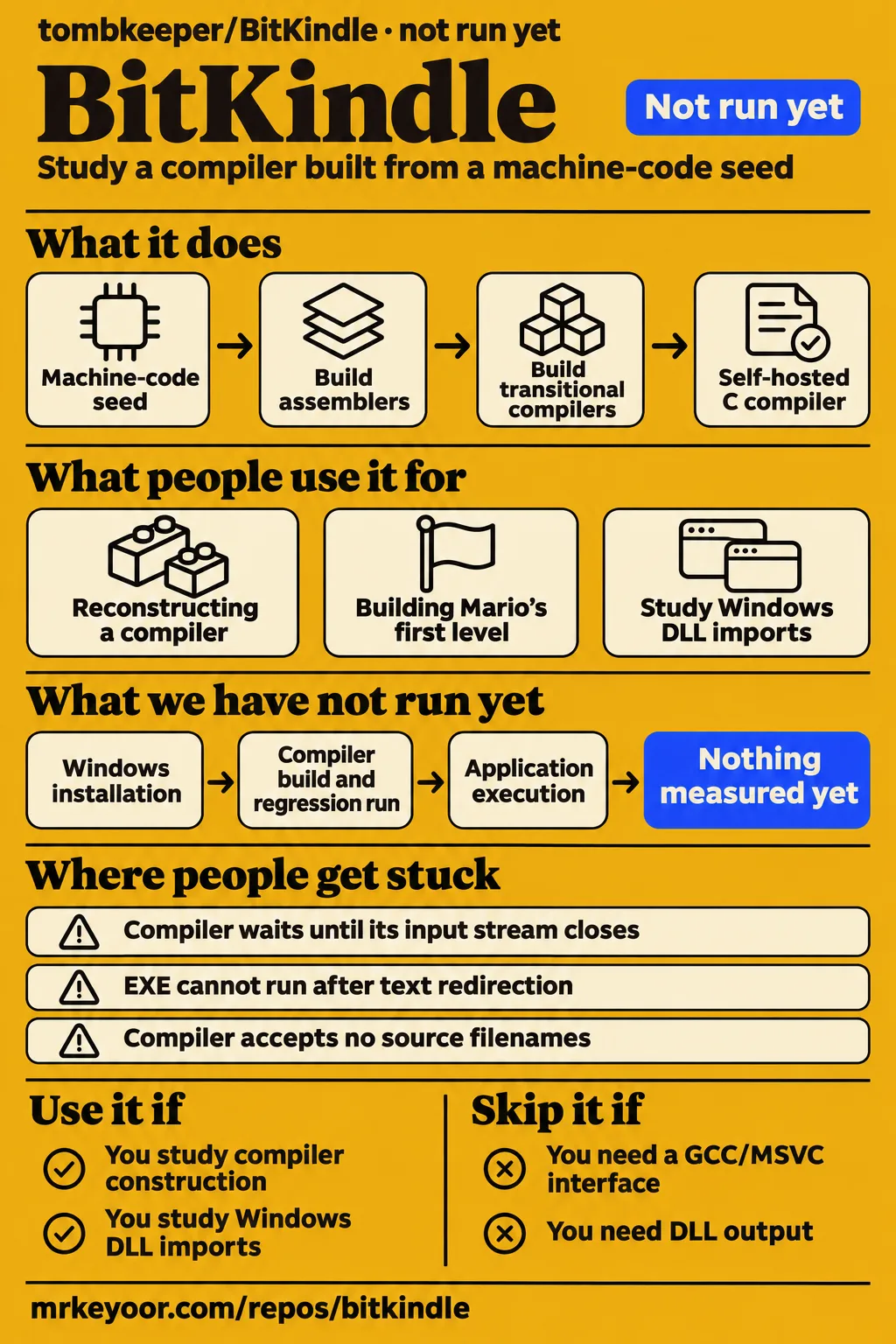
BitKindle documents a Windows x64 C compiler built from a 3,584-byte machine-code seed. Its main attraction for compiler students is the sequence between that seed and a compiler capable of compiling its own source. The repository includes the A0 and A1 assemblers, C0 transitional compiler, C1 compiler written in C, runtime library and PE linker. These components make the construction process the subject of study, with sources for the tools that produce later stages. BitKindle README
The 3,584-byte figure describes the starting seed. PowerShell 5.1 decodes it and coordinates the build. After decoding, previously built custom tools generate the machine-code binaries, objects and executables. The README says building requires no MSVC, GCC, Clang, Windows SDK or external linker and downloads no dependencies. The educational value lies in those dependencies: an assembler produces tools that support progressively more capable compilers, eventually reaching the final C1 compiler and runtime.
For Windows C developers, the application interface supplies a second reason to examine the project. C1 emits a custom object format, and the accompanying linker produces Windows x64 PE executables. The runtime and explicit DLL imports connect compiled C code to application startup and Windows facilities. Those interfaces give the included examples a purpose beyond demonstrating syntax: they show how source, objects, runtime code and imported functions become an application.
What people use BitKindle for
Tombkeeper reports reconstructing a compiler chain through A0, A1 and C0, beginning with an AI-generated 3,584-byte machine-code assembler. The author's account describes successive iterations toward a compiler supporting C89 and parts of C99. That account supplies the project's development story, while the README identifies the assembler, compiler, runtime and linker sources included in the repository. Together, they explain why the project is useful to readers interested in how one tool makes the next tool possible. Tombkeeper's compiler reconstruction account
The README presents Mario's first level as an application built with the toolchain. It describes an actual gameplay recording in which the built-in automated player completes the level, shown at 2× speed. Its example table names side scrolling, keyboard input, collisions, timers and GDI double buffering, with graphics drawn in C. Those features connect the compiler and runtime to a graphical application with input, timing and rendering work. README Mario demonstration
The included hello, command-line argument and minicurl examples provide smaller application exercises. Hello covers the runtime and startup path; the argument example covers argc and argv; minicurl uses system WinHTTP for HTTP and TLS and saves retrieved content to a file. These examples serve different learning tasks. Hello introduces the ordinary application driver, the argument example introduces startup configuration, and minicurl demonstrates a program with Windows DLL imports and networking facilities. README example descriptions
What happened when we ran it
Our run stopped before BitKindle execution after a two-second harness assessment. The November 16, 2026 record identifies commit 4527957 and reports an unsupported C ecosystem with no Dockerfile. Two seconds is the assessment duration, not compiler build time. The recorded sandbox allocation was 3 CPUs and 8 GB RAM, with image n/a. These values describe the harness encounter and its configuration rather than compiler resource consumption.
| Recorded item | Result | What it means for a reader |
|---|---|---|
| Repository execution | NOT RUN | No supported C ecosystem in this harness, and no Dockerfile |
| Checkout | 4527957, November 16, 2026 | The revision associated with the assessment |
| Sandbox allocation | 3 CPUs, 8 GB RAM | Recorded configuration |
| Image | n/a | The record supplies no runtime image |
| Assessment duration | 2 seconds | Time spent on the harness assessment |
The detailed hands-on safety step failed because none of compose.yaml, compose.yml, docker-compose.yaml or docker-compose.yml existed. Its message says "unsafe repo" and immediately names the enforced rule: a Compose file is required. That wording records a harness admission decision, rather than a diagnosis of the C implementation. The teardown record reports "teardown: ok", completing the recorded sequence after the failed admission step. Failed Compose admission step · Teardown result
The accompanying run summary claims deployment through the repository's own Docker Compose on November 16, 2026, with every port bound to 127.0.0.1. That statement conflicts with the detailed missing-Compose failure and the harness's NOT RUN result. We reject the deployment claim. The supported sequence ends at admission failure and cleanup; the retained records contain no compiler session after that point.
Where people get stuck: C1 uses streams
C1 reads source from standard input, writes binary data to standard output and sends diagnostics to standard error. It accepts neither source filenames nor GCC-style -c, -o, -I or -std options. The executable waits until its input stream closes. For a single-source application, compile-program.ps1 configures headers, compiles an object, selects the runtime and invokes the linker. This driver is the usage guide's starting point for ordinary programs. C1 compiler and driver interfaces
The upstream troubleshooting table connects symptoms with specific actions. A waiting compiler needs source input followed by stream closure. Invalid output calls for checking compilation failure and the handling of binary bytes. Header lookup depends on the working directory or configured include directories because the top-level source arrives through stdin. Object and entry-symbol errors concern the files and definitions passed to the linker, so those checks belong to the compilation and linking sequence.
| Symptom documented upstream | Check or action in the usage guide |
|---|---|
| Compiler keeps waiting | Supply source on standard input and close the stream, or use the Compile helper |
| EXE cannot run or object is invalid | Check for text redirection of binary output and compilation failure |
| Header not found | Check C1_INCLUDE and the working directory or explicit header paths |
| cannot read valid object | Supply a complete .c1o file generated by these tools |
| entry symbol has no global definition | Check the symbol spelling and include its defining object |
Windows PowerShell 5.1 text redirection and pipelines must not capture compiler binary output. The guide specifically includes >, Out-File and Set-Content in that warning; its examples use Set-Content for C source text. The supplied raw-byte-stream Compile function handles compilation and reports failure through PowerShell errors. Directly invoked compiler and linker executables return exit codes. After a failed link, the guide says to avoid running an old executable with the same name. Binary streams and failure handling
Existing C projects need the right object and runtime interfaces
BitKindle's application path links custom .c1o program objects with the appropriate runtime to produce Windows x64 PE executables. Direct PE output serves bootstrap stages and self-contained programs. Programs using the full standard library take the object-and-runtime path instead. This distinction explains the separate compiler and linker steps in the usage guide's multiple-source example, which compiles two C files and links their objects with the C89 runtime. Object output and runtime linking
C1_STANDARD selects c89 or c99 for applications, while C1_OUTPUT=object requests custom object output. Leaving C1_OUTPUT unset requests direct PE output. C1_RUNTIME=c89 has a different job: it selects a runtime-build export policy and requires object mode. The usage guide tells application authors to leave that runtime variable unset. These controls distinguish the application's language mode, the compiler's output format and the policy used when building runtime exports.
Windows DLL calls require declarations and explicit imports. The guide pairs a GetCurrentProcessId declaration with a linker import and explains that prototypes, arguments, return values and structure layouts must match the target API. Imports bind symbols; declarations describe their use in C. The runtime entry __c1_start handles startup, and applications import their own Windows APIs in addition to the runtime's imports. The minicurl build script is the guide's referenced example of argument-enabled startup and WINHTTP.dll imports. DLL imports and startup symbols
Windows setup and build modes are explicit
The README requires Windows x64 and Windows PowerShell 5.1, naming Windows 10 x64 as its verified environment. It requests a writable local directory with a short path, the complete source tree and the original src hierarchy. The stated 5 GiB reservation applies to the full test run. English README and usage text accompany Simplified Chinese versions. The usage examples start from the release root after a successful build-all.ps1 run. README setup requirements
The default build produces the compiler, linker and C89/C99 runtimes without running regression tests. The -All mode adds compilation of hello, the argument example, minicurl and Mario, while skipping example execution and regressions. The -Full mode selects stage regressions, a full audit, three supplemental suites, hello and argument examples, and minicurl local HTTP tests. Mario has separate build and test entry points. The README makes -All and -Full mutually exclusive.
For default and -All builds, the README describes RESULT.json values of Status=BUILT and TestsRun=false. A successful -Full run reports Status=PASS and TestsRun=true. Logs and results go under work/release-run/. The build script refuses existing default output directories, so another build requires the documented cleanup path or a fresh source copy. Cleanup removes the listed output directories in full, making retained logs and handwritten files relevant before those directories are cleared. Build modes and result records
Self-compilation compares compiler generations
The documented bootstrap ends with two self-compiled compiler generations whose bytes are compared. All three build modes check self-compilation identity and the compiler baseline. The pipeline places these comparisons after the assemblers, transitional compilers, object support, custom PE linker and final compiler with runtime. That ordering gives the self-compilation result a specific place in the construction process: the finished compiler produces another compiler generation, followed by a further generation for comparison. README bootstrap pipeline
Lettersformachines describes the same sequence in social coverage: assemblers, compilers and a linker, followed by two byte-identical compiler generations and Mario. Github.locker explicitly identifies its material as the project's README. The two records therefore serve different reading purposes. One is a short account of the project's headline results; the other reproduces the project documentation. The README itself provides the build modes, result-file fields and stage descriptions behind those shorter summaries. Lettersformachines coverage · README mirror attribution
BitKindle vs TinyCC and Clang
TinyCC documents direct execution of C source, while Clang compiles C-family languages through LLVM bitcode into object files. BitKindle centers this comparison on a different task: studying a documented seed bootstrap and the interfaces of the resulting Windows toolchain. Each project provides a concrete route for further investigation, depending on whether the reader wants compiler ancestry, direct source execution or LLVM's compiler infrastructure. TinyCC README · LLVM project README
| Project | Documented purpose | When to choose it |
|---|---|---|
| BitKindle | Windows x64 C toolchain built through a documented seed bootstrap | Studying the stages that lead to a self-hosted compiler |
| TinyCC | Direct compilation and execution of C source, including scripting | Exploring direct C execution |
| Clang in LLVM | C-family compilation through LLVM bitcode into object files | Investigating LLVM's compilation toolset for a C-family workflow |
TinyCC's README describes direct source execution and a scripting mode. It also says TCC can compile itself. BitKindle's educational distinction in this comparison is the succession of seed, assemblers and transitional compilers that precedes its final compiler. LLVM's README describes tools, libraries and headers for processing intermediate representations and converting them into object files, with Clang as the frontend for C, C++, Objective-C and Objective-C++. These documented interfaces support task-based choices between the projects.
What the other reviews get wrong
The investment pages concern bitkindle.io and bitkindle.pw, while this review concerns tombkeeper/BitKindle, the Windows C compiler repository. The research synthesis flags inconsistent registration-duration wording on the bitkindle.pw monitoring page: it says two years, while the dates recorded in the synthesis span December 28, 2019 to December 28, 2020. That discrepancy concerns the investment-domain page. Using the full repository name keeps the compiler's sources and build instructions separate from those domain-specific reports. Investment monitor record
FAQ
BitKindle's reconstruction route starts with a machine-code seed running on Windows x64, with PowerShell 5.1 decoding the seed and coordinating later stages. This answers the compiler-rebuilding question through a concrete sequence of tools and their inputs. The author's related questions concern AI-assisted compiler development and the capabilities available to an AI through tools it creates. The three answers below keep those questions attached to the reported project and its stated starting environment. README prerequisites · Author's questions
How could we rebuild the compiler ecosystem if every compiler disappeared?
BitKindle's documented route begins with a machine-code seed and builds successive assemblers and compilers. Tombkeeper presents that sequence as an answer to the reconstruction question. PowerShell 5.1 decodes the seed on Windows x64, and previously built custom tools generate later binaries. The chain progresses through assembler and transitional compiler stages toward C1, its runtime and its linker, providing a concrete example of constructing more capable tools from earlier ones. Author's reconstruction account · README bootstrap
Can AI recreate the development of modern compilers?
Tombkeeper reports an AI-assisted sequence from a 3,584-byte assembler to a compiler supporting C89 and parts of C99. The account names A0, A1 and C0 as stages in that progression. The repository includes sources for the assemblers, transitional compiler, C1 compiler, runtime and linker. In this project, the reported reconstruction takes the form of successive working tools, with earlier stages used to produce the later compiler chain. Author's AI-assisted development account
Does restricting AI to task-specific tools prevent it from gaining powerful network intrusion capabilities?
Tombkeeper raises this security question alongside the reported creation of a compiler chain, rather than reporting a containment experiment. The activity described is tool construction: an assembler helps produce later tools, and the resulting compiler supports application development. The author's question concerns the relationship between the tools initially available to an AI and the tools it can subsequently create. The supplied development account explains why that question motivated the project. Author's security question
What we have not tested yet
commit 4527957 has no successful Windows installation, compiler build, regression run or application execution in the supplied records. Actual runtime versions, compiler elapsed time and peak-memory observations are also absent. A retained Windows run with its revision, runtime versions, selected mode and complete result logs would address that execution gap. The README and usage extracts support the instructions described here, but the supplied source URLs track main rather than an independently retained documentation snapshot tied to commit 4527957.
Application adoption needs evidence beyond the included examples. The README places general Windows SDK headers, COFF .obj/.lib files and external-toolchain compatibility outside its scope; the usage guide says the linker emits EXEs rather than DLLs. It makes no complete C99-conformance claim, uses binary64 for long double, and says self-compilation identity and functional tests are not a complete correctness proof or standards certification. The supplied records contain no outside-project port, comparative benchmark, conformance result or DLL-integration run.
The compiler coverage adds no independent execution record, and the author's security question comes with no demonstrated network-intrusion or containment result. The supplied evidence establishes no ownership relationship between the compiler repository and the similarly named investment domains. GitHub metadata observed on November 16, 2026 records an October 20 last push and zero open issues and PRs, without a support-response history. The null latest-release field supplies no endpoint response. Rendered layout, assets, automatic related links and recommendation modules also fall outside this text review. The four editor notes remain unassessed for the reasons stated above.
Use BitKindle to study the documented bootstrap and its application interfaces. Choose another workflow when your immediate requirement is GCC/MSVC command compatibility, SDK/COFF integration or DLL output. For further evaluation, begin with a retained Windows build and its RESULT.json, then select an application whose headers, runtime and imports exercise the interfaces you need. That produces a concrete adoption question around the application's requirements and the toolchain's documented behavior. README scope and results · Usage compatibility boundaries