
Static HTML is the default, browser code is an explicit choice
Astro components render to HTML without a client runtime unless the developer adds a client directive. An interactive React, Svelte, Vue, Preact, Solid, or Alpine component becomes an island that hydrates separately from the rest of the page. Directives can load it immediately, during idle time, or when it enters the viewport. This makes the amount and timing of browser JavaScript visible in the template instead of treating hydration as a page-wide default.
That model fits a publication, documentation site, storefront, or marketing site where text and navigation do most of the work. A calculator, search box, account menu, or image carousel can be interactive without turning every paragraph into application state. A dashboard whose panels constantly share client state may gain little from those boundaries. Astro supports single-page application patterns, but its clearest advantage appears when much of the page can remain ordinary HTML.
The monorepo build passed in 68 seconds
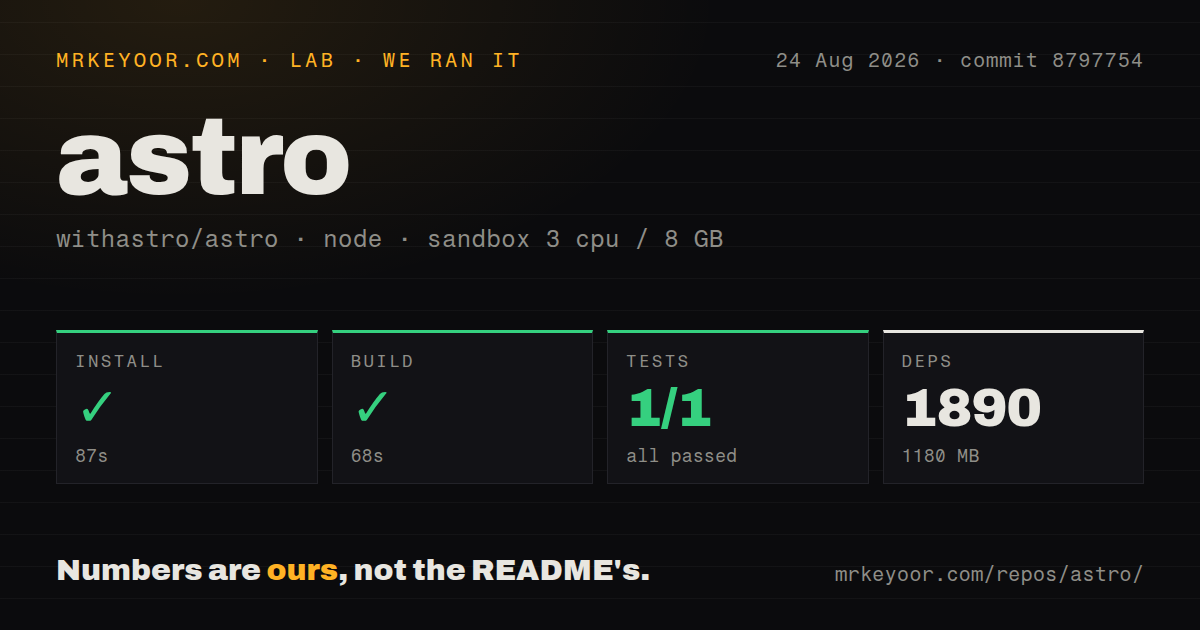
We cloned commit 8797754 into a fresh Node 22 Debian container with 3 CPUs and 8 GB of RAM. The checkout had 6,664 files, about 258,143 source lines, and occupied 50.7 MB. Installing 1,890 pnpm packages took 87 seconds and left 1,180 MB on disk. The build completed successfully in another 68 seconds. This is a sizable contributor setup even though a generated Astro site can be small.
The repository is a pnpm workspace containing Astro itself, project creation, adapters, framework integrations, RSS, sitemap, MDX, language tools, and editor support. Our scan found 21 CI workflow files but no root Dockerfile or tests directory. Site users consume only the packages they choose. Contributors and organizations producing private builds inherit the monorepo's larger dependency and validation surface.
What happened when we ran it
Our test command ran for 338 seconds and exited 1. Vitest reported 1 passed and 0 failed out of 1 visible test, but Turbo marked astro#test as failed and showed 0 successful tasks out of 1. The final lines contain repeated lifecycle errors without the earlier error detail. It is therefore accurate to say the repository test task failed, even though the visible Vitest count itself was green.
The tail does not identify a missing service, package, or assertion, so we cannot assign a cause. This matters because a 5-minute test command that ends nonzero will block a conventional CI job regardless of its inner count. Teams building Astro from source should retain the full log, locate the first error, and reproduce it in their chosen Node image. Our successful 68-second build confirms compilation only; it does not turn the failed test task into a pass.
Content collections give files and remote data a schema
Astro's content collections organize related content and validate entries against a schema. Loaders can gather local files or remote material, while pages query the resulting collection. Markdown and MDX cover authored content, and image, RSS, and sitemap packages handle common publishing needs. Type checking catches missing or malformed frontmatter earlier than a template discovering it during rendering. This is more structured than reading arbitrary files in every route.
The tradeoff is framework-specific content plumbing. A team migrating an existing CMS must map its data into loaders and schemas, decide whether pages build ahead of time or render on request, and preserve preview behavior for editors. Large collections also make build strategy important. Static generation pays work during deployment; on-demand routes pay it at request time and require a compatible adapter. Neither choice removes the need for cache and failure planning.
Adapters decide whether server features work on the host
Static sites can be deployed as files. On-demand routes, sessions, actions, middleware, and server islands need a runtime adapter. The repository lists official packages for Node, Cloudflare, Netlify, and Vercel. These are separate packages because each platform has different request objects, asset behavior, runtime limits, and deployment output. A passing local preview is useful, but the adapter's production environment is the real target.
Open reports show specific edges. Issue 16931 says the Cloudflare adapter with static output generated runtime /_image URLs that returned 404 because no handler existed. Issue 17838 reports a Cloudflare server manifest retaining an entry for a removed prerender asset. Issue 17823 says Astro's logger produced no output through the Cloudflare adapter while console.log still worked. These reports are not evidence against every Cloudflare site; they justify an end-to-end deployment test with images, logs, and mixed rendered routes.
Version 7.2.8 was released on August 26, 2026, updating the minimum supported Sharp version to 0.35.4 and replacing an internal process-finding dependency. GitHub recorded 62,074 stars, 108 combined issues and pull requests, and a push on August 27. The small combined queue and current release activity support a serious evaluation, while same-day adapter reports show why pinning and staging are still necessary.
Astro is strongest when content stays in charge
The framework's decision is easy to state: send HTML by default and make browser execution opt-in per component. That is a useful constraint for editorial and documentation work because an imported component does not automatically turn the whole page into a client application. React or Vue teams can reuse selected components, and an adapter can add server rendering where a route genuinely needs it.
Our 87-second install and 68-second build make the codebase workable, but the failed 338-second test task prevents a clean source verdict for commit 8797754. For a new content-led site, Astro belongs near the top of the shortlist. Build one representative page with real content, an interactive island, images, and the intended adapter, then verify its production output before selecting it over Next.js, Nuxt, or Eleventy.