One desktop app fronts three API shapes
Antigravity Tools puts account switching and protocol translation in the same process. After you authorize supported web-session accounts, the dashboard shows quota and health, recommends an account, and can switch the active one. Local clients can call OpenAI-style chat completions, Anthropic messages, or Gemini-compatible routes. Claude Code gets a familiar endpoint even though the request eventually reaches a different upstream shape.
The dispatcher can rotate after a 401 or 429 response, group model names into routing rules, and prefer accounts by tier or quota timing. The current README also documents Imagen requests and a 100 MB configurable payload ceiling. That is useful for a solo developer who already understands each account. It also means one local process handles OAuth material, request logs, routing rules, and every client's API traffic.
The 888 MB install is only the source-build cost
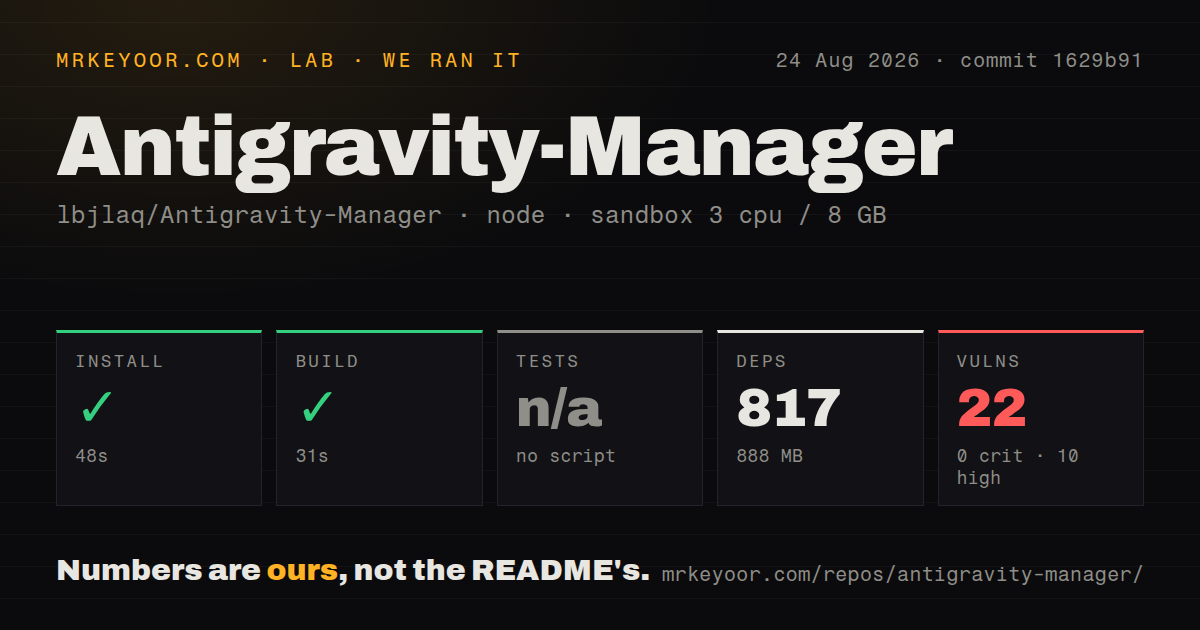
Our checkout contained 447 files, about 104,278 lines of source, and occupied 27.2 MB before installation. npm then added 817 packages and raised the installed footprint to 888 MB. That is a substantial dependency tree for a desktop utility, though users who download a release package will take a different path from the source build we measured.
Desktop releases cover Windows, macOS, and Linux. The README also offers a headless container listening on port 8045, with x86_64 and ARM64 support. It requires API_KEY. WEB_PASSWORD is optional, but omitting it makes the web login fall back to the API key. A mounted data directory keeps configuration and account state after replacement. Treat that directory as credential storage, not ordinary app cache.
What happened when we ran it
Our sandbox installed commit 1629b91 in 48 seconds on 3 CPUs with 8 GB of RAM and Node 22. The install succeeded with 817 packages and used 888 MB on disk. The production build also succeeded, finishing in 31 seconds. These figures describe repository setup and compilation, not proxy speed, model quality, or the reliability of any upstream account.
Tests could not run because the project supplied no test script or target. Our scan also found no tests directory. A passing build proves that this checkout compiled in the lab image, but it does not exercise token refresh, account rotation, request conversion, streaming, or failure recovery. Those are the paths that decide whether a long coding session survives an upstream change.
The npm audit reported 22 known vulnerabilities: 10 high, 11 moderate, and 1 low, with zero critical findings. The same checkout had three CI workflow files and no Dockerfile. The current README now documents a published container and a Docker build path, so inspect the exact release artifact you plan to deploy rather than extending our commit-level result to today's image.
The noncommercial license is a firm adoption boundary
The LICENSE file is Creative Commons Attribution-NonCommercial-ShareAlike 4.0, while GitHub's repository metadata reports no recognized SPDX identifier. For a hobby setup, the attribution and sharing conditions still deserve a read. For a company planning to modify, redistribute, or incorporate the software, the noncommercial restriction is enough reason to pause and obtain legal guidance or written permission.
Account policy deserves a separate decision. Antigravity Tools turns web sessions into local API access and can rotate accounts when quotas or authorization fail. The README describes that behavior, but it cannot grant permission from Google, Anthropic, or any account provider. Use only accounts whose terms and ownership you understand, and do not put an irreplaceable personal login into an experiment.
Port 8045 belongs behind a trusted network
The documented container publishes port 8045 for both the admin console and API base. Set a distinct web password, restrict network reachability, and protect the mounted state. The OAuth URL contains a one-time localhost callback port, so the app must remain open and the current authorization dialog must still be valid while consent completes. Remote enrollment is therefore more involved than starting the container.
Platform fit is uneven. Open issue #3605 reports that the v4.9.4 .deb renders a blank or transparent window on Debian 13 under GNOME Wayland, while the AppImage works for the reporter. The v4.9.6 release notes say GNOME rendering fixes landed afterward, but that issue remained open on October 7. Test the exact package, desktop session, and upgrade path you will use.
October activity is high, and so is the issue queue
GitHub recorded the last push on October 6, 2026, and v4.9.6 was published October 5. That release republished v4.9.5 after hosted runner capacity prevented its assets from being produced. Its notes also list fixes for stream errors, credential handling, account selection, schema conversion, and macOS signing rollback. This is active maintenance against moving upstream targets.
The repository had 31,976 stars on October 7, alongside 1,722 open issues and one open pull request returned by GitHub search. A large issue count is not 1,722 confirmed defects, and some entries are support questions or user discussion. It does show the support surface created by several operating systems, three request formats, many clients, and account-provider behavior. Keep upgrades observable and reversible.
Antigravity Tools earns a trial when one technical user wants a local account dashboard and can tolerate frequent compatibility work. Our 31-second build says the code was buildable. The missing tests and 22 audit findings say much less about safe unattended operation. If the proxy will serve a team or a commercial product, use official API credentials and a gateway licensed for that job.