The useful part is the inspection procedure
This repository is mostly a scaffold and a detailed set of agent instructions. The command /clone-website <url> starts a workflow that inspects a live page, records computed styles and behavior, downloads assets, writes component specifications, and assigns isolated pieces to builder agents. The output is a Next.js application using React, Tailwind, and shadcn/ui. The process aims at visual fidelity rather than translating the target's original source.
Our commit 92872bc checkout contained only 73 files and about 369 lines of source, occupying 2 MB. Those figures make sense because the value sits in the skill text and generated agent rules, while the application starts as a small scaffold. The skill itself is long and prescriptive. It defines how routes, screenshots, research artifacts, component folders, and downloaded files must be namespaced so one page does not erase another.
Browser automation is mandatory, not optional setup
The skill requires a browser tool before it will begin. It checks for Chrome MCP, Playwright MCP, Browserbase MCP, Puppeteer MCP, or a similar connection, then verifies every target URL through that browser. Static HTML fetches are insufficient because the procedure asks the agent to scroll, click, hover, resize, inspect computed CSS, watch timed changes, and compare interactive states. Without that tool, the instructions explicitly tell the agent to ask for a connection.
The responsive sweep covers desktop at 1440 px, tablet at 768 px, and mobile at 390 px. The agent records its findings in a behavior document before it writes components. This is better than the usual screenshot prompt because it forces a distinction between click-driven tabs, scroll-triggered sections, hover states, and timed carousels. Whether the chosen agent follows every step still needs human review.
Route isolation fixes a real multi-page failure mode
Version 0.4.0 changed the workflow so later cloning runs preserve existing pages. Issue 66 had reported that cloning pages B and C removed page A. The current skill now inventories existing routes, computes namespaced site and page identifiers, refuses to overwrite a non-scaffold route without approval, and separates assets plus research by target. Different origins may need separate app roots because fonts, global CSS, and metadata can conflict.
Each target gets an output plan before edits begin. A normalized path becomes its Next.js route, while query strings and fragments must be mapped to explicit state behavior. Multiple pages on the same origin share a foundation only after that shared work is fixed. This is careful guidance for agents working concurrently, though it also shows why “one command” understates the number of decisions in a faithful multi-page rebuild.
What happened when we ran it
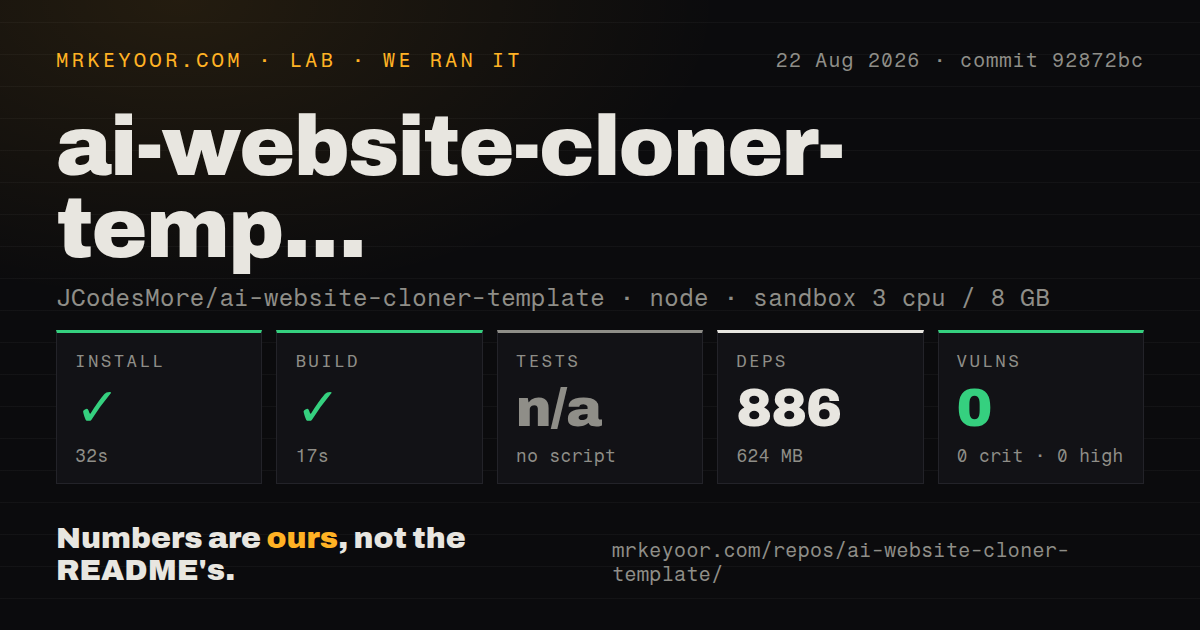
Our fresh Node 22 Debian container installed 886 packages in 32 seconds and used 624 MB on disk. The production build completed in 17 seconds. The repository included a Dockerfile, a Compose file, and 1 CI workflow. npm audit reported 0 known vulnerabilities in the installed tree. These results show that the untouched scaffold is easy to compile.
There was no test script or target, so the lab skipped tests. That distinction matters: the build proves the starter compiles, while it says nothing about browser extraction, repeated clone runs, visual comparisons, route preservation, or the output produced by a particular model. The package defines lint, typecheck, build, and a combined check command. None replaces an end-to-end run against a target site.
The default scope ends at the visible front end
The skill says the normal clone includes layout, styling, component structure, interactions, responsive behavior, and mock data. It excludes a real backend, authentication, live features, SEO work, and an accessibility audit unless the user changes the scope. That is an honest boundary. A convincing marketing page can emerge from this process, but forms, accounts, checkout, search, analytics, and data rules need separate engineering.
Asset handling also needs judgment. The instructions prefer real text, images, videos, fonts, and SVGs from the live page. An optional image-generation fallback requires explicit approval and excludes logos, trademarks, product screenshots, and legal marks. Even when a download is technically possible, the README tells users to respect ownership and site terms. Reconstructing a site you own is a very different proposition from publishing someone else's brand.
Model quality determines how much supervision it needs
The README recommends Claude Code with Opus 5 and lists many other supported agents. Compatibility means the repository supplies an instruction or skill format for that client. It does not mean every model will interpret a 150-line component specification equally, operate browser tools correctly, or merge concurrent work without regressions. The skill tries to control this variance by limiting component scope and requiring a TypeScript check from each builder.
A capable front-end engineer can use the artifacts as a review trail: screenshots, extracted values, behavior notes, component specs, and visual diffs. That trail is the project's strongest idea. Teams seeking a push-button migration will find too many human decisions behind the command. Use the template to organize authorized reconstruction, then test the result as a new application with accessibility, security, content, and functional requirements of its own.
v0.4.0 is active, young, and still instruction-heavy
The latest release was v0.4.0 on 2026-08-10, and GitHub recorded the last push on 2026-08-14. The repository showed 1 open issue or pull request, specifically a proposed fix to fail rule synchronization when an imported instruction file is missing. That is current activity, while the March 2026 creation date and absent test target still place the project early in its life.
For a live URL and a developer willing to inspect the result, this template is more disciplined than an improvised “copy this screenshot” prompt. Screenshot to Code is a better match when only an image exists. Playwright makes sense when the team wants a custom, deterministic inspection harness. AI Website Cloner Template earns its place when the reusable process and audit artifacts matter as much as the first rendered page.