mrkeyoor.com_
Thu 17 Sept 05:15 UTC
AI Toolsevaluationupdated 26 Aug 2026

ai-engineering-hub review

AI Engineering Hub is a collection of more than 90 small projects and tutorials covering RAG, agents, model comparisons, multimodal applications, fine-tuning, and MCP. It is a learning library rather than one deployable product; our lab measured its `Multi-Agent-deep-researcher-mcp-windows-linux` example, which combines 3 CrewAI agents, Linkup web search, local DeepSeek R1 through Ollama, Streamlit, and an MCP server.

+85stars / 7d
Verdict

Our measured researcher installed 33 packages in 30 seconds and built in 11 seconds, but it exposed no test target and the repository has 0 CI workflows. Use AI Engineering Hub as a menu of code samples, especially when you want to compare several approaches quickly. Do not adopt the repository as a platform or copy an MCP server into production unchanged; choose a focused project and add tests, quota handling, credential controls, and deployment boundaries yourself.

We ran it

Lab card: what happened when we ran ai-engineering-hubScreenshot of ai-engineering-hub (join.dailydoseofds.com)
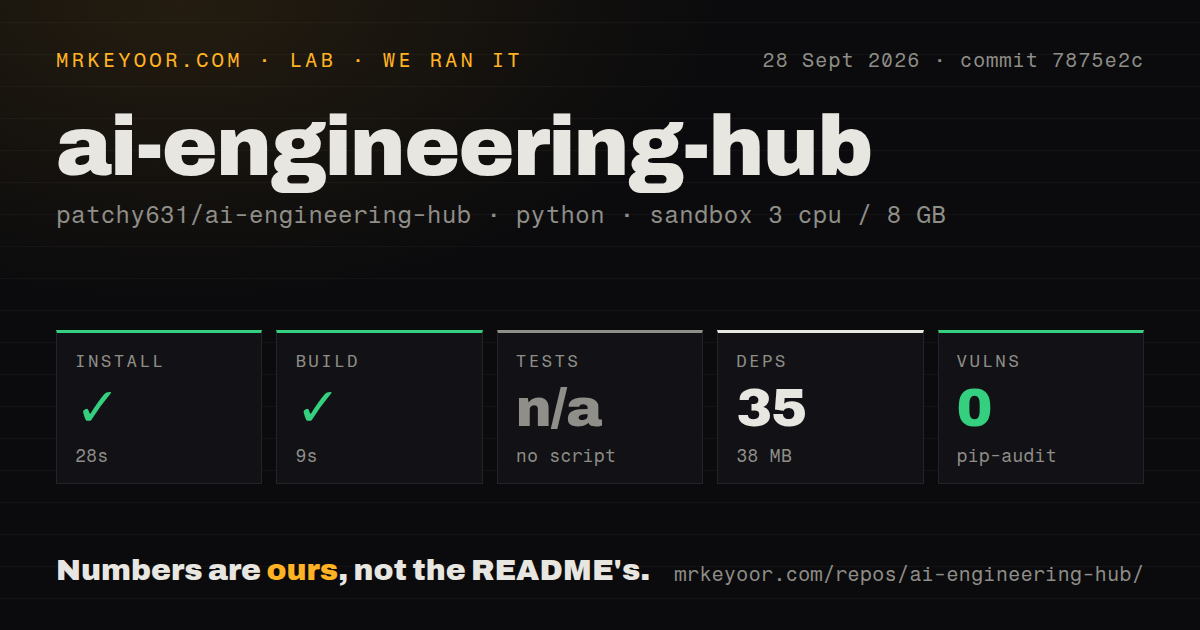
Install✓ · 30s33 packages · 36 MB
Build✓ · 11s
Testsn/ano test script
Known vulns0(pip-audit)
Repo1444 files~104,367 lines of source · 349.5 MB · 0 CI workflows

Answers from our run

Does ai-engineering-hub build from source?

Dependencies installed in 30 seconds (33 packages), and the build succeeded in 11 seconds. We cloned commit c5c2278 into a clean Debian container with 3 CPUs and no project-specific setup.

Does ai-engineering-hub have tests you can run?

Not through a standard command: the project exposes no test script or target that our harness could run.

Does ai-engineering-hub have known vulnerabilities in its dependencies?

pip-audit found none in the dependency tree at the time of our run.

Who should not use ai-engineering-hub?

Teams looking for one supported production platform: the repository is a gallery of independent projects with separate dependencies and operating assumptions.

What are the alternatives to ai-engineering-hub?

GPT Researcher, Open Deep Research, AI Agents for Beginners. Our measured researcher installed 33 packages in 30 seconds and built in 11 seconds, but it exposed no test target and the repository has 0 CI workflows.

Setup3/5Small uv install, plus Linkup credentials and a local Ollama model
Docs3/5Broad index, but the measured example has a very short guide
Community4/5Recent pull requests and discussion across 124 open items
Maturity2/5Many demos, no releases, no root CI, and no measured tests

Who it’s for

Developers who learn best by taking apart short AI application examples.
Python practitioners comparing concrete RAG, agent, MCP, voice, OCR, and model-evaluation patterns.
CrewAI users who want a small 3-stage web-research example with both Streamlit and MCP entry points.
Instructors looking for varied project prompts, provided they review each example before assigning it.

Who it’s NOT for

Teams looking for one supported production platform: the repository is a gallery of independent projects with separate dependencies and operating assumptions.
Anyone expecting repository-wide verification: GitHub shows 0 CI workflow files, the measured subproject has no tests directory, and our harness found no test target.
Users who need the measured researcher to work without external setup: its source hardcodes ollama/deepseek-r1:7b at localhost port 11434 and requires a Linkup API key.
Operators expecting graceful quota handling: open issue 250 names the measured researcher and says it terminates on a GitHub API rate-limit exception.
Developers copying MCP examples into a privileged environment without review: issue 229 reports raw eval() and exec() sinks in the separate Pixeltable MCP example.

Setup reality

Our sandbox entered Multi-Agent-deep-researcher-mcp-windows-linux at commit c5c2278. uv installed 33 Python packages in 30 seconds and used 36 MB; the measured build succeeded in 11 seconds, and pip-audit found 0 known vulnerabilities. No test script or target existed, so tests were skipped.

Running the example needs Python 3.11+, uv sync, a Linkup API key, and an Ollama service at http://localhost:11434 serving deepseek-r1:7b. The Streamlit UI accepts the Linkup key, while MCP clients pass it in the server environment.

The larger 349.5 MB checkout contains 1,444 files and about 104,367 source lines spread across many unrelated examples. There is no root CI workflow or Dockerfile. Treat each directory as its own tutorial, inspect its code and credentials, and create your own tests before reuse.

This is a project shelf, not a single AI framework

AI Engineering Hub collects more than 90 examples grouped as beginner, intermediate, and advanced. The menu covers OCR, local chat interfaces, RAG, voice agents, model comparisons, fine-tuning, MCP servers, and multi-agent workflows. That breadth is useful when you want working shapes to inspect. It also means there is no one installation, architecture, or reliability claim that applies to the repository.

Each directory is effectively its own small project. Some use local models, others depend on hosted search, model, vector, voice, or browser services. The root README offers a roadmap through 22 beginner, 48 intermediate, and 23 advanced entries, but it cannot replace the instructions and code review required for each one. Treat the difficulty labels as navigation, not certification that an example is safe or complete.

The measured researcher is a 3-step CrewAI pipeline

Our selected directory, Multi-Agent-deep-researcher-mcp-windows-linux, creates 3 agents. A web searcher calls Linkup, a research analyst turns results into structured findings, and a technical writer produces Markdown with source links. CrewAI runs the tasks sequentially. The researcher can be opened as a Streamlit chat app or called through one stdio MCP tool named crew_research.

agents.py defines the tool, agents, tasks, and crew. app.py stores a Linkup key in Streamlit session state and displays the conversation. server.py wraps run_research with FastMCP. The package metadata asks for Python 3.11 or newer and lists CrewAI, Linkup, MCP, OpenAI, dotenv, and Streamlit dependencies.

The model path is less flexible than the root description suggests. get_llm_client() hardcodes ollama/deepseek-r1:7b and http://localhost:11434. Running the example therefore needs Ollama reachable on that address with the named model available, plus a Linkup API key for web search. The README explains uv sync, the Streamlit command, and an MCP client block, but it does not document changing the model or operating the service remotely.

What happened when we ran it

Our sandbox checked commit c5c2278 and worked inside the measured subdirectory rather than treating all 93-plus examples as one Python package. uv installed 33 packages in 30 seconds, consuming 36 MB. The measured build succeeded in 11 seconds, and pip-audit reported 0 known vulnerabilities. The container had 3 CPUs, 8 GB of RAM, and no secrets.

There was no test script or target, so we skipped tests. The repository has no tests directory for this measured path, no Dockerfile, and 0 GitHub CI workflow files. A successful 11-second build tells us the locked dependency set resolved in our fresh Debian container. It does not verify a Linkup search, the local DeepSeek model, a 3-agent handoff, Streamlit, or the MCP call. No credentials were available in the sandbox.

The whole checkout was 349.5 MB across 1,444 files and roughly 104,367 source lines. That size belongs to the collection, while the 33-package result belongs only to the deep-researcher directory. Mixing those scopes would make the install look more representative than it is. Another example may use notebooks, Node, a hosted database, GPU libraries, or several paid APIs and have a completely different setup cost.

Error handling is tutorial-grade

The Linkup tool catches a broad exception and returns its text as a string. run_research does the same around CrewAI. That keeps some failures visible in chat, but it does not distinguish authentication, quota, timeout, model, or malformed-result errors. There is no retry policy, structured failure response, health check for Ollama, or test around partial agent output. They are unacceptable defaults in an unattended research service.

Open issue 250 is specifically about Multi-Agent-deep-researcher-mcp-windows-linux. It reports that a GitHub API rate-limit exception is not handled and terminates the workflow. The current source we read does not expose a GitHub tool directly, so the report may concern a path or revision not obvious from the small files. It still identifies quota handling as something a prospective user must reproduce before deployment rather than assuming a general catch covers it.

Security review must happen per directory too. Open issue 229 concerns the separate Pixeltable MCP example and reports MCP tools that build Python functions from raw strings passed to eval() and exec(). That finding does not apply to the measured CrewAI server. It does show why a large tutorial collection cannot carry one blanket safety verdict. Never expose copied MCP tools to a privileged agent until you have traced every input to its side effects.

Activity is healthy, release discipline is absent

The last repository push was July 27, 2026. Pull requests were still being updated in August, including new examples and model-pin changes. GitHub listed 124 open issues and pull requests, with reports about notebook rendering, dependency conflicts, incorrect RAG branching, hardcoded paths, and the MCP code-execution concern. That is real activity around a large teaching collection, though the queue mixes contributions with defects.

There is no latest GitHub release. Users must pin a commit rather than a versioned artifact, and independent examples can age at different rates even when the root README receives updates. The lack of root CI makes that drift harder to spot. A dependency lock in the measured directory is helpful, but without an executable test it only preserves a set of packages, not known behavior.

Pick one lesson and take ownership of it

AI Engineering Hub is good browsing material for a developer who wants several concrete starting points in one place. The 3-agent researcher is readable, installs quickly, and demonstrates both Streamlit and MCP around the same function. It is a sketch you can extend after adding model configuration, typed errors, retries, tests, and safer credential handling.

For a research service you intend to operate, GPT Researcher or Open Deep Research offers a more focused starting point. For a course, Microsoft's AI Agents for Beginners gives lessons an explicit order. Use this hub when breadth and experimentation are the goal. The moment one example becomes production code, move it into its own repository and give it the controls the collection does not provide.

Alternatives

ProjectWhat it isPick it when
GPT Researcher gh↗A dedicated autonomous research application with report generation and a focused codebase.pick this instead when deep web research is the product you want rather than one example inside a learning collection.
Open Deep Research gh↗A configurable research agent from LangChain built around search, synthesis, and report workflows.pick this instead when you want a maintained reference focused on research-agent architecture and evaluation.
AI Agents for Beginners gh↗A structured course repository teaching agent concepts through ordered lessons and samples.pick this instead when a guided curriculum matters more than a large menu of standalone demos.

Sources

  1. AI Engineering Hub README
  2. Agentic Deep Researcher README
  3. Deep researcher rate-limit issue
  4. Pixeltable MCP code-execution report

More ai tools reviews

yolov5 · eve · MemOS · LongCat-Video · Concat · DLSS5-Feeder · the whole board →