Short answer: evaluate it for one person's local workflows
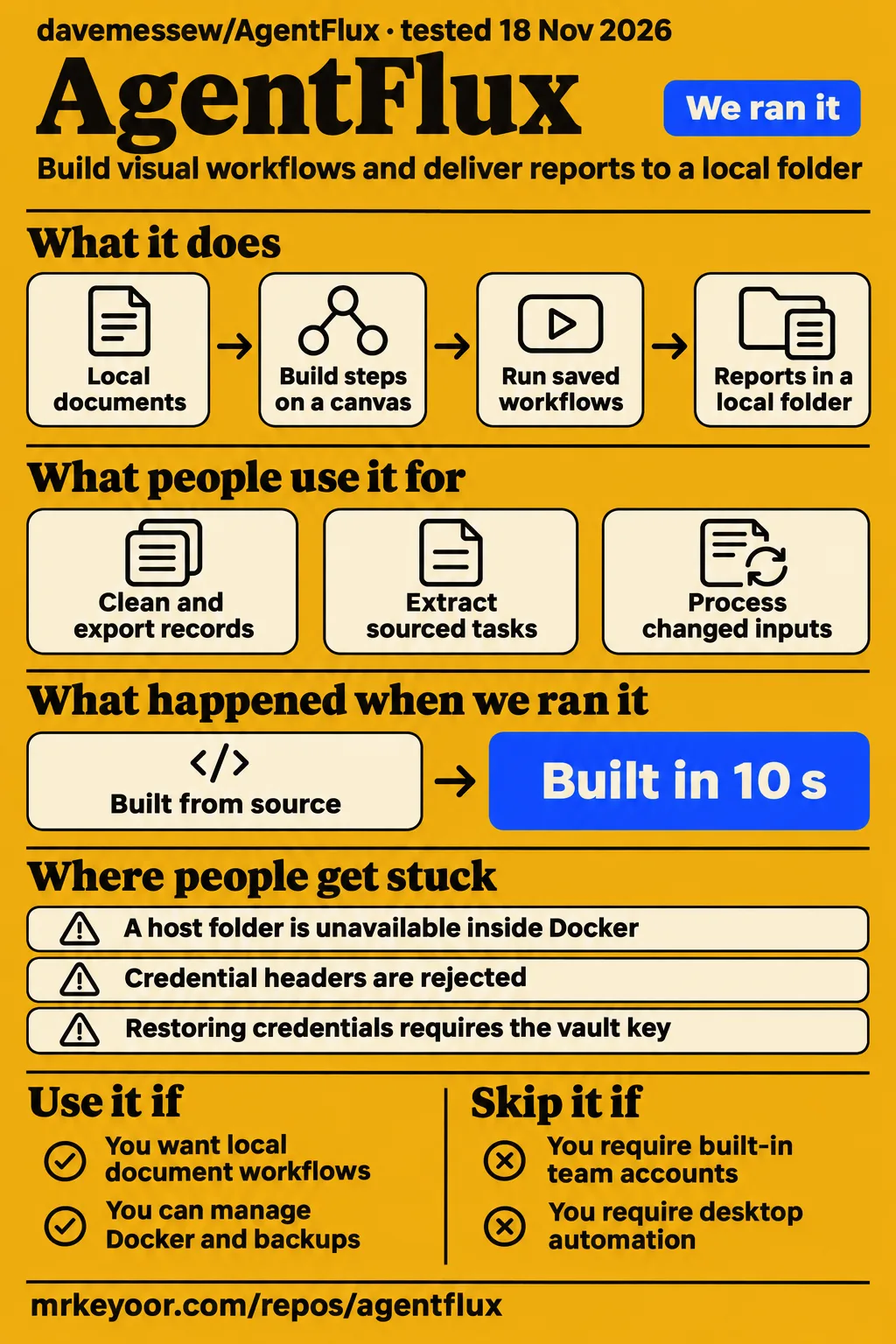
Our AgentFlux source checks passed, while our separate Docker deployment attempt failed after 603 seconds. Dave Messew's AgentFlux is worth evaluating if one technical user wants visual workflows over local files and can manage Docker, model connections and backups. Teams requiring built-in accounts should choose another route: the installation guide describes a single-user application without authentication or user roles. Our deployment step and the AgentFlux installation guide support that distinction.
The practical attraction is a saved processing sequence connected to your own inputs and report folder. You can choose the model endpoint and inspect the resulting workflow instead of keeping the task solely as a chat instruction. Start with the README's model-free records export, then add a model for sourced task extraction or report writing. That sequence gives a new evaluator a concrete first output to inspect before introducing model configuration. The AgentFlux README describes both stages.
What you can do with AgentFlux
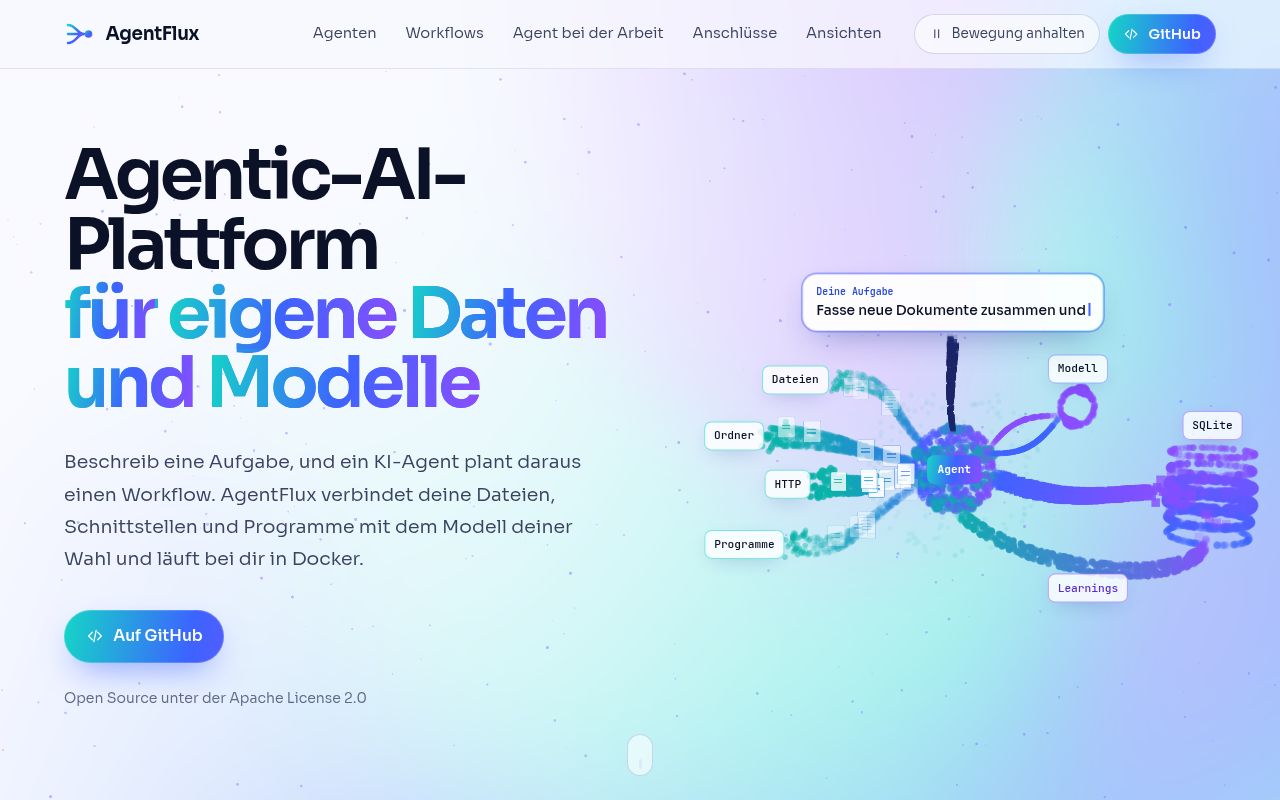
AgentFlux connects documents, data sources and language models in a visual workflow. Its browser interface runs on your computer or server, and an agent can create a workflow from a task description. The README lists 17 preconfigured steps, eight templates, branching, undo/redo and JSON import/export. Together, these provide a saved sequence that a developer can reopen and change. These capabilities are described in the AgentFlux README.
The documented model connections include Ollama, LM Studio, vLLM and OpenAI-compatible endpoints. Language and vision tasks use a model server or external provider that you supply. The release includes a separate speech model, which serves transcription rather than replacing that language or vision connection. This distinction matters when preparing an installation: downloading the application and speech service is one task, while choosing and connecting the model used to interpret documents or images is another.
Video analysis is another documented entry point. Select a recording and a vision model, answer clarification questions, then save or start the generated workflow. The README describes overlapping one-minute segments combining screen changes, periodic frames and timestamped speech. Generated workflows use existing connections and executable steps. They do not replay arbitrary mouse or keyboard actions in other applications. The result is a workflow using supported connections, rather than a recording replay mechanism. AgentFlux video instructions.
What people use AgentFlux for
AgentFlux's documented examples cover model-free records export, sourced task extraction and scheduled processing of changed inputs. These are intended workloads described by the project, rather than customer deployment accounts. Each offers a concrete acceptance check: inspect the exported records, follow a task's source reference or change an input before the next scheduled run. The examples make the evaluation more useful than starting with an open-ended request for an autonomous agent.
For records cleanup, the README directs users to choose "Clean and export records without a model", select Local inbox and choose an output directory. This is the simplest documented starting point because it separates file handling from language-model interpretation. The output is something a reader can compare with the input records directly. The README's first-workflow instructions describe the sequence and say that run details show the delivered files.
For task extraction, the next documented step is connecting a model server to extract sourced tasks or write reports. Missing owners and dates remain unresolved. A useful proposed evaluation would include a spreadsheet with a deliberately absent deadline, then compare the extracted task with the source row. That checks a specific documented behavior without assuming that a fluent report has preserved every field correctly. AgentFlux sourced-task setup.
For recurring work, the README describes enabling a schedule to process new or changed inputs automatically. The v0.3.0 release adds that inputs are processed after successful delivery and repeat runs reuse existing report batches. A proposed acceptance check is to retain an exported batch, change one input and inspect the next output. The AgentFlux README and v0.3.0 release notes describe these behaviors.
What happened when we ran it
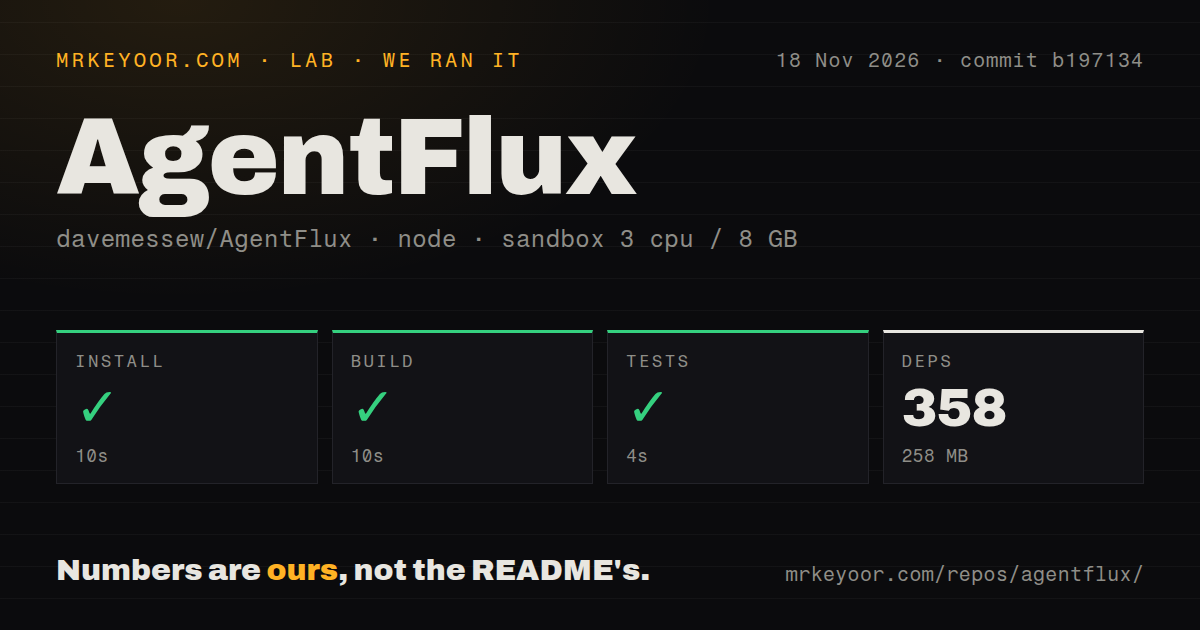
Our Docker Compose deployment attempt at commit b197134d8f80 failed after 603 seconds on November 18, 2026. The run configuration records the project's own Compose setup on our lab server, with every port bound to 127.0.0.1. Although that configuration record uses the word "deployed", the separate deployment step records FAILED. The step outcome is the basis for describing this as an attempted deployment.
| Recorded check | Outcome | What it tells you |
|---|---|---|
| Docker Compose deployment | Failed after 603 seconds | The deployment step recorded failure |
| Teardown | OK | The cleanup record reports success |
| pnpm installation | Succeeded in 10 seconds | The recorded dependency installation completed |
| Source build | Succeeded in 10 seconds | The build command completed |
| Tests | Succeeded in 4 seconds | The recorded test command completed |
| Dependencies | 358 recorded, 258 MB on disk | The source-check environment's recorded dependency footprint |
The supplied deployment tail shows runtime-image assembly: WORKDIR completed, production dependencies were copied, and the extract ends during a COPY from the build stage. Those are the last visible steps, so there is no supported package or environment diagnosis to give here. The deployment log extract records the failed step; the separate teardown record records successful cleanup.
Our source-check run recorded 358 dependencies occupying 258 MB. At commit b197134, pnpm installation succeeded in 10 seconds, the build succeeded in 10 seconds and tests succeeded in 4 seconds. The sandbox configuration was 3 CPUs, 8 GB RAM and image label lab-node:22. The checkout contained 92 files, approximately 10,163 source lines and 0.9 MB, with workspaces, a tests directory, a Dockerfile, a Compose file and zero CI workflow files.
These records answer two different setup questions. The source checks show completed installation, build and test commands for the checkout. The Docker record shows a longer image-assembly attempt ending in failure. A developer considering code changes can use the first result when estimating the local feedback loop; someone considering service adoption must also account for the deployment outcome. Keeping the commands and their outcomes separate makes both findings useful without turning one into a substitute for the other.
Where people get stuck: model networking and file permissions
A host model server must accept connections from the AgentFlux container. The installation guide gives different addresses for native and Docker installations, and says to retain /v1 when the server uses that path. If the model server works from a host terminal, compare the application address with the installation route before changing model settings. The AgentFlux model connection guide supplies the addresses.
| Documented obstacle | Practical response | Configuration detail |
|---|---|---|
| A host folder is unavailable inside Docker | Mount it and allow its container path as an import root | Create the host directory first |
| Reports should reach a host folder | Add a writable mount and an allowed output root | Import permission does not grant output permission |
| An older prebuilt image lacks video analysis | Use the v0.3.0 release documentation | Reveneau's warning concerned v0.2.0 |
| A different CPU architecture is required | Follow the README's source-build route | The prebuilt image targets Linux/amd64 |
The installation guide separates input permissions from output permissions. Its input example mounts a directory read-only and allows its container path through AGENTFLUX_IMPORT_ROOTS. Its report example uses a writable mount and AGENTFLUX_OUTPUT_ROOTS, followed by selecting that path in the task. Keep these destinations explicit so that reading a source and delivering a report are separate configuration decisions.
Programs also require an allowlist and must be enabled in settings. An executable installed on the machine therefore needs an approved connection before a workflow can use it. For HTTP connections, the guide supports GET and POST and directs users to the encrypted bearer-token field; credential headers such as Authorization and API-Key are rejected. These details give an evaluator specific settings to inspect when assembling a workflow from local files, HTTP services and programs.
Privacy depends on the connections you permit
AgentFlux has no login, and the supplied configuration binds port 4310 to localhost. Shared or public access requires an access-control layer and suitable network configuration. This makes account management a deployment responsibility for anyone sharing the application. The AgentFlux README states both the default binding and the single-user design, while the installation guide also explicitly excludes user roles.
Cloud model calls and external HTTP POST require both global and workflow approval. HTTP GET can still send data through URLs and headers. Redaction uses patterns for email addresses, Swiss phone numbers, AHV numbers, Swiss IBANs and custom terms, and the guide says those patterns can miss data or change harmless text. Choose destinations by examining what the workflow sends, including metadata. AgentFlux data-handling documentation.
Documents, workflows and logs are unencrypted. Credentials use AES-256-GCM, with the key stored beside the database in data/.vault-key; access to the entire data directory therefore also gives access to the credentials. Back up the database and key together and treat that backup as sensitive. The README places persistent application data in agentflux-data, reports in its outbox by default and speech assets in the separate agentflux-models volume. Installation guide, persistent-volume instructions.
Import limits shape the workload before model speed does
Imports allow up to 12 MB per file or HTTP response, 500 records per import and 40 files per folder, without recursion. PDFs need readable text because OCR is not included. Those documented intake rules help select an initial workload: use a bounded collection of text-bearing files or spreadsheet records, and prepare scanned archives or nested folder collections separately. The AgentFlux file-import guide lists the formats and ceilings.
For XLSX files, the guide describes previewing the workbook, choosing the sheet and header row, assigning stable names to blank or duplicate headings and retaining sheet and row references. A header row of 0 preserves raw columns. These details make row-based tasks a useful evaluation choice: compare an extracted action with the original sheet and row, rather than judging only the readability of a generated summary. The documented references provide a specific output property to inspect.
AgentFlux vs hosted agents, Dify and n8n
Choose AgentFlux for one user's local file workflows, Dify for LLM application development, or n8n for general automation combining a canvas and code. These choices follow the projects' documented purposes. AgentFlux centers local inputs, saved workflows and local report delivery; Dify describes an LLM app development platform; n8n describes workflow automation with custom code. The comparison below translates those descriptions into starting points for evaluation.
| Option | Documented reason to consider it | Pick it when |
|---|---|---|
| Dave Messew's AgentFlux | Local files, selectable model endpoints and saved visual workflows | One technical user wants to own the processing and report folders |
| Hosted cloud agent platforms | Reveneau contrasts hosted platforms with owning the local components | You prefer evaluating a managed service over operating those components yourself |
| Dify | Its README combines AI workflows, RAG, model management and observability, with cloud and self-hosted routes | Building an LLM application is the main job |
| n8n | Its README combines a visual canvas with custom code and offers self-hosted or cloud operation | General workflow automation with code is the main job |
Dify's README and n8n's README support their capability descriptions. Licensing also changes the decision: AgentFlux uses Apache-2.0, Dify describes an Apache-based license with additional conditions, and n8n describes fair-code distribution under Sustainable Use and Enterprise licenses. Compare those terms against the intended deployment before treating the projects as interchangeable dependencies. A similar-looking canvas does not make their licensing or operating responsibilities identical.
Reveneau describes the local-ownership trade as running the pieces yourself in exchange for pre-1.0 maturity and a single-user design. That is a useful account of operating responsibility for this comparison. A reader deciding between local and hosted operation should identify who will maintain model connections, backups and access controls, then use the appropriate project's installation route. Reveneau's AgentFlux account supplies that framing.
Outdated claims, corrected
AgentFlux v0.3.0 includes segmented video analysis, FFmpeg and the Whisper base speech model. Reveneau's statement that video analysis was absent from the prebuilt image explicitly concerned v0.2.0. Use that statement to understand the older package, and use the release notes for the v0.3.0 package reviewed here. The release still requires a separately connected language or vision model for AI tasks and video interpretation. AgentFlux v0.3.0 release, Reveneau's v0.2.0 description.
The supplied X extract supports a narrower statement about the roundup's method: its author wrote, "I read the READMEs, haven’t audited the code, so test in a sandbox." That disclosure identifies the material as README-based coverage. It is useful context when weighing outside attention alongside the project documentation and our recorded checks. The X roundup extract supplies the disclaimer.
The repository owner also matters when researching AgentFlux. The efeslab repository describes a separate tool-calling framework using model training and routing, while agentflux.org describes isolated e2b cloud execution. Dave Messew's README links to agentflux.cloud. The supplied video transcript discusses bringing agents onchain under a separate Interop Labs description. Keep those records attached to their respective entities when comparing capabilities. efeslab repository extract, agentflux.org features extract, onchain video transcript.
FAQ
AgentFlux's prebuilt installation needs Docker with Compose; language and vision tasks also need a model connection. The release includes local speech recognition, so transcription and language-model interpretation have different setup requirements. For a first installation, choose the prebuilt route or native route before entering model addresses, because the documented host connection changes between them. The AgentFlux README and installation guide describe both routes.
Can I use AgentFlux with Ollama?
Yes. The installation guide lists Ollama at http://127.0.0.1:11434 for native installation and http://host.docker.internal:11434 from Docker. Add a connection under Models and enter an available model ID. The host model server must accept the container's connection, so use the address for your installation route rather than copying the native loopback address into the container setup. AgentFlux model connection instructions.
What do I need to install it?
The prebuilt route requires Docker with Compose and targets Linux/amd64. Windows users are directed to Docker Desktop in Linux container mode. Native installation requires Node.js 24+ and pnpm 11.25.0, with FFmpeg and ffprobe on PATH for video analysis. The prebuilt release includes the application, built interface, FFmpeg and local speech recognition, avoiding a separate local Node or pnpm installation. AgentFlux README, native installation requirements.
Is AgentFlux free to use commercially?
AgentFlux's code is licensed under Apache-2.0, while bundled dependencies and fonts retain their respective licenses. The application also uses your computer and whichever model server or external provider you connect. Evaluate those service costs and terms separately from the code license when planning a commercial installation. The AgentFlux README's licence section supplies the license statement and dependency qualification.
What we have not tested yet
Our run ended before a completed application workflow, and the deployment extract omits the final diagnostic. Document extraction quality, scheduled delivery, backup restoration, video understanding, practical model compatibility and concurrent workloads remain outside the completed application testing. The supplied pack contains no application screenshot records or known-answer task results from this run. The networking and folder configurations above are documented instructions, rather than fixes demonstrated by our deployment attempt.
The recorded 258 MB is the source-check dependency footprint, rather than total service disk usage, container memory consumption or downloaded language-model storage. The configured 8 GB RAM is not a measured minimum requirement. The image label lab-node:22 does not identify the actual runtime or operating-system version; those require raw toolchain logs. The recorded test command has no supplied test count and supplies no exhaustive coverage or security-audit result.
The outside coverage supplies no adoption measurement, support-resolution sample or demonstrated production deployment. Reveneau reports no hosted-platform benchmark, and our records contain no comparative workflow success rate, accuracy, latency or cost result. The v0.3.0 release says its vision-model validation used protocol-fixture responses, leaving recognition quality across real vision models unbenchmarked. Other CPU architectures were outside that release's testing. Reveneau comparison boundary, release validation statement, release architecture statement.
The next useful evaluation is the README's inbox-to-report task on the intended machine, followed by comparing the source records with the exported output. Add sourced task extraction and changed-input scheduling after that first result. This sequence follows the documented setup progression and gives a technical single user concrete outputs to inspect before deciding whether to adopt the application for recurring work.