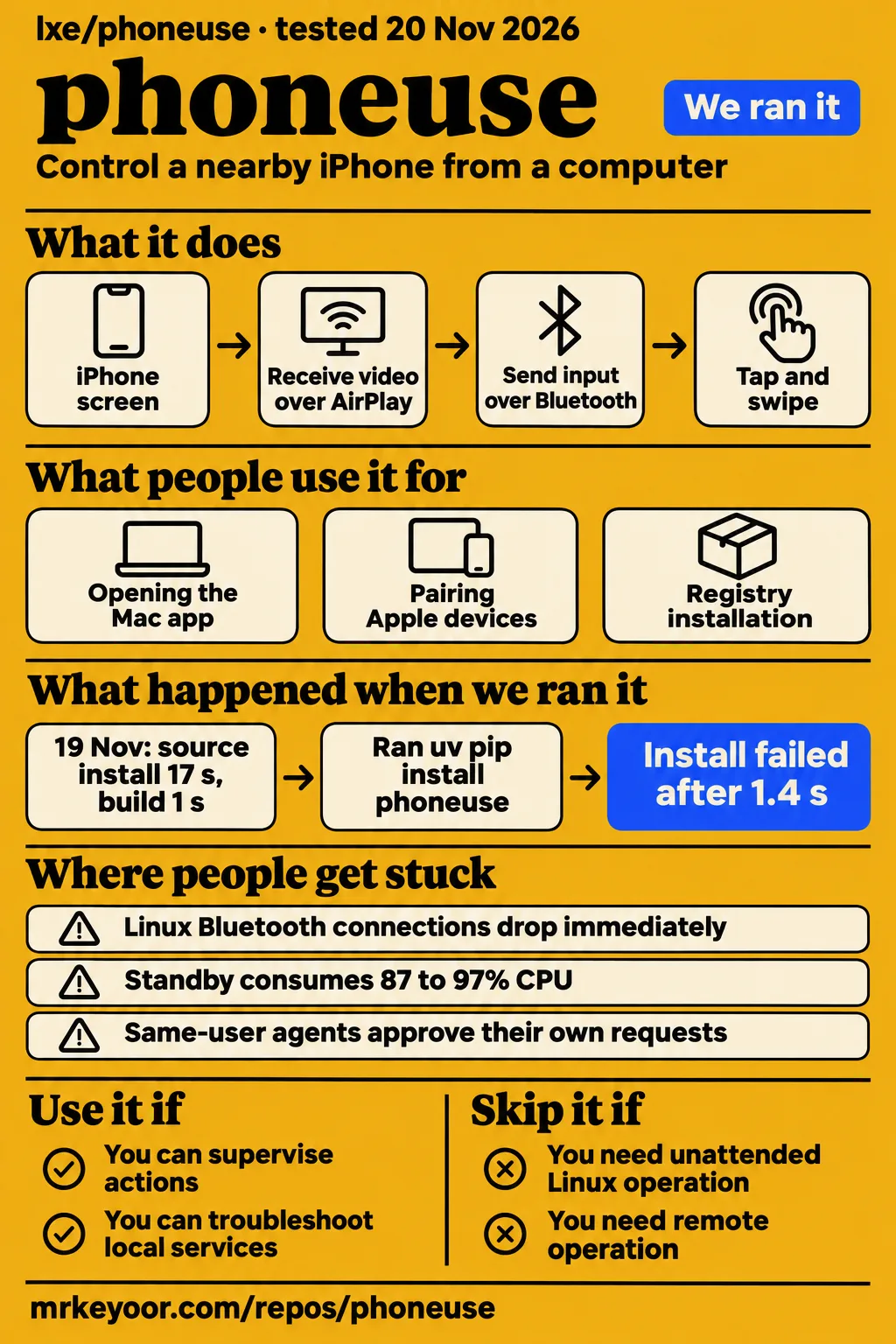
Our source installation succeeded in 17 seconds, but pytest stopped during collection because numpy was missing. lxe/phoneuse is worth considering for supervised experiments with a nearby iPhone when you can troubleshoot its local services. Its README calls it alpha software, and the Linux connection, standby and approval reports make it a poor choice for unattended operation or containing an untrusted agent running under your computer account.
AirPlay and Bluetooth control a nearby iPhone
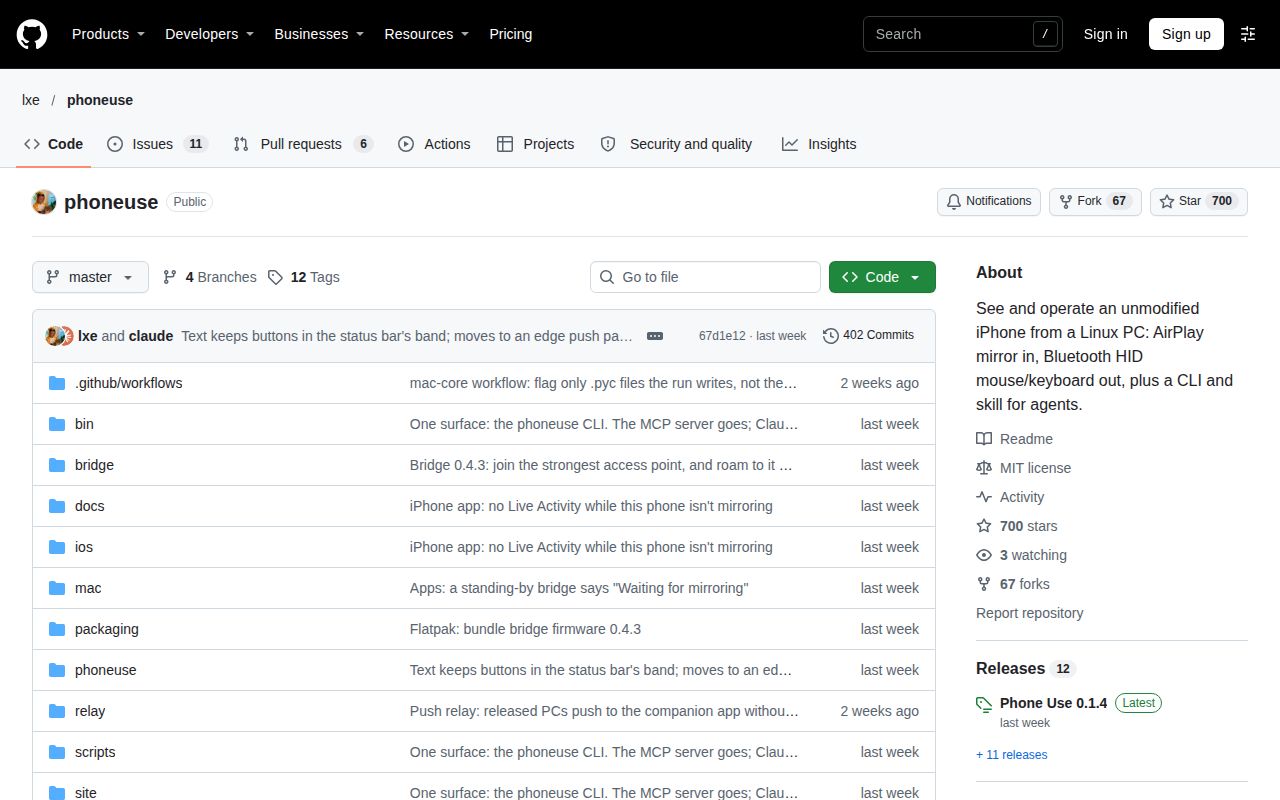
lxe/phoneuse receives the iPhone screen over AirPlay and sends input over Bluetooth, according to its architecture document. These are independent channels: the picture arrives through the network, while the computer or bridge acts as a keyboard and mouse. The document describes UxPlay receiving the video, a hub distributing it, a frames service reading the picture and a browser mirror accepting input. That division gives troubleshooting a useful starting point: screen reception and input delivery are separate parts of the system.
The Phone Use README describes clicking to tap, dragging to swipe, scrolling with a mouse wheel and typing with a keyboard. It also describes connecting Claude Code so an agent can act on the phone. The installation sequence includes the Phone Use iPhone app, keyboard and mouse setup, companion-app pairing and Screen Mirroring. The README requires the iPhone and computer to share Wi-Fi and identifies the software as alpha. Those are concrete requirements for choosing where to run it.
What people use phoneuse for
The lxe/phoneuse issue reports describe Mac startup, Linux pairing and standby use, with outcomes tied to particular versions and configurations. These accounts show what people attempted rather than a collection of successful customer deployments. They also help distinguish this repository from similarly named hosted products. The table links each use to its report, including our separate registry-installation attempt.
| Who used it | What they did | What happened |
|---|---|---|
| Reporter of Mac issue #11 | Opened Mac app 0.1.2 on macOS 15.8.1 | The window opened, but background services crashed and the CLI failed; maintainer lxe subsequently announced a 0.1.3 fix. |
| Reporter of Linux issue #17 | Used the Linux Flatpak with the computer's Bluetooth and paired Apple devices | Phone-initiated links dropped immediately; the title also reports reconnection failure after a mirror switch. |
| Reporter of standby issue #19 | Released the input connection into standby | The reporter recorded 87 to 97% CPU for about 8 minutes. |
| Our lab on November 20 | Attempted registry installation in a fresh environment | The registry could not resolve phoneuse, and the attempt stopped at installation. |
The YouTube explainer's opening discusses connecting an iPhone to a Linux machine. For the current installation requirements, the README explicitly includes the companion app. Separately, ryanmerket's r/RuntimeWire post links a founder interview about robot-tapped iPhones. That is a different product context from controlling your nearby phone through lxe/phoneuse's AirPlay and Bluetooth channels.
What happened when we ran it
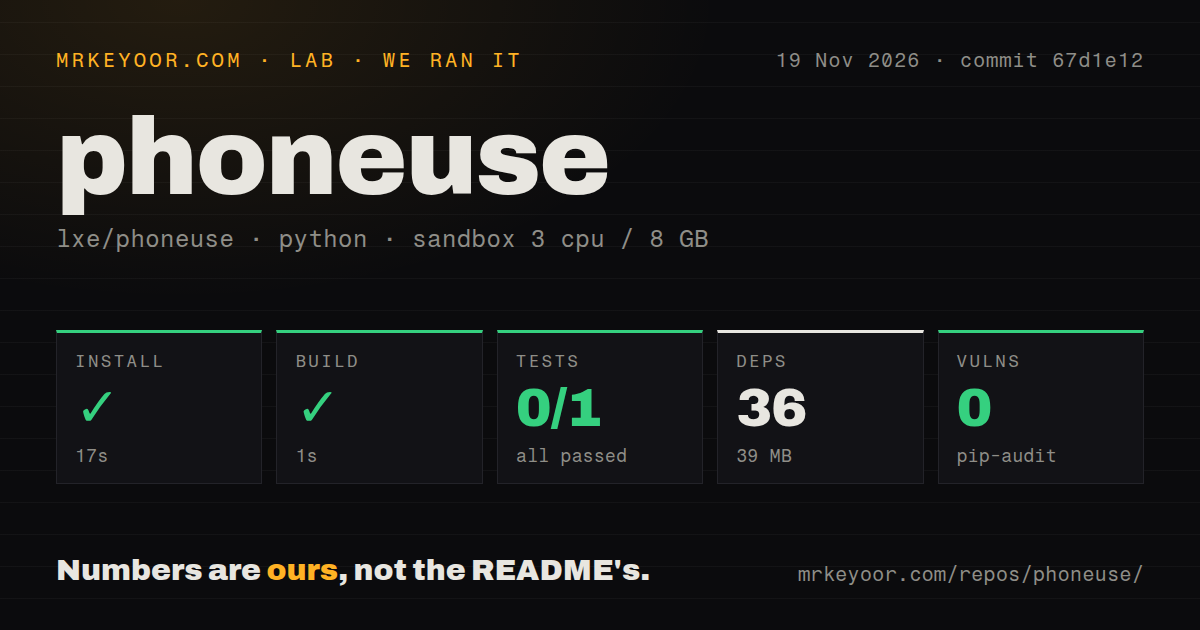
Our November 19 source run at commit 67d1e12 installed in 17 seconds and built in 1 second, according to our sandbox measurements. The test command then exited 1 after 2 seconds. The separate November 20 route used a registry package name and failed earlier, during dependency resolution. Keeping the routes separate explains how a successful source installation and an unsuccessful registry attempt can both be accurate findings.
| Question | Answer | Verdict | Why |
|---|---|---|---|
| Did the November 19 source installation complete? | Yes, in 17 seconds; 36 dependencies and 39 MB recorded | Installation completed | The harness recorded a successful install exit. |
| Did the build complete? | Yes, in 1 second | Build completed | The harness recorded a successful build exit. |
| Did pytest run successfully? | No; exit 1 after 2 seconds, 0 passed, 0 failed, 1 collection/setup error | Collection failed | tests/test_offline.py:8 imports numpy, which raised ModuleNotFoundError: No module named 'numpy'. |
| What did dependency auditing report? | pip-audit reported 0 known vulnerabilities | Recorded audit result | This was the dependency scanner's output. |
| What sandbox configuration was recorded? | 3 CPUs, 8 GB RAM; image ghcr.io/astral-sh/uv:python3.12-bookworm |
Configuration recorded | These values identify the configured sandbox. |
| Did the November 20 clone step complete? | The step recorded 2 seconds | Clone step recorded | The clone record precedes installation. |
| Did registry installation complete? | No; uv pip install phoneuse exited 1 in 1.4 seconds |
Installation failed | The installation log says phoneuse was not found in the registry. |
| Was the November 20 environment torn down? | Teardown returned ok | Teardown completed | The teardown record records that outcome. |
The failing source log reaches import numpy as np in tests/test_offline.py and stops with the missing-module error. That is a collection failure, which explains the combination of zero passing tests, zero failing tests and one error. The same source check found a tests directory and one CI workflow file, with no Dockerfile detected. Those observations describe the checkout and the commands that ran, rather than replacing the test result with a judgment based on repository structure.
The November 20 run summary identifies commit 67d1e121e2ea and a container configured with 2 CPUs and 4 GB RAM, no published ports and no secrets. Its statement that installation succeeded conflicts with the actual failed step. The finding records the registry-resolution failure, so the step log determines the installation outcome. This run used a different route and configuration from the November 19 harness.
Where people get stuck: Mac packaging and Linux input
Mac issue #11 concerns 0.1.2 packaging, while Linux issues #17 and #19 concern Bluetooth handling and standby behavior. These symptoms point to different components and remedies. A Mac window opening can coexist with crashed background services; a phone displaying Connected can coexist with a dropped input path. The reports make those distinctions more useful than treating every failure as a single installation problem.
| Symptom | What the reporter found | Fix or status in the issue |
|---|---|---|
| Mac 0.1.2 opens but services crash | Issue #11 reports _pipe2 failure and GLib built for macOS 27 |
lxe announced corrected deployment targets in 0.1.3. |
| Mac app changes its signed bundle | Issue #11 describes Python bytecode written inside the bundle | lxe says Python files are compiled before signing and runtime writes are prevented. |
| Phone says Connected but input drops | Issue #17 reports phone-initiated connections dropping and reconnect attempts returning [Errno 111] Connection refused |
Open issue describing Linux PC-Bluetooth handling. |
| Released connection consumes CPU | Issue #19 identifies a zero-wait reconnect loop | Reporter proposes a longer wait while released. |
Issue #17 identifies Phone Use Flatpak 0.1.3 and says the involved code is the same in v0.1.4 and master 67d1e12. Its environment includes BlueZ 5.85, Linux 7.0, Ubuntu 26.04.1 LTS and GNOME Platform 50, with an iPhone on iOS 27.3 and an iPad mini. The report specifically starts the failing link from the phone's Bluetooth settings. That direction matters because the connection enters through the Bluetooth profile callback rather than the daemon's outbound connection path.
Desktop downloads and platform requirements
The README offers Linux Flatpak and Mac DMG downloads, while Windows installation starts from a source checkout. The older packaging issue #5 describes cloning the repository and assembling UxPlay, GStreamer, GTK 4, Python packages and vision models. The current download instructions are therefore the relevant starting point for Linux and Mac users choosing a desktop installation route.
The Mac app needs the bridge, according to the README's installation instructions. The bridge joins Wi-Fi and acts as the iPhone's keyboard and mouse; the README names a LilyGO T-Display and flashing it through the Linux app. The older macOS discussion explains the mirroring choice and notes that UxPlay and Apple's built-in AirPlay receiver both use port 7000. Hardware preparation and receiver configuration are separate setup considerations.
The Windows guide documents Bluetooth LE input through the PC's own adapter. Its tested configuration lists Windows 11, Python 3.13, UxPlay 1.74 built in MSYS2, and Edge or Chrome for the mirror window. The installer requests administrator rights for a local-network firewall rule. The guide also says to pair only the intended phone: two connected phones can both identify themselves as iPhone, leaving Phone Use unable to select the mirroring device.
Approval prompts and the same-user threat
The author of issue #10 says an agent running as the same computer user can approve its own requests. The approval report names locally callable approval endpoints, a command-line ownership check and a saved passcode readable by the user account. Its argument concerns programs executing with the owner's local permissions. It directly affects the decision to connect an untrusted agent to a phone containing personal accounts.
Issue #10 proposes moving the approval decision to the iPhone and enforcement to the bridge, with the computer carrying messages between them. The architecture document separately describes a browser mirror listening on 127.0.0.1 and a Take over control that makes the agent's next action fail until resumed. These descriptions address different control mechanisms: the issue focuses on the agent's local permissions, while the architecture explains the browser interface and action interruption.
Standby, stale frames and slow tool calls
Issue #19 reports 87 to 97% CPU for about 8 minutes after releasing the connection. Its author also records a 4-second trace with about 1,200 system calls taking 0.007 seconds, and a loop turning 1,705,690 times in one second. The standby diagnosis traces this to wait(0) returning immediately while the released branch resets the pause to zero. The suggested change makes that state use the longer timeout.
The stale-frame report in issue #1 describes the last received phone image staying behind a disconnected overlay, including after restarting phoneuse up. The connection indication and the visible image therefore carry different information in that report. For an operator watching a mirror, the overlay reports the disconnected state even though the retained picture still looks like a phone screen.
The performance discussion in issue #4 proposes executable recipes, batched actions and returns triggered by expected screen elements. It also reports GoClick returning coordinates for absent elements and text-recognition heuristics limited to dark mode. The current architecture describes ignoring regions that move continuously during settling. Reading the proposal beside the architecture separates requested improvements from the behavior described in the current implementation document.
phoneuse vs alternatives
lxe/phoneuse documents AirPlay and Bluetooth, PhoneUse Local documents WebDriverAgent, and phoneuse.dev documents simulator and Android operation. These are different control routes with different setup commitments. Matching the route to the target device is more useful here than choosing by the shared Phone Use name. The comparison below keeps those entities separate and states the requirements their own documentation describes.
| Choice | Documented approach | Pick it when |
|---|---|---|
| lxe/phoneuse | Nearby iPhone, AirPlay picture and Bluetooth input; Mac requires a bridge | You want supervised experiments with your own nearby iPhone. |
| PhoneUse Local, phoneuse-official/phoneuse | WebDriverAgent; your own Mac, iPhone, Apple signing setup and model access | You want that developer-preview approach and can supply its requirements. |
| Phone Use at phoneuse.dev | iOS Simulator with Mac and Xcode; Android through adb on macOS or Linux | Your target is a simulator or Android device. |
| UxPlay versus Apple's receiver | Direct stream decoding versus capturing the receiver window | You are choosing a mirroring component. |
PhoneUse Local describes itself as an experimental developer preview requiring your own Mac, iPhone, Apple signing setup and model access. Its README excerpt also separates the project from hosted PhoneUse and describes opening apps, reading screens, tapping, typing and scrolling. The phoneuse.dev quickstart instead specifies a Mac with Xcode and an iOS Simulator runtime, or adb with an Android emulator or device on macOS or Linux.
Outdated claims, corrected
Mac 0.1.2's advertised macOS 15 support conflicts with the crash described in issue #11, and the November 20 lab summary conflicts with its failed installation step. The maintainer names 0.1.3 as the Mac fix. The registry log records installation failure. These corrections concern version compatibility and the outcome of a particular installation route, so neither should become a blanket claim about every release or installation method.
The hosted-service descriptions also conflict. The 1si4 directory review presents cloud and real devices through the same interfaces, while hosted PhoneUse documentation says current access is cloud Android. Carly's November 12 article opens broadly but subsequently separates robot-tapped iPhones from API access. These descriptions concern hosted PhoneUse, whereas this review evaluates the lxe/phoneuse repository.
The AI Product DB listing quotes $99 per month for reserved hosted real iPhones; the research synthesis records Carly's November 12 price as $149 per month. Those conflicting hosted-service prices are separate from the repository's MIT licence. They give no basis for assigning either monthly subscription price to running lxe/phoneuse on your own computer and phone.
FAQ
Phone Use 0.1.3 is the maintainer-reported fix for the Mac 0.1.2 startup failure on macOS 15. The response in issue #11 says the new DMG's binaries target macOS 15.0 or older and that runtime Python bytecode writes no longer change the signed app bundle. The other questions below address the platform, connection and control problems raised in the issue discussions.
Does lxe/phoneuse work on macOS 15, and which version fixes the startup crash?
Version 0.1.3 is the fix announced by lxe in issue #11. The maintainer says the core's libraries were tested on a macOS 15 machine before release and explains the corrected binary targets. This replaces the 0.1.2 packaging described in the crash report, where the app opened but its background services failed.
Does using lxe/phoneuse on a Mac require an ESP32 bridge?
Yes, the README says the Mac app needs the bridge. It names a LilyGO T-Display and describes the board joining Wi-Fi while acting as the iPhone's keyboard and mouse. Its flashing instructions point to the Linux app's Bridge menu. This requirement belongs alongside the DMG download when planning a Mac installation.
What is required to run lxe/phoneuse on Windows?
The Windows guide describes source installation, Python 3.13, MSYS2-built UxPlay and an Edge or Chrome mirror window. Input uses the PC's Bluetooth LE adapter. The installer creates the environment and a local-network firewall rule; the guide also calls for Bluetooth pairing and the phone's pointer setup, followed by pointer measurement for that phone.
Can I install lxe/phoneuse as a desktop app instead of assembling its dependencies?
Yes, the README offers Linux Flatpak and Mac DMG downloads, while Windows uses source installation. The same instructions include installing the iPhone companion app, pairing it and starting Screen Mirroring. Mac users also need the bridge. The download choice changes how the computer software arrives; the phone and connection steps remain part of installation.
Why does the iPhone's Bluetooth connection drop immediately or fail to reconnect?
The author of issue #17 reports phone-initiated links dropping about a millisecond after connection on Linux PC Bluetooth. The log shows control and interrupt channels followed by a closed control channel, while outbound reconnection returns Connection refused. The issue title also reports the old phone refusing to reconnect after switching mirrors.
Why does lxe/phoneuse use a full CPU core while in standby?
The author of issue #19 traces the reported CPU use to the reconnect loop waiting for zero time while released. The proposed change makes the loop take its longer wait in that state as well as while connected. The report includes the observed CPU range, trace results and loop count described in the standby section above.
Can an agent bypass lxe/phoneuse's approval and unlock controls?
According to issue #10, an agent running under the same computer account can approve its own requests. The author identifies approval endpoints, ownership detection and passcode storage as parts of the problem. The proposed architecture moves approval to the iPhone and enforcement to the bridge, placing those decisions outside the computer account running the agent.
Is the browser mirror showing a live screen or an old frame?
The picture can be an old frame, as issue #1 describes after Screen Mirroring stops. The disconnected overlay appears over the last received picture rather than replacing it with a blank screen. The report's expected behavior is a blank state or placeholder, so the connection overlay is the relevant status indication in its account.
How can lxe/phoneuse reduce slow tool calls and repeated screen reads?
Issue #4 proposes recipes that execute several steps, batched plans and returning when an expected element appears. Its examples include opening apps, searching and scrolling until text appears. These proposals target the issue author's account of agents waiting for settling, reading the screen again and making one gesture per tool call.
Can lxe/phoneuse operate a phone remotely when it is outside the host's Wi-Fi or Bluetooth range?
Issue #8 describes current operation as shared Wi-Fi with a Bluetooth partner near the phone. Its remote-hosted proposal keeps a local component beside the phone to receive AirPlay and send Bluetooth reports, while heavier services run on a server. The issue frames remote modes around feasibility research and measuring the additional latency.
Can an iPhone mirror to a receiver connected to its own Personal Hotspot?
Personal Hotspot mirroring is a research question in issue #8's question list. The remote-mode discussion distinguishes receiving AirPlay near the phone from moving agent services elsewhere. That distinction explains why connecting a receiver to a hotspot and running an agent remotely are separate questions in the proposed untethered design.
Can an open receiver use peer-to-peer AirPlay?
Peer-to-peer AirPlay through AWDL is another research question associated with issue #8. The issue explores ways to remove the current network and proximity constraints, including keeping an input partner near the phone. Its question about an open receiver concerns the screen transport, which is separate from the Bluetooth input channel.
What we have not tested yet
Our source checks and failed registry installation contain no successful physical-phone control or task-completion benchmark. The lab work did not exercise the Mac or Linux downloads, Windows installation, bridge flashing, physical-iPhone actions, agent accuracy, reconnection recovery, prolonged standby, multiple phones or remote operation. The sandbox image label records configuration rather than proving actual runtime versions. The missing numpy import identifies the collection failure without establishing its underlying packaging or environment cause.
The Mac 0.1.3 fix is maintainer-reported; the issue account contains no reporter retest. We did not reproduce the Linux defects, apply the suggested reconnect-loop change or test the approval bypass. Phone-signed grants, remote modes and the performance changes discussed in issues are proposals rather than protections or improvements demonstrated by these runs. Issue #17's available body stops before the complete mirror-switch account, and issue #1's closed status provides no implementation or retest of its requested blank state.
The video excerpt does not substantiate its broader architectural discussion, and the social records do not demonstrate a lxe/phoneuse deployment or measured customer gains. There are no comparative task results for PhoneUse Local or phoneuse.dev, no successful hotspot or peer-to-peer AirPlay result, and no screenshots of successful lab phone control. The dependency audit measures known dependency vulnerabilities rather than approval isolation. Rendered layout, related links and recommendation modules were outside this text review. A useful next device test would record one reversible action, reconnection, standby resource use and approval behavior separately.