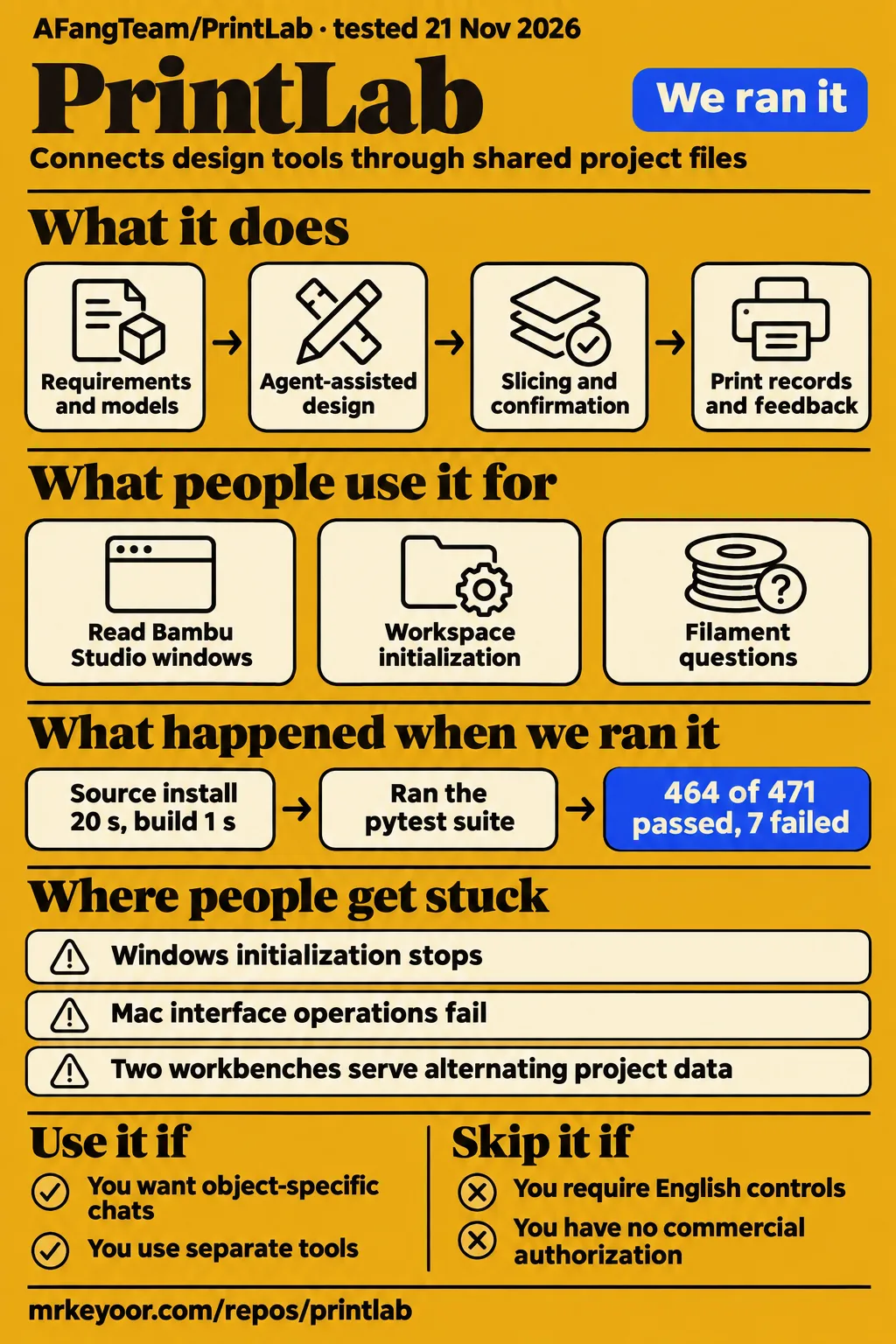
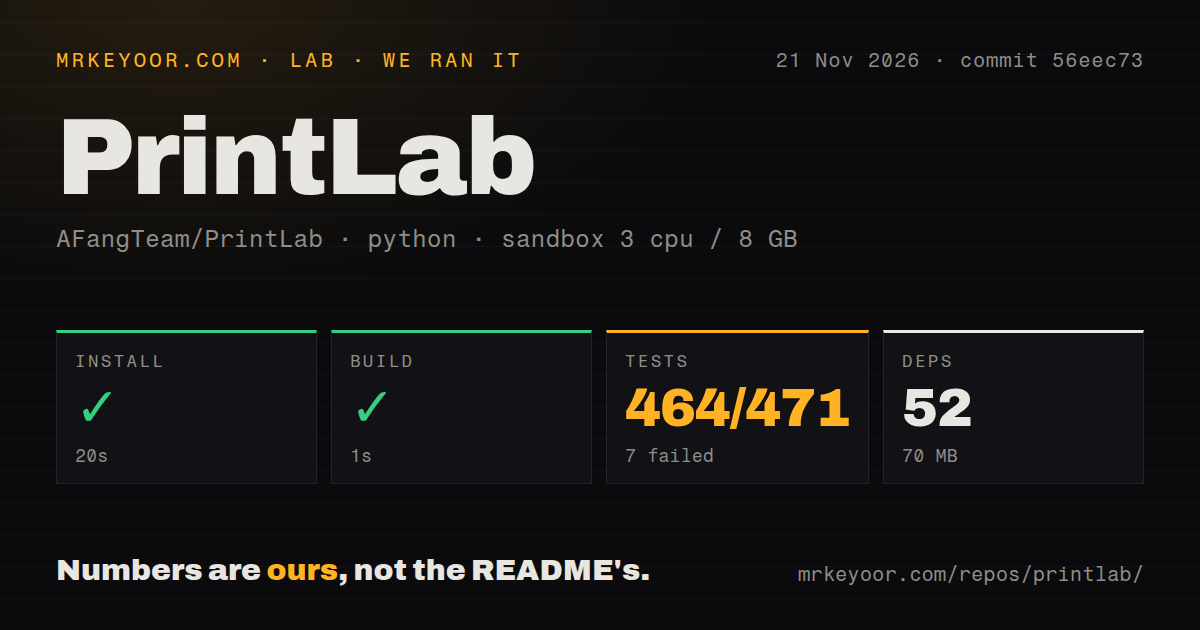
Our PrintLab source run installed in 20 seconds and built in 1 second, then tests failed with 464 passed, 7 failed and 46 skipped. Those are our November 21 measurements at commit 56eec73. AFangTeam/PrintLab is worth considering for personal Bambu projects when you want design decisions, models and print records kept together across agent sessions. Its README describes a Chinese workbench and a noncommercial license. Choose it for that coordination job, with the separate tools and permissions it requires.
What you can do with PrintLab
AFangTeam/PrintLab connects agent-assisted design, CAD, slicing comparisons, materials and print records in a Mac or Windows workspace, according to its README. CAD is the model and dimensional work that precedes slicing into printer instructions. PrintLab contributes the workbench, collaboration workflow and adapters. Text-to-CAD supplies modeling and viewing tools, Bambuddy supplies printer information and captured history, and Bambu Studio handles slicing and official print submission. Each component has its own installation and license.
The README gives each object a task-group chat and project. Requirements, selected references, source models, slices and physical feedback stay together for later sessions. Sarah, the printing advisor, tracks equipment, filament and parts; Mike, the workflow designer, maintains connections and procedures. These roles use prompts, files and commands. Their available models and tools come from the user's agent installation, so the role names describe responsibilities rather than independent services bundled with the workbench.
This arrangement is useful when an object needs several revisions. Keeping a chosen material beside the model and its earlier decisions gives the next conversation concrete context. The documented workflow moves through dimensions, views, CAD revisions, material choices, slice comparisons and confirmation of the exact print. The object-specific project provides a place for those decisions and the physical feedback that follows a print, rather than leaving each conversation to start with a fresh description.
What people use PrintLab for
Issue #7 describes a Mac workflow that reached readable Bambu Studio windows but required manual interface operations. Issue #4 describes Windows initialization under a regular user account. These reports show two different points in adopting PrintLab: operating an existing application through Codex and getting the workspace initialized. They are attributed user accounts, with their own configurations and outcomes, rather than additional runs behind our installation figures.
| Configuration | Reported use and outcome | Source |
|---|---|---|
| MacBook Air, Codex, Bambu Studio and Bambu A1 | Window reading and screenshots worked; interface-operation calls returned errors and the user took over manually. | Issue #7 Mac operation report |
| Windows 11, v0.3.0, regular user account, DeepSeek Harness, no printer connected | Workspace initialization encountered private-directory permission handling; the reporter describes revised ACL handling. | Issue #4 Windows permission report |
The Mac sequence distinguishes reading an application from controlling it. In issue #7, the user could obtain a screenshot, then receive noWindowsAvailable during an operation call. After the user completed the interface steps manually, Codex could read the updated window state. Someone choosing PrintLab for chat-driven Studio operation should consider that reported sequence alongside the README's description of the broader design workflow.
The X account hsianghui describes PrintLab as a Mac and Windows workbench pairing Codex with Bambu printers, with roles for filament questions, tool connections and individual objects. That description matches the project's coordination model. The two issue reports add operational detail to the same adoption question: one concerns using an existing application, while the other concerns creating the initial workspace under an ordinary Windows account.
What happened when we ran it
Our November 21 source run at commit 56eec73 completed installation and build, then returned test exit code 1. Installation took 20 seconds, recorded 52 dependencies and used 70 MB on disk. The build took 1 second. The outer test step took 27 seconds; pytest's final line reported 7 failed, 464 passed, 46 skipped and 1 warning in 24.41 seconds in our source-run log.
| Source-run step | Result | What the result means |
|---|---|---|
| Install | Succeeded in 20 seconds; 52 dependencies; 70 MB on disk | The recorded dependency step completed. |
| Build | Succeeded in 1 second | The recorded build step completed. |
| Tests | Exit 1 after 27 seconds; 464 passed, 7 failed, 46 skipped | The suite failed, with inspector and history-recovery errors in the tail. |
Three named inspector tests raised WorkflowError with 离线检查器未安装, meaning the offline inspector was not installed: test_real_public_mcp_inspector, test_prepared_check_uses_real_public_inspector and test_workbench_api_through_official_reservation_with_real_inspection. The recorded error directs the user to python scripts/install_inspector.py and says no print was sent. This is the command reported by the failed tests, rather than an installation step completed during the run.
Three other named failures reported Regex pattern did not match: test_real_inspector_rejects_overheat, test_real_inspector_rejects_wrong_plate and test_inspector_refuses_changed_artifact_before_launch. The seventh was test_normal_cli_entry_point_with_http_archive_source in test_preview_recovery.py. Its history-recover subprocess raised CalledProcessError, and the recorded command ends at --manifest. Naming these failures preserves what happened behind the aggregate count instead of letting 464 passing cases obscure the failed command.
The separate November 22 application attempt stopped at the runner's safety step. Its failure record says unsafe repo: none of compose.yaml, compose.yml, docker-compose.yaml, docker-compose.yml exists (rule: a compose file is required). The run-summary record nevertheless says it deployed with its own Docker Compose, with every port bound to 127.0.0.1. The failed step determines our reported outcome: blocked application attempt. The teardown record says teardown: ok.
The source-run sandbox recorded 3 CPUs, 8 GB RAM and image ghcr.io/astral-sh/uv:python3.12-bookworm. Repository measurements were 219 files, approximately 17,732 source lines and a 1.5 MB checkout. The scan found one CI workflow, a tests directory and no Dockerfile. These figures describe the checkout and recorded source steps; the separately installed printing applications have their own installation requirements.
Where people get stuck: Windows permissions and Mac operations
Windows reports describe private-directory permissions and two workbenches sharing port 8018; the Mac report describes failed interface-operation calls. Issues #4 and #5 concern v0.3.0 at 3583cb1. Keeping the reported version beside each Windows symptom distinguishes those reports from our source run at 56eec73, which used a different checkout and tested a different part of the workflow.
| Symptom | Reported detail | Response in the evidence |
|---|---|---|
| Windows initialization stops | SetAccessControl encounters missing SeSecurityPrivilege |
Issue #4 describes an icacls fallback that resets the ACL before restricting access. |
| One URL alternates between workspaces | Two processes bind port 8018; /api/projects alternates between P001 and an empty list |
Issue #5 proposes Windows SO_EXCLUSIVEADDRUSE; the setup guide documents a separate port. |
| Studio reading succeeds but operations fail | Calls return noWindowsAvailable, with earlier timeoutReached and "Computer Use is not active" errors |
Issue #7 records manual takeover followed by successful reading of the updated state. |
The permission report concerns the privacy of the directory as well as initialization. An ACL controls which identities can access files. The issue #4 reporter found that removing inherited permissions alone left existing explicit entries intact. Their revised sequence reset the ACL before writing restricted permissions, converging on the current user and SYSTEM from both clean and prepopulated directories. That is a more specific response than running the whole application as administrator.
The port report describes a page that loaded and returned HTTP 200 while showing alternating project data. A successful HTTP response therefore accompanied the wrong workspace state in issue #5. For separate workspaces, the setup guide's port example is bash scripts/start.sh --port 18018. Giving each workspace its own address follows the documented setup approach and associates the address with its intended project collection.
Installation starts with Python 3.11+ and Node.js 22+
The README requires Python 3.11+ and Node.js 22+ for manual installation; Mac support starts at macOS 14+, with Apple Silicon recommended. Windows has native PowerShell setup and start scripts. The README installation instructions create an empty workspace and local configuration, then expose the workbench at http://127.0.0.1:8018. Running setup again preserves existing settings, according to that documentation.
The manual shell sequence clones the repository, enters PrintLab, runs bash scripts/setup.sh and then bash scripts/start.sh. Windows instructions instead invoke scripts/setup.ps1 and scripts/start.ps1 through PowerShell. These are documented installation routes, distinct from our Python source run in Harness/. The setup extract says Open . without a destination; the README supplies the concrete local address above, resolving that reading problem without inventing another endpoint.
Tool connections and print confirmation are separate steps
PrintLab's README assigns printer status and print-record management to independently installed Bambuddy, and slicing and official submission to Bambu Studio. Its installation prompt asks the agent to report specific actions needed for device information, login or system permissions. Installing the workbench therefore precedes connecting the equipment and applications that populate it with useful project and printer information.
The documented workflow includes confirmation of the exact print after comparing slices and selecting materials. The README's workbench description also lists prepared packages, material mappings, task-specific confirmations and execution receipts. A fresh installation begins with an empty project collection and an unconfigured printer. The useful next step is to follow the onboarding instructions for the actual equipment and record the connection status before treating the workspace as ready for a printing task.
English instructions lead to a Chinese workbench
The workbench UI is Chinese, while the default README, installation guide and core collaboration guides are English. Some detailed references and project templates also remain Chinese, according to the README language statement. Its demonstration video has Chinese audio. Readers choosing the software for another person should distinguish the language of installation instructions from the language that person will encounter while operating the workbench.
The README says an agent can explain material in the user's preferred language. That fits the chat-based workflow, where the agent helps interpret project files and setup steps. English documentation supports maintaining the connections, while Chinese controls are part of using the documented interface. For someone who wants to operate the workbench directly, that difference belongs in the adoption decision before installation begins.
Recorded history comes from Bambuddy and local collections
PrintLab displays print history already captured by Bambuddy and locally maintained inspiration collections, according to its README history description. The workbench also presents model previews, design revisions, material mappings, prepared packages and execution receipts. Those records support the object-centered workflow: a project's earlier model and material decisions can sit alongside the print information collected through its connected tools.
The README documents thumbnail recovery through history-recover using Mac Studio caches or explicitly linked local PNG and 3MF files. That makes the failing HTTP-archive recovery test relevant to this feature rather than an unrelated test statistic. The source log gives the subprocess name and exception, while the README describes the intended recovery inputs. Both facts belong in an account of archive recovery: the documented feature and the failed source test.
PrintLab vs Bambu Studio and Bambuddy
Bambu Studio lists slicing and GCode viewing, while Bambuddy describes itself as a self-hosted command center for Bambu Lab printers. They are also components credited by PrintLab, so choosing between them means deciding which job needs another workspace. PrintLab adds object-specific chats and shared context across design and printing tools. A reader who mainly needs slicing or printer management can choose the corresponding component directly.
| Project | Documented job | Choose it directly when |
|---|---|---|
| PrintLab | Agent collaboration workflow, workbench and adapters | You want object-specific chats with models, decisions and print records together. |
| Bambu Studio | Slicing, GCode viewing, multiple plates, remote control and monitoring | You have a model and want to prepare its print in the slicer. |
| Bambuddy | Self-hosted Bambu printer command center | Printer management is the main job. |
Bambu Studio's README lists global, object and part-level slicing parameters alongside multiple-plate management and material tools. Bambuddy's README says every print it starts flows through the same queue scheduler. These documented roles give a starting point for choosing the workflow. Add PrintLab when maintaining the design conversation across those tools is itself the problem you want to solve; its adapters and project context are the additional layer.
FAQ
Issue #7 reports noWindowsAvailable during Bambu Studio operations even though window reading and screenshots succeeded. The reporter completed the interface steps manually, after which Codex could read the updated state. The Mac operation report concerns a MacBook Air and Bambu A1 configuration; the Windows questions below concern initialization and simultaneous workbench instances in v0.3.0.
Which PrintLab does this review cover, and how does AFangTeam/PrintLab differ from similarly named printing services and education platforms?
This review covers AFangTeam/PrintLab, the Mac and Windows workbench for Codex and Bambu printers. The separate PrintLab education platform describes online 3D-printing courses and projects. Its curriculum, student access and certification instructions concern that education service. For installation and troubleshooting of the software reviewed here, use the full repository name, AFangTeam/PrintLab, rather than transferring information between products that share "PrintLab."
Why does controlling Bambu Studio through Codex return noWindowsAvailable even when screenshots and window reading work?
Issue #7 identifies the errors as coming from Codex's Computer Use calls rather than PrintLab's sending helper. The report records successful reading and screenshots followed by failed interface operations, including noWindowsAvailable, timeoutReached and "Computer Use is not active." Its practical workaround was to complete the interface operations manually and then let Codex read the updated state.
How can PrintLab initialization succeed on Windows without administrator privileges when SeSecurityPrivilege is missing?
Issue #4 describes an icacls fallback that resets the private directory's ACL before applying restricted permissions. The reporter's comparison used clean directories and directories containing explicit access entries. Resetting first removed entries that otherwise survived the inheritance change, leaving the current user and SYSTEM. This answer concerns the reported permission-handling sequence in v0.3.0 rather than a recommendation to grant the entire workflow administrator privileges.
Why can two Windows workbenches use port 8018 at the same time and show different project data?
Issue #5 attributes the behavior to SO_REUSEADDR on Windows and proposes SO_EXCLUSIVEADDRUSE. The port-binding report describes /api/projects alternating between one workspace's P001 and another's empty list while both instances ran. The setup guide documents choosing another port for a separate workspace. Distinct workbench addresses are the documented setup response, while the issue explains the simultaneous binding observed in the reported version.
What we have not tested yet
Our source measurements cover commit 56eec73; the November 22 application attempt stopped at the Compose-file requirement. We did not assess a supported Mac or Windows installation, complete a physical print, measure print quality, operate a print farm or measure sustained memory use. The image label records sandbox configuration rather than proving actual runtime versions. The harness shorthand "of 471" excludes the additional skipped cases from that apparent total, so the page reports the individual pytest counts without a passing percentage.
The README's Mac sending helper targets X2D, Chinese Bambu Studio 02.08.02.61, a 0.4 mm nozzle, one main AMS filament, the left main nozzle and one Textured PEI plate. It also describes eligible Bambuddy queue combinations for A1, A1 mini, P1S and X1 Carbon. We have not exercised those routes, physical acceptance or reconciliation after an unknown send outcome. The README says A1 external-spool automatic dispatch is not adapted. Older Bambu Cloud history and MakerWorld account-collection imports are outside PrintLab's stated scope.
The failed inspector cases do not demonstrate physical protections operating on a printer, and the truncated recovery exception does not identify its cause. Installing the inspector was the log's suggested action, not a completed follow-up test. The Mac report does not identify the underlying failing component or establish a completed print. The closed Windows issues do not identify a fixed release or independently demonstrate current behavior. Release metadata separately lists v0.5.0, published November 21, 2026; it contains no tag-to-commit resolution connecting that release to 56eec73.
We have not audited credential storage, assessed API-key scopes or device-directory configuration, benchmarked the alternatives side by side, or assessed a particular business's commercial authorization. PrintLab-authored code and documentation use PolyForm Noncommercial 1.0.0; the README requires separate authorization from AFangTeam for commercial use. The unassessed ratings reflect the installation and operational evidence available, rather than assigning numerical credit for adoption, support capacity or production reliability. Rendered layout, resolved links, automatic related links, recommendation modules and template content also remain untested.