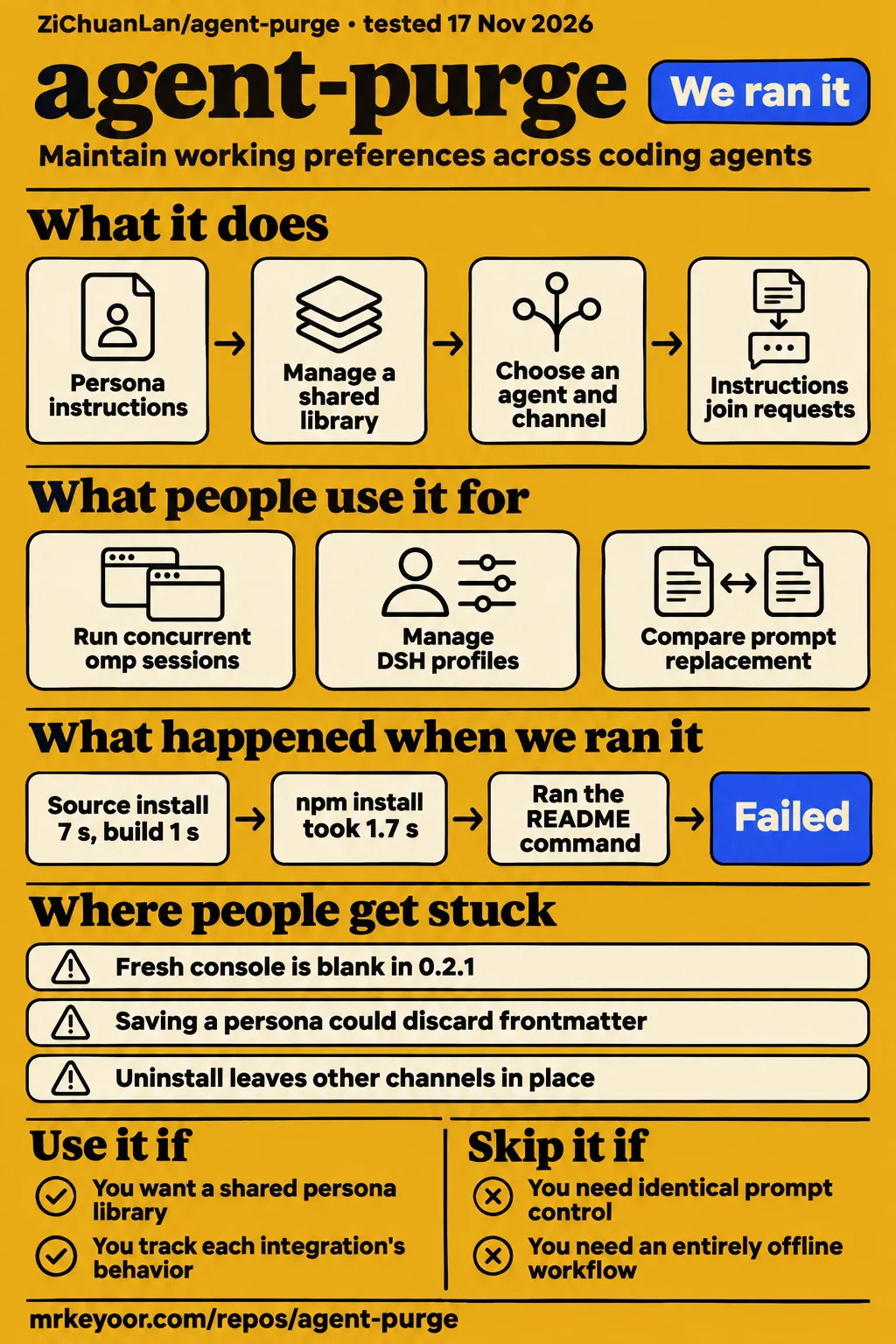
Use agent-purge if you maintain the same working instructions across several coding agents and want a shared persona library. Skip it if your requirement is identical prompt control in every agent or an entirely offline workflow. In our sandbox, installation, build and tests succeeded. The separate CLI exercise stopped before a real agent task, so the most useful adoption evidence comes from the integration reports below.
What people use agent-purge for
Developers in the supplied issue threads used agent-purge to run concurrent omp sessions and manage DSH profiles, with outcomes that depended on the integration version.
| Who used it | What they did | What happened |
|---|---|---|
| The macOS reporter of issue #8 | Launched multiple omp sessions through a shim with persistent slash and install channels | A redundant restore lock blocked the second session. Their local patch allowed identical-content launches; the maintainer shipped the fix in 0.2.18. |
| The reporter of issue #3 | Used DSH web and headless profiles with slash controls | They said normal use worked, but status checks opened a nonexistent desktop-profile file. The maintainer reproduced the configuration and fixed it in 0.2.9. |
| The maintainer in issue #4 | Checked DSH startup and restoration against a real DSH release | They reported failed startup before the YAML fix, successful startup afterward, and original-byte restoration on uninstall. |
| The project author, described in the deep dive | Compared prompt replacement with canaries, refusal probes and a separate judge model | The article reports refusal-to-compliance changes for tested DeepSeek pairings. Its experimental boundaries are collected at the end of this review. |
These are useful because they describe someone doing something beyond opening a dashboard. They also suggest the right first evaluation: choose the agent and launch route you actually use, then exercise that route. A shared persona file is only the beginning. An extension, a command shim and a project rule file reach the host through different paths.
What happened when we ran it
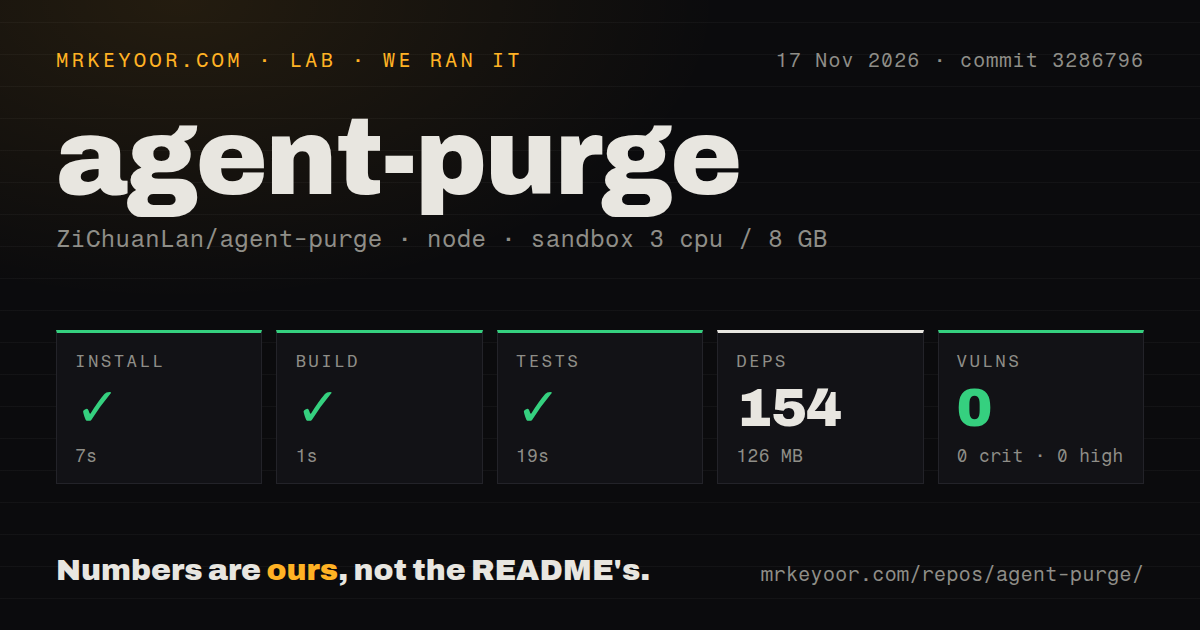
Our source sandbox installed agent-purge in 7 seconds, built it in 1 second and completed the test step successfully in 19 seconds at commit 3286796 on 2026-11-17.
| Source check | Recorded result |
|---|---|
| Installation | Succeeded in 7 seconds; 154 dependencies recorded; 126 MB on disk |
| Build | Succeeded in 1 second |
| Tests | Succeeded in 19 seconds |
| npm audit | 0 known vulnerabilities: 0 critical, high, moderate or low |
| Checkout | 232 files, approximately 25,105 source lines, 3.1 MB |
| Repository signals | 4 CI workflow files, a tests directory, no Dockerfile |
| Sandbox configuration | 3 CPUs, 8 GB RAM, image label lab-node:22 |
Those results make source setup an encouraging part of the decision. The recorded configuration identifies the sandbox allocation and image label; actual runtime and operating-system versions require the raw toolchain logs. The dependency footprint belongs to this source run, not every distributed executable.
The separate quickstart CLI run used commit 3286796669ea on the same date in an unprivileged container configured with 2 CPUs, 4 GB RAM, no published ports and no secrets. It recorded a clone step and an npm package installation. Its CLI observations are more revealing than another installation headline.
| CLI step | Observation | Meaning for a first launch |
|---|---|---|
| Clone | The quickstart-cli recipe cloned the project | The recipe reached the checkout stage |
| Package setup | The recorded global npm command installed agent-purge 0.2.36 | The subsequent CLI checks had a package available |
| Version request | agent-purge --version exited 0 but returned a Chinese missing-default-harness message |
Exit status alone did not demonstrate a useful version response |
| Help | agent-purge --help exited 0 and described shared state, persona switching and per-harness overrides |
Help was reachable |
| Usage task | FAILED: the recipe found no runnable command in the README usage/examples sections | The automated exercise stopped before a real agent task |
| Teardown | Recorded as ok | The recipe recorded successful teardown |
The version request is the detail to remember. A newcomer asking which version is running instead got instructions to choose a default in the browser or name a harness explicitly. The message gave a way forward, but it answered a different question. The English help output worked, making this a mixed CLI experience rather than a total startup failure.
The failed usage step also needs a narrow reading. Its log says the recipe could not find a runnable example in the sections it inspected. The current English README contains direct launch examples, including agent-purge codex --mode append. The recorded recipe failure therefore supports an incomplete automated walkthrough, not a claim that the project has no launch command.
Where people get stuck: match the error to the fixed version
The GitHub reports describe distinct failures in console rendering, profile discovery, generated plugins and cleanup; upgrading the package is sometimes only part of the repair.
| Reported symptom | What the thread says | Resolution or next action recorded |
|---|---|---|
| Fresh console is blank | Issue #1 reports 0.2.1 reading mode from null defaults and swallowing rendering errors |
Maintainer says 0.2.2 added fallbacks and visible errors; the thread also records a delay before npm publication |
| Persona metadata changes after saving | The same issue #1 reports dropped frontmatter, desc/description mismatch and broken model-array matching |
Maintainer says the defects were fixed in commit e48a131 for 0.2.2 |
| DSH status raises desktop-profile ENOENT | Issue #3 used only web/headless profiles | Maintainer reports the same two-profile reproduction passed with 0.2.9 |
DSH YAML ends with a stray -slash |
Issue #4 traces partial marker deletion and a separate empty-array problem | Maintainer reports 0.2.9 repairs both; upgrading and running agent-purge install dsh heals residue |
| DSH cannot import agent-purge | Issue #11 connects a dependency-resolution change to the old profile-local package layout | Maintainer shipped migration changes in 0.2.20 and home-path YAML escaping in 0.2.21 |
DSH slash plugin says hostProfile is not defined |
Issue #12 identifies a missing generated helper and an incompatible constant declaration | Maintainer reports 0.2.23 fixes the template; upgrade and rerun agent-purge install dsh to regenerate files |
| Windows shows a white rectangle or ignores another launch | Issue #9 describes a hidden browser app window and silent port-collision exit | Maintainer reports 0.2.19 changes browser launch visibility and reopens a confirmed running service |
For DSH, preserve the exact error text before changing anything. ENOENT for a desktop plugin, a YAML parse failure and a missing JavaScript helper are different problems. Deleting a data directory is a poor substitute for identifying which one you have: the missing-helper reporter had already tried a fresh installation.
For hand-written personas, my recommended check is simple: copy the file, save it through the editor, then compare description, harness, order and every model value with the copy. That check follows directly from issue #1's reported data loss. It checks the metadata you rely on instead of treating a successful Save button as sufficient evidence.
Concurrent sessions exposed a lock that dry-run skipped
Issue #8 reports that a successful dry run could miss a lock that blocked the second omp session.
The reporter had enabled shim, slash and install channels. With the first terminal still running, the second launch failed because the restore journal was exclusively held. Yet the existing extension and replacement extension were identical. The launcher was protecting a write that changed nothing. The issue explicitly explains that --dry-run returned before the file-swap path, so it could not expose this problem. Issue #8
The maintainer's 0.2.18 fix compares content before taking the lock, skips identical swaps, attempts recovery for dead journal holders and includes the holder PID in genuine conflicts. Concurrent changes to different contents still conflict. That distinction matters if your normal work involves several terminals: test overlapping launches with the same enabled extensions, then test what happens when configuration changes. A single successful launch answers neither question.
Local personas still travel to model services
The README says persona text goes to the host's configured model provider, and the Chinese README also states that update checks contact GitHub.
The console binds to 127.0.0.1; the project tells users not to expose it publicly. Persona storage defaults to ~/.agent-purge/, with AGENT_PURGE_HOME available to change that location. Local storage describes where you manage the files. Once enabled, those instructions join requests made by your coding agent. Keep secrets out of a persona that you intend to reuse across providers. README
Prompt strength also changes what instructions survive. The English README describes append as keeping host instructions, replace as approximately replacing identity lines, and strict as replacing controllable host prompt text. It explicitly warns that strict mode does not guarantee the model receives only your persona. Host text and request roles depend on the channel. For ordinary working preferences, I would start with append and inspect the chosen integration before removing host instructions. English mode reference
Cleanup has a wider scope than uninstall
The current README recommends agent-purge clean to revoke all registered managed takeovers while retaining personas.
A narrower command such as agent-purge uninstall dsh removes that harness's persistent configuration while leaving other channels alone. Issue #5 explains why this distinction became necessary: the reporter still had slash integration after uninstall, and the maintainer found that launcher injection could continue through the default mode. Version 0.2.10 corrected disarm semantics, including a named target accidentally affecting other harnesses.
Before removing the npm program, the documented sequence is agent-purge clean, followed by npm uninstall -g agent-purge. Keep recovery files when restoration reports a conflict. The Chinese README says content already sent in historical sessions cannot be recalled. Cleanup is a configuration operation, not deletion of messages from a model provider. Current cleanup instructions
English docs exist, but support threads often need translation
The default README is Chinese and links to an English README; our CLI version request also returned Chinese guidance.
The English README covers startup, modes, application scopes and cleanup. It labels the detailed compatibility reference as Chinese. The issue threads used for this review are largely Chinese, with executable commands and errors that remain useful across languages. An English-speaking developer can begin with the translated README, but diagnosing DSH's generated plugin or restore behavior can require reading those threads through translation. English README
There is also a concrete documentation mismatch: the English support summary lists Auggie as append-only, while the Chinese README describes an override switch. For that integration, inspect the detailed compatibility evidence for your version rather than assuming the translated summaries agree. This review's recommendation does not depend on Auggie's replacement support.
agent-purge vs pi-purge and separate agent configuration
The practical choice is whether to manage instructions across several hosts or keep changes inside one host's existing configuration.
| Option | Documented scope | Pick it when |
|---|---|---|
| agent-purge | Shared personas across multiple coding agents, with launch, installed, slash and project channels | You maintain the same instructions in several tools and will track each integration's behavior |
| pi-purge | Pi extension for switching a session's prompt between stock, trimmed and persona forms | Your prompt experiments are centered on Pi and you want its session controls |
| Separate native configuration | Each agent keeps its own instructions; the Hotrepo overview describes copying and synchronization as the tradeoff | You prefer each host's own instruction path and accept keeping the files in sync |
The pi-purge README describes a Pi extension for system-prompt experiments. The supplied deep dive calls it the author's predecessor to the broader agent-purge project. That supports a scope comparison. The Hotrepo overview supplies the rationale for centralization versus maintaining instructions separately.
OpenCode is another project to consider if consolidating onto one coding agent is acceptable. Its README describes an open-source AI coding agent. It belongs on a different decision branch: choosing the agent itself rather than adding a shared persona layer to several existing agents. Switching tools solely to avoid synchronizing instructions would be a bigger decision than this review supports.
What the other reviews get wrong
Reveneau's persona-only description of strict mode conflicts with the current README's explicit warning that hosts can still add text.
Reveneau also says agent-purge makes no network calls on its own. The current Chinese README names GitHub update checks, while both the README and the later Devtoolwatch review explain that personas go to the selected model service. Those are separate network paths, and both matter when evaluating an offline requirement. Reveneau, Devtoolwatch
FreeLLMArena's claim about swapping personas without touching disk files needs a channel attached to it. Persistent installation writes configuration or plugins, while static entry points need a new session. Dynamic updates describe particular host callbacks, not every launch route. Reveneau's broad restoration wording also misses the uninstall residue documented in issue #5. Use the current cleanup scope instead. FreeLLMArena, issue #5
The deep dive goes further than its experiment when it concludes that refusal behavior mostly lives in the client harness. Its own stated limits are one downstream model, one author and one or two repetitions per cell. The reported results belong to those tested pairings. They do not justify a general claim about model safety or coding quality. Deep dive
Questions people ask
Run agent-purge clean to revoke all registered managed takeovers while keeping your personas, according to the current README.
How do I completely disable agent-purge and remove every active injection channel?
Use agent-purge clean for the current documented cleanup path. For the historical behavior, issue #5 says 0.2.10's disarm --all revokes channels and sets the master mode off. A named uninstall has a narrower scope. README, issue #5
How do I uninstall the Windows portable version when its files are still in use?
End the agent-purge.exe background process, then delete the portable files. The maintainer suggested Task Manager or taskkill /f /im agent-purge.exe, and the reporter confirmed success. Clean up registered takeovers before deleting the executable you need for cleanup. Issue #7
Why is the web console blank on a fresh installation?
Version 0.2.1 had a null-default rendering failure. The maintainer says 0.2.2 fixed the fallback and error reporting; the thread records that the source fix initially preceded npm publication. Check the installed package rather than assuming a merged change reached it. Issue #1
Will saving a persona in the web console preserve its frontmatter and model matching?
The maintainer reports fixes for the metadata and model-array defects in commit e48a131 for 0.2.2. For a hand-written persona, retain a copy and compare its metadata after saving. The reported defect affected matching and ordering, not just the description shown in the UI. Issue #1
How do I install the magpie plugin and initialize its persona directory?
Point magpie at the repository's magpie-plugin subdirectory, then initialize personas with agent-purge web or agent-purge ls before running gen-personas.mjs. The maintainer also identified a malformed AGENT_PURGE_HOME path in the report and advised correcting or removing it. Issue #2
Why does DSH report ENOENT for a desktop-profile plugin when I only use web or headless?
The status check assumed a desktop plugin path even in the reported two-profile setup. The maintainer reproduced that failure and reports it fixed in 0.2.9. Creating an unused desktop profile is not the repair described by the thread. Issue #3
How do I repair DSH YAML after uninstall leaves a stray -slash line?
Upgrade past the fix shipped in 0.2.9 and rerun agent-purge install dsh; the maintainer says this heals orphan -slash lines. Manually deleting only the stray line was the interim workaround. Preserve the configuration before editing it. Issue #4
Can I run multiple omp or Pi sessions with persistent slash integration enabled?
Version 0.2.18 removes the redundant lock when extension contents are identical. Different-content swaps remain mutually exclusive. The reporter demonstrated the original failure with concurrent omp launches, and the maintainer says Pi uses the same relevant extension mechanism. Issue #8
Why does the Windows app show a white rectangle or do nothing when launched again?
Issue #9 identifies browser launch hiding and silent port-collision handling as separate causes. The maintainer reports fixes in 0.2.19, including opening a window on a confirmed existing agent-purge service. This answer describes that reported regression, not every possible Windows launch failure. Issue #9
How do I fix DSH failing to import the agent-purge package after an upgrade?
Use the migration fix shipped in agent-purge 0.2.20; issue #11 also records YAML path escaping fixed in 0.2.21. The thread ties the import error to DSH's changed dependency resolution and the former profile-local plugin layout. Issue #11
How do I fix hostProfile is not defined in the DSH slash plugin?
Upgrade to a version containing the 0.2.23 fix, then rerun agent-purge install dsh. The maintainer explicitly says reinstalling regenerates and overwrites the installed plugin files. Updating the package without regenerating those files misses the documented repair step. Issue #12
Does strict mode guarantee that the model sees only my persona?
No. Strict replaces text at controllable entry points, and the host can still add instructions. The effective role can be system, developer or project context. A persona name in an answer is insufficient evidence of which prompt layers reached the model. English README
What we have not tested yet
Our evidence covers source checks and a CLI walkthrough that stopped at usage discovery; it contains no completed coding task or live prompt-capture result from our lab.
We have not tested the Windows app, real macOS hardware, browser console editing, DSH plugin regeneration, concurrent omp/Pi sessions or conflict restoration ourselves. Those findings above are attributed reports. Issue #1's extract ends before the complete metadata-fix implementation, and issue #2 does not include a final successful plugin-install confirmation. The pack contains no screenshots or known-answer task responses to evaluate.
The author's DeepSeek prompt experiments use a small sample and cannot establish universal model behavior. Neither those experiments nor our passing source checks establish improved coding outcomes, maintenance savings or sustained team adoption. Stars measure attention. The public GitHub facts retrieved on 2026-11-17 show a last push that day; the sampled issue replies document active repairs, not a support guarantee.
The supplied X and Bilibili results include dsh-purge, while the YouTube records concern unrelated meanings of purge. We excluded them as evidence of agent-purge use. Search relevance is not interchangeable with adoption. No side-by-side performance result for the alternatives accompanies this review.
A useful next test is a disposable project with your actual host and channel: inspect the outgoing instructions, overlap the sessions you normally keep open, save a copied persona, then clean up and compare the managed files with their originals. That would connect this review's encouraging source results to the configuration behavior you intend to rely on.