torchvision review
torchvision is PyTorch's official package for computer-vision datasets, pretrained model families, image decoding, tensor drawing operations, and transforms that understand images, masks, boxes, and keypoints. Its weight enums pair checkpoints with metadata and the preprocessing needed to reproduce expected input. Version 0.28.0 is the companion release for torch 2.13. It lets resize transforms accept interpolation strings, preserves metadata when wrapping custom TVTensor subclasses, corrects `NEAREST_EXACT` resizing for masks, and fixes a malformed-GIF decoder bug that could write outside its allocated tensor. Our clean Python environment grew to 4,657 MB, so this is a framework-level dependency rather than a casual image helper.
torchvision 0.28 is the sensible baseline for PyTorch vision models, structured-target transforms, and official weights. Avoid it for basic image work, pin it with torch 2.13, and review dataset and checkpoint licenses before treating a downloadable asset as production-safe.
We installed it
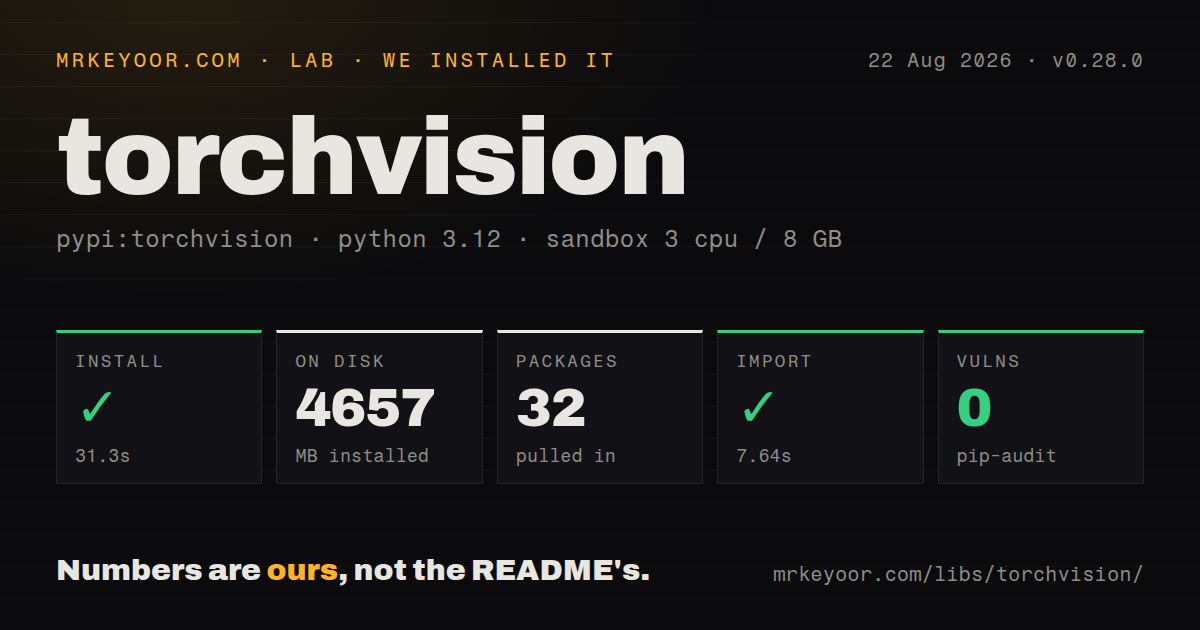
| Install | ✓ · 31.3s | 32 packages on disk · 4657 MB |
| Import | ✓ | import torchvision in 7.64s · compiled extensions · requires Python >=3.10,!=3.14.1 |
| Known vulns | 0 | (pip-audit) |
Answers from our run
Does torchvision install cleanly?
Yes. In a fresh container with an empty cache, pip install torchvision finished in 31 seconds, leaving 32 packages and 4657 MB on disk. pip-audit reported no known vulnerabilities.
What does torchvision need to run?
Python >=3.10,!=3.14.1, and a platform wheel with compiled extensions. In our run import torchvision succeeded in 7.64s.
torchvision or timm: which should you use?
timm: Use it for a larger and faster-moving catalog of pretrained image backbones and classifiers. torchvision 0.28 is the sensible baseline for PyTorch vision models, structured-target transforms, and official weights.
When should you not use torchvision?
The job is resizing, thresholding, measuring, or reading ordinary images without a PyTorch model. Our install used 4,657 MB; Pillow, OpenCV, or scikit-image is a better-sized dependency.
Use it if
- A PyTorch training or inference pipeline needs official ResNet, ViT, detection, segmentation, or keypoint weights with matching preprocessing.
- Images, bounding boxes, masks, and keypoints must receive the same random crop, resize, or flip through transforms v2.
- Common datasets such as CIFAR or COCO should plug into a DataLoader through documented dataset classes.
- Inference code needs torchvision's compiled operators, image codecs, box utilities, non-maximum suppression, or ROI operations.
- The job is resizing, thresholding, measuring, or reading ordinary images without a PyTorch model. Our install used 4,657 MB; Pillow, OpenCV, or scikit-image is a better-sized dependency.
- The environment cannot pin torch and torchvision as a pair. Version 0.28 requires torch 2.13.0, and mismatches commonly surface as missing compiled operators at import or runtime.
- You need current video decoding or encoding APIs. Torchvision removed `read_video`, `write_video`, `VideoReader`, and related utilities in 0.26 and directs users to TorchCodec.
- A broad and fast augmentation catalog is the main requirement. Albumentations has more CPU-oriented image transforms, while torchvision is strongest when targets and tensors stay in the PyTorch workflow.
- Every pretrained weight must allow commercial use without separate review. The README says model terms can follow their training data and specifically identifies SWAG weights as CC-BY-NC 4.0.
Setup reality
We installed torchvision 0.28.0 in a fresh Python 3.12 Bookworm container. The install took 31.3 seconds, left 32 packages, and used 4,657 MB on disk. Package metadata has 5 direct requirements, including the exact torch==2.13.0 pair. It requires Python 3.10 or newer while excluding Python 3.14.1, ships compiled .so extensions, and has no py.typed marker. pip-audit reported zero known vulnerabilities. import torchvision worked in 7.64 seconds.
Use PyTorch's install selector for the target operating system and accelerator. CPU and CUDA wheels come from chosen package indexes, and a lockfile can resolve a build that does not match the deployed driver or hardware if the index is implicit. Upgrade torch and torchvision together. An incompatible pair can install successfully, then fail when an operator such as NMS is registered or called because its compiled symbols do not match.
Pretrained weights download on first use into the torch cache unless already present. Dataset classes also fetch archives when download=True; some datasets are large, need manual files, or require acceptance outside the package. The torchvision README disclaims dataset quality, fairness, hosting, and license rights. Review the dataset and the specific weight enum's terms before production, especially SWAG's noncommercial restriction.
Transforms v2 can update images and structured targets together, but only when boxes, masks, and keypoints carry the right tv_tensors metadata such as canvas size and coordinate format. Keep the original uint8 image for drawing, since models usually receive normalized floats. DataLoader worker counts, pinned memory, decode path, device transfer, and augmentation placement need profiling; the 7.64-second cold import we measured also matters for short-lived jobs.
Patterns
Run the default ResNet-50 weights classify-pretrained-image
import torch
from torchvision.models import resnet50, ResNet50_Weights

weights = ResNet50_Weights.DEFAULT
model = resnet50(weights=weights).eval()
batch = weights.transforms()(image).unsqueeze(0)

with torch.inference_mode():
    scores = model(batch).softmax(dim=1)[0]
label = weights.meta['categories'][scores.argmax().item()]
Use the transform attached to the chosen weights. Hand-written resize and normalization can produce plausible output with much worse accuracy.
Create a tensor training pipeline build-v2-transform
import torch
from torchvision.transforms import v2

transform = v2.Compose([
    v2.ToImage(),
    v2.RandomResizedCrop((224, 224), antialias=True),
    v2.RandomHorizontalFlip(),
    v2.ToDtype(torch.float32, scale=True),
    v2.Normalize(
        mean=[0.485, 0.456, 0.406],
        std=[0.229, 0.224, 0.225],
    ),
])
Import from `torchvision.transforms.v2`. `ToDtype(..., scale=True)` converts uint8 values to the floating range expected by normalization.
Map class folders into batches load-image-folders
from torch.utils.data import DataLoader
from torchvision.datasets import ImageFolder

dataset = ImageFolder('data/train', transform=transform)
loader = DataLoader(
    dataset,
    batch_size=32,
    shuffle=True,
    num_workers=4,
)
print(dataset.class_to_idx)
ImageFolder derives ids from sorted folder names. Confirm train and validation mappings match when either split lacks a class.
Train only a ResNet classifier head fine-tune-model-head
import torch.nn as nn
from torchvision.models import resnet50, ResNet50_Weights

model = resnet50(weights=ResNet50_Weights.DEFAULT)
for parameter in model.parameters():
    parameter.requires_grad = False
model.fc = nn.Linear(model.fc.in_features, class_count)
optimizer = torch.optim.AdamW(model.fc.parameters(), lr=1e-3)
Other architectures use different head attributes. Freeze after loading weights, replace the correct head, and pass only trainable parameters to the optimizer.
Decode an image into CHW uint8 decode-image-tensor
from torchvision.io import decode_image

image = decode_image('photo.jpg')
print(image.shape)
print(image.dtype)
The result is a channel-first uint8 tensor. Convert and scale it before normalization; keep uint8 when using drawing utilities.
Prepare a built-in training dataset download-cifar10
from torchvision.datasets import CIFAR10

train_set = CIFAR10(
    root='data',
    train=True,
    download=True,
    transform=transform,
)
The package does not grant dataset rights. Cache downloads for repeatable builds and review the original dataset terms before use.
Filter Faster R-CNN predictions detect-objects
from torchvision.models.detection import (
    FasterRCNN_ResNet50_FPN_Weights,
    fasterrcnn_resnet50_fpn,
)

weights = FasterRCNN_ResNet50_FPN_Weights.DEFAULT
model = fasterrcnn_resnet50_fpn(weights=weights).eval()
with torch.inference_mode():
    prediction = model([weights.transforms()(image)])[0]
keep = prediction['scores'] >= 0.8
boxes = prediction['boxes'][keep]
labels = prediction['labels'][keep]
Detection input is a list of image tensors, and output is one dictionary per image. Choose the score threshold for the application.
Annotate the original image draw-detection-boxes
from torchvision.utils import draw_bounding_boxes
from torchvision.transforms.v2.functional import to_pil_image

names = [weights.meta['categories'][index] for index in labels]
annotated = draw_bounding_boxes(
    image,
    boxes=boxes,
    labels=names,
    width=3,
)
to_pil_image(annotated).save('detections.png')
Draw on the original uint8 image. A normalized float tensor can yield wrong colors or unsupported value assumptions.
Flip an image and its boxes together transform-boxes-with-image
from torchvision import tv_tensors
from torchvision.transforms import v2

boxes = tv_tensors.BoundingBoxes(
    raw_boxes,
    format='XYXY',
    canvas_size=image.shape[-2:],
)
flip = v2.RandomHorizontalFlip(p=1.0)
flipped_image, flipped_boxes = flip(image, boxes)
BoundingBoxes metadata tells v2 how to update coordinates. A plain numeric tensor lacks format and canvas semantics.
Read semantic segmentation logits segment-image
from torchvision.models.segmentation import (
    DeepLabV3_ResNet50_Weights,
    deeplabv3_resnet50,
)

weights = DeepLabV3_ResNet50_Weights.DEFAULT
model = deeplabv3_resnet50(weights=weights).eval()
batch = weights.transforms()(image).unsqueeze(0)
with torch.inference_mode():
    logits = model(batch)['out']
mask = logits.argmax(dim=1)[0]
The model returns a dictionary, with primary logits under `out`. Check the weight metadata for its category set before interpreting mask ids.
Resize a mask with exact nearest interpolation resize-segmentation-mask
from torchvision.transforms import InterpolationMode
from torchvision.transforms.v2 import functional as F

resized = F.resize(
    mask,
    size=(512, 512),
    interpolation=InterpolationMode.NEAREST_EXACT,
)
Version 0.28 fixes Mask handling so this choice is honored. Earlier code silently used plain nearest interpolation for masks.
Install the matching framework pair pin-compatible-versions
python -m pip install 'torch==2.13.0' 'torchvision==0.28.0'Select the CPU or accelerator wheel index from pytorch.org for the deployment. Matching version numbers alone do not choose the correct CUDA build.
Alternatives
| Package | Registry | Pick it when |
|---|---|---|
| timm | PyPI | Use it for a larger and faster-moving catalog of pretrained image backbones and classifiers. |
| albumentations | PyPI | Use it when CPU augmentation variety and speed matter more than a native tensor-only pipeline. |
| kornia | PyPI | Use it for differentiable batched vision operations that stay on a PyTorch device. |
| opencv-python | PyPI | Use it for classic image and video processing without installing the torch training stack. |
More ai / ml guides
@modelcontextprotocol/sdk · openai · mcp · huggingface-hub · @anthropic-ai/sdk · openai · the whole shelf →
Related reading
How this guide is made: grounded in the library's documentation, release notes, changelog, and issue history, on a fixed rubric — not a hands-on install of every release. The 50 most-downloaded entries are additionally install-verified in clean containers. Corrections: contact the desk.