termcolor review
termcolor 3.3.0 adds ANSI escape sequences to a string with colored() or writes it through cprint(). Our Python 3.12 sandbox imported the pure-Python, typed package in 0.04 seconds. Foreground and background accept named colors or 3-value RGB tuples; attributes include bold, underline, reverse, and the italic option added in 3.3. can_colorize() decides whether codes should be emitted from call options, environment variables, TERM, and stdout behavior. Release 3.3.0 also handles OSError from fileno() during detection. The package has no table layout, progress display, cursor control, input handling, or Windows console translation.
Our termcolor 3.3.0 install took 0.1 seconds, occupied 1 MB as one pure-Python package, imported in 0.04 seconds, and had no audit findings, so it is enough for small CLI color accents. Choose Rich, Blessed, or Colorama when output needs structure, interaction, or legacy Windows translation.
We installed it
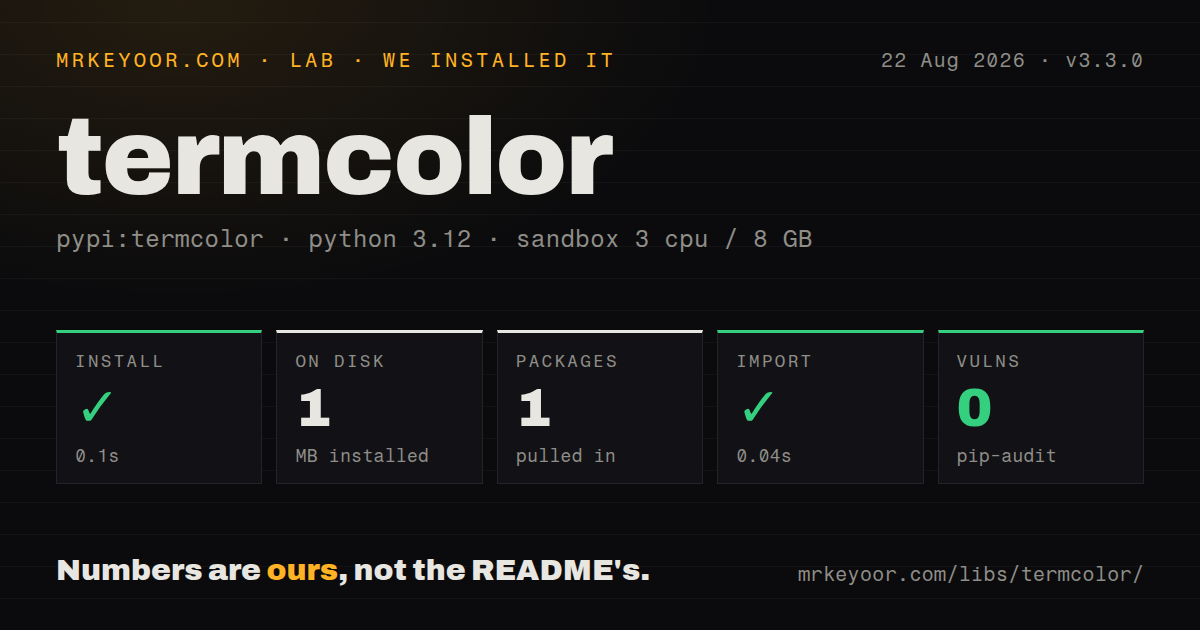
| Install | ✓ · 0.1s | 1 package on disk · 1 MB |
| Import | ✓ | import termcolor in 0.04s · pure Python · py.typed · requires Python >=3.10 |
| Known vulns | 0 | (pip-audit) |
Answers from our run
Does termcolor install cleanly?
Yes. In a fresh container with an empty cache, pip install termcolor finished in 0.1s, leaving 1 package and 1 MB on disk. pip-audit reported no known vulnerabilities.
What does termcolor need to run?
Python >=3.10, and nothing compiled: it is pure Python. In our run import termcolor succeeded in 0.04s, and the package ships py.typed for type checkers.
termcolor or colorama: which should you use?
colorama: Choose it to enable ANSI behavior on older Windows consoles or wrap streams. Our termcolor 3.3.0 install took 0.1 seconds, occupied 1 MB as one pure-Python package, imported in 0.04 seconds, and had no audit findings, so it is enough for small CLI color accents.
When should you not use termcolor?
Rich is the better fit for tables, panels, progress, tracebacks, markup, or wrapping because termcolor only styles text spans
Use it if
- termcolor 3.3 can add a few status colors while the script keeps Python's normal print flow
- NO_COLOR, FORCE_COLOR, ANSI_COLORS_DISABLED, TERM=dumb, and stdout detection need a documented precedence
- Named ANSI colors or 24-bit RGB are enough and a layout framework would add unused features
- Tests, redirected logs, and CI need per-call force_color or no_color overrides
- Rich is the better fit for tables, panels, progress, tracebacks, markup, or wrapping because termcolor only styles text spans
- Blessed or a TUI library is required for cursor movement, screen regions, keyboard input, or full-screen state
- Each colored() result ends with a reset, so nested spans cancel the outer style instead of restoring it afterward
- termcolor does not enable ANSI processing on a legacy Windows console; Colorama supplies that compatibility layer
- can_colorize() caches its decision, so code that swaps stdout or environment state must call cache_clear() to see the change
Setup reality
We installed termcolor 3.3.0 in 0.1 seconds in a fresh, unprivileged Python 3.12 Bookworm sandbox with 3 CPUs and 8 GB of RAM. One package occupied 1 MB, and pip-audit found zero known vulnerabilities. The pure-Python distribution declares 2 direct dependencies, requires Python >=3.10, and ships py.typed. import termcolor completed in 0.04 seconds. Our measurement recorded the license as unknown; current PyPI metadata declares MIT.
No credentials, config file, compiler, or background process are involved. colored() returns a string; cprint() forwards print arguments such as file, end, and flush. Unknown color names raise at runtime, and RGB values need exactly 3 integers from 0 through 255. Italic, blink, and other attributes vary by terminal, so the plain text must remain understandable when a terminal ignores them.
Color policy has a strict order. Per-call no_color comes before force_color. Nonempty ANSI_COLORS_DISABLED or NO_COLOR disables codes; FORCE_COLOR enables them; TERM=dumb and automatic detection come later. Empty environment values count as unset. can_colorize() caches the first decision, so a test that changes an environment variable or replaces stdout must call can_colorize.cache_clear() before checking the 3.3.0 behavior again.
cprint may write to stderr, but automatic detection still examines stdout. When those streams have different redirection, pass force_color or no_color from stderr.isatty(). Release 3.3.0 catches OSError from fileno(), covering streams that document that failure. Every colored span writes a final reset code; nested calls therefore cancel an outer style. Build adjacent colored pieces when a color must resume after an inner label.
Patterns
Build a bold red failure label color-string
from termcolor import colored

message = colored('Deploy failed', 'red', attrs=['bold'])
print(message)
colored() returns text containing the opening ANSI codes and a final reset when color is enabled.
Print and flush a green status print-color
from termcolor import cprint

cprint('42 checks passed', 'green', attrs=['bold'], flush=True)
cprint forwards flush, end, and file to Python's print after styling the value.
Make a black-on-yellow warning style-background
label = colored(' WARNING ', 'black', 'on_yellow', attrs=['bold'])Some terminals render attributes differently, so the word WARNING must carry the meaning without style.
Set foreground and background RGB use-rgb
cprint('brand', (100, 150, 250), (20, 20, 20))Each RGB value is a tuple of 3 integers, and every channel must be between 0 and 255.
Write plain text to a log file disable-color
plain = colored(message, 'red', no_color=True)
log_file.write(plain + '\n')
no_color=True wins over force_color and every environment variable for this call.
Force cyan output in an ANSI-aware CI force-color
cprint('building', 'cyan', force_color=True)force_color=True writes escape sequences even without a TTY, so the CI log viewer must support ANSI.
Fall back to a plain status marker respect-environment
from termcolor import can_colorize

if can_colorize():
    status = colored('ok', 'green')
else:
    status = '[ok]'
can_colorize evaluates disable and force variables, TERM, then stdout terminal behavior.
Retest detection after setting NO_COLOR clear-color-cache
monkeypatch.setenv('NO_COLOR', '1')
can_colorize.cache_clear()
assert can_colorize() is False
can_colorize caches its first answer for the process; cache_clear() makes the changed environment visible.
Use stderr's own TTY state color-stderr
import sys

cprint(
    'warning: missing config', 'yellow', file=sys.stderr,
    force_color=True if sys.stderr.isatty() else None,
    no_color=True if not sys.stderr.isatty() else None,
)
Automatic detection reads stdout even when file=sys.stderr, so these per-call options follow the actual destination.
Resume red after a cyan filename avoid-nested-styles
line = (
    colored('error: ', 'red', attrs=['bold'])
    + colored(filename, 'cyan')
    + colored(' was not found', 'red')
)
Each span resets all styling, so separate adjacent calls are needed to return to red after cyan.
Inspect this terminal's style support demo-capabilities
python -m termcolorThe module demo prints named colors and attributes through the terminal currently in use.
Enable ANSI before printing on old Windows support-old-windows
from colorama import just_fix_windows_console
from termcolor import cprint

just_fix_windows_console()
cprint('ready', 'green')
Colorama changes Windows console handling; termcolor only generates the ANSI sequence.
Alternatives
More cli & tooling guides
commander · chalk · typescript · esbuild · yargs · click · the whole shelf →
How this guide is made: grounded in the library's documentation, release notes, changelog, and issue history, on a fixed rubric — not a hands-on install of every release. The 50 most-downloaded entries are additionally install-verified in clean containers. Corrections: contact the desk.