s3fs review
Our clean Python 3.12 install put 20 packages and 42 MB on disk. That footprint comes from an fsspec adapter backed by aiobotocore. It lets pandas, Dask, intake, and file-oriented Python code handle `s3://` paths through familiar calls such as `open`, `ls`, `glob`, `get`, and `put`. Release 2026.7.0 fixes a concrete cache bug: a listing narrowed by a prefix is no longer stored as though it described the entire directory. The package covers object access shaped like a filesystem; AWS account and bucket administration remain outside that job.
Use s3fs when the useful abstraction is a file or an fsspec URL, especially inside pandas or Dask. Reach for boto3 when the operation is an AWS API task, and account for s3fs's credential rules, listing cache, and async dependency chain before adding it to a small service.
We installed it
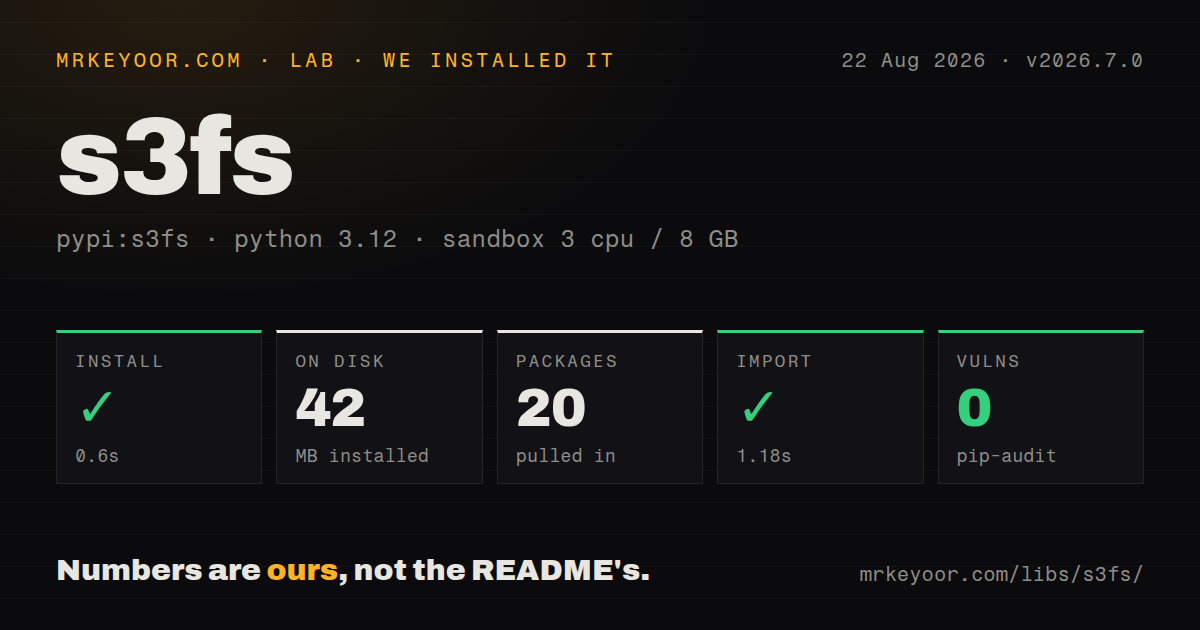
| Install | ✓ · 0.6s | 20 packages on disk · 42 MB |
| Import | ✓ | import s3fs in 1.18s · pure Python · requires Python >= 3.10 |
| Known vulns | 0 | (pip-audit) |
Answers from our run
Does s3fs install cleanly?
Yes. In a fresh container with an empty cache, pip install s3fs finished in 0.6s, leaving 20 packages and 42 MB on disk. pip-audit reported no known vulnerabilities.
What does s3fs need to run?
Python >= 3.10, and nothing compiled: it is pure Python. In our run import s3fs succeeded in 1.18s.
s3fs or boto3: which should you use?
boto3: Choose it for bucket administration, presigning, policy work, or explicit S3 API calls. Use s3fs when the useful abstraction is a file or an fsspec URL, especially inside pandas or Dask.
When should you not use s3fs?
You need lifecycle configuration, bucket policies, presigned forms, or the rest of the S3 service API; the documented scope stops at convenient filesystem access
Discussed on
- hnWorld's richest 10% produce half of global carbon emissions (2015) [pdf]79 points
- hnUnidentified anomalous phenomena – Independent study team report [pdf]44 points
- hnShow HN: Goofys – a faster s3fs written in Go40 points
- hnShow HN: cunoFS – mount S3/AZ/GCP storage *without* FUSE, 60x faster than s3fs19 points
- hnShow HN: ZeroFS: The S3FS that does not suck10 points
Use it if
- Your pandas, Dask, intake, xarray, or other fsspec consumer needs to read and write `s3://` URLs through its existing API
- You are adapting code that expects binary file objects, directory listings, globs, or recursive copy operations to S3 storage
- One code path must work with AWS S3 and a compatible service such as MinIO or Ceph through endpoint configuration
- You want synchronous application code while s3fs handles concurrent multipart transfers through its aiobotocore implementation
- You need lifecycle configuration, bucket policies, presigned forms, or the rest of the S3 service API; the documented scope stops at convenient filesystem access
- Your program only calls GetObject and PutObject a few times; our sandbox ended with 20 installed packages and 42 MB for the fsspec and async AWS layers
- Your worker model depends on POSIX `fork`; s3fs owns sockets and an async thread, and its documentation warns that this start method can deadlock
- You must pin botocore on its own schedule; s3fs requires aiobotocore, so its supported botocore range can collide with a separate boto3 constraint
- You need text mode, `chmod`, or `chown` from the filesystem object; the documented interface implements binary reads and writes and omits those permission methods
Setup reality
We installed s3fs==2026.7.0 in a fresh Python 3.12 Bookworm container with no cache. Installation succeeded in 0.6s, leaving 20 packages that occupied 42 MB. Its three declared dependencies are aiobotocore, fsspec, and aiohttp. import s3fs succeeded in 1.18s. pip-audit reported 0 known vulnerabilities. The wheel is pure Python, requires Python 3.10 or newer, uses the BSD license, and has no py.typed marker.
Authentication comes from explicit keys or the boto credential resolver. In practice that means environment variables, AWS credential files, a named profile, or an EC2 IAM role. Public data still needs anon=True; lack of credentials does not silently select anonymous mode. Each distributed worker needs access to its own credentials. For MinIO, Ceph, and similar services, pass endpoint_url; region and addressing differences may also belong in client_kwargs or config_kwargs.
An S3FileSystem keeps directory information locally, so a process can miss objects written by another process until you invalidate or refresh that listing. The 2026.7.0 change fixes one narrower mistake where prefix-filtered results polluted the complete directory cache. Reads use readahead caching by default. Writes buffer data, and closing the file completes the upload. Use a context manager so the close path always runs.
Bulk get, put, cat, pipe, cp, and rm calls use async concurrency internally. Multipart work defaults to ten transfers per file, and combining it with a batch multiplies simultaneous connections and memory use. Coroutine code must create the filesystem with asynchronous=True, await set_session(), call coroutine methods such as _ls, and close the session. Multiprocessing must start with spawn or forkserver; the documented warning rules out fork because inherited sockets and the async thread can hang.
Patterns
Read an object through the file interface open-binary-object
import s3fs

fs = s3fs.S3FileSystem()
with fs.open("reports-bucket/2026/summary.json", "rb") as file:
    payload = file.read()
s3fs documents binary modes only. Decode the bytes yourself or pass the file to a consumer that accepts binary input.
Load credentials from an AWS profile use-named-profile
import s3fs

fs = s3fs.S3FileSystem(profile="warehouse-readonly")
keys = fs.ls("company-warehouse/curated/")
The named profile comes from the normal AWS configuration files, keeping permanent secrets out of source code.
List a public bucket without signing requests browse-public-data
import s3fs

public_fs = s3fs.S3FileSystem(anon=True)
files = public_fs.glob("noaa-ghcn-pds/csv/by_year/202?.csv")
Anonymous access is opt in. Constructing the default authenticated client can fail credential lookup even when the target objects are public.
Finish an upload by closing the file write-buffered-object
import json

record = {"run_id": 42, "state": "complete"}
with fs.open("reports-bucket/runs/42.json", "wb") as file:
    file.write(json.dumps(record).encode("utf-8"))
The context manager closes the buffered file and completes its upload path. An exception before close should be treated as an unfinished write.
Connect to an S3-compatible endpoint configure-custom-endpoint
import s3fs

fs = s3fs.S3FileSystem(
    endpoint_url="https://minio.internal.example",
    key=access_key,
    secret=secret_key,
    client_kwargs={"region_name": "us-east-1"},
)
A compatible service may also need path-style addressing in `config_kwargs`. Check that service's S3 compatibility notes.
Let pandas open an S3 parquet file load-parquet-with-pandas
import pandas as pd

orders = pd.read_parquet(
    "s3://company-warehouse/orders/2026-08.parquet",
    storage_options={"profile": "warehouse-readonly"},
)
pandas passes `storage_options` to the fsspec implementation selected for the URL. The s3fs package must be installed in that environment.
Discard a stale directory listing refresh-cached-listing
prefix = "company-warehouse/incoming/"
fs.invalidate_cache(prefix)
latest = fs.ls(prefix, refresh=True)
Use this after another process changes the prefix. Release 2026.7.0 repairs prefix-filtered cache entries, while normal instance-level listing caches still exist.
Download a prefix to a local directory download-prefix
fs.get(
    "company-warehouse/exports/run-42/",
    "./run-42",
    recursive=True,
)
Recursive downloads can open several transfers at once. Reduce `max_concurrency` when memory or connection limits are tight.
Read a byte range ending on a delimiter read-complete-records
block = fs.read_block(
    "logs-bucket/events.jsonl",
    offset=1_000_000,
    length=256_000,
    delimiter=b"\n",
)
The delimiter extends the requested range to record boundaries, which is useful when workers split a line-oriented object.
Read from a requester-pays bucket access-requester-pays
import s3fs

fs = s3fs.S3FileSystem(
    profile="research-billing",
    requester_pays=True,
)
with fs.open("paid-dataset/sample.bin", "rb") as file:
    sample = file.read(4096)
The authenticated AWS account accepts the request charges. Anonymous access cannot authorize a requester-pays request.
Own and close an async S3 session call-async-api
import s3fs

async def list_partition():
    fs = s3fs.S3FileSystem(asynchronous=True)
    session = await fs.set_session()
    try:
        return await fs._ls("company-warehouse/raw/2026-08-22/")
    finally:
        await session.close()
Coroutine calls such as `_ls` begin with `_`. The official async example creates the client first and closes its session explicitly.
Select a multiprocessing mode that s3fs supports start-worker-processes
import multiprocessing as mp

if __name__ == "__main__":
    ctx = mp.get_context("spawn")
    with ctx.Pool(processes=3) as pool:
        results = pool.map(process_object, object_keys)
Build the filesystem inside each spawned worker. The documented `fork` warning is tied to inherited sockets and the package's async thread.
Alternatives
| Package | Registry | Pick it when |
|---|---|---|
| boto3 | PyPI | Choose it for bucket administration, presigning, policy work, or explicit S3 API calls. |
| smart-open | PyPI | Choose it for straightforward streamed reads and writes when directory-style operations are unnecessary. |
| obstore | PyPI | Choose it for a Rust-backed object-store client when fsspec compatibility is not a requirement. |
| cloudpathlib | PyPI | Choose it when pathlib-like cloud paths and managed local caching match the application model. |
More data guides
numpy · pandas · fsspec · pyarrow · lxml · sqlalchemy · the whole shelf →
How this guide is made: grounded in the library's documentation, release notes, changelog, and issue history, on a fixed rubric — not a hands-on install of every release. The 50 most-downloaded entries are additionally install-verified in clean containers. Corrections: contact the desk.