lxml review
lxml exposes libxml2 and libxslt through Python APIs compatible with much of ElementTree. It parses and builds XML or damaged HTML, evaluates XPath 1.0, runs XSLT 1.0, validates DTD, Relax NG, and XML Schema documents, and streams large trees through iterparse. The stable 6.1 line changed entity resolution defaults for iterparse and ETCompatXMLParser after an XXE report, updated packaged libxslt builds, and added safer HTML link attributes. Version 6.1.2 repairs missing source-distribution build files and minor error paths; version 7 remains a prerelease and is not the stable PyPI version.
lxml remains the right tool for serious XML, full XPath, XSLT, validation, and streamed parsing. Use the standard library for small trusted documents, and treat wheel availability plus parser security flags as part of deployment design.
We installed it
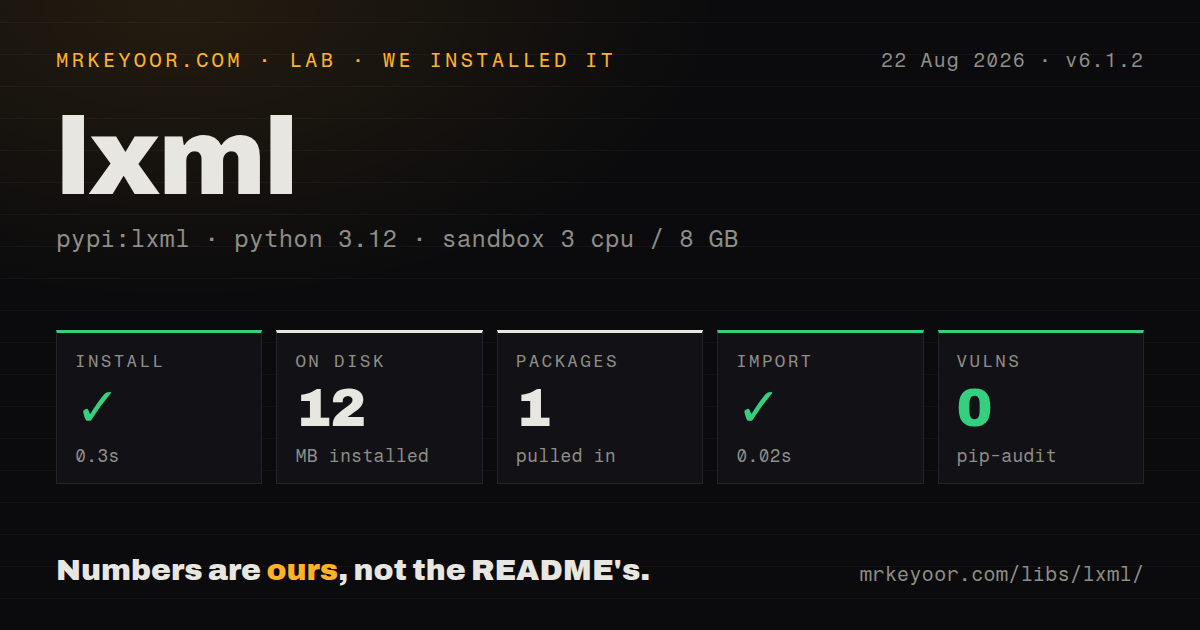
| Install | ✓ · 0.3s | 1 package on disk · 12 MB |
| Import | ✓ | import lxml in 0.02s · compiled extensions · requires Python >=3.8 |
| Known vulns | 0 | (pip-audit) |
Answers from our run
Does lxml install cleanly?
Yes. In a fresh container with an empty cache, pip install lxml finished in 0.3s, leaving 1 package and 12 MB on disk. pip-audit reported no known vulnerabilities.
What does lxml need to run?
Python >=3.8, and a platform wheel with compiled extensions. In our run import lxml succeeded in 0.02s.
lxml or beautifulsoup4: which should you use?
beautifulsoup4: Choose it for an approachable HTML traversal API and use lxml underneath only as the parser. lxml remains the right tool for serious XML, full XPath, XSLT, validation, and streamed parsing.
When should you not use lxml?
Input is small, trusted, and only uses basic XML traversal; xml.etree.ElementTree avoids a compiled dependency and shares the core tree vocabulary
Use it if
- Python code needs full XPath 1.0 or XSLT instead of the small ElementPath subset in the standard library
- Large XML feeds must be processed incrementally while cleared elements keep memory bounded
- Malformed HTML needs a forgiving parser plus XPath or CSS selection at high volume
- DTD, Relax NG, or XML Schema validation must run locally against a parsed document
- Input is small, trusted, and only uses basic XML traversal; xml.etree.ElementTree avoids a compiled dependency and shares the core tree vocabulary
- Untrusted XML will be parsed with huge_tree, DTD loading, network access, or custom resolvers without a threat review; those switches weaken resource and entity protections
- You deploy to a platform without a matching wheel and cannot install a compiler plus compatible libxml2 and libxslt headers
- Static typing must be complete from the installed distribution; our 6.1.2 package inspection found no py.typed marker
- You only need simple HTML text or CSS extraction; selectolax is narrower, while Beautiful Soup is often easier for exploratory cleanup
Setup reality
Our fresh Python 3.12 install of lxml 6.1.2 completed in 0.3 seconds. One package used 12 MB, and pip-audit found no known vulnerabilities. The package metadata lists four direct dependency entries, requires Python 3.8 or newer, carries BSD-3-Clause, and includes compiled shared objects. It did not ship py.typed. Importing lxml worked in 0.02 seconds. The clean install used a compatible wheel, so no compiler or system headers were needed.
When a wheel is unavailable, pip builds the C extension. That path needs a compiler, Python development files, and libxml2 and libxslt development headers that match what the build can consume. Alpine, unusual architectures, prerelease Python, and constrained build images are the common places to hit it. Build wheels in a controlled image instead of compiling on every deployment. Version 6.1.2 specifically restores files missing from the source distribution, so source builders should avoid 6.1.1.
Parser flags are security decisions. Keep no_network enabled, leave huge_tree disabled, avoid loading DTDs, and set resolve_entities to false when entity substitution is unnecessary. In 6.1.0 the iterparse and ETCompatXMLParser defaults were corrected to resolve internal entities only after CVE-2026-41066. That reduces one exposure and does not make every XML feature safe. External schemas, XSLT document access, custom resolvers, decompression, giant text nodes, and deep trees require their own controls.
Namespaces cause more application bugs than installation. XPath has no implicit default namespace, so bind the document URI to a prefix in the namespaces argument. Element tags use the {uri}local form. Mixed XML content is split between element.text and child.tail, which makes naive text assembly lose ordering. In streaming code, elem.clear() alone leaves prior siblings attached; delete processed siblings from the parent if file size is large. CSS selection requires the separate cssselect package.
Patterns
Query a parsed XML document parse-xml-xpath
from lxml import etree

tree = etree.parse('catalog.xml')
titles = tree.xpath("//book[@lang='en']/title/text()")
for title in titles:
    print(title)
xpath may return elements, strings, numbers, or booleans depending on the expression.
Bind a prefix for XPath query-default-namespace
from lxml import etree

tree = etree.parse('feed.xml')
ns = {'atom': 'http://www.w3.org/2005/Atom'}
titles = tree.xpath('//atom:entry/atom:title/text()', namespaces=ns)
XPath does not inherit the document's default namespace. Assign any prefix and map it to the URI.
Disable entity and network access parse-untrusted-xml
from lxml import etree

parser = etree.XMLParser(
    resolve_entities=False,
    load_dtd=False,
    no_network=True,
    huge_tree=False,
)
root = etree.fromstring(untrusted_bytes, parser=parser)
Keep input-size and time limits outside the parser too. Do not enable huge_tree merely to accept hostile documents.
Release processed nodes during iterparse stream-large-xml
from lxml import etree

for _event, element in etree.iterparse(
    'events.xml',
    events=('end',),
    tag='{urn:events}event',
    resolve_entities=False,
    no_network=True,
):
    process(element)
    element.clear()
    while element.getprevious() is not None:
        del element.getparent()[0]
Clearing content and deleting earlier siblings prevents the parent tree from retaining the whole file.
Extract links from HTML parse-broken-html
from lxml import html

document = html.fromstring(page_bytes)
links = [
    (node.text_content().strip(), node.get('href'))
    for node in document.xpath('//a[@href]')
]
Pass bytes when possible so declarations and meta tags can guide encoding detection. The HTML parser repairs malformed markup.
Create and serialize elements build-xml-document
from lxml import etree

root = etree.Element('order', id='42')
item = etree.SubElement(root, 'item', sku='INK-1')
item.text = 'Black ink'

output = etree.tostring(
    root, encoding='UTF-8', xml_declaration=True, pretty_print=True
)
An explicit encoding returns bytes. Use encoding='unicode' when a Python string is required.
Collect XML Schema failures validate-xsd
from lxml import etree

schema = etree.XMLSchema(etree.parse('order.xsd'))
document = etree.parse('order.xml')

if not schema.validate(document):
    for error in schema.error_log:
        print(error.line, error.column, error.message)
Use assertValid when the first validation failure should raise. Schema imports can involve external resources and need resolver policy.
Apply an XSLT 1.0 stylesheet run-xslt
from lxml import etree

stylesheet = etree.XSLT(etree.parse('report.xsl'))
result = stylesheet(
    etree.parse('report.xml'),
    title=etree.XSLT.strparam('Monthly report'),
)
print(str(result))
libxslt implements XSLT 1.0. Use access controls when an untrusted stylesheet could read files or network resources.
Delete nodes through their parent remove-tree-elements
tree = etree.parse('config.xml')
root = tree.getroot()

for debug in root.findall('.//debug'):
    debug.getparent().remove(debug)

tree.write('config.xml', encoding='UTF-8', xml_declaration=True)
lxml elements expose getparent(), unlike standard ElementTree elements. Writing recreates formatting around changed content.
Remove scripts before collecting text extract-visible-text
document = html.fromstring(page_bytes)
for node in document.xpath('//script | //style | //template'):
    parent = node.getparent()
    if parent is not None:
        parent.remove(node)

text = ' '.join(document.text_content().split())
text_content includes all descendant text. Remove non-content nodes before normalization.
Alternatives
| Package | Registry | Pick it when |
|---|---|---|
| beautifulsoup4 | PyPI | Choose it for an approachable HTML traversal API and use lxml underneath only as the parser |
| defusedxml | PyPI | Choose it for hardened wrappers around common XML parsers when untrusted input is the main concern |
| selectolax | PyPI | Choose it for fast HTML parsing and CSS selection without XML Schema or XSLT features |
More data guides
numpy · pandas · fsspec · pyarrow · sqlalchemy · pg · the whole shelf →
How this guide is made: grounded in the library's documentation, release notes, changelog, and issue history, on a fixed rubric — not a hands-on install of every release. The 50 most-downloaded entries are additionally install-verified in clean containers. Corrections: contact the desk.