numpy review
NumPy provides the ndarray: a fixed-dtype, N-dimensional, strided array whose operations run in compiled loops instead of Python element loops. Broadcasting, indexing, reductions, random generation, linear algebra, Fourier transforms, and binary file formats make it the interchange layer for scientific Python. Version 2.5.2 is a bug-fix release for Python 3.12 through 3.15. It adds wheels for Python 3.15 RC, makes StringDType opaque under the free-threading stable ABI, and fixes StringDType promotion, indexing errors, random-state locking, overlapping copy leaks, CPU diagnostics, typing, and several possible crashes.
NumPy is the correct foundation for dense numeric arrays on CPU and the common language of Python's scientific stack. Check Python and binary-extension compatibility before a 2.x upgrade, and choose a labeled, chunked, or accelerator library when ndarray is one layer too low.
We installed it
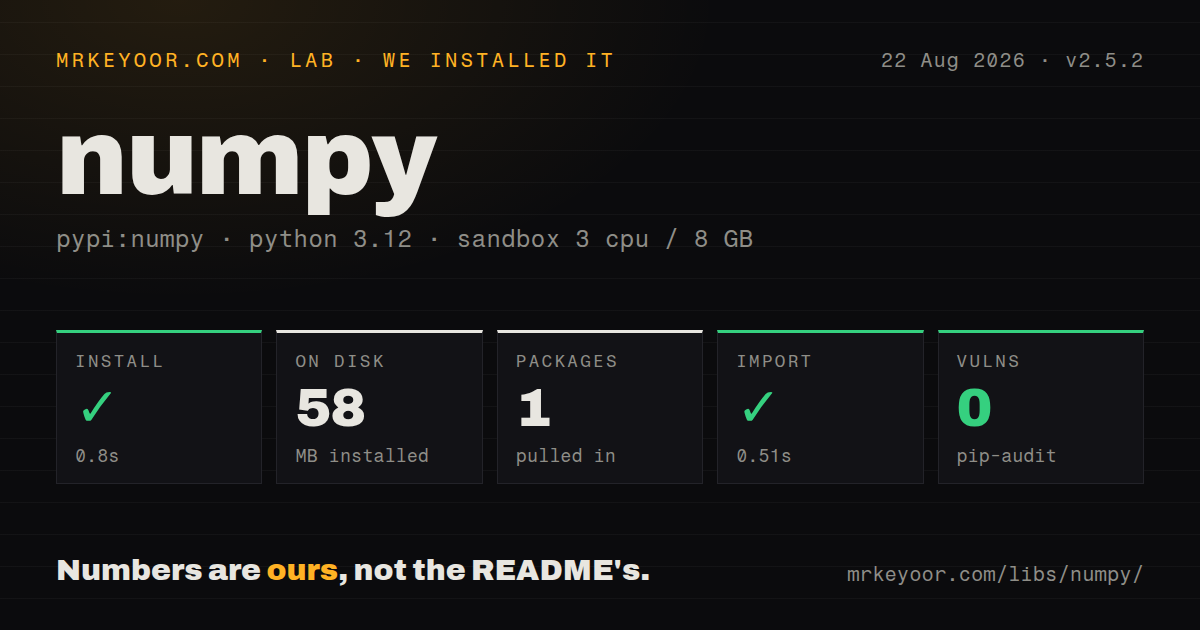
| Install | ✓ · 0.8s | 1 package on disk · 58 MB |
| Import | ✓ | import numpy in 0.51s · compiled extensions · py.typed · requires Python >=3.12 |
| Known vulns | 0 | (pip-audit) |
Answers from our run
Does numpy install cleanly?
Yes. In a fresh container with an empty cache, pip install numpy finished in 0.8s, leaving 1 package and 58 MB on disk. pip-audit reported no known vulnerabilities.
What does numpy need to run?
Python >=3.12, and a platform wheel with compiled extensions. In our run import numpy succeeded in 0.51s, and the package ships py.typed for type checkers.
numpy or torch: which should you use?
torch: Choose it for GPU tensors, automatic differentiation, and neural-network training or inference. NumPy is the correct foundation for dense numeric arrays on CPU and the common language of Python's scientific stack.
When should you not use numpy?
Rows have mixed types, missing-value rules, labels, joins, and group operations; pandas or Polars is a better user-facing layer
Discussed on
- hnA GPT in 60 Lines of NumPy1,563 points
- hnNumpy: Plan for dropping Python 2.7 support662 points
- hnWeld: Accelerating numpy, scikit and pandas as much as 100x with Rust and LLVM592 points
- hnNumPy receives first ever funding, thanks to Moore Foundation548 points
- hnI don't like NumPy488 points
Use it if
- A workload performs numeric operations, masks, reductions, reshaping, or linear algebra on homogeneous in-memory arrays
- Data must move efficiently between pandas, SciPy, scikit-learn, image libraries, and native extensions
- Broadcasting can express repeated row or column operations without Python loops
- A stable binary array representation and explicit dtype, shape, and stride control are required
- Rows have mixed types, missing-value rules, labels, joins, and group operations; pandas or Polars is a better user-facing layer
- Arrays exceed available memory or live primarily in chunked object storage; NumPy arrays are in-process and need Dask, Zarr, or another chunked system around them
- GPU execution, automatic differentiation, or JIT compilation drives the workload; JAX, PyTorch, or CuPy targets those requirements
- The project still has binary extensions built against NumPy 1.x; moving to 2.x requires compatible rebuilt wheels across the dependency tree
- The supported Python runtime is older than 3.12; NumPy 2.5.2 metadata requires Python 3.12 or newer
Setup reality
Our fresh Python 3.12 installation of NumPy 2.5.2 succeeded in 0.8 seconds. One package occupied 58 MB, and pip-audit found no known vulnerabilities. NumPy lists zero direct dependencies, requires Python 3.12 or newer, includes compiled shared objects, and ships py.typed. Its measured package license field was unknown. Importing numpy worked in 0.51 seconds. The large single package is expected because wheels contain compiled array code and platform-specific optimized components.
Common CPython and operating-system combinations receive wheels. A missing wheel changes the job into a native build using Meson, a C/C++ toolchain, Python headers, and platform math libraries. Do not compile opportunistically during production deployment; build or obtain a wheel in a repeatable environment. Native packages importing NumPy's C API must support the installed major. An extension built only for NumPy 1.x can fail immediately under 2.x even though its Python source imports correctly.
Array dtype decides storage, overflow, precision, and casting. Integer arithmetic does not become arbitrary precision, and narrow arrays can overflow. Mixing Python scalars with arrays follows NumPy 2 promotion rules, which can differ from 1.x results. Views are another recurring surprise: slicing, transpose, and many reshape calls share memory, so assigning through the result can change the source. Fancy indexing and boolean indexing usually copy. Use shares_memory or copy() when ownership is part of correctness.
Vector expressions can allocate several full-size temporaries. out parameters, in-place operators, and careful broadcasting reduce peak memory, though overlapping writes need testing. Most NumPy operations hold arrays in process memory and do not distribute work automatically. The modern random API uses default_rng and an explicit Generator; shared generator state across threads requires coordination even though 2.5.2 fixes additional locking cases. Never load an untrusted object array with allow_pickle=True because that invokes Python pickle.
Patterns
Choose shape and dtype explicitly create-typed-array
import numpy as np

values = np.array([[1, 2], [3, 4]], dtype=np.float64)
zeros = np.zeros((3, 4), dtype=np.int32)
steps = np.arange(0, 10, 2)
points = np.linspace(0.0, 1.0, num=5)
dtype controls memory, precision, and overflow. np.asarray may reuse an existing compatible array.
Run math over a whole array apply-vector-operation
x = np.arange(1_000_000, dtype=np.float64)
y = np.sqrt(x, out=np.empty_like(x))
y *= 2.0
y += 1.0
out and in-place updates reduce temporary arrays. Verify that mutation is acceptable before reusing storage.
Select values by condition filter-with-mask
values = np.array([-2, -1, 0, 1, 2])
positive = values[values > 0]
middle = values[(values > -2) & (values < 2)]
Use elementwise & and | with parentheses. Python and or or cannot combine array conditions.
Align row and column operands broadcast-row-column
matrix = np.ones((3, 4))
row = np.array([0.0, 1.0, 2.0, 3.0])
column = np.array([10.0, 20.0, 30.0])

by_row = matrix + row
by_column = matrix + column[:, None]
Broadcast dimensions align from the right. Insert an axis when the intended column shape is otherwise ambiguous.
Keep dimensions for later broadcasting reduce-by-axis
matrix = np.arange(12, dtype=np.float64).reshape(3, 4)
row_totals = matrix.sum(axis=1, keepdims=True)
normalized = np.divide(
    matrix,
    row_totals,
    out=np.zeros_like(matrix),
    where=row_totals != 0,
)
keepdims retains a size-one axis. where prevents division on zero-total rows.
Make array ownership explicit inspect-view-copy
source = np.arange(10)
view = source[2:6]
owned = source[2:6].copy()

view[0] = 99
assert source[2] == 99
assert not np.shares_memory(source, owned)
Basic slices usually share memory. Fancy or boolean indexing usually creates a copy.
Use an explicit random generator generate-random-values
rng = np.random.default_rng(42)
samples = rng.normal(loc=0.0, scale=1.0, size=(3, 3))
indices = rng.integers(0, 100, size=8)
shuffled = rng.permutation(np.arange(20))
A local Generator makes reproducibility and state ownership visible. Do not share one mutable generator casually across threads.
Solve equations without an inverse solve-linear-system
matrix = np.array([[3.0, 1.0], [1.0, 2.0]])
result = np.array([9.0, 8.0])
solution = np.linalg.solve(matrix, result)
product = matrix @ matrix
Use solve for Ax=b. Computing inv(A) @ b is usually slower and less numerically sound.
Aggregate around NaN values handle-missing-floats
values = np.array([1.0, np.nan, 3.0])
mean = np.nanmean(values)
missing = np.isnan(values)
filled = np.where(missing, 0.0, values)
NaN is a floating-point marker, not a general nullable value. Ordinary mean propagates it.
Store several arrays without pickle save-array-archive
np.savez_compressed('arrays.npz',
    features=np.arange(12).reshape(3, 4),
    labels=np.array([0, 1, 1]),
)

with np.load('arrays.npz', allow_pickle=False) as archive:
    features = archive['features']
Keep allow_pickle false for untrusted files. Object-dtype arrays cannot load without pickle.
Alternatives
| Package | Registry | Pick it when |
|---|---|---|
| torch | PyPI | Choose it for GPU tensors, automatic differentiation, and neural-network training or inference |
| jax | PyPI | Choose it for NumPy-like array code with transformations, JIT compilation, and accelerator execution |
| cupy-cuda12x | PyPI | Choose it for a NumPy-like API on CUDA 12 when GPU arrays are the primary target |
More data guides
pandas · fsspec · pyarrow · lxml · sqlalchemy · pg · the whole shelf →
How this guide is made: grounded in the library's documentation, release notes, changelog, and issue history, on a fixed rubric — not a hands-on install of every release. The 50 most-downloaded entries are additionally install-verified in clean containers. Corrections: contact the desk.