react-native-web review
react-native-web 0.21.2 implements much of React Native's component and JavaScript API with React DOM. Shared code can render View, Text, Pressable, ScrollView, StyleSheet, Platform, and related exports in a browser after the build maps react-native imports to this package. The result is still a web application with DOM semantics and browser constraints; native modules do not appear in the browser. Version 0.21.2 improves Modal animation, fixes a memory leak in AnimatedProps construction, and forwards the HTML inert property for accessibility and focus control. It supports React 18 and 19 as peers.
react-native-web 0.21.2 installed in 2.1 seconds with 28 packages, 19 MB on disk, and 0 audit findings in our sandbox, while a full import measured 138.1 KB gzipped. It earns that cost when a team has real React Native code to share, especially under Expo; a web-only application should start with React DOM.
We installed it
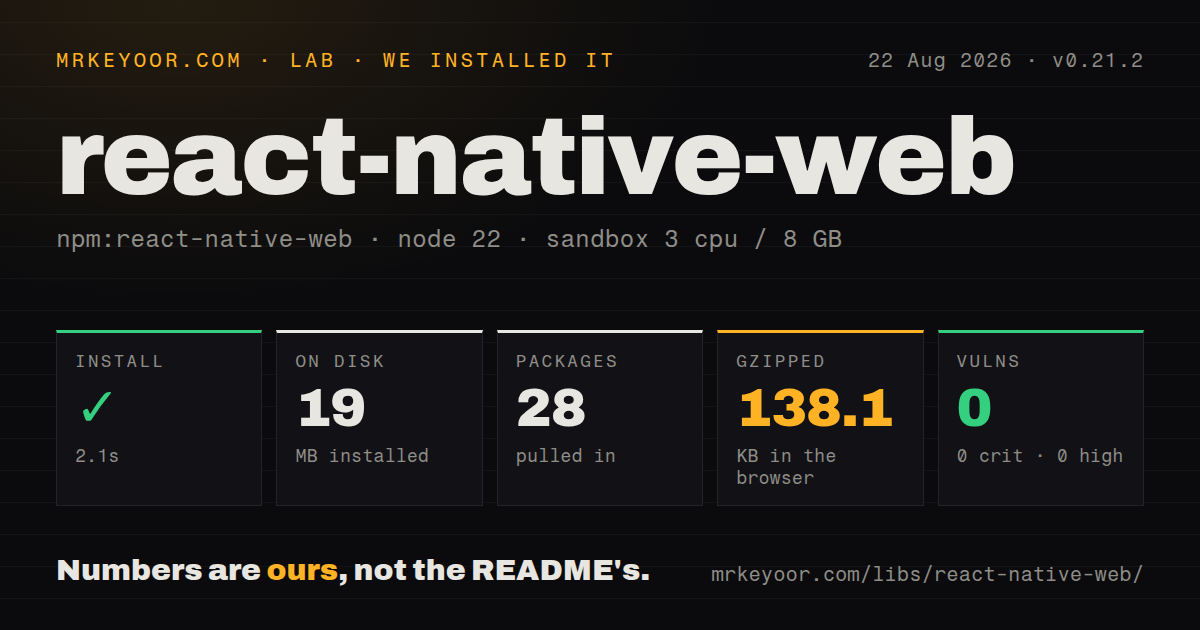
| Install | ✓ · 2.1s | 28 packages on disk · 19 MB |
| Import | ✓ | ESM import works · require() works · CommonJS package |
| Browser | 138.1 KB | gzipped (448.3 KB minified), bundled with esbuild |
| Types | — | no TypeScript types found |
| Known vulns | 0 | 0 critical · 0 high · 0 moderate · 0 low (npm audit) |
Answers from our run
Does react-native-web install cleanly?
Yes. In a fresh container with an empty cache, npm install react-native-web finished in 2 seconds, leaving 28 packages and 19 MB on disk. npm audit reported no known vulnerabilities.
How much does react-native-web add to a browser bundle?
138.1 KB gzipped (448.3 KB minified) when the whole package is bundled for the browser with esbuild. Importing only part of it is usually smaller.
Does react-native-web work with both ESM and CommonJS?
Yes. Both import 'react-native-web' and require('react-native-web') worked in Node 22 in our run. The package is published as CommonJS.
Does react-native-web include TypeScript types?
No type declarations were found in our install, so TypeScript users need their own declarations.
react-native-web or react-dom: which should you use?
react-dom: Use it for a web-first React product that should work directly with HTML semantics, CSS, and browser libraries. react-native-web 0.21.2 installed in 2.1 seconds with 28 packages, 19 MB on disk, and 0 audit findings in our sandbox, while a full import measured 138.1 KB gzipped.
When should you not use react-native-web?
The product is web-only and uses semantic HTML, forms, CSS selectors, and browser libraries throughout. React DOM exposes those primitives directly without an adaptation layer.
Use it if
- A React Native product has presentation and interaction code worth sharing with a browser target.
- Expo owns the universal build setup and the application stays within APIs that have documented web implementations.
- A shared design system benefits from View, Text, Pressable, StyleSheet, and Platform across native and web entry points.
- The team can test DOM accessibility and browser behavior separately instead of assuming React Native parity.
- The product is web-only and uses semantic HTML, forms, CSS selectors, and browser libraries throughout. React DOM exposes those primitives directly without an adaptation layer.
- You need every React Native API. The compatibility table marks Alert, Settings, RefreshControl, and TouchableNativeFeedback unsupported, while NativeModules and several device APIs are mocks.
- Bundled TypeScript declarations are required. Our 0.21.2 package check found none, and the official guide sends TypeScript users to @types/react-native-web.
- A 138.1 KB gzipped full-package browser import is too much for the target. Our measured bundle reached 448.3 KB minified before application code.
- You cannot maintain the react-native alias in the bundler, Jest, SSR, and any other process that evaluates shared imports. Each tool has its own resolution configuration.
Setup reality
We installed react-native-web 0.21.2 in a fresh Node 22 Bookworm sandbox in 2.1 seconds. npm left 28 packages and 19 MB on disk, and its audit reported 0 known vulnerabilities. The package declares 8 direct dependencies and 2 peers, with 6708 KB unpacked. It is CommonJS with no exports map; both require() and ESM import worked in our Node check. We found no bundled TypeScript declarations.
Install react-dom beside it and keep React plus React DOM within the declared 18 or 19 peer ranges. Shared files normally import from react-native, so every web evaluator must map that exact name to react-native-web. Configure the alias in the bundler, Jest, and server-rendering process. The optional Babel plugin rewrites named imports for better pruning. TypeScript projects need the separate @types/react-native-web package and may need react-native-web in compilerOptions.types.
Our full-package esbuild browser import measured 448.3 KB minified and 138.1 KB gzipped. That namespace-style measurement is a ceiling, since named imports plus the Babel transform can remove unused modules. Check the application output rather than assuming every export ships. Full-screen ScrollView shells also need explicit html, body, and root heights; body overflow hidden belongs only in that app-shell layout, not an ordinary document page.
Platform gaps remain runtime work. NativeModules is mocked, Share needs HTTPS, Animated lacks useNativeDriver on web, and third-party React Native packages need their own web implementation. Use Platform for small differences and .web.js files when markup or behavior diverges. Version 0.21.2 forwards inert and improves Modal animation, but keyboard focus, semantic roles, scroll behavior, and screen-reader output still need browser tests. Expo handles much of the wiring and is the project's recommended multi-platform path.
Patterns
Map React Native imports in webpack alias-webpack
// webpack.config.js
module.exports = {
  resolve: {
    alias: {
      'react-native$': 'react-native-web',
    },
    extensions: ['.web.js', '.js'],
  },
};
The dollar sign limits the alias to the exact react-native package. Listing .web.js first selects a browser-specific file when one exists.
Apply the same package map in Jest alias-jest
// jest.config.js
module.exports = {
  moduleNameMapper: {
    '^react-native$': 'react-native-web',
  },
};
A bundler alias does not affect Jest. Without this map, a shared test can resolve React Native's native entry instead of the web implementation.
Rewrite imports with the Babel plugin optimize-imports
// babel.config.json
{
  "plugins": ["react-native-web"]
}
Install babel-plugin-react-native-web separately. It rewrites named imports so the production build can omit package modules the app never uses.
Add the separate web type declarations configure-typescript
// npm install -D @types/react-native-web
// tsconfig.json
{
  "compilerOptions": {
    "jsx": "react-jsx",
    "types": ["react-native-web"]
  }
}
Our 0.21.2 package check found no bundled declarations. The official guide uses DefinitelyTyped to augment React Native props and styles.
Register a browser entry with AppRegistry run-application
import {AppRegistry, Text, View} from 'react-native';

function App() {
  return <View><Text>Hello, web</Text></View>;
}

AppRegistry.registerComponent('App', () => App);
AppRegistry.runApplication('App', {
  rootTag: document.getElementById('root'),
});
This shared file imports react-native. The web build must resolve that name to react-native-web before AppRegistry runs.
Create styles for shared components create-styles
import {StyleSheet, Text, View} from 'react-native';

const styles = StyleSheet.create({
  card: {padding: 16, borderRadius: 8, backgroundColor: '#fff'},
  title: {fontSize: 18, fontWeight: '600'},
});

export function Card() {
  return <View style={styles.card}><Text style={styles.title}>Title</Text></View>;
}
Style objects use camelCase and the supported React Native web subset. CSS descendant selectors and ordinary cascade rules are outside StyleSheet.create().
Render hover, focus, and press state handle-press-state
import {Pressable, Text} from 'react-native';

export function SaveButton() {
  return (
    <Pressable
      role="button"
      onPress={save}
      style={({hovered, focused, pressed}) => ({
        opacity: pressed ? 0.6 : 1,
        outlineStyle: focused ? 'solid' : 'none',
        backgroundColor: hovered ? '#eee' : '#fff',
      })}
    >
      <Text>Save</Text>
    </Pressable>
  );
}
hovered and focused matter on web. If outlineStyle removes the browser outline, the focused branch must provide an equally visible replacement.
Keep a small browser difference inline branch-by-platform
import {Platform, StyleSheet} from 'react-native';

const styles = StyleSheet.create({
  panel: {
    height: Platform.OS === 'web' ? 240 : 180,
    cursor: Platform.OS === 'web' ? 'pointer' : undefined,
  },
});
Platform works for a small value branch. Use .web.js and .native.js files once markup, imports, or control flow starts to diverge.
Give web a browser-native implementation split-platform-files
// ShareButton.web.js
export function ShareButton({url}) {
  return <button onClick={() => navigator.clipboard.writeText(url)}>Copy link</button>;
}

// ShareButton.native.js
import {Button, Share} from 'react-native';
export function ShareButton({url}) {
  return <Button title="Share" onPress={() => Share.share({message: url})} />;
}
Prefer this split when one target needs navigator or a native module. The resolver must choose .web.js before the generic extension.
Collect markup and styles for server rendering render-server-html
import {renderToString} from 'react-dom/server';
import {AppRegistry} from 'react-native-web';
import App from './App.js';

AppRegistry.registerComponent('App', () => App);
const {element, getStyleElement} = AppRegistry.getApplication('App');
const html = renderToString(element);
const styleMarkup = renderToString(getStyleElement());
The server must resolve shared react-native imports to react-native-web too. Keep modules that read window or document out of this import graph.
Size a full-screen ScrollView shell prepare-fullscreen-root
html, body { height: 100%; }
body { overflow: hidden; }
#root { display: flex; height: 100%; }
The official setup uses these 100% heights for a full-screen root ScrollView. Do not hide body overflow on a normal document-scrolling page.
Make background content inert behind a modal disable-background-focus
import {Modal, Text, View} from 'react-native';

export function Screen({open}) {
  return (
    <>
      <View inert={open}><Text>Main content</Text></View>
      <Modal visible={open}><Text role="heading">Dialog</Text></Modal>
    </>
  );
}
Version 0.21.2 forwards inert to the DOM. It blocks background focus and interaction, but the modal still needs a label, focus placement, and a keyboard-close path.
Alternatives
| Package | Registry | Pick it when |
|---|---|---|
| react-dom | npm | Use it for a web-first React product that should work directly with HTML semantics, CSS, and browser libraries. |
| expo | npm | Use it when a managed universal application should configure React Native for Web and supply additional cross-platform APIs. |
| react-strict-dom | npm | Evaluate it for an experimental web-first component system with stricter cross-platform styling rules. |
| @tamagui/core | npm | Use it when the main need is a compiled cross-platform styling and component layer rather than React Native API compatibility. |
More mobile guides
react-native · expo · react-native-safe-area-context · react-native-reanimated · react-native-worklets · react-native-svg · the whole shelf →
How this guide is made: grounded in the library's documentation, release notes, changelog, and issue history, on a fixed rubric — not a hands-on install of every release. The 50 most-downloaded entries are additionally install-verified in clean containers. Corrections: contact the desk.