react-native-worklets review
React Native Worklets moves selected JavaScript functions into a UI runtime or separately created worker runtimes backed by native code. Its Babel plugin rewrites worklet functions, scheduling APIs cross runtime boundaries, and serializable or synchronizable values carry data between isolated JavaScript heaps. This is low-level infrastructure for React Native libraries that need predictable UI-thread or worker execution. It is not a Node worker package. Version 0.12 added WeakRef support in worklet runtimes, changed Bundle Mode script loading, and introduced the advanced `enableLocking` runtime option. The 0.12.1 patch extracts the UI-thread check into the native UI scheduler.
Use react-native-worklets directly when you own a runtime-sensitive React Native library or native integration. Most app teams should consume it through Reanimated or another higher-level package, especially given the native rebuild burden and eight high audit findings in our resolved install.
We installed it
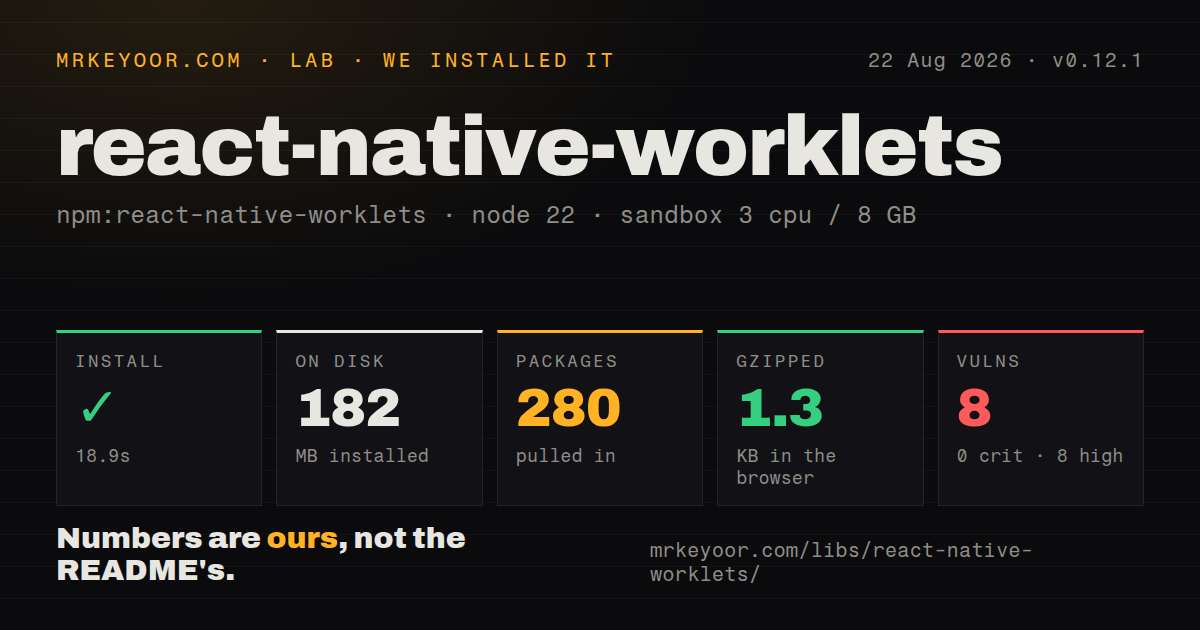
| Install | ✓ · 18.9s | 280 packages on disk · 182 MB |
| Import | ✗ | ESM import fails · require() fails · CommonJS package |
| Browser | 1.3 KB | gzipped (4.3 KB minified), bundled with esbuild |
| Types | ✓ | TypeScript types bundled |
| Known vulns | 8 | 0 critical · 8 high · 0 moderate · 0 low (npm audit) |
Answers from our run
Does react-native-worklets install cleanly?
Yes. In a fresh container with an empty cache, npm install react-native-worklets finished in 19 seconds, leaving 280 packages and 182 MB on disk. npm audit reported 8 known vulnerabilities.
How much does react-native-worklets add to a browser bundle?
1.3 KB gzipped (4.3 KB minified) when the whole package is bundled for the browser with esbuild. Importing only part of it is usually smaller.
Does react-native-worklets work with both ESM and CommonJS?
Neither plain import nor require succeeded in our sandbox, so it needs a bundler or extra setup.
Does react-native-worklets include TypeScript types?
Yes, type declarations ship inside the package, so no @types install is needed.
react-native-worklets or react-native-reanimated: which should you use?
react-native-reanimated: Choose it for animations, animated styles, gestures, and UI reactions without managing runtime objects directly. Use react-native-worklets directly when you own a runtime-sensitive React Native library or native integration.
When should you not use react-native-worklets?
Your goal is ordinary application animation or gesture handling. Reanimated and Gesture Handler own higher-level lifecycle and state APIs while consuming Worklets underneath.
Use it if
- You maintain a React Native native module that must schedule JavaScript on the UI runtime or a dedicated JSI runtime.
- CPU work needs a worker runtime and its inputs and return values fit the package's serializable types.
- The app uses React Native 0.83 through 0.87 on the New Architecture and can rebuild native binaries after upgrades.
- You need the runtime and memory primitives beneath an animation, gesture, graphics, audio, or inference integration.
- Your goal is ordinary application animation or gesture handling. Reanimated and Gesture Handler own higher-level lifecycle and state APIs while consuming Worklets underneath.
- The app uses React Native 0.82 or older. Version 0.12.x declares and documents support for React Native 0.83 through 0.87.
- The app remains on the Legacy Architecture. The Worklets guide says Paper is untested and recommends moving to Fabric first.
- You need worker runtimes on the web. createWorkletRuntime and scheduleOnRuntime are native-only; scheduleOnUI falls back to requestAnimationFrame in a browser.
- The package must load directly in a Node process. In our Node.js 22.23.2 check, both require() and ESM import failed, and the measurement log supplied no useful stack trace beyond the runtime version.
- A large native dependency tree with unresolved high advisories is unacceptable. Our fresh install resolved 280 packages and npm audit reported eight high-severity findings.
Setup reality
We installed react-native-worklets 0.12.1 in a fresh Node 22 Bookworm container. npm took 18.9 seconds, left 280 packages, and used 182 MB. The package has 14 direct dependencies and 4 peer dependencies, with 2704 KB unpacked. npm audit reported 8 known vulnerabilities, all high severity. TypeScript declarations are bundled. Both require() and ESM import failed under Node.js 22.23.2; the log recorded no diagnostic beyond that version.
This is a CommonJS package without an exports map. The browser check still built at 4.3 KB minified and 1.3 KB gzipped, but that does not make native worker APIs available on web. Expo projects run prebuild after installation. Community CLI projects add react-native-worklets/plugin to Babel plugins, reset Metro's cache, install iOS pods, and rebuild the application. Expo Go must use the exact Worklets version bundled with its Expo SDK.
A function marked with the worklet directive executes in another JavaScript runtime after transformation. Captured objects are serialized and copied at invocation, so later mutations on the RN runtime do not update that copy. Functions scheduled back through scheduleOnRN must have been defined in RN runtime scope. Synchronizable values provide coordinated native storage, though blocking reads or writes can stall one runtime while another holds the lock.
Version 0.12.x supports React Native 0.83 through 0.87 and is untested on Paper. Native, JavaScript, and Babel-plugin versions must match; stale transformed code can keep failing until Metro's cache is cleared and the binary is rebuilt. Jest needs the packaged mock or web resolver. Review all eight high audit paths in the actual lockfile before release, because the lab finding covers the resolved tree rather than proving which direct package owns each advisory.
Patterns
Enable worklet transformation configure-babel-plugin
module.exports = {
  presets: ['module:@react-native/babel-preset'],
  plugins: ['react-native-worklets/plugin'],
};
Community CLI projects add this plugin, clear Metro's cache, and rebuild native code. Expo starter templates from SDK 54 include it.
Queue work on the UI runtime schedule-ui-task
import { scheduleOnUI } from 'react-native-worklets';

function readFrame(label: string) {
  'worklet';
  console.log(label, performance.now());
}

scheduleOnUI(readFrame, 'drag');
scheduleOnUI returns no value and runs asynchronously. On web it uses requestAnimationFrame.
Receive a value from the UI runtime await-ui-result
import { runOnUIAsync } from 'react-native-worklets';

const distance = await runOnUIAsync(
  (start: number, end: number) => {
    'worklet';
    return end - start;
  },
  24,
  96
);
Pass the function reference and arguments separately. Calling the function before passing it executes on the current runtime.
Read a tiny UI value synchronously run-ui-synchronously
import { runOnUISync } from 'react-native-worklets';

const uiNow = runOnUISync(() => {
  'worklet';
  return performance.now();
});
The caller blocks until the UI runtime returns. Keep the callback short and prefer runOnUIAsync when immediate ordering is unnecessary.
Create a named worker runtime create-worker-runtime
import { createWorkletRuntime } from 'react-native-worklets';

const worker = createWorkletRuntime({
  name: 'image-math',
  initializer: () => {
    'worklet';
    console.log('image-math initialized');
  },
  enableEventLoop: true,
  enableLocking: true,
});
Worker runtimes are native-only. The initializer runs synchronously, and disabling locking requires disabling the event loop too.
Send fire-and-forget work to a worker schedule-worker-task
import { scheduleOnRuntime } from 'react-native-worklets';

scheduleOnRuntime(worker, (samples: number[]) => {
  'worklet';
  console.log(samples.reduce((sum, value) => sum + value, 0));
}, [4, 8, 15, 16, 23, 42]);
scheduleOnRuntime returns no result. Its arguments cross into another runtime as serializable values.
Await computation on a worker runtime await-worker-result
import { runOnRuntimeAsync } from 'react-native-worklets';

const total = await runOnRuntimeAsync(
  worker,
  (values: number[]) => {
    'worklet';
    return values.reduce((sum, value) => sum + value, 0);
  },
  [10, 20, 30]
);
This native-only call returns a Promise. A thrown worklet error rejects that Promise.
Schedule a React state update return-to-rn-runtime
import { scheduleOnRN, scheduleOnUI } from 'react-native-worklets';

const acceptProgress = (value: number) => setProgress(value);

scheduleOnUI(() => {
  'worklet';
  scheduleOnRN(acceptProgress, 100);
});
acceptProgress must be defined in RN runtime scope. A function created inside the UI callback cannot be scheduled back this way.
Coordinate a small value across runtimes share-coordinated-value
import { createSynchronizable, scheduleOnUI } from 'react-native-worklets';

const status = createSynchronizable('idle');
status.setBlocking('working');

scheduleOnUI(() => {
  'worklet';
  console.log(status.getBlocking());
});
Synchronizable access is imperative rather than reactive. Blocking methods can wait for another runtime that holds the native lock.
Branch on the active runtime detect-current-runtime
import { getRuntimeKind, RuntimeKind } from 'react-native-worklets';

function whereAmI() {
  'worklet';
  return getRuntimeKind() === RuntimeKind.UI
    ? 'ui'
    : 'another-runtime';
}
Use the enum or isUIRuntime-style helpers instead of relying on internal global variables.
Verify that Babel transformed a function check-worklet-transformation
import { isWorkletFunction } from 'react-native-worklets';

function calculate(value: number) {
  'worklet';
  return value * 2;
}

console.log(isWorkletFunction(calculate));
A false result in the built app usually points to Babel configuration, stale transformed code, or a missing Metro cache reset.
Use the packaged TypeScript mock mock-native-runtime-in-jest
jest.mock('react-native-worklets', () =>
  require('react-native-worklets/src/mock')
);
JavaScript builds use `react-native-worklets/lib/module/mock`. The documented web alternative sets `react-native-worklets/jest/resolver` in Jest config.
Alternatives
| Package | Registry | Pick it when |
|---|---|---|
| react-native-reanimated | npm | Choose it for animations, animated styles, gestures, and UI reactions without managing runtime objects directly. |
| react-native-worklets-core | npm | Consider it when a native library already targets Margelo's worklet-core conventions and its React Native compatibility fits the project. |
| react-native-threads | npm | Consider it for an older app built around long-lived secondary JS bundles and message passing rather than workletized functions. |
More mobile guides
react-native · expo · react-native-safe-area-context · react-native-reanimated · react-native-svg · react-native-web · the whole shelf →
How this guide is made: grounded in the library's documentation, release notes, changelog, and issue history, on a fixed rubric — not a hands-on install of every release. The 50 most-downloaded entries are additionally install-verified in clean containers. Corrections: contact the desk.