react-native-safe-area-context review
`react-native-safe-area-context` measures screen insets around notches, rounded corners, status bars, and home indicators, then exposes them through native views, hooks, and context. It supports iOS, Android, web, macOS, and Windows. Version 5.9 adds Android Gradle Plugin 9 support and fixes nested providers plus resize updates on web. The 5.9.1 patch restores the old-architecture Android Java source set. Our plain Node imports failed and the browser build failed because this is React Native native-module code, not a general JavaScript layout package.
This is the normal safe-area layer for current React Native stacks, but it belongs inside a configured native app. Check edge ownership to avoid double padding and resolve the measured audit findings before release.
We installed it
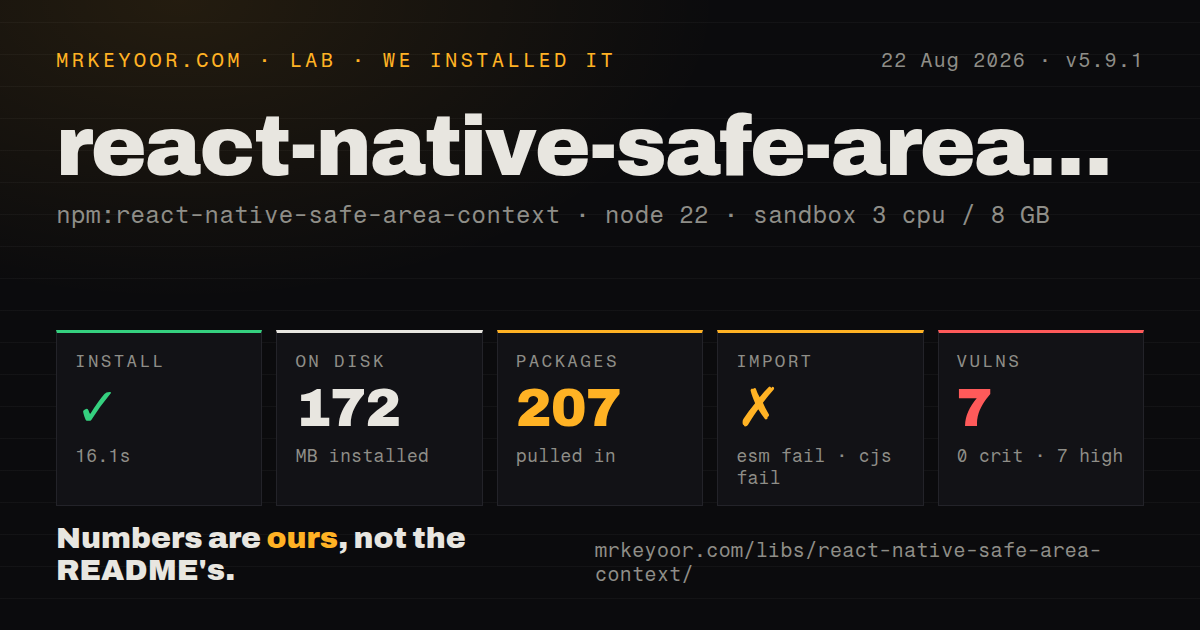
| Install | ✓ · 16.1s | 207 packages on disk · 172 MB |
| Import | ✗ | ESM import fails · require() fails · CommonJS package |
| Browser | n/a | could not be bundled for the browser (Node-only code, most likely) |
| Types | ✓ | TypeScript types bundled |
| Known vulns | 7 | 0 critical · 7 high · 0 moderate · 0 low (npm audit) |
Answers from our run
Does react-native-safe-area-context install cleanly?
Yes. In a fresh container with an empty cache, npm install react-native-safe-area-context finished in 16 seconds, leaving 207 packages and 172 MB on disk. npm audit reported 7 known vulnerabilities.
Can react-native-safe-area-context run in a browser?
Not directly: esbuild could not bundle it for the browser in our run, which normally means it depends on Node built-ins. Use it on the server, or find a browser-targeted alternative.
Does react-native-safe-area-context work with both ESM and CommonJS?
Neither plain import nor require succeeded in our sandbox, so it needs a bundler or extra setup.
Does react-native-safe-area-context include TypeScript types?
Yes, type declarations ship inside the package, so no @types install is needed.
react-native-safe-area-context or react-native-keyboard-controller: which should you use?
react-native-keyboard-controller: Use it when keyboard movement and overlap are the real layout problem. This is the normal safe-area layer for current React Native stacks, but it belongs inside a configured native app.
When should you not use react-native-safe-area-context?
The project runs on React Native below the version supported by 5.x; select the documented 4.x line or upgrade React Native.
Use it if
- A React Native app draws edge to edge and must keep controls clear of system cutouts and indicators.
- React Navigation, Expo, modals, or native screens already expect this provider and its inset hooks.
- The same layout needs live safe-area values across mobile and web.
- A native `SafeAreaView` can apply padding without waiting for a JavaScript hook render.
- The project runs on React Native below the version supported by 5.x; select the documented 4.x line or upgrade React Native.
- The obstruction is the software keyboard. Safe-area insets do not represent keyboard height or animation.
- A navigator already consumes the same edge and another view would create double padding.
- You need a package that can be imported in plain Node or bundled as an ordinary website dependency; both checks failed in our lab.
- Seven high audit findings in the resolved install are unacceptable until `npm audit` shows which peer-tooling packages caused them and the app team resolves the graph.
Setup reality
We installed react-native-safe-area-context 5.9.1 in a fresh Node 22 Bookworm container. npm took 16.1 seconds and left 207 packages using 172 MB. The package declares 0 direct dependencies and 2 peer dependencies, React and React Native, with 1008 KB unpacked. npm audit reported 7 known vulnerabilities, all high severity. TypeScript declarations are bundled.
The package is CommonJS without an exports map, but neither require() nor ESM import worked in our plain Node 22.23.2 check. The browser esbuild attempt also failed. Those results fit a native React Native library whose source expects Metro, React Native platform resolution, and native modules. Install with Expo's version-aware command when using Expo. Bare iOS projects need CocoaPods installation and an app rebuild; Android also requires a native rebuild.
Place SafeAreaProvider near the app root. Add another provider where a native modal or screen establishes a different coordinate frame, but avoid putting providers inside animated or scrolling containers. initialWindowMetrics can remove the first asynchronous inset update, yet it can become wrong if that provider remounts. On web, supply suitable initial metrics for SSR or accept a client measurement update. Version 5.9 fixes resize and nested-provider measurement there.
SafeAreaView applies padding or margin natively and is usually smoother during rotation than recalculating styles from useSafeAreaInsets. Limit edges when headers or tab bars already handle part of the screen. Safe areas exclude the keyboard, so use keyboard-specific APIs for input screens. Before shipping, inspect the seven high audit findings in the actual lockfile; the package itself has no direct dependencies, so the resolved peer and tooling graph determines remediation.
Patterns
Wrap the application root provide-insets
import {SafeAreaProvider} from 'react-native-safe-area-context'

export default function App() {
  return <SafeAreaProvider><RootNavigator /></SafeAreaProvider>
}
Consumers use the nearest provider's frame. Keep the root provider outside scroll and animation containers.
Seed the first measurement seed-metrics
import {SafeAreaProvider, initialWindowMetrics} from 'react-native-safe-area-context'

<SafeAreaProvider initialMetrics={initialWindowMetrics}>
  <RootNavigator />
</SafeAreaProvider>
Do not seed a provider that can remount with stale values. SSR on web needs metrics chosen for that render.
Apply native edge padding pad-safe-edges
<SafeAreaView style={{flex: 1}} edges={['top', 'left', 'right']}>
  <Screen />
</SafeAreaView>
Omit an edge already handled by a navigator. Insets add to the view's existing padding under the default edge mode.
Choose the larger bottom spacing keep-bottom-gutter
<SafeAreaView style={{paddingBottom: 16}} edges={{bottom: 'maximum'}}>
  <Controls />
</SafeAreaView>
`maximum` uses the greater of the safe inset and style spacing instead of adding them together.
Position a custom floating control read-insets
const insets = useSafeAreaInsets()
return <Pressable style={{position: 'absolute', right: 16, bottom: Math.max(insets.bottom, 16)}} />
Hook values update through JavaScript and may lag native layout during rotation. Prefer `SafeAreaView` for ordinary padding.
Measure a native modal separately use-modal-provider
<Modal visible={open}>
  <SafeAreaProvider>
    <SafeAreaView style={{flex: 1}}><ModalContent /></SafeAreaView>
  </SafeAreaProvider>
</Modal>
A native modal may have a different frame from the app root, so its consumers need a nearer provider.
Use insets as margin apply-safe-margin
<SafeAreaView mode="margin" edges={['left', 'right']} style={{height: 1, backgroundColor: '#ccc'}} />Margin mode helps separators avoid unsafe sides while their surrounding background can still extend edge to edge.
Use the packaged Jest mock mock-jest
import mockSafeAreaContext from 'react-native-safe-area-context/jest/mock'

jest.mock('react-native-safe-area-context', () => mockSafeAreaContext)
The standard mock uses fixed metrics. Supply explicit provider values when a test must verify nonzero inset behavior.
Alternatives
| Package | Registry | Pick it when |
|---|---|---|
| react-native-keyboard-controller | npm | Use it when keyboard movement and overlap are the real layout problem. |
| react-native-static-safe-area-insets | npm | Use it only for a legacy iOS integration that needs static constants. |
| expo-status-bar | npm | Use it to control status-bar appearance, not as a replacement for inset measurement. |
More mobile guides
react-native · expo · react-native-reanimated · react-native-worklets · react-native-svg · react-native-web · the whole shelf →
How this guide is made: grounded in the library's documentation, release notes, changelog, and issue history, on a fixed rubric — not a hands-on install of every release. The 50 most-downloaded entries are additionally install-verified in clean containers. Corrections: contact the desk.