react-native-reanimated review
react-native-reanimated runs React Native animations and gesture reactions in a separate UI runtime. Shared values carry mutable state; worklets compute styles and callbacks without waiting on the JavaScript thread; timing, spring, decay, layout, and CSS APIs drive native views. Version 4.6.0 supports React Native 0.83 through 0.87 with Worklets 0.12.x, adds native CSS lifecycle callbacks, and introduces contrastColor. It requires the New Architecture and a native rebuild. Our install occupied 195 MB and npm audit reported eight high-severity vulnerabilities.
Reanimated 4.6 is the strong choice for demanding React Native gestures and UI-thread animation on a current New Architecture app. Do not add it casually: the native rebuild, strict peer matrix, worklet mental model, 195 MB measured tree, and eight high audit findings are real costs.
We installed it
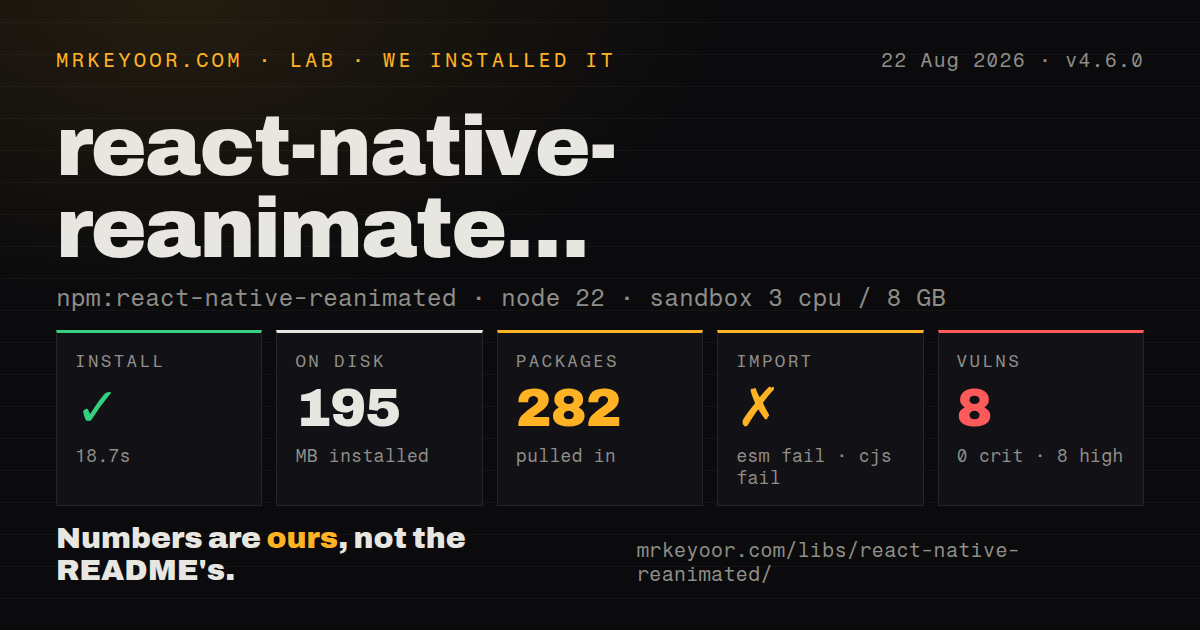
| Install | ✓ · 18.7s | 282 packages on disk · 195 MB |
| Import | ✗ | ESM import fails · require() fails · CommonJS package |
| Browser | n/a | could not be bundled for the browser (Node-only code, most likely) |
| Types | ✓ | TypeScript types bundled |
| Known vulns | 8 | 0 critical · 8 high · 0 moderate · 0 low (npm audit) |
Answers from our run
Does react-native-reanimated install cleanly?
Yes. In a fresh container with an empty cache, npm install react-native-reanimated finished in 19 seconds, leaving 282 packages and 195 MB on disk. npm audit reported 8 known vulnerabilities.
Can react-native-reanimated run in a browser?
Not directly: esbuild could not bundle it for the browser in our run, which normally means it depends on Node built-ins. Use it on the server, or find a browser-targeted alternative.
Does react-native-reanimated work with both ESM and CommonJS?
Neither plain import nor require succeeded in our sandbox, so it needs a bundler or extra setup.
Does react-native-reanimated include TypeScript types?
Yes, type declarations ship inside the package, so no @types install is needed.
react-native-reanimated or moti: which should you use?
moti: Use it for declarative component animation props while accepting Reanimated as the underlying engine. Reanimated 4.6 is the strong choice for demanding React Native gestures and UI-thread animation on a current New Architecture app.
When should you not use react-native-reanimated?
The app still uses React Native's old architecture; Reanimated 4 supports only the New Architecture and the maintainers direct old apps to 3.x
Use it if
- A gesture-driven interaction must keep updating while React rendering or network work occupies the JavaScript thread
- List rows, cards, or screens need entering, exiting, and layout transitions without manual measurements
- An application already uses react-native-gesture-handler and needs pan, pinch, swipe, or scroll values handled on the UI thread
- The team accepts worklet constraints and needs shared values, springs, decay, interpolation, or declarative CSS animations
- The app still uses React Native's old architecture; Reanimated 4 supports only the New Architecture and the maintainers direct old apps to 3.x
- React Native is outside 0.83 through 0.87 or react-native-worklets is outside 0.12.x; those are the 4.6.0 peer ranges
- You cannot rebuild iOS and Android native projects after installation or upgrade; this package contains native code
- A large dependency and security review is unacceptable: our sandbox installed 282 packages using 195 MB and npm audit found eight high-severity vulnerabilities
- The interaction is a simple opacity or transform transition that React Native Animated can handle without a second runtime and Babel worklet transform
Setup reality
Our clean npm install of react-native-reanimated 4.6.0 took 18.7 seconds. It left 282 packages consuming 195 MB. The package declares two direct dependencies and three peers, and bundles TypeScript declarations. npm audit reported eight known vulnerabilities, all high severity. Both require() and ESM import failed under Node.js v22.23.2, and esbuild could not build a browser bundle. Those failures show that a bare Node probe cannot execute this native React Native package.
Version alignment comes before animation code. Reanimated 4.6.0 peers with React Native 0.83 through 0.87 and react-native-worklets 0.12.x, and it needs the New Architecture. Install the Worklets package, put react-native-worklets/plugin last in Babel's plugins, clear Metro's cache, and rebuild native binaries. Expo users should select versions through the SDK's installer because an arbitrary npm upgrade can move outside Expo's tested native combination.
A worklet runs in another JavaScript runtime. It can read shared values and captured constants, but React state changes, navigation, and ordinary JS callbacks cross back explicitly through runOnJS. Reading shared.value during component render does not subscribe React to later changes; read it inside useAnimatedStyle or a reaction. Repeated animations should be cancelled on unmount. Jest needs setUpTests before animated components render, and native failures often require a clean build rather than another Metro refresh.
Prefer transform and opacity where possible because layout properties can trigger layout work every frame. Respect the system motion preference with the reduced-motion APIs. Version 4.6 adds CSS animation and transition callbacks on iOS and Android, plus contrastColor for worklets and JS. Its Android platform-driven CSS opacity transition is experimental, disabled by default, and controlled through a feature flag. Verify web behavior separately because its implementation and supported properties differ from native.
Patterns
Place the Worklets transform last configure-worklets-plugin
// babel.config.js
module.exports = {
  presets: ['babel-preset-expo'],
  plugins: [
    // other plugins first
    'react-native-worklets/plugin',
  ],
};
Clear Metro's cache and rebuild the native app after changing this file. A missing transform often appears only when a worklet runs.
Drive a style from a shared value animate-shared-value
import Animated, { useSharedValue, useAnimatedStyle, withTiming } from 'react-native-reanimated';

const opacity = useSharedValue(0);
const animatedStyle = useAnimatedStyle(() => ({ opacity: opacity.value }));
opacity.value = withTiming(1, { duration: 250 });
return <Animated.View style={[styles.card, animatedStyle]} />;
Attach the style to an Animated component. Reading opacity.value in React render gives a snapshot instead of an animated subscription.
Move a value with a spring run-spring
import { withSpring } from 'react-native-reanimated';

translateX.value = withSpring(targetX, {
  damping: 18,
  stiffness: 180,
  mass: 1,
});
Tune spring parameters on the real device. A duration-based expectation does not map directly to a physics spring's settling time.
Sequence and repeat a shake compose-animation
import { withSequence, withRepeat, withTiming } from 'react-native-reanimated';

shake.value = withSequence(
  withTiming(-8, { duration: 60 }),
  withRepeat(withTiming(8, { duration: 120 }), 3, true),
  withTiming(0, { duration: 60 }),
);
An infinite repeat keeps scheduling frames. Call cancelAnimation on teardown when the effect can outlive its view.
Return from a worklet to JavaScript call-js-thread
import { runOnJS, useAnimatedReaction } from 'react-native-reanimated';

useAnimatedReaction(
  () => translateX.value,
  current => {
    if (current > 200) runOnJS(onDismiss)();
  },
);
Navigation, React state, network calls, and ordinary callbacks belong on the JS thread. Direct worklet calls to them can throw.
Derive a header from scroll position animate-scroll
const y = useSharedValue(0);
const onScroll = useAnimatedScrollHandler(event => { y.value = event.contentOffset.y; });
const header = useAnimatedStyle(() => ({
  transform: [{ translateY: interpolate(y.value, [0, 120], [0, -116], Extrapolation.CLAMP) }],
}));
return <Animated.ScrollView onScroll={onScroll} scrollEventThrottle={16} />;
Clamp interpolation unless movement beyond the input range is intended. A transform avoids changing layout height every frame.
Follow a pan gesture connect-pan-gesture
const x = useSharedValue(0);
const pan = Gesture.Pan()
  .onChange(event => { x.value += event.changeX; })
  .onEnd(event => { x.value = withDecay({ velocity: event.velocityX }); });
const style = useAnimatedStyle(() => ({ transform: [{ translateX: x.value }] }));
Gesture callbacks execute as worklets when integrated correctly. Apply the style to the Animated view inside GestureDetector.
Animate list insertion and removal animate-layout
{items.map(item => (
  <Animated.View
    key={item.id}
    entering={FadeInDown.duration(200)}
    exiting={FadeOut}
    layout={LinearTransition.springify()}
  >
    <Row item={item} />
  </Animated.View>
))}
Stable keys are required. Index keys can make unchanged rows appear to enter or exit after a reorder.
Follow the system motion preference respect-reduced-motion
import { useReducedMotion, withTiming } from 'react-native-reanimated';

const reduceMotion = useReducedMotion();
opacity.value = withTiming(1, { duration: reduceMotion ? 0 : 300 });
Remove or shorten decorative movement when the preference is enabled; preserve the final visible state and interaction result.
Select readable black or white text choose-contrast-color
import { contrastColor, useAnimatedStyle } from 'react-native-reanimated';

const labelStyle = useAnimatedStyle(() => ({
  color: contrastColor(background.value),
}));
contrastColor is new in 4.6 and can run in a worklet or on the JS thread. It returns black or white by WCAG contrast ratio.
Receive a CSS animation completion listen-css-animation
<Animated.View
  style={styles.pulse}
  onCSSAnimationEnd={event => {
    console.log(event.animationName, event.elapsedTime);
  }}
/>
Version 4.6 brings CSS lifecycle callbacks to iOS and Android. These callbacks belong to CSS animations, not timing, spring, or layout animations.
Prepare Reanimated for Jest setup-jest
// jest.setup.js
require('react-native-reanimated').setUpTests();

// test body
advanceAnimationByTime(300);
expect(getAnimatedStyle(node)).toMatchObject({ opacity: 1 });
Load setUpTests before rendering animated components. Fake-time helpers let tests assert a final state without real waiting.
Alternatives
| Package | Registry | Pick it when |
|---|---|---|
| moti | npm | Use it for declarative component animation props while accepting Reanimated as the underlying engine |
| @shopify/react-native-skia | npm | Use it when the moving content is canvas drawing, paths, shaders, or per-pixel graphics |
| react-native-worklets | npm | Use it alone when multithreaded JavaScript execution is needed without Reanimated's view-animation APIs |
More mobile guides
react-native · react-native-safe-area-context · expo · react-native-svg · react-native-worklets · @react-native-async-storage/async-storage · the whole shelf →
How this guide is made: grounded in the library's documentation, release notes, changelog, and issue history, on a fixed rubric — not a hands-on install of every release. The 50 most-downloaded entries are additionally install-verified in clean containers. Corrections: contact the desk.