react-native review
React Native 0.87.0 lets React components render platform views on Android and iOS while JavaScript runs through the React Native runtime and native modules expose device APIs. Metro builds the JavaScript application, Hermes executes it by default, and Gradle or Xcode produces the actual app. The project recommends starting new work through a framework such as Expo, leaving bare React Native for teams that need direct native project control. Version 0.87 makes the Strict TypeScript API the default, requires Node 22.13+, adopts Android Gradle Plugin 9 and Android SDK 37, adds Swift Package Manager work, and removes legacy exports and APIs including `InteractionManager`, old StatusBar controls, and several deep-import paths.
React Native 0.87.0 can share substantial React code across Android and iOS, but it is a native mobile stack with two build systems, tight version coupling, and a breaking upgrade cadence. Start through Expo when it fits, and do not ship the measured dependency graph until the seven high audit findings have been reviewed and resolved or formally accepted.
We installed it
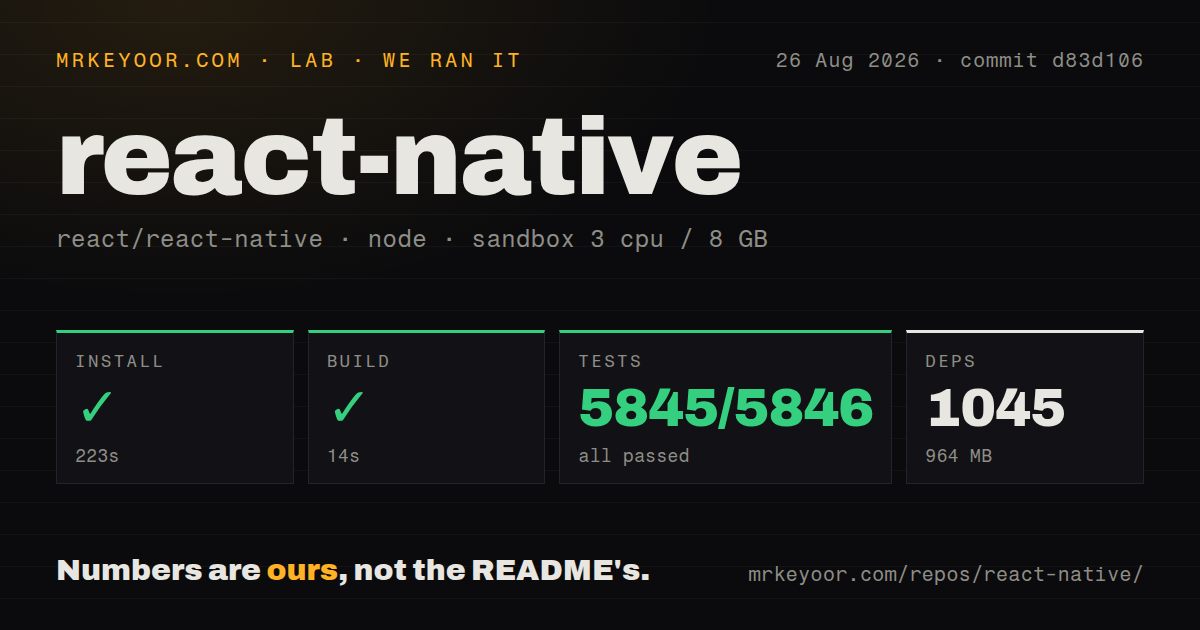
| Install | ✓ · 13.6s | 206 packages on disk · 171 MB |
| Import | ✗ | ESM import fails · require() fails · CommonJS package with exports map |
| Browser | n/a | could not be bundled for the browser (Node-only code, most likely) |
| Types | — | no TypeScript types found |
| Known vulns | 7 | 0 critical · 7 high · 0 moderate · 0 low (npm audit) |
Answers from our run
Does react-native install cleanly?
Yes. In a fresh container with an empty cache, npm install react-native finished in 14 seconds, leaving 206 packages and 171 MB on disk. npm audit reported 7 known vulnerabilities.
Can react-native run in a browser?
Not directly: esbuild could not bundle it for the browser in our run, which normally means it depends on Node built-ins. Use it on the server, or find a browser-targeted alternative.
Does react-native work with both ESM and CommonJS?
Neither plain import nor require succeeded in our sandbox, so it needs a bundler or extra setup.
Does react-native include TypeScript types?
No type declarations were found in our install, so TypeScript users need their own declarations.
react-native or expo: which should you use?
expo: Use it as the recommended React Native framework when managed builds, routing, updates, and a curated native-module set fit the app. React Native 0.87.0 can share substantial React code across Android and iOS, but it is a native mobile stack with two build systems, tight version coupling, and a breaking upgrade cadence.
When should you not use react-native?
Nobody can diagnose Gradle, Android manifests, Xcode projects, CocoaPods or SwiftPM, certificates, provisioning profiles, and native crash logs. JavaScript knowledge alone does not operate both release pipelines.
Use it if
- A React team needs Android and iOS applications with native views and is prepared to test each platform separately.
- The product can share state, networking, validation, and much of its UI logic while retaining platform-specific files and native code where behavior diverges.
- Expo or another React Native framework covers routing, builds, updates, and native modules, or the team can own Xcode, Gradle, CocoaPods, SDKs, and signing directly.
- Required third-party modules explicitly support React Native 0.87, the New Architecture, React 19.2.3, and the application's platform targets.
- Nobody can diagnose Gradle, Android manifests, Xcode projects, CocoaPods or SwiftPM, certificates, provisioning profiles, and native crash logs. JavaScript knowledge alone does not operate both release pipelines.
- Seven high-severity npm audit findings in the measured 0.87.0 install are unacceptable under your release policy. Inspect the resolved advisories and wait for compatible fixes rather than overriding them blindly.
- An existing responsive web application only needs store packaging and a few device APIs. Capacitor reuses the web UI, while React Native requires rebuilding it from native primitives.
- A dependency still relies on removed legacy architecture symbols, deep private imports, the old Jest preset path, `InteractionManager`, deprecated StatusBar props, or other APIs deleted in 0.87.
- The application depends on browser DOM, CSS, or direct Node imports. Our Node `require()` and ESM `import` checks both failed, and esbuild could not produce a browser bundle; Metro and the native runtime are the supported path.
Setup reality
We installed react-native 0.87.0 in a fresh Node 22 Bookworm container. npm finished in 13.6 seconds, left 206 packages, and used 171 MB. The package declares 30 direct dependencies, 2 peer dependencies, and 35960 KB unpacked. It requires Node ^22.13.0 || ^24.3.0 || >=26.0.0 and uses the MIT license. npm audit reported 7 known vulnerabilities, all high severity. Our package scan found no TypeScript declaration files.
Direct loading failed in both module styles under Node 22.23.2: require('react-native') failed and ESM import('react-native') failed. The package is CommonJS with an exports map, but application code is transformed by Metro for the React Native runtime rather than executed as a plain Node library. esbuild also failed to build it for a browser. These are platform boundaries, yet they make generic Node scripts and web bundler tests poor health checks for a mobile project.
Start with the framework route unless a named native constraint rules it out. Bare Android work needs the matching JDK, Android Studio, SDK 37, AGP 9, emulator or device, and environment paths. iOS builds need macOS, Xcode, platform SDKs, signing, and whichever CocoaPods or SwiftPM integration the project uses. The npm package alone cannot produce either app. React 19.2.3 and @types/react are peers, so keep the framework template's versions aligned before adding libraries.
Upgrade with a project diff, then rebuild both native projects from clean derived artifacts. Version 0.87 turns the Strict TypeScript API on by default, restricts private deep-import visibility, removes the old Jest preset path, and continues legacy architecture removal. Audit every native dependency for 0.87 and New Architecture support. Fast Refresh covers many JavaScript edits, while changes to native modules, build settings, entitlements, manifests, or linked packages need a native rebuild. Test release builds because debug Metro behavior does not prove store binaries are sound.
Patterns
Start with the recommended framework path create-app
npx create-expo-app@latest MyApp
cd MyApp
npx expo start

# Bare project when a framework does not fit
npx @react-native-community/cli@latest init MyBareApp
Expo is the framework route recommended by the React Native README. A bare project exposes native build files immediately and needs Android and iOS tooling configured separately.
Compose a screen from native primitives render-screen
import { StyleSheet, Text, View } from 'react-native';

export function Welcome() {
  return (
    <View style={styles.screen}>
      <Text style={styles.heading}>Welcome</Text>
    </View>
  );
}

const styles = StyleSheet.create({
  screen: { flex: 1, alignItems: 'center', justifyContent: 'center' },
  heading: { fontSize: 24, fontWeight: '600' },
});
These are native components, not HTML elements. Text strings belong inside `Text`, and the default flex direction is column.
Virtualize a keyed collection render-long-list
import { FlatList, Text } from 'react-native';

export function Users({ users, loadMore }) {
  return (
    <FlatList
      data={users}
      keyExtractor={(user) => String(user.id)}
      renderItem={({ item }) => <Text>{item.name}</Text>}
      onEndReached={loadMore}
      onEndReachedThreshold={0.5}
    />
  );
}
`FlatList` renders a moving window instead of mounting every row. Keep keys stable and make pagination idempotent because end-reached callbacks can occur more than once.
Cancel a request when the screen leaves fetch-with-cleanup
import { useEffect, useState } from 'react';

export function useProfile(id) {
  const [profile, setProfile] = useState(null);

  useEffect(() => {
    const controller = new AbortController();
    fetch(`https://api.example.com/profiles/${id}`, { signal: controller.signal })
      .then((response) => {
        if (!response.ok) throw new Error(`HTTP ${response.status}`);
        return response.json();
      })
      .then(setProfile)
      .catch((error) => {
        if (error.name !== 'AbortError') console.error(error);
      });
    return () => controller.abort();
  }, [id]);

  return profile;
}
An Android emulator reaches the development host through its emulator address rather than the emulator's own `localhost`. Use environment-specific API origins.
Give a control pressed feedback handle-press
import { Pressable, Text } from 'react-native';

<Pressable
  accessibilityRole="button"
  onPress={submit}
  hitSlop={8}
  style={({ pressed }) => ({ opacity: pressed ? 0.6 : 1 })}
>
  <Text>Submit</Text>
</Pressable>
`hitSlop` expands the touchable area without changing layout. Add an accessibility role and a label when the visible child does not describe the action.
Configure an email field control-text-input
import { useState } from 'react';
import { TextInput } from 'react-native';

export function EmailField() {
  const [email, setEmail] = useState('');
  return (
    <TextInput
      value={email}
      onChangeText={setEmail}
      keyboardType="email-address"
      autoCapitalize="none"
      autoCorrect={false}
      accessibilityLabel="Email address"
    />
  );
}
Keyboard hints do not validate the value. Disable automatic capitalization for identifiers such as email addresses and usernames.
Select small platform differences branch-by-platform
import { Platform, StyleSheet } from 'react-native';

const styles = StyleSheet.create({
  card: {
    ...Platform.select({
      ios: { shadowColor: '#000', shadowOpacity: 0.2, shadowRadius: 6 },
      android: { elevation: 4 },
      default: {},
    }),
  },
});
Use `.ios` and `.android` file suffixes when an entire implementation differs. Excessive inline branching makes shared components hard to test.
Size a network image explicitly display-remote-image
import { Image } from 'react-native';

<Image
  source={{ uri: 'https://example.com/avatar.png' }}
  style={{ width: 64, height: 64, borderRadius: 32 }}
  resizeMode="cover"
  accessibilityLabel="Account avatar"
/>
Remote assets do not contribute bundled dimensions. Give them a resolved width and height or they can occupy no visible space.
Handle dark, light, and unknown schemes respect-color-scheme
import { Text, useColorScheme, View } from 'react-native';

export function Card() {
  const scheme = useColorScheme();
  const dark = scheme === 'dark';
  return (
    <View style={{ backgroundColor: dark ? '#111' : '#fff' }}>
      <Text style={{ color: dark ? '#fff' : '#111' }}>Status</Text>
    </View>
  );
}
In 0.87 the return type is `ColorSchemeName | null`, and `'unspecified'` is no longer part of the type. Decide how null should fall back.
Open a supported link open-external-url
import { Alert, Linking } from 'react-native';

export async function openDocs() {
  const url = 'https://reactnative.dev';
  if (await Linking.canOpenURL(url)) {
    await Linking.openURL(url);
  } else {
    Alert.alert('This link cannot be opened');
  }
}
Custom schemes may need allow-list entries in iOS and Android configuration before `canOpenURL()` reports them as available.
Replace removed InteractionManager work defer-idle-work
import { useEffect } from 'react';

useEffect(() => {
  const id = requestIdleCallback(() => {
    prepareSearchIndex();
  }, { timeout: 1000 });

  return () => cancelIdleCallback(id);
}, []);
React Native 0.87 removes deprecated `InteractionManager`. `requestIdleCallback` schedules low-priority work, but a timeout still allows it to run when the UI never becomes idle.
Let the status bar follow the theme set-status-bar-style
import { StatusBar } from 'react-native';

export function AppChrome() {
  return <StatusBar barStyle="auto" />;
}
Version 0.87 adds `barStyle="auto"` and removes deprecated background color, translucency, network activity, and matching imperative methods from the core StatusBar API.
Alternatives
| Package | Registry | Pick it when |
|---|---|---|
| expo | npm | Use it as the recommended React Native framework when managed builds, routing, updates, and a curated native-module set fit the app. |
| @capacitor/core | npm | Use it when the product is already a web app and native packaging plus plugin access is enough. |
| nativescript | npm | Use it when direct JavaScript access to native platform APIs matters more than using React Native's renderer and ecosystem. |
More mobile guides
expo · react-native-safe-area-context · react-native-reanimated · react-native-worklets · react-native-svg · @react-native-async-storage/async-storage · the whole shelf →
How this guide is made: grounded in the library's documentation, release notes, changelog, and issue history, on a fixed rubric — not a hands-on install of every release. The 50 most-downloaded entries are additionally install-verified in clean containers. Corrections: contact the desk.