PyPDF2 review
PyPDF2 3.0.1 reads and rewrites existing PDF files in pure Python. Its useful surface covers page extraction and concatenation, rotation and cropping, text and metadata access, form values, overlays, and password handling. The current release added no PDF feature: a wheel comparison with 3.0.0 shows only the version bump and a new import-time warning that tells users to move to pypdf. That warning matters because 3.0.1 is the final PyPDF2 release. The same maintainers now develop the code under the pypdf package name.
PyPDF2 3.0.1 installed in 0.3 seconds and used 2 MB in our sandbox, but pip-audit found one known vulnerability and the successful import emitted the package's own deprecation warning. Keep it only for bounded maintenance on legacy Python code; install pypdf for new work.
We installed it
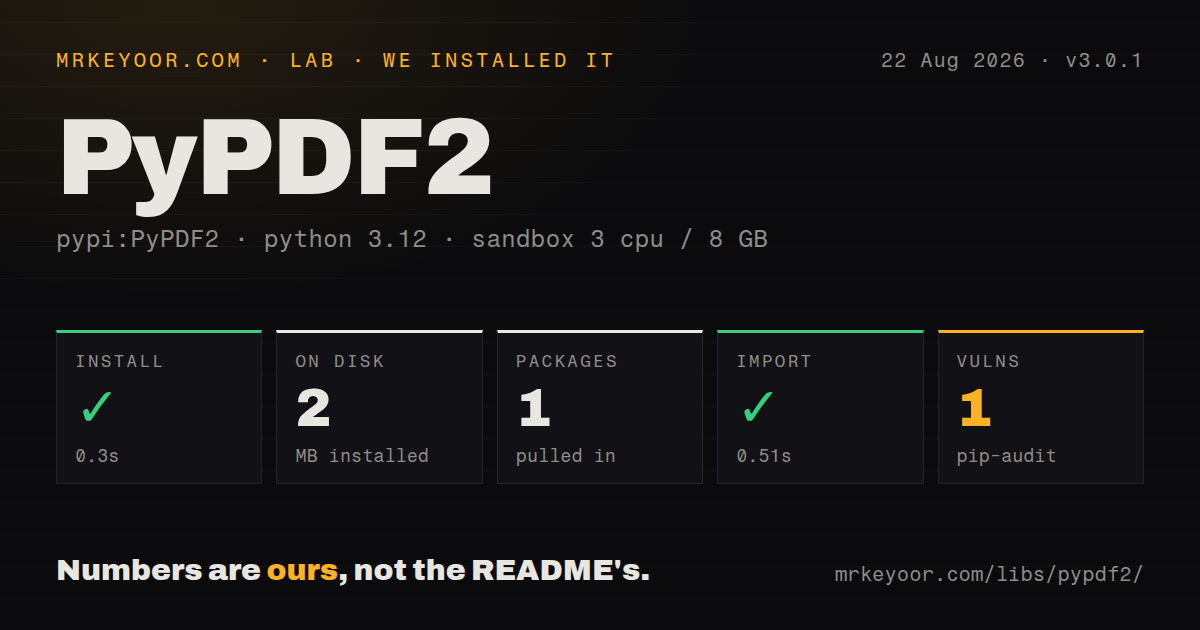
| Install | ✓ · 0.3s | 1 package on disk · 2 MB |
| Import | ✓ | import PyPDF2 in 0.51s · pure Python · py.typed · requires Python >=3.6 |
| Known vulns | 1 | (pip-audit) |
Answers from our run
Does PyPDF2 install cleanly?
Yes. In a fresh container with an empty cache, pip install PyPDF2 finished in 0.3s, leaving 1 package and 2 MB on disk. pip-audit reported 1 known vulnerability.
What does PyPDF2 need to run?
Python >=3.6, and nothing compiled: it is pure Python. In our run import PyPDF2 succeeded in 0.51s, and the package ships py.typed for type checkers.
PyPDF2 or pypdf: which should you use?
pypdf: Choose it for new pure-Python PDF work or the supported continuation of an existing PyPDF2 codebase. PyPDF2 3.0.1 installed in 0.3 seconds and used 2 MB in our sandbox, but pip-audit found one known vulnerability and the successful import emitted the package's own deprecation warning.
When should you not use PyPDF2?
You are starting new code. The maintainers declared the 3.0.x line final and continue the project as pypdf, whose current releases contain later parser, extraction, and encryption work.
Use it if
- You maintain an application that already imports PyPDF2 and need a small, bounded fix before scheduling its move to pypdf.
- Your deployment still runs Python 3.6, 3.7, or 3.8, which PyPDF2 3.0.1 supports while current pypdf requires Python 3.9 or newer.
- You need to split, concatenate, crop, rotate, or stamp existing PDFs without installing a compiled extension or a system PDF library.
- You need basic access to PDF metadata, outlines, page content streams, or AcroForm values and can test against the exact documents you receive.
- You are starting new code. The maintainers declared the 3.0.x line final and continue the project as pypdf, whose current releases contain later parser, extraction, and encryption work.
- A known vulnerability is unacceptable in the dependency set. pip-audit reported one known vulnerability in our clean PyPDF2 3.0.1 install.
- Your input is scanned or has columns and tables that must retain reading order. The extraction docs say PyPDF2 is not OCR software, and the 3.0.1 docstring warns that output order can change.
- You need page rendering, thumbnails, or pixel output. PyPDF2 edits PDF objects and content streams; it does not render a page to an image.
- You need AES encryption for newly written files. The 3.0.1 writer source selects 40-bit or 128-bit RC4, while the crypto extra is needed to read AES-protected input.
- Your test runner promotes DeprecationWarning to an exception. Version 3.0.1 emits that warning from `PyPDF2.__init__` as soon as the import runs.
Setup reality
In our fresh Python 3.12 Bookworm sandbox, PyPDF2 3.0.1 installed successfully in 0.3 seconds. One package occupied 2 MB on disk, and import PyPDF2 completed in 0.51 seconds. The distribution is pure Python, includes py.typed, requires Python 3.6 or newer, and is marked with the BSD License. pip-audit found one known vulnerability.
The package declares 15 direct dependencies across environment markers and optional extras. A normal Python 3.12 install still left only PyPDF2 on disk in our test. Python versions below 3.10 may pull typing_extensions, and versions below 3.7 may pull dataclasses. Install PyPDF2[crypto] for AES-encrypted input and PyPDF2[image] for the page image helpers; those extras add PyCryptodome or Pillow. No credentials or config file are involved.
Version 3.0.1 imports successfully, then emits a DeprecationWarning from the package initializer. Python usually hides that warning, while pytest or python -W error can turn the same 0.51-second import into a failure. PdfReader defaults to strict=False, so it attempts to recover from some malformed structures. Use strict=True while diagnosing a troublesome supplier file, and keep fixtures for the exact PDFs your service accepts.
PDF parsing is synchronous and a path passed to PdfReader is read into memory. The 3.0.1 text extractor follows drawing commands rather than reconstructing a document layout, and it cannot read text that exists only as pixels. Its writer can protect output with 40-bit or 128-bit RC4, not AES. For AES input, install the crypto extra before the first encrypted file arrives; otherwise the optional cipher dependency is absent.
Patterns
Open a PDF and inspect its pages inspect-pages
from PyPDF2 import PdfReader

reader = PdfReader("input.pdf", strict=True)
print(reader.pdf_header)
print(len(reader.pages))
first_page = reader.pages[0]
`strict=True` makes some repairable PDF defects fatal or visible. The default is `False`, which is easier on imperfect files but can hide why a supplier document behaves differently.
Collect text from every page extract-text
from PyPDF2 import PdfReader

reader = PdfReader("input.pdf")
text = "\n".join(
    page.extract_text() or ""
    for page in reader.pages
)
`extract_text()` follows PDF drawing commands and performs no OCR. Scanned pages can return an empty string, while columns and tables may arrive in an unexpected order.
Exclude headers and footers during extraction filter-text-by-position
from PyPDF2 import PdfReader

parts = []
def keep_body(text, cm, tm, font, size):
    y = tm[5]
    if 50 < y < 720:
        parts.append(text)

page = PdfReader("input.pdf").pages[0]
page.extract_text(visitor_text=keep_body)
body = "".join(parts)
The visitor receives the text matrix and font data for each fragment. Coordinates can be wrong in complicated files, so verify the y limits against samples from the same producer.
Write a selected page range split-page-range
from PyPDF2 import PdfReader, PdfWriter

reader = PdfReader("input.pdf")
writer = PdfWriter()
for page in reader.pages[2:7]:
    writer.add_page(page)

with open("pages-3-to-7.pdf", "wb") as output:
    writer.write(output)
Python slices use a zero-based start and exclude the stop value. `reader.pages[2:7]` therefore copies printed page positions 3 through 7 when the PDF has no front-matter offset.
Concatenate whole PDF files merge-pdfs
from PyPDF2 import PdfWriter

writer = PdfWriter()
for filename in ("cover.pdf", "report.pdf", "appendix.pdf"):
    writer.append(filename)
writer.write("combined.pdf")
`PdfWriter.append()` is available in 3.0.1 and can import each source outline. Set `import_outline=False` when bookmarks from the inputs should not enter the combined file.
Rotate wider-than-tall pages rotate-pages
from PyPDF2 import PdfReader, PdfWriter

reader = PdfReader("input.pdf")
writer = PdfWriter()
for page in reader.pages:
    if page.mediabox.width > page.mediabox.height:
        page.rotate(90)
    writer.add_page(page)
writer.write("portrait.pdf")
`rotate()` accepts multiples of 90 degrees and changes the page rotation entry. Arbitrary-angle content needs a `Transformation` instead.
Crop a page to a fixed rectangle crop-page
from PyPDF2 import PdfReader, PdfWriter

page = PdfReader("input.pdf").pages[0]
page.cropbox.lower_left = (36, 72)
page.cropbox.upper_right = (576, 720)

writer = PdfWriter()
writer.add_page(page)
writer.write("cropped.pdf")
PDF box coordinates are points measured from the lower-left corner. Changing `cropbox` controls the visible region and does not erase content outside it.
Overlay a stamp on every page stamp-pages
from PyPDF2 import PdfReader, PdfWriter

stamp = PdfReader("stamp.pdf").pages[0]
reader = PdfReader("input.pdf")
writer = PdfWriter()
for page in reader.pages:
    page.merge_page(stamp)
    writer.add_page(page)
writer.write("stamped.pdf")
`merge_page()` places the stamp at the PDF origin without fitting it to the destination. Apply a `Transformation` first when stamp and document page sizes differ.
Copy pages and replace document metadata read-write-metadata
from PyPDF2 import PdfReader, PdfWriter

reader = PdfReader("input.pdf")
print(reader.metadata.title if reader.metadata else None)

writer = PdfWriter()
writer.append_pages_from_reader(reader)
writer.add_metadata({
    "/Title": "Quarterly report",
    "/Author": "Finance",
})
writer.write("retagged.pdf")
Metadata dictionary names include a leading slash. `add_metadata()` adds the supplied entries to the writer; it does not copy every source metadata field automatically in this pattern.
Fill AcroForm fields fill-form-fields
from PyPDF2 import PdfReader, PdfWriter

reader = PdfReader("form.pdf")
writer = PdfWriter()
writer.append(reader)
for page in writer.pages:
    writer.update_page_form_field_values(
        page,
        {"customer_name": "Ada Lovelace", "approved": "/Yes"},
    )
writer.write("filled.pdf")
`update_page_form_field_values()` updates AcroForm annotations already present on a writer page. Button values must match an appearance name such as `/Yes`; arbitrary text does not check a box.
Open an encrypted PDF decrypt-input
from PyPDF2 import PasswordType, PdfReader

reader = PdfReader("protected.pdf")
if reader.is_encrypted:
    result = reader.decrypt("open-me")
    if result == PasswordType.NOT_DECRYPTED:
        raise ValueError("incorrect PDF password")
print(len(reader.pages))
`decrypt()` returns a `PasswordType` result rather than a plain boolean. AES-protected input requires the `crypto` extra, which installs PyCryptodome.
Add a password to output encrypt-output
from PyPDF2 import PdfReader, PdfWriter

writer = PdfWriter()
writer.append_pages_from_reader(PdfReader("input.pdf"))
writer.encrypt(
    user_password="open-me",
    owner_password="change-settings",
    use_128bit=True,
)
writer.write("protected.pdf")
PyPDF2 3.0.1 writes 128-bit RC4 when `use_128bit=True` and 40-bit RC4 when it is false. Its writer has no AES output option.
Alternatives
| Package | Registry | Pick it when |
|---|---|---|
| pypdf | PyPI | Choose it for new pure-Python PDF work or the supported continuation of an existing PyPDF2 codebase. |
| pymupdf | PyPI | Choose it when you need page rendering, coordinates, or faster extraction and can accept native code plus AGPL or commercial licensing. |
| pdfplumber | PyPI | Choose it when words, lines, tables, and their page coordinates matter more than rewriting PDF pages. |
| pikepdf | PyPI | Choose it for repair and low-level PDF object work backed by qpdf, with a compiled dependency and MPL-2.0 licensing. |
More data guides
numpy · pandas · fsspec · lxml · pyarrow · sqlalchemy · the whole shelf →
How this guide is made: grounded in the library's documentation, release notes, changelog, and issue history, on a fixed rubric — not a hands-on install of every release. The 50 most-downloaded entries are additionally install-verified in clean containers. Corrections: contact the desk.