pymupdf review
Our Python 3.12 install put PyMuPDF 1.28.2 on disk as one 60 MB package with compiled extensions and no direct dependencies. It binds the MuPDF engine for extracting positioned text, rendering pages, editing PDF objects, finding tables, adding annotations, applying redactions, and saving modified documents. It also opens formats such as XPS, EPUB, CBZ, SVG, and common images. Version 1.28.2 updates the bundled engine to MuPDF 1.28.2, warns on the legacy fitz import, improves handling of invalid UTF-8 in Markdown, and adds use_layout, union, and refine options to Page.find_tables(). That range makes it attractive for document pipelines, but the AGPL or commercial licensing choice must be settled before shipping it.
PyMuPDF is a strong choice when one process needs fast extraction, rendering, and real PDF edits. Do not install it casually into a closed-source product: licensing and the 60 MB compiled footprint are part of the architecture, not cleanup tasks.
We installed it
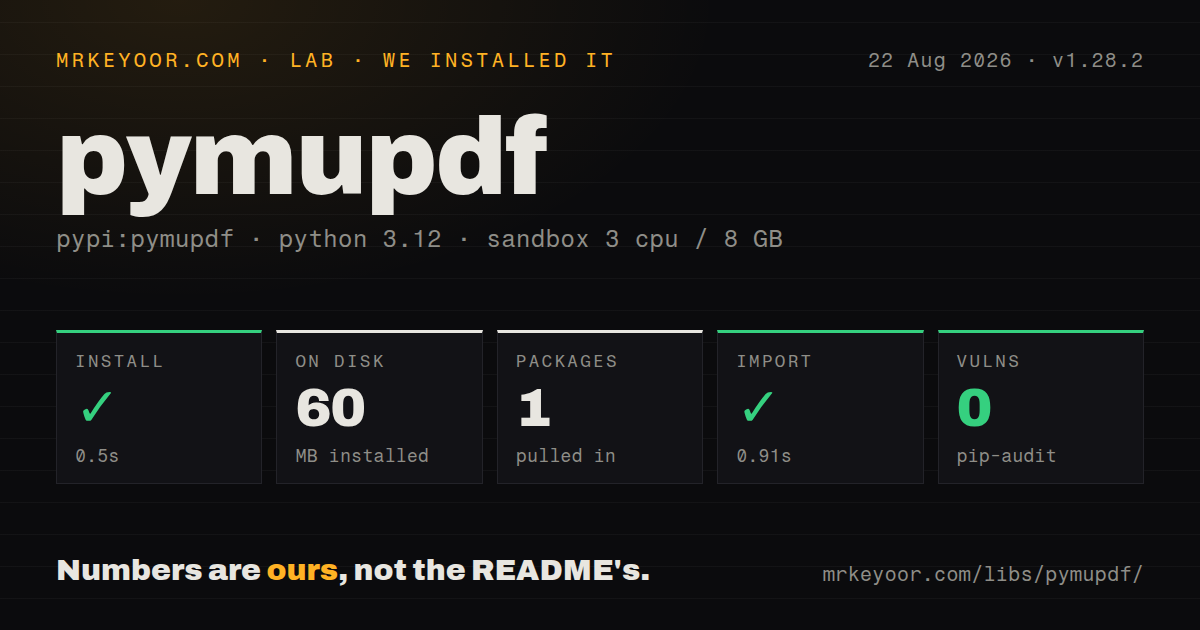
| Install | ✓ · 0.5s | 1 package on disk · 60 MB |
| Import | ✓ | import fitz in 0.91s · compiled extensions · py.typed · requires Python >=3.10 |
| Known vulns | 0 | (pip-audit) |
Answers from our run
Does pymupdf install cleanly?
Yes. In a fresh container with an empty cache, pip install pymupdf finished in 0.5s, leaving 1 package and 60 MB on disk. pip-audit reported no known vulnerabilities.
What does pymupdf need to run?
Python >=3.10, and a platform wheel with compiled extensions. In our run import fitz succeeded in 0.91s, and the package ships py.typed for type checkers.
pymupdf or pypdf: which should you use?
pypdf: Use it for basic PDF splitting, merging, rotation, forms, or encryption under a permissive license. PyMuPDF is a strong choice when one process needs fast extraction, rendering, and real PDF edits.
When should you not use pymupdf?
Your closed-source product cannot comply with AGPL 3.0 and has no budget for the Artifex commercial license
Use it if
- You need fast text extraction with blocks, spans, fonts, coordinates, and reading-order controls
- The same process must render pages, annotate them, redact content, merge documents, and save the result
- You need page or embedded-image output for OCR, previews, or vision processing
- A compiled 60 MB package is acceptable and your project can satisfy AGPL 3.0 or buy an Artifex license
- Your closed-source product cannot comply with AGPL 3.0 and has no budget for the Artifex commercial license
- A 60 MB installed package is too large for your function, image, or desktop bundle
- You only split, merge, rotate, or encrypt ordinary PDFs; a smaller permissively licensed package can cover that work
- You expect OCR to work from pip install alone; PyMuPDF calls Tesseract, which must be installed separately with language data
- You need Office document support from the open package; the README places DOCX, XLSX, and PPTX behind PyMuPDF Pro
Setup reality
Our fresh Python 3.12 install of PyMuPDF 1.28.2 succeeded in 0.5 seconds. It left 1 package using 60 MB, and pip-audit found 0 known vulnerabilities. PyMuPDF declares 0 direct dependencies and requires Python 3.10 or newer. The wheel includes compiled shared objects and ships py.typed. import fitz worked in 0.91 seconds, although version 1.28.2 now warns that fitz is the legacy name. New code should import pymupdf.
The open package needs no credentials or config file and runs locally. Licensing is the setup decision that cannot wait: the distribution is dual licensed under GNU AGPL 3.0 or an Artifex commercial license. PyMuPDF Pro is separate and uses a license key for Office formats. OCR is also separate. Install Tesseract and its requested language data, then ensure the process can locate tessdata before calling get_textpage_ocr().
Coordinates use a top-left origin in the page API, which differs from the PDF coordinate convention many developers expect. Text extraction follows the order stored in the file unless sort=True is requested, and multi-column layouts still need testing. Render memory grows rapidly with DPI, so cap page concurrency when producing high-resolution Pixmaps. Close Document objects promptly, especially in workers processing many files.
Saving deserves its own tests. A normal save rewrites a document; an incremental save appends changes and requires encryption=pymupdf.PDF_ENCRYPT_KEEP when preserving the file's encryption state. Redaction annotations do not remove content until apply_redactions() runs. Table detection in 1.28.2 gained layout, union, and refine controls, but borderless or irregular tables remain document-dependent. Keep representative PDFs as fixtures because engine updates can change extraction order, table boundaries, and raster output.
Patterns
Extract page text extract-plain-text
import pymupdf

doc = pymupdf.open('document.pdf')
for page in doc:
    print(page.get_text())

# reading order can be wrong on multi-column pages
print(doc[0].get_text(sort=True))
doc.close()
Stored text order can differ from reading order. sort=True helps with positional ordering but cannot repair every multi-column layout.
Inspect text spans and geometry extract-with-layout
page = doc[0]
for block in page.get_text('dict')['blocks']:
    if block['type'] != 0:      # 0 is text, 1 is image
        continue
    for line in block['lines']:
        for span in line['spans']:
            print(span['text'], span['font'], round(span['size'], 1), span['bbox'])
Text blocks have lines and spans; image blocks do not. Check the block type before reading text-specific keys.
Render a page to PNG render-page-to-image
page = doc[0]
pix = page.get_pixmap(dpi=150)
pix.save('page_0.png')

img_bytes = pix.tobytes('png')   # for an in-memory pipeline
print(pix.width, pix.height, pix.n)
Higher DPI multiplies pixel count and memory use. Bound parallel rendering instead of letting every worker hold several large Pixmaps.
Find text and add highlights search-and-highlight
page = doc[0]
hits = page.search_for('confidential')
for rect in hits:
    page.add_highlight_annot(rect)

doc.save('highlighted.pdf')
search_for() returns rectangles in PyMuPDF page coordinates, whose origin is at the top left.
Apply permanent redactions redact-content
page = doc[0]
for rect in page.search_for('social security'):
    page.add_redact_annot(rect, fill=(0, 0, 0))

page.apply_redactions()
doc.save('redacted.pdf')
Adding an annotation only marks the area. apply_redactions() performs the content removal before save.
Extract detected tables extract-tables
page = doc[0]
tabs = page.find_tables()
for table in tabs.tables:
    rows = table.extract()          # list of lists of strings
    print(table.to_markdown())
    df = table.to_pandas()          # needs pandas installed
to_pandas() needs pandas. Version 1.28.2 adds layout, union, and refine options for tuning detection.
Merge documents or copy a page range merge-and-split
merged = pymupdf.open()
for path in ['a.pdf', 'b.pdf']:
    with pymupdf.open(path) as src:
        merged.insert_pdf(src)
merged.save('merged.pdf', garbage=4, deflate=True)

with pymupdf.open('big.pdf') as src:
    out = pymupdf.open()
    out.insert_pdf(src, from_page=0, to_page=9)
    out.save('first10.pdf')
An empty Document is the destination. garbage and deflate options can reduce duplicated objects and compressed stream size.
Open and save entirely in memory open-from-bytes
data = await response.read()
doc = pymupdf.open(stream=data, filetype='pdf')

text = doc[0].get_text()
out_bytes = doc.tobytes(garbage=4, deflate=True)
doc.close()
Specify filetype when bytes have no filename. tobytes() returns the saved document for storage or transport.
Append an incremental update incremental-save
doc = pymupdf.open('report.pdf')
doc[0].insert_text((72, 200), 'reviewed')

doc.save('report.pdf', incremental=True, encryption=pymupdf.PDF_ENCRYPT_KEEP)
doc.close()
Keep the existing encryption setting during an incremental save. Repeated incremental edits grow the file because changes are appended.
Save an encrypted PDF encrypt-document
perm = int(
    pymupdf.PDF_PERM_ACCESSIBILITY
    | pymupdf.PDF_PERM_PRINT
)

doc.save(
    'protected.pdf',
    encryption=pymupdf.PDF_ENCRYPT_AES_256,
    owner_pw='owner-secret',
    user_pw='user-secret',
    permissions=perm,
)
authenticate() is required before reading protected content. PDF permission bits depend on viewer cooperation.
Extract embedded images extract-embedded-images
for page_index, page in enumerate(doc):
    for img_index, img in enumerate(page.get_images(full=True)):
        xref = img[0]
        pix = pymupdf.Pixmap(doc, xref)
        if pix.n > 4:                                   # CMYK
            pix = pymupdf.Pixmap(pymupdf.csRGB, pix)
        pix.save(f'p{page_index}_i{img_index}.png')
The same xref can appear on several pages, so deduplicate it. Convert CMYK Pixmaps before saving them as PNG.
OCR a scanned page ocr-scanned-page
page = doc[0]
if not page.get_text().strip():
    tp = page.get_textpage_ocr(language='eng', dpi=300, full=True)
    text = page.get_text(textpage=tp)
    print(text)
Tesseract and its language data are external requirements. Run OCR only when native text is missing because it is much slower.
Alternatives
| Package | Registry | Pick it when |
|---|---|---|
| pypdf | PyPI | Use it for basic PDF splitting, merging, rotation, forms, or encryption under a permissive license |
| pdfplumber | PyPI | Use it when character positions and table extraction are the main job |
| pikepdf | PyPI | Use it for low-level PDF object and stream editing backed by qpdf |
| pdfminer-six | PyPI | Use it for pure-Python text and layout extraction when rendering is unnecessary |
More utils guides
lru-cache · type-fest · ajv · zod · p-limit · find-up · the whole shelf →
How this guide is made: grounded in the library's documentation, release notes, changelog, and issue history, on a fixed rubric — not a hands-on install of every release. The 50 most-downloaded entries are additionally install-verified in clean containers. Corrections: contact the desk.