pypdf review
pypdf 6.16.2 is a pure Python toolkit for reading and rewriting existing PDF files. PdfReader exposes pages, text, metadata, forms, outlines, images, and attachments. PdfWriter can select and merge pages, change page boxes and transformations, add annotations, fill forms, encrypt, and save a new file. It neither rasterizes pages nor recognizes text inside scans. Version 6.16.2 corrects layout-mode spacing and text leading, repairs transformed annotation appearance matrices and outline removal, accepts repeated page references, and improves an RC4 fallback. Our installation measurements remain tied to 6.16.1.
pypdf 6.16.1 installed in 0.2 seconds as one 2 MB package and imported in 0.45 seconds in our sandbox; the current registry release is 6.16.2. Use it to inspect and rewrite existing PDFs, then add separate rendering, OCR, or table tooling only when those jobs appear.
We installed it
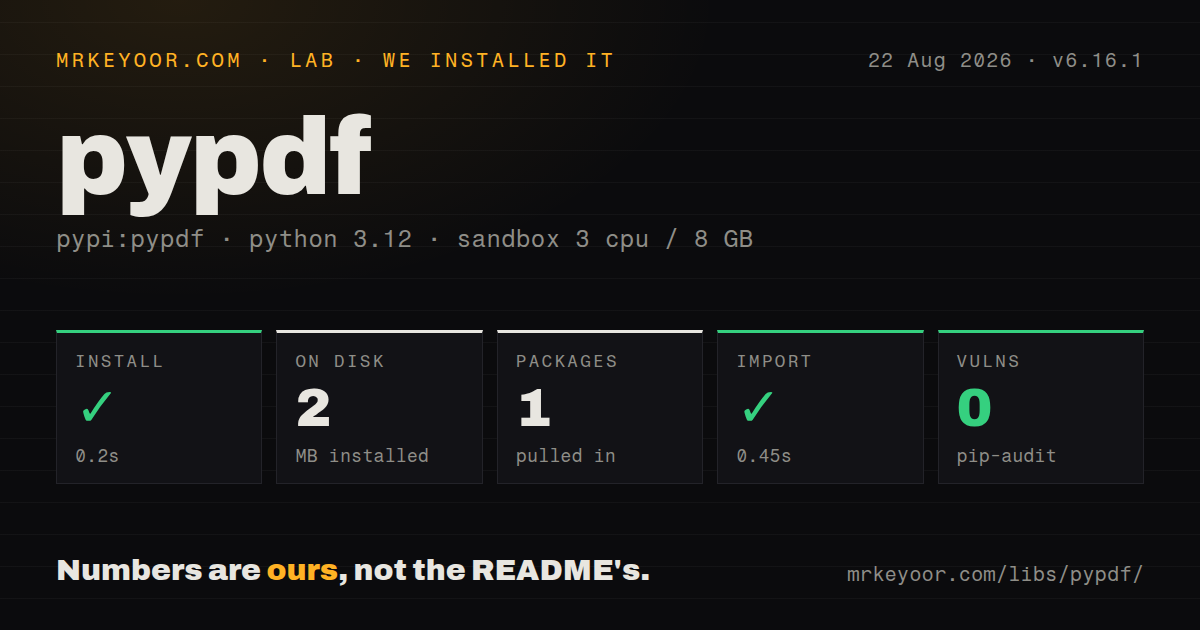
| Install | ✓ · 0.2s | 1 package on disk · 2 MB |
| Import | ✓ | import pypdf in 0.45s · pure Python · py.typed · requires Python >=3.9 |
| Known vulns | 0 | (pip-audit) |
Answers from our run
Does pypdf install cleanly?
Yes. In a fresh container with an empty cache, pip install pypdf finished in 0.2s, leaving 1 package and 2 MB on disk. pip-audit reported no known vulnerabilities.
What does pypdf need to run?
Python >=3.9, and nothing compiled: it is pure Python. In our run import pypdf succeeded in 0.45s, and the package ships py.typed for type checkers.
pypdf or pdfplumber: which should you use?
pdfplumber: Choose it for words, geometry, lines, rectangles, and table extraction rather than document rewriting. pypdf 6.16.1 installed in 0.2 seconds as one 2 MB package and imported in 0.45 seconds in our sandbox; the current registry release is 6.16.2.
When should you not use pypdf?
The output is a thumbnail, preview, or printed bitmap; pypdf has no page renderer, so use a rendering engine such as PyMuPDF
Use it if
- Python code must merge, split, reorder, rotate, crop, stamp, or encrypt PDFs that already exist
- A document pipeline needs to inspect or change metadata, outlines, attachments, annotations, or AcroForm fields
- Deployment should remain pure Python without calling a separate PDF command-line program
- Best-effort digital text is enough for triage and image-only pages can be handed to an OCR service
- The output is a thumbnail, preview, or printed bitmap; pypdf has no page renderer, so use a rendering engine such as PyMuPDF
- The source is mostly scanned paperwork; page.extract_text() reads text operations and cannot recognize characters in an image
- Reliable tables or visual reading order are the product requirement; layout mode reconstructs spaces but does not create a table model
- You are generating reports, charts, flowing paragraphs, and pagination from new content; ReportLab is designed for document creation before a PDF exists
- Inputs are hostile and cannot run in an isolated worker with time and memory caps; recent loop and token limits do not bound every large stream, image, or malformed object
Setup reality
We installed pypdf 6.16.1 in a fresh Python 3.12 sandbox in 0.2 seconds. It was the only installed package and used 2 MB. pip-audit found zero known vulnerabilities, and import pypdf succeeded in 0.45 seconds. The pure Python distribution requires Python 3.9 or newer and includes py.typed. Our package metadata check counted 23 direct dependency entries across conditions and extras, and returned an unknown license value. PyPI now serves 6.16.2, so those lab figures do not claim to measure the patch release.
Ordinary page reading, writing, and text extraction work from the base package. AES operations need pypdf[crypto], image decoding can need pypdf[image], font work has a fonts extra, and right-to-left text support is also optional. Declare the required extra in the lock file before deployment. Otherwise a feature can be the first place you discover a missing optional module. There are no service credentials or required config files. PDF user and owner passwords are document inputs, not application credentials.
PdfReader can defer object reads. If it receives an open stream, keep that stream alive until page and attachment access is finished. extraction_mode='layout' estimates spacing from drawing coordinates; version 6.16.2 fixes space-width tolerance and text-leading scale, but it still does not perform OCR. Treat a blank extraction as a routing result. Any embedded or attachment filename originated inside the PDF, so replace it with an application-generated safe name before writing to disk.
Old PyPDF2 examples are a common source of wrong code. Current merging belongs to PdfWriter; removed names such as PdfFileReader, PdfFileWriter, and PdfMerger should stay out of new work. Pin a tested 6.x release and keep a sample set of real documents, since repair and extraction fixes can change output. Run untrusted files behind wall-time, memory, page-count, and size limits. Internal iteration caps in recent versions cover specific parser paths, not the whole process.
Patterns
Extract text and flag scans read-page-text
from pypdf import PdfReader

reader = PdfReader('report.pdf')
for number, page in enumerate(reader.pages, start=1):
    text = page.extract_text() or ''
    if not text.strip():
        print(f'page {number}: send to OCR')
    else:
        print(text)
A page-sized scan may look full while exposing zero text operations to pypdf.
Use layout extraction mode preserve-text-layout
from pypdf import PdfReader

page = PdfReader('columns.pdf').pages[0]
text = page.extract_text(
    extraction_mode='layout',
    layout_mode_space_vertically=False,
)
print(text)
Version 6.16.2 fixes two layout spacing behaviors, but layout mode still does not infer table cells.
Append complete and partial documents combine-pdf-files
from pypdf import PdfWriter

writer = PdfWriter()
writer.append('cover.pdf')
writer.append('chapters.pdf', pages=(0, 10))
writer.append('appendix.pdf')
writer.write('combined.pdf')
writer.close()
The page tuple follows Python slice behavior, so (0, 10) selects indexes 0 through 9.
Write one PDF per page split-into-pages
from pathlib import Path
from pypdf import PdfReader, PdfWriter

out = Path('pages')
out.mkdir(exist_ok=True)
for number, page in enumerate(PdfReader('packet.pdf').pages, start=1):
    writer = PdfWriter()
    writer.add_page(page)
    writer.write(out / f'page-{number}.pdf')
Shared resources can be copied into several outputs, so individual file sizes will not divide evenly from the source.
Rotate an existing page rotate-page
from pypdf import PdfReader, PdfWriter

page = PdfReader('sideways.pdf').pages[0]
page.rotate(90)
writer = PdfWriter()
writer.add_page(page)
writer.write('upright.pdf')
rotate() changes the page object and accepts right-angle values such as 90, 180, or 270 degrees.
Change the visible media box crop-page-box
from pypdf import PdfReader, PdfWriter

page = PdfReader('scan.pdf').pages[0]
page.mediabox.lower_left = (36, 36)
page.mediabox.upper_right = (576, 756)
writer = PdfWriter()
writer.add_page(page)
writer.write('cropped.pdf')
PDF box coordinates use points from the lower-left origin; this example removes a 36-point border from one page size.
Clone and update metadata replace-document-metadata
from pypdf import PdfWriter

writer = PdfWriter(clone_from='report.pdf')
writer.add_metadata({
    '/Title': 'Quarterly report',
    '/Author': 'Finance',
})
writer.write('report-tagged.pdf')
Document-info keys include the leading slash, and cloning retains more structure than rebuilding from selected pages.
Protect an output with AES-256 encrypt-with-aes
from pypdf import PdfWriter

writer = PdfWriter(clone_from='private.pdf')
writer.encrypt(
    user_password=reader_password,
    owner_password=owner_password,
    algorithm='AES-256',
)
writer.write('private-encrypted.pdf')
Install pypdf[crypto] and name AES-256 explicitly; encryption does not stop an authorized viewer from copying visible content.
Verify a PDF password open-encrypted-pdf
from pypdf import PdfReader

reader = PdfReader('protected.pdf')
if reader.is_encrypted and reader.decrypt(password) == 0:
    raise ValueError('incorrect PDF password')
first = reader.pages[0]
Do not access encrypted page content until decrypt() reports success.
Write images under generated names save-embedded-images
from pathlib import Path
from pypdf import PdfReader

out = Path('images')
out.mkdir(exist_ok=True)
for number, image in enumerate(PdfReader('catalog.pdf').pages[0].images, start=1):
    suffix = Path(image.name).suffix or '.bin'
    (out / f'image-{number}{suffix}').write_bytes(image.data)
Document-provided image names are untrusted. Install pypdf[image] when decoding needs Pillow.
Populate an AcroForm page fill-form-fields
from pypdf import PdfReader, PdfWriter

reader = PdfReader('form.pdf')
writer = PdfWriter(clone_from=reader)
writer.update_page_form_field_values(
    writer.pages[0],
    {'full_name': 'Ada Lovelace', 'consent': '/Yes'},
    auto_regenerate=False,
)
writer.write('form-filled.pdf')
Checkbox values use the field's export name, often /Yes; inspect reader.get_fields() instead of passing a boolean by guess.
Merge a watermark over every page overlay-watermark
from pypdf import PdfReader, PdfWriter

source = PdfReader('report.pdf')
mark = PdfReader('watermark.pdf').pages[0]
writer = PdfWriter()
for page in source.pages:
    page.merge_page(mark, over=True)
    writer.add_page(page)
writer.write('report-watermarked.pdf')
merge_page() mutates each source page; test transparency, rotations, and mismatched page boxes before batch use.
Alternatives
| Package | Registry | Pick it when |
|---|---|---|
| pdfplumber | PyPI | Choose it for words, geometry, lines, rectangles, and table extraction rather than document rewriting |
| PyMuPDF | PyPI | Choose it when a native engine and page rasterization are required, after reviewing its AGPL or commercial licensing options |
| pikepdf | PyPI | Choose it for lower-level object repair and transformation backed by the qpdf engine |
| reportlab | PyPI | Choose it to lay out and generate a new PDF with text, graphics, tables, and page templates |
More data guides
numpy · pandas · fsspec · pyarrow · lxml · sqlalchemy · the whole shelf →
How this guide is made: grounded in the library's documentation, release notes, changelog, and issue history, on a fixed rubric — not a hands-on install of every release. The 50 most-downloaded entries are additionally install-verified in clean containers. Corrections: contact the desk.