pipenv review
Pipenv 2026.8.0 manages a Python application's virtual environment, direct dependencies, resolved lockfile, scripts, and command execution around Pipfile and Pipfile.lock. install() edits project intent and may resolve; lock writes exact versions and hashes; sync recreates what the lock already records. The current release adds PEP 691 JSON index parsing, an experimental parallel manifest prefetcher, a TTL-backed disk manifest cache, and early resolver-backend plumbing. It also updates its vendored pip to 26.2.1, rejects unknown Pipfile keys, and fixes corrupt-lock recovery, editable VCS extras, Windows cache replacement, and missing hashes.
Pipenv 2026.8.0 installed in 0.4 seconds and occupied 22 MB across 9 packages in our sandbox, with 0 pip-audit findings and a typed pure-Python distribution. Keep it for applications already committed to Pipfile; compare uv before giving a new project a Pipenv-specific metadata and lock workflow.
We installed it
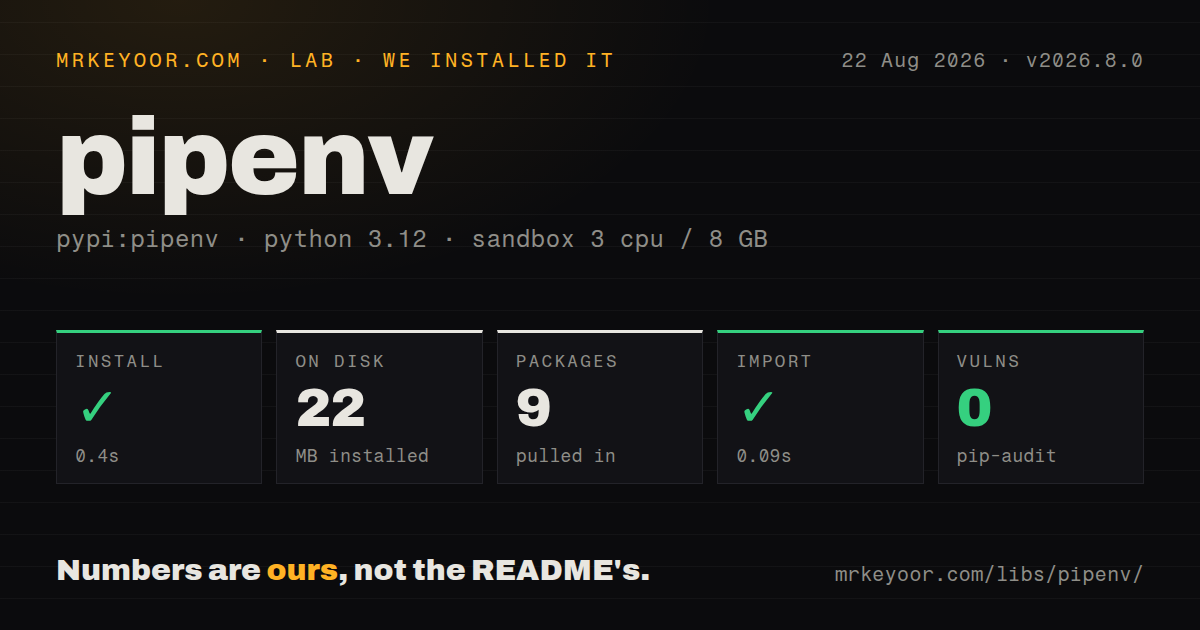
| Install | ✓ · 0.4s | 9 packages on disk · 22 MB |
| Import | ✓ | import benchmarks in 0.09s · pure Python · py.typed · requires Python >=3.10 |
| Known vulns | 0 | (pip-audit) |
Answers from our run
Does pipenv install cleanly?
Yes. In a fresh container with an empty cache, pip install pipenv finished in 0.4s, leaving 9 packages and 22 MB on disk. pip-audit reported no known vulnerabilities.
What does pipenv need to run?
Python >=3.10, and nothing compiled: it is pure Python. In our run import benchmarks succeeded in 0.09s, and the package ships py.typed for type checkers.
pipenv or uv: which should you use?
uv: Use it for a fast installer, resolver, project environment, and lockfile centered on pyproject.toml. Pipenv 2026.8.0 installed in 0.4 seconds and occupied 22 MB across 9 packages in our sandbox, with 0 pip-audit findings and a typed pure-Python distribution.
When should you not use pipenv?
You are publishing a reusable library; Pipenv describes itself as application-oriented, while library build metadata and dependency ranges belong in pyproject.toml
Use it if
- An application already commits Pipfile and Pipfile.lock and the team wants to keep that workflow
- One CLI should create the virtualenv, resolve dependencies, run project scripts, and export requirements
- Deployments need hash-bearing locked dependencies installed with sync rather than re-resolved
- Developers work across Linux, macOS, and Windows and need the same environment commands
- You are publishing a reusable library; Pipenv describes itself as application-oriented, while library build metadata and dependency ranges belong in pyproject.toml
- New-project tooling must use standard project metadata directly; Pipfile and Pipfile.lock are Pipenv-specific and often require exports for other tools
- Implicit upward Pipfile discovery or automatic .env loading is unacceptable; commands can change behavior with the working directory unless those defaults are controlled
- The deployment process uses pipenv install and expects no lock changes; install can resolve, while sync --deploy is the operation for consuming an existing lock
- Resolver speed is the main selection criterion; version 2026.8.0 adds experimental prefetch and caching, but uv remains the simpler benchmark candidate before choosing a workflow
Setup reality
We installed Pipenv 2026.8.0 in a fresh unprivileged Python 3.12 Bookworm container with 3 CPUs and 8 GB of RAM. Installation completed in 0.4 seconds and left 9 packages using 22 MB on disk. The distribution records 18 direct requirements, needs Python >=3.10, is pure Python, ships py.typed, and uses the MIT license. pip-audit reported 0 known vulnerabilities.
Install Pipenv as a user-level tool or through pipx rather than inside each application environment. By default it stores virtualenvs centrally and derives their names from project paths. Set PIPENV_VENV_IN_PROJECT=1 before creating the environment when the repository should contain .venv. pipenv --where, --venv, and --py reveal which project, environment, and interpreter the current directory selected.
Pipenv searches parent directories for Pipfile and automatically reads .env when present. Disable that with PIPENV_DONT_LOAD_ENV=1 if the process manager owns environment variables. pipenv install may create files, create an environment, resolve packages, and update an old lock. In deployment, commit both files and use pipenv sync --deploy so disagreement fails instead of changing the lock. pipenv run is easier to reproduce in CI than a stateful pipenv shell.
Version 2026.8.0 can parse PEP 691 JSON index responses. Its parallel index-manifest prefetcher and disk cache are experimental and activated through PIPENV_PREFETCH_INDEX_MANIFESTS, so test private-index authentication and per-source TLS settings before enabling them in CI. The recorded import probe in our sandbox was import benchmarks, which completed in 0.09 seconds; that is package metadata, not a measurement of pipenv lock or CLI startup time.
Patterns
Install Pipenv outside the project install-cli
pipx install pipenvpipx gives Pipenv its own environment. The tool then creates and manages a separate virtualenv for each application.
Create a local project environment choose-python
export PIPENV_VENV_IN_PROJECT=1
pipenv --python 3.13
Set PIPENV_VENV_IN_PROJECT before environment creation to place it at .venv. The requested interpreter must already be available or installable through configured tooling.
Add a runtime requirement add-runtime
pipenv install 'requests>=2.32,<3'install updates Pipfile and resolves Pipfile.lock. Quote comparison operators so the shell does not treat them as redirection.
Add a test dependency add-development
pipenv install --dev pytestThe package is written under [dev-packages]. Use pipenv sync --dev when recreating both locked runtime and development sets.
Run inside the selected environment run-command
pipenv run python -m pytestpipenv run selects the project environment for one command. It avoids depending on an activated subshell in CI.
Name repeatable project commands define-script
# Pipfile
[scripts]
test = "python -m pytest"
serve = "python -m myapp"

# terminal
pipenv run test
The [scripts] table stores command strings. Put branching or multi-step orchestration in a checked-in script or task runner.
Resolve a fresh lockfile write-lock
pipenv lock --clear--clear drops resolver caches before locking. It can fix stale metadata and also forces fresh index work.
Install the committed lock in deployment deploy-lock
pipenv sync --deploysync installs versions already recorded in Pipfile.lock. --deploy fails when Pipfile and the lock disagree instead of relocking.
Restore development dependencies sync-dev
pipenv sync --devThis consumes both locked categories. Run pipenv lock separately when new resolutions are intentional.
Inspect the installed dependency tree show-graph
pipenv graphgraph reads the current virtualenv, not an abstract lockfile view. Sync first when diagnosing a deployment mismatch.
Generate requirements files from the lock export-requirements
pipenv requirements > requirements.txt
pipenv requirements --dev > requirements-dev.txt
Treat exports as derived files. Regenerate them whenever Pipfile.lock changes and keep one declared source of truth.
Locate the active project and interpreter locate-state
pipenv --where
pipenv --venv
pipenv --py
These commands expose upward Pipfile discovery, the central or in-project environment path, and the Python executable Pipenv selected.
Alternatives
| Package | Registry | Pick it when |
|---|---|---|
| uv | PyPI | Use it for a fast installer, resolver, project environment, and lockfile centered on pyproject.toml |
| poetry | PyPI | Use it when dependency locking and package build or publish workflows should share pyproject.toml |
| hatch | PyPI | Use it for package environments, builds, versioning, and scripts under standard project metadata |
More cli & tooling guides
commander · chalk · typescript · esbuild · yargs · click · the whole shelf →
How this guide is made: grounded in the library's documentation, release notes, changelog, and issue history, on a fixed rubric — not a hands-on install of every release. The 50 most-downloaded entries are additionally install-verified in clean containers. Corrections: contact the desk.