pdfminer.six review
pdfminer.six 20260107 reads PDF objects and content streams to recover digital text, coordinates, fonts, colors, outlines, forms, and embedded images. Its simple helper returns page text, while extract_pages() exposes LTPage trees for layout-sensitive parsing. It does not perform OCR and does not edit a document. Release 20260107 adds CMap formats 6, 10, and 12, limits xref start size, contains failures while reading stream attributes or data, and removes unused PSBaseParser methods. Our pure Python install imported in 0.23 seconds and carried the py.typed marker.
pdfminer.six 20260107 installed in 0.4 seconds, used 25 MB across 5 packages, and imported in 0.23 seconds in our sandbox. Install it for digital text plus geometry; send scans to OCR and use a PDF writer when pages must change.
We installed it
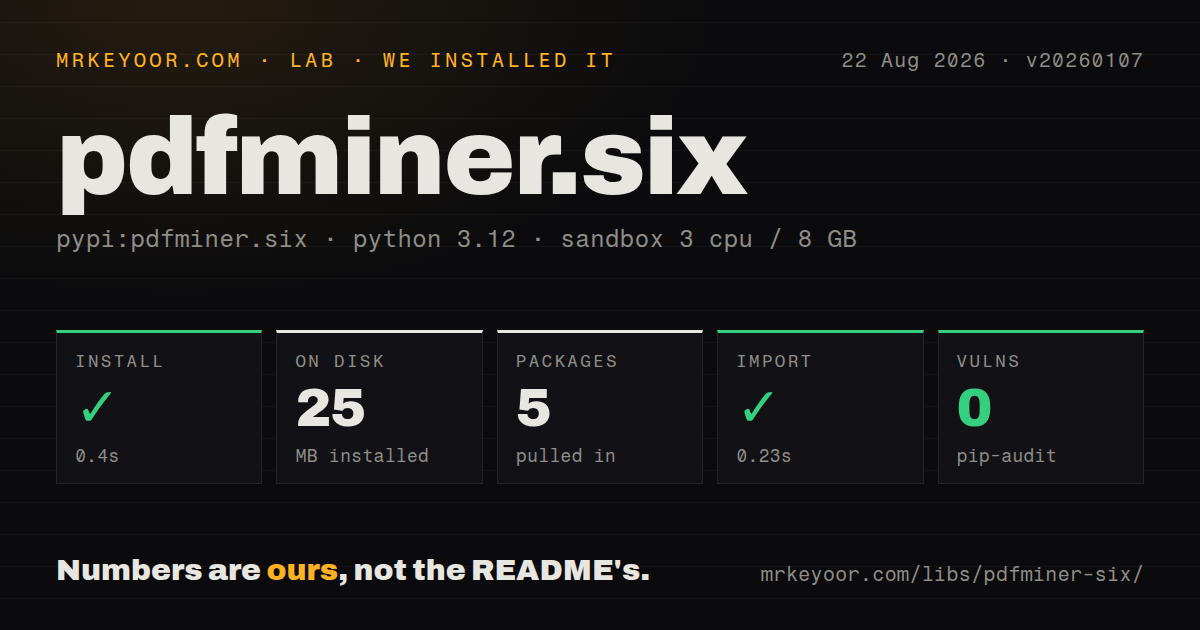
| Install | ✓ · 0.4s | 5 packages on disk · 25 MB |
| Import | ✓ | import pdfminer in 0.23s · pure Python · py.typed · requires Python >=3.10 |
| Known vulns | 0 | (pip-audit) |
Answers from our run
Does pdfminer.six install cleanly?
Yes. In a fresh container with an empty cache, pip install pdfminer.six finished in 0.4s, leaving 5 packages and 25 MB on disk. pip-audit reported no known vulnerabilities.
What does pdfminer.six need to run?
Python >=3.10, and nothing compiled: it is pure Python. In our run import pdfminer succeeded in 0.23s, and the package ships py.typed for type checkers.
pdfminer.six or pypdf: which should you use?
pypdf: Choose it when splitting, merging, rotating, forms, metadata, encryption, or page writing matters more than low-level layout analysis. pdfminer.six 20260107 installed in 0.4 seconds, used 25 MB across 5 packages, and imported in 0.23 seconds in our sandbox.
When should you not use pdfminer.six?
Most input pages are scans; the README describes source-level text extraction, and there are no glyphs to recover from a page-sized image
Use it if
- A parser needs the position, font, size, or color of text drawn in a digital PDF
- Invoices or forms have stable regions that can be selected from page coordinates
- Reading order needs document-specific LAParams tuning instead of a fixed paragraph model
- The deployment can use a pure Python parser and does not want a system PDF renderer
- Most input pages are scans; the README describes source-level text extraction, and there are no glyphs to recover from a page-sized image
- You need table rows and cells out of the box; pdfminer.six provides layout objects, while pdfplumber adds table-finding logic on top
- The task changes pages, fills fields, merges documents, signs files, or writes encryption; this project focuses on parsing and conversion
- Native-speed rendering or high-volume extraction is the top constraint; the distribution is pure Python and does not ship a native PDF engine
- One layout configuration must work without sampling invoices, papers, and multi-column reports; LAParams groups characters and lines using document-dependent geometry
- Automated intake rejects packages whose installed metadata has no license value; our package measurement returned the license as unknown
Setup reality
We installed pdfminer.six 20260107 in a fresh Python 3.12 sandbox in 0.4 seconds. Five packages used 25 MB, with three direct dependencies. pip-audit reported zero known vulnerabilities. The distribution is pure Python, requires Python 3.10 or newer, includes py.typed, and returned an unknown license value in our package measurement. import pdfminer succeeded and took 0.23 seconds.
The distribution name and import name differ: install pdfminer.six, then import pdfminer. The original package named pdfminer is a separate artifact and should not be substituted. pdf2txt.py is the text-conversion command and dumppdf.py exposes object structure. Image export requires the image extra. Normal extraction has no credential or config requirement; encrypted files take a PDF password at the API or CLI boundary.
LAParams is where most document-specific work lives. char_margin, word_margin, line_margin, and boxes_flow change how glyphs become words, lines, and reading order. Values are relative to glyph or line geometry, so a setting proven on one invoice family may scramble a two-column paper. extract_text() returns one string. extract_pages() yields LTPage trees lazily and reports PDF coordinates from the lower-left origin.
A parser success does not prove useful extraction. Image-only pages can return almost no text, so sample 3 pages or another fixed slice and route low-text files to OCR. Treat PDFs as hostile parser inputs and impose file-size, page-count, and wall-time limits. Version 20260107 now caps xref start size and wraps more stream-reading failures, but those checks do not bound the resources your application spends on a difficult file.
Patterns
Read text from a digital PDF extract-document-text
from pdfminer.high_level import extract_text

text = extract_text('report.pdf')
print(text)
An empty result can mean the page contains only images; pdfminer.six does not run OCR.
Read chosen pages select-page-numbers
from pdfminer.high_level import extract_text

text = extract_text('report.pdf', page_numbers=[0, 2, 4])
page_numbers uses zero-based indexes, so 0 selects the first page.
Sample the first three pages limit-page-count
from pdfminer.high_level import extract_text

sample = extract_text('incoming.pdf', maxpages=3)
maxpages limits the count from the start; use page_numbers when the sample must include specific indexes.
Adjust layout grouping tune-reading-order
from pdfminer.high_level import extract_text
from pdfminer.layout import LAParams

layout = LAParams(char_margin=1.5, line_margin=0.3, boxes_flow=0.5)
text = extract_text('two-column.pdf', laparams=layout)
LAParams values are relative to text geometry rather than PDF points, so validate them on each document family.
Prefer positional order disable-box-flow
from pdfminer.high_level import extract_text
from pdfminer.layout import LAParams

text = extract_text('fixed-form.pdf', laparams=LAParams(boxes_flow=None))
boxes_flow=None disables the higher-level ordering heuristic and can suit rigid forms better than flowing documents.
Read text with bounding boxes iterate-text-boxes
from pdfminer.high_level import extract_pages
from pdfminer.layout import LTTextContainer

for page in extract_pages('report.pdf'):
    for item in page:
        if isinstance(item, LTTextContainer):
            print(item.bbox, item.get_text().strip())
PDF coordinates start at the lower-left, unlike browser coordinates that usually grow downward.
Collect character font data inspect-font-per-character
from pdfminer.high_level import extract_pages
from pdfminer.layout import LTChar, LTTextContainer, LTTextLine

for page in extract_pages('report.pdf'):
    for box in page:
        if not isinstance(box, LTTextContainer):
            continue
        for line in box:
            if isinstance(line, LTTextLine):
                for item in line:
                    if isinstance(item, LTChar):
                        print(item.get_text(), item.fontname, item.size)
LTTextLine can also contain LTAnno objects for inferred spaces and newlines, so test each child before reading font fields.
Extract a fixed invoice box filter-by-page-region
from pdfminer.high_level import extract_pages
from pdfminer.layout import LTTextContainer

region = (350, 680, 560, 720)
def contained(box, area):
    x0, y0, x1, y1 = box
    return x0 >= area[0] and y0 >= area[1] and x1 <= area[2] and y1 <= area[3]

for page in extract_pages('invoice.pdf', page_numbers=[0]):
    for item in page:
        if isinstance(item, LTTextContainer) and contained(item.bbox, region):
            print(item.get_text().strip())
Confirm page size and rotation before applying one rectangle across Letter, A4, or rotated documents.
Supply a PDF user password open-encrypted-document
from pdfminer.high_level import extract_text

text = extract_text('protected.pdf', password=pdf_password)
Pass the secret from a protected input source and keep it out of logs and command history.
Inspect the PDF info dictionary read-document-metadata
from pdfminer.pdfdocument import PDFDocument
from pdfminer.pdfparser import PDFParser

with open('report.pdf', 'rb') as source:
    document = PDFDocument(PDFParser(source))
    print(document.info)
Metadata values can be raw bytes with inconsistent encodings; normalize them before indexing or display.
Flag a low-text sample for OCR route-likely-scan
from pdfminer.high_level import extract_text

def likely_scan(path, pages=3, minimum=100):
    sample = extract_text(path, maxpages=pages)
    return len(sample.strip()) < minimum
Three pages and 100 characters are application heuristics, not package defaults; tune them against sparse covers and real scans.
Extract text or inspect objects run-command-line-tools
pdf2txt.py report.pdf > report.txt
dumppdf.py -a report.pdf > objects.xml
The installed command names include the .py suffix; dumppdf.py is for structure inspection rather than plain text output.
Alternatives
| Package | Registry | Pick it when |
|---|---|---|
| pypdf | PyPI | Choose it when splitting, merging, rotating, forms, metadata, encryption, or page writing matters more than low-level layout analysis |
| pdfplumber | PyPI | Choose it for word, line, rectangle, and table helpers built over pdfminer.six layout data |
| PyMuPDF | PyPI | Choose it for a native PDF engine that can extract and render pages after checking its licensing terms for your use |
More data guides
numpy · pandas · fsspec · pyarrow · lxml · sqlalchemy · the whole shelf →
How this guide is made: grounded in the library's documentation, release notes, changelog, and issue history, on a fixed rubric — not a hands-on install of every release. The 50 most-downloaded entries are additionally install-verified in clean containers. Corrections: contact the desk.