papaparse review
Papa Parse converts CSV text, browser `File` objects, remote downloads, and Node readable streams into rows, then turns arrays or objects back into CSV with `unparse`. It understands quoted delimiters and embedded newlines, can infer a delimiter, reports row errors, and offers browser workers plus row or chunk callbacks for large files. Version 5.6.0 removes jQuery from the package dependencies. Our install confirmed that the published package now has no direct or peer dependencies.
Papa Parse remains a good browser CSV tool, especially for uploads that need workers or incremental callbacks. Skip it when bundled types, promises, Node-first streams, or truly streaming CSV output are requirements.
We installed it
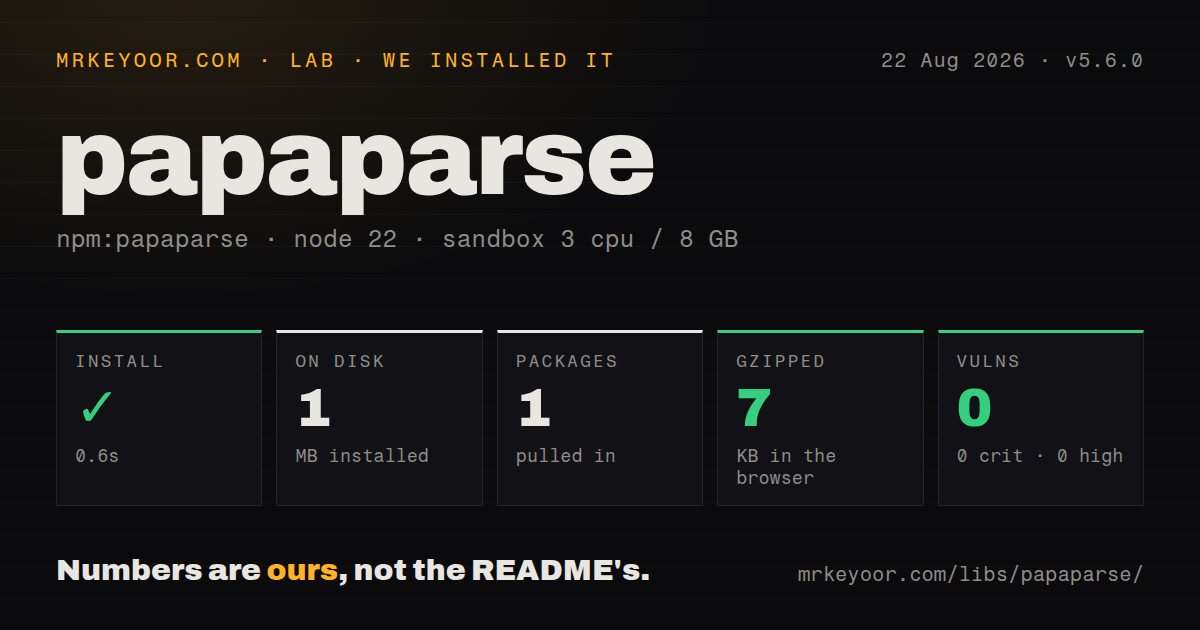
| Install | ✓ · 0.6s | 1 package on disk · 1 MB |
| Import | ✓ | ESM import works · require() works · CommonJS package |
| Browser | 7 KB | gzipped (18.7 KB minified), bundled with esbuild |
| Types | — | no TypeScript types found |
| Known vulns | 0 | 0 critical · 0 high · 0 moderate · 0 low (npm audit) |
Answers from our run
Does papaparse install cleanly?
Yes. In a fresh container with an empty cache, npm install papaparse finished in 0.6s, leaving 1 package and 1 MB on disk. npm audit reported no known vulnerabilities.
How much does papaparse add to a browser bundle?
7 KB gzipped (18.7 KB minified) when the whole package is bundled for the browser with esbuild. Importing only part of it is usually smaller.
Does papaparse work with both ESM and CommonJS?
Yes. Both import 'papaparse' and require('papaparse') worked in Node 22 in our run. The package is published as CommonJS.
Does papaparse include TypeScript types?
No type declarations were found in our install, so TypeScript users need their own declarations.
papaparse or csv-parse: which should you use?
csv-parse: Use it for Node streams, async iteration, or a synchronous parser from the same project. Papa Parse remains a good browser CSV tool, especially for uploads that need workers or incremental callbacks.
When should you not use papaparse?
The project requires bundled TypeScript declarations; our package check found none, so TypeScript users need separate community types or local declarations
Use it if
- A browser must parse a user-selected CSV without uploading it first
- Large browser files need row or chunk callbacks, pause and resume controls, or a Web Worker
- Input delimiters and line endings vary, and parsing errors must be returned with row metadata
- The same client-side feature also needs to create a downloadable CSV with correct quoting
- The project requires bundled TypeScript declarations; our package check found none, so TypeScript users need separate community types or local declarations
- You need a promise or async-iterator API; asynchronous file and download paths use callbacks
- Server code depends on Node stream backpressure and pipeline errors; `csv-parse` or fast-csv has a more native Node surface
- Numeric identifiers, postal codes, or account numbers cannot be coerced accidentally; broad `dynamicTyping` can remove leading zeroes or exceed safe integer precision
- Exports are too large to hold as one JavaScript string; `unparse` returns the complete CSV in memory rather than a streaming writer
Setup reality
Papa Parse 5.6.0 installed successfully in 0.6 seconds in our clean Node 22 sandbox. The result was 1 package using 1 MB on disk. npm audit reported 0 known vulnerabilities at all severities. The package is 344 KB unpacked and declares zero direct dependencies and zero peers, matching 5.6.0's removal of jQuery. Its license is MIT.
The package is CommonJS with no exports map. Both require() and ESM import worked in our test. No TypeScript declarations were found, so typed projects need another source of declarations. Our browser bundle, made by importing the whole package through esbuild, measured 18.7 KB minified and 7 KB gzipped. Import only after deciding the browser owns CSV parsing.
String parsing is synchronous, while File and remote-download inputs report through callbacks. header: true changes row arrays into objects; duplicate or missing headers still need application policy. dynamicTyping can be a boolean, map, or function, and field-specific conversion is safer than enabling it for every cell. Always inspect results.errors, because many malformed rows are reported without throwing.
Worker mode keeps parsing off the browser's main thread, but configuration functions cannot be transferred into the worker. In Node stream mode, browser controls such as worker, download, and browser chunk sizes are unavailable; step and complete are also unavailable with NODE_STREAM_INPUT. Use data and end events there. Pause before asynchronous row work or callbacks can outrun storage writes.
Patterns
Parse a string into objects parse-string
import Papa from 'papaparse'

const result = Papa.parse('name,age\nAda,36', {
  header: true,
  skipEmptyLines: true,
})
console.log(result.data, result.errors)
String parsing returns synchronously, and values remain strings unless you configure conversion.
Read a browser file input parse-file-upload
input.addEventListener('change', () => {
  Papa.parse(input.files[0], {
    header: true,
    complete: results => render(results.data),
    error: error => showError(error),
  })
})
A `File` input is asynchronous; use callbacks rather than the return value.
Parse a remote browser resource download-csv
Papa.parse('https://example.com/report.csv', {
  download: true,
  header: true,
  downloadRequestHeaders: { Authorization: `Bearer ${token}` },
  complete: results => render(results.data),
})
The URL must satisfy browser CORS rules. `download` is unavailable in Node mode.
Handle one row at a time process-rows
Papa.parse(file, {
  header: true,
  step(result, parser) {
    if (!result.data.email) return parser.abort()
    queue(result.data)
  },
  complete: () => finish(),
})
Use `pause()` and `resume()` around asynchronous work so callbacks do not outrun the consumer.
Insert rows in batches process-chunks
Papa.parse(file, {
  header: true,
  chunk(results, parser) {
    parser.pause()
    bulkInsert(results.data)
      .then(() => parser.resume())
      .catch(error => parser.abort(error))
  },
})
Chunk mode reduces per-row callback overhead but each batch still occupies memory.
Move parsing off the UI thread use-worker
Papa.parse(file, {
  worker: true,
  header: true,
  complete: results => render(results.data),
})
Worker mode is browser-only, and function-valued transforms cannot cross the worker boundary.
Parse a Node readable stream pipe-node-stream
import fs from 'node:fs'
import Papa from 'papaparse'

const parser = Papa.parse(Papa.NODE_STREAM_INPUT, { header: true })
fs.createReadStream('report.csv')
  .pipe(parser)
  .on('data', consume)
  .on('error', console.error)
  .on('end', finish)
`step` and `complete` are unavailable with `NODE_STREAM_INPUT`; use stream events.
Convert fields deliberately convert-selected-fields
const result = Papa.parse(csv, {
  header: true,
  dynamicTyping: { active: true },
  transform(value, field) {
    return field === 'account_id' ? value.trim() : value
  },
})
Leave identifiers as strings when leading zeroes or integer precision matter.
Clean incoming column names normalize-headers
const result = Papa.parse(csv, {
  header: true,
  transformHeader(header, index) {
    return `${index}_${header.trim().toLowerCase().replace(/\s+/g, '_')}`
  },
})
Including the index gives duplicate source headers distinct object keys.
Create CSV from objects write-csv
const csv = Papa.unparse([
  { name: 'Ada', note: 'said "hello"' },
  { name: 'Grace', note: 'line 1\nline 2' },
], {
  columns: ['name', 'note'],
  newline: '\r\n',
  escapeFormulae: true,
})
`escapeFormulae` guards spreadsheet formula prefixes. `unparse` builds the complete output string in memory.
Reject malformed rows inspect-errors
const result = Papa.parse(csv, { header: true })

for (const error of result.errors) {
  console.error(error.code, error.row, error.message)
}
if (result.errors.length) throw new Error('CSV validation failed')
Papa often returns row errors instead of throwing, so checking only `data` accepts partial parses.
Avoid delimiter guessing set-delimiter
const result = Papa.parse(csv, {
  delimiter: ';',
  quoteChar: '"',
  escapeChar: '"',
  preview: 100,
})
Set the delimiter when the producer is known; inference only samples the input and can guess badly on unusual first rows.
Alternatives
| Package | Registry | Pick it when |
|---|---|---|
| csv-parse | npm | Use it for Node streams, async iteration, or a synchronous parser from the same project |
| fast-csv | npm | Use it for Node parsing and formatting with row validation hooks |
| csv-parser | npm | Use it for a focused Node readable-to-object transform when writing CSV is out of scope |
More data guides
numpy · pandas · fsspec · pyarrow · lxml · sqlalchemy · the whole shelf →
How this guide is made: grounded in the library's documentation, release notes, changelog, and issue history, on a fixed rubric — not a hands-on install of every release. The 50 most-downloaded entries are additionally install-verified in clean containers. Corrections: contact the desk.