fast-csv review
fast-csv 5.0.7 combines the `@fast-csv/parse` and `@fast-csv/format` Node packages. Its transform streams read delimited records, write arrays or objects as CSV, remap headers, reject malformed rows, and run per-row transforms or validators without first loading the complete file. The current patch changes dependencies and development tooling rather than the parsing contract. It returns cell text as strings, supports a one-character delimiter, and depends on Node stream and filesystem behavior; our esbuild browser target could not bundle it.
fast-csv 5.0.7 installed in 1.1 seconds as six packages using 1 MB in our sandbox, passed npm audit, and failed our browser bundle. It fits Node pipelines that must validate or format CSV records in motion; use a synchronous parser for tiny strings and a browser-oriented parser for client files.
We installed it
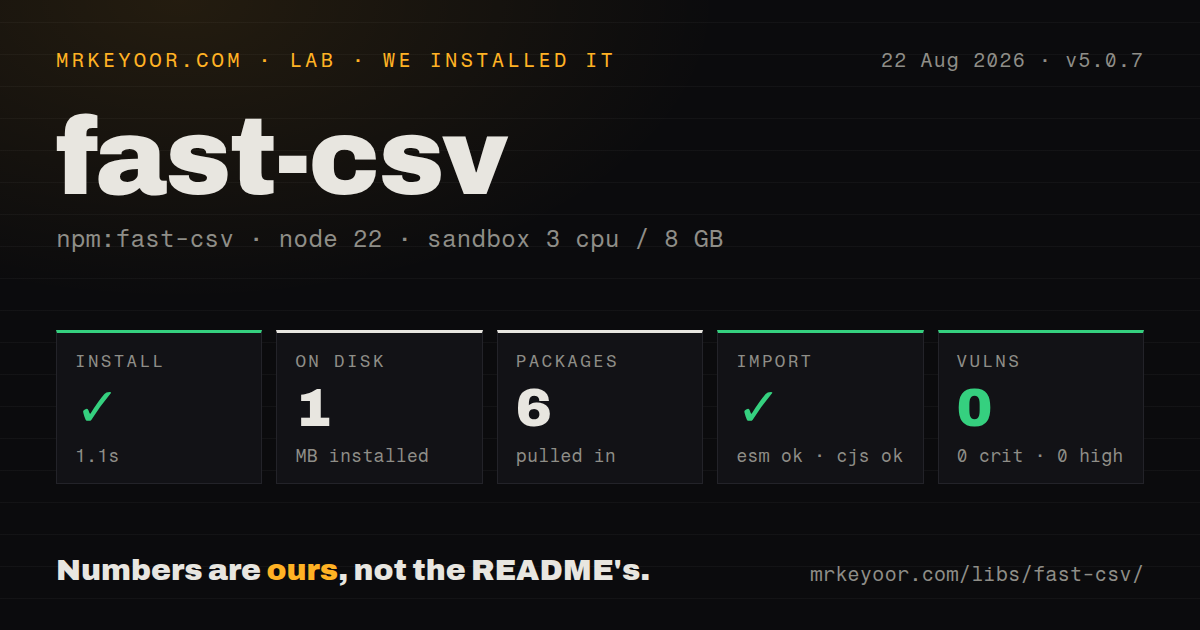

| Install | ✓ · 1.1s | 6 packages on disk · 1 MB |
| Import | ✓ | ESM import works · require() works · CommonJS package |
| Browser | n/a | could not be bundled for the browser (Node-only code, most likely) |
| Types | ✓ | TypeScript types bundled |
| Known vulns | 0 | 0 critical · 0 high · 0 moderate · 0 low (npm audit) |
Answers from our run
Does fast-csv install cleanly?
Yes. In a fresh container with an empty cache, npm install fast-csv finished in 1 seconds, leaving 6 packages and 1 MB on disk. npm audit reported no known vulnerabilities.
Can fast-csv run in a browser?
Not directly: esbuild could not bundle it for the browser in our run, which normally means it depends on Node built-ins. Use it on the server, or find a browser-targeted alternative.
Does fast-csv work with both ESM and CommonJS?
Yes. Both import 'fast-csv' and require('fast-csv') worked in Node 22 in our run. The package is published as CommonJS.
Does fast-csv include TypeScript types?
Yes, type declarations ship inside the package, so no @types install is needed.
fast-csv or csv-parse: which should you use?
csv-parse: Use it when you need Node stream parsing plus a synchronous API for small in-memory inputs. fast-csv 5.0.7 installed in 1.1 seconds as six packages using 1 MB in our sandbox, passed npm audit, and failed our browser bundle.
When should you not use fast-csv?
CSV work runs in a browser or edge isolate. Our browser bundle failed on Node dependencies; Papa Parse has browser and worker paths.
Use it if
- A Node upload or export must process records as a stream because the entire CSV should not sit in memory.
- Valid rows should continue while bad column counts or validation failures are routed to `data-invalid`.
- Parsing needs header replacement, trimming, comments, row limits, or callback-based transformations in the stream.
- One dependency should cover both CSV ingestion and CSV generation with matching Node stream conventions.
- CSV work runs in a browser or edge isolate. Our browser bundle failed on Node dependencies; Papa Parse has browser and worker paths.
- A short string must be parsed synchronously. fast-csv offers stream helpers even for strings, while `csv-parse/sync` returns directly.
- You expect schema inference or automatic conversion to numbers, booleans, or dates. fast-csv leaves cells as strings until your transform changes them.
- The input uses a separator longer than one character. The parser documents `delimiter` as one character and rejects wider tokens.
- You need independently reproduced throughput rankings before choosing a parser. The README gives an unqualified production-volume claim, so benchmark your actual quoting, columns, and transforms.
Setup reality
We installed fast-csv 5.0.7 without a cache in an unprivileged Node 22 Bookworm sandbox. npm completed in 1.1 seconds; six packages occupied 1 MB afterward. The package declares two direct dependencies, zero peers, and 36 KB unpacked, with an MIT license and a Node 10 minimum. npm audit reported zero known vulnerabilities at critical, high, moderate, and low severity.
The published entry point is CommonJS and has no exports map. Both require('fast-csv') and ESM import worked in our Node 22 check, and TypeScript declarations are bundled. Applications that only parse or only format can install @fast-csv/parse or @fast-csv/format instead. Our esbuild browser build failed because the code follows Node stream and filesystem paths, so do not let it cross a client bundle boundary.
Headers are the common setup trap. With headers: true, the parser consumes row 1 as field names. Passing your own header array does not consume that row unless renameHeaders: true is also set. Too many columns throw by default; discardUnmappedColumns drops extras. Too few columns can emit data-invalid when strictColumnHandling is enabled. Decide whether those rows should stop the import, enter quarantine, or continue before wiring production input.
Use pipeline() or attach an error listener because malformed quoting and stream failures are asynchronous. Callback transforms and validators preserve record order, which means one remote lookup per row can set total throughput. skipLines removes raw physical lines before header parsing, while skipRows ignores parsed records after it. For exports, wait for the destination's finish event; the formatter ending only tells you that it has stopped producing bytes.
Patterns
Parse a file as records arrive parse-file
const fs = require('node:fs')
const { parse } = require('fast-csv')

fs.createReadStream('users.csv')
  .pipe(parse({ headers: true, trim: true, ignoreEmpty: true }))
  .on('error', console.error)
  .on('data', row => console.log(row.email))
  .on('end', count => console.log({ count }))
`headers: true` uses the first row for field names. The `end` handler receives the accepted row count, not an accumulated array.
Replace the source header row rename-headers
const { parseFile } = require('fast-csv')

parseFile('users.csv', {
  headers: ['id', 'email', 'joinedAt'],
  renameHeaders: true,
}).on('data', row => console.log(row.id))
Set `renameHeaders: true` with a header array; otherwise the source's first line is emitted as ordinary data.
Keep rejected records separate validate-rows
const { parse } = require('fast-csv')

const csv = parse({ headers: true })
  .validate(row => row.email.includes('@'))
  .on('data', accept)
  .on('data-invalid', (row, number) => reject({ number, row }))
  .on('error', console.error)

input.pipe(csv)
A validator returning `false` emits `data-invalid`; a thrown exception emits `error` and ends normal processing.
Convert CSV strings into application types transform-types
const { parse } = require('fast-csv')

input.pipe(parse({ headers: true })
  .transform(row => ({
    id: Number(row.id),
    active: row.active === 'true',
    note: row.note || null,
  })))
  .on('data', save)
Every cell starts as text. Normalize an empty string before `Number()` because JavaScript converts `''` to `0`.
Collect a small CSV string parse-string
const { parseString } = require('fast-csv')

const rows = await new Promise((resolve, reject) => {
  const output = []
  parseString('id,name\n1,Ada', { headers: true })
    .on('error', reject)
    .on('data', row => output.push(row))
    .on('end', () => resolve(output))
})
`parseString` is still asynchronous and stream-based; fast-csv does not publish a synchronous parse function.
Format object rows into a file write-file
const fs = require('node:fs')
const { format } = require('fast-csv')

const output = fs.createWriteStream('users.csv')
const csv = format({ headers: true })
csv.pipe(output)
csv.write({ id: 1, email: 'ada@example.com' })
csv.write({ id: 2, email: 'alan@example.com' })
csv.end()
Wait for `finish` on the file destination before code that uploads, renames, or reports the completed output.
Pipe a database export to HTTP stream-http
const { pipeline } = require('node:stream/promises')
const { format } = require('fast-csv')

app.get('/users.csv', async (req, res) => {
  res.type('text/csv')
  res.attachment('users.csv')
  await pipeline(db.users.stream(), format({ headers: true }), res)
})
After CSV bytes reach the client, a later query error cannot be replaced with a clean JSON error response.
Generate an Excel-friendly UTF-8 file write-excel-csv
const { writeToPath } = require('fast-csv')

writeToPath('report.csv', rows, {
  headers: true,
  writeBOM: true,
  rowDelimiter: '\r\n',
  quoteColumns: true,
})
A BOM helps Excel identify UTF-8, while `quoteColumns: true` quotes every cell and increases output size.
Choose a policy for ragged input handle-ragged-rows
const { parse } = require('fast-csv')

parse({
  headers: true,
  discardUnmappedColumns: true,
  strictColumnHandling: true,
})
  .on('data', save)
  .on('data-invalid', quarantine)
  .on('error', console.error)
This combination discards extra cells and sends short records to `data-invalid`; it does not repair missing values.
Ignore a report preamble skip-preamble
const { parseFile } = require('fast-csv')

parseFile('report.csv', {
  skipLines: 3,
  headers: true,
  skipRows: 2,
  maxRows: 100,
  comment: '#',
}).on('data', consume)
`skipLines` operates on physical input before headers; `skipRows` applies later to already parsed records.
Alternatives
| Package | Registry | Pick it when |
|---|---|---|
| csv-parse | npm | Use it when you need Node stream parsing plus a synchronous API for small in-memory inputs. |
| papaparse | npm | Use it for browser files, Web Workers, or optional dynamic type conversion. |
| csv-parser | npm | Use it for a focused Node reader when CSV writing and validation events are unnecessary. |
More data guides
numpy · pandas · fsspec · pyarrow · lxml · sqlalchemy · the whole shelf →
How this guide is made: grounded in the library's documentation, release notes, changelog, and issue history, on a fixed rubric — not a hands-on install of every release. The 50 most-downloaded entries are additionally install-verified in clean containers. Corrections: contact the desk.