csv-parser review
csv-parser 3.2.1 is a Node Transform stream that reads CSV bytes and emits one object for each row. It handles quoted fields and embedded newlines, lets you supply or rewrite headers, converts values through a callback, enforces column counts, and can report the starting byte offset of every row. The package also installs a CLI that writes newline-delimited JSON. Version 3.2.1 drops columns named `__proto__`, `constructor`, or `prototype` to close a prototype-pollution path. Our browser bundle failed, matching a CommonJS, Node-stream parser rather than code intended for a web page.
csv-parser 3.2.1 installed in 0.3 seconds as one 1 MB package with bundled types and no audit findings, but our browser bundle failed. It is a good fit for bounded Node stream ingestion; set `strict` and `maxRowBytes`, clean the encoding first, and do not depend on the broken CLI flags.
We installed it
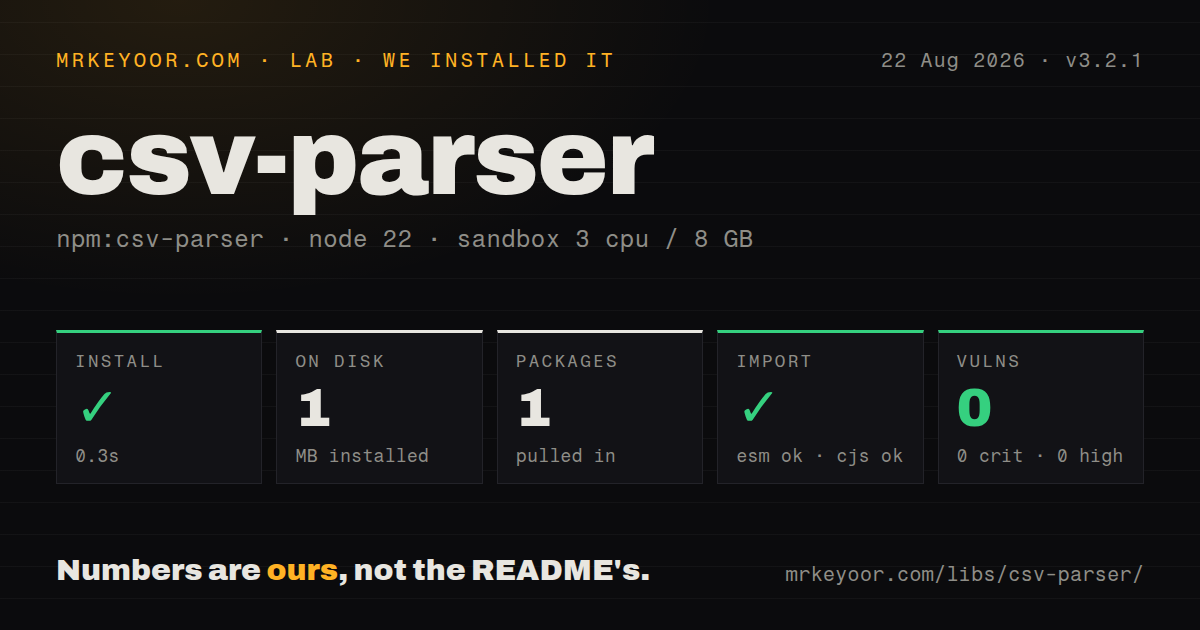
| Install | ✓ · 0.3s | 1 package on disk · 1 MB |
| Import | ✓ | ESM import works · require() works · CommonJS package |
| Browser | n/a | could not be bundled for the browser (Node-only code, most likely) |
| Types | ✓ | TypeScript types bundled |
| Known vulns | 0 | 0 critical · 0 high · 0 moderate · 0 low (npm audit) |
Answers from our run
Does csv-parser install cleanly?
Yes. In a fresh container with an empty cache, npm install csv-parser finished in 0.3s, leaving 1 package and 1 MB on disk. npm audit reported no known vulnerabilities.
Can csv-parser run in a browser?
Not directly: esbuild could not bundle it for the browser in our run, which normally means it depends on Node built-ins. Use it on the server, or find a browser-targeted alternative.
Does csv-parser work with both ESM and CommonJS?
Yes. Both import 'csv-parser' and require('csv-parser') worked in Node 22 in our run. The package is published as CommonJS.
Does csv-parser include TypeScript types?
Yes, type declarations ship inside the package, so no @types install is needed.
csv-parser or csv-parse: which should you use?
csv-parse: Choose it for sync and callback modes, casting controls, and a larger set of dialect and recovery options. csv-parser 3.2.1 installed in 0.3 seconds as one 1 MB package with bundled types and no audit findings, but our browser bundle failed.
When should you not use csv-parser?
You want a Promise returning all rows. csv-parser emits a stream, and collecting every object into an array removes its main memory advantage.
Use it if
- A large CSV must move through a Node pipeline row by row without collecting the entire table in memory.
- The destination is already a writable stream or an async row consumer that can preserve backpressure.
- Headers need renaming or removal and a few cells need conversion during parsing.
- Imports need byte offsets so a rejected record can be tied back to its location in the original file.
- You want a Promise returning all rows. csv-parser emits a stream, and collecting every object into an array removes its main memory advantage.
- The parser must run directly in a modern browser. Our esbuild browser target failed, and the README's browser instructions point to Browserify-era bundling.
- Untrusted uploads cannot be given an explicit row cap. `maxRowBytes` defaults to `Number.MAX_SAFE_INTEGER`, which is not a practical safety limit.
- The input needs delimiter detection, schema errors, recovery reports, or multi-character separators. This API accepts one-byte delimiters and has a narrow row-oriented error model.
- Your workflow depends on the CLI's documented `--strict` or `--remove` switches. In 3.2.1 they appear in help text, but the CLI argument code does not apply them.
Setup reality
We installed csv-parser 3.2.1 in 0.3 seconds in a clean Node 22 Bookworm sandbox. The result was one package and 1 MB on disk; the package is 48 KB unpacked and has 0 direct and 0 peer dependencies. npm audit reported 0 known vulnerabilities. require() and ESM import both worked, even though the package is CommonJS and has no exports map. It includes TypeScript declarations, carries an MIT license, and declares Node 10 or newer.
There are no native builds, credentials, or config files. Input cleanup belongs in the stream before csv(): remove a UTF-8 BOM, and transcode non-UTF-8 files with a tool such as iconv-lite. Cells remain strings unless mapValues converts them. If you supply headers for a file that already has a header line, also set skipLines: 1 or that line becomes ordinary data.
Set strict: true when every row must match the header count. With the default false setting, extra cells receive names such as _10, while missing middle cells can shift values under the wrong property. Cap maxRowBytes for uploads because its default is Number.MAX_SAFE_INTEGER. Version 3.2.1 silently removes three dangerous property names, so a legitimate column called constructor will also disappear.
Consume the Transform with pipeline(), a writable stream, or for await and handle errors from both the source and parser. Awaiting each async-iterator row preserves backpressure; attaching data and launching unbounded promises does not. Our browser build failed, which is consistent with Node stream use. The CLI writes one JSON object per line, and its --strict and --remove help entries should not be trusted in this release.
Patterns
Read a CSV file one row at a time stream-file-rows
const fs = require('node:fs');
const csv = require('csv-parser');

fs.createReadStream('data.csv')
  .pipe(csv())
  .on('data', (row) => console.log(row))
  .on('error', (error) => console.error(error))
  .on('end', () => console.log('done'));
The first physical row supplies property names and is not emitted. Every later cell is a string unless you map it.
Process rows through an async iterator await-each-row
const fs = require('node:fs');
const csv = require('csv-parser');

const rows = fs.createReadStream('data.csv').pipe(csv());
for await (const row of rows) {
  await saveRow(row);
}
Awaiting inside the loop limits work to one row at a time and lets stream backpressure reach the file reader. Parser or file errors reject the loop.
Assign numeric keys to headerless input parse-headerless-file
fs.createReadStream('rows.csv')
  .pipe(csv({ headers: false }))
  .on('data', (row) => {
    console.log(row['0'], row['1']);
  });
With `headers: false`, the first row is data and keys are column indexes. The implementation also disables strict checking in this mode, so validate width yourself.
Supply fixed names and skip the original header override-headers
const parser = csv({
  headers: ['name', 'age'],
  skipLines: 1,
  strict: true,
});

fs.createReadStream('people.csv').pipe(parser);
Providing names does not consume the file's own header line. `skipLines: 1` prevents those labels from appearing as the first record.
Normalize names and remove one column map-header-names
const parser = csv({
  mapHeaders: ({ header }) => {
    const name = header.trim().toLowerCase();
    return name === 'internal_notes' ? null : name;
  },
});
Returning null removes the whole column. Version 3.2.1 also discards `__proto__`, `constructor`, and `prototype` after header mapping.
Convert selected cells during parsing cast-cell-values
const parser = csv({
  mapValues: ({ header, value }) => {
    if (header === 'age') return Number(value);
    if (header === 'active') return value === 'true';
    return value;
  },
});
`Number('')` becomes 0 and malformed numeric text becomes NaN. Check empty and invalid cells before conversion when they need different outcomes.
Stop malformed or oversized upload rows bound-upload-rows
const { pipeline } = require('node:stream');
const parser = csv({
  strict: true,
  maxRowBytes: 1024 * 1024,
});

pipeline(
  fs.createReadStream('upload.csv'),
  parser,
  destination,
  (error) => { if (error) reportImportFailure(error); }
);
The 1 MiB cap here replaces a default of `Number.MAX_SAFE_INTEGER`. Strict mode checks column count, not cell types or required fields.
Use a tab as the field separator read-tsv
fs.createReadStream('data.tsv')
  .pipe(csv({ separator: '\t' }))
  .on('data', processRow);
The parser uses the first byte of the separator. Multi-character and multibyte Unicode separators are outside this API.
Skip two preamble lines and hash comments ignore-preamble
const parser = csv({
  skipLines: 2,
  skipComments: '#',
});

fs.createReadStream('export.csv').pipe(parser);
Comment syntax is an input convention, not part of CSV itself. A line is skipped only when the configured marker appears at its start.
Strip a UTF-8 BOM before parsing headers remove-bom
const stripBom = require('strip-bom-stream');

fs.createReadStream('excel-export.csv')
  .pipe(stripBom())
  .pipe(csv())
  .on('data', processRow);
csv-parser leaves the BOM untouched. Without a stripping transform, the invisible bytes become part of the first header name.
Emit each row with its source position record-byte-offset
fs.createReadStream('data.csv')
  .pipe(csv({ outputByteOffset: true }))
  .on('data', ({ byteOffset, row }) => {
    indexRow(byteOffset, row);
  });
This option changes the chunk from a plain row to `{ byteOffset, row }`. Update every downstream transform and its TypeScript type.
Convert a file to newline-delimited JSON write-ndjson
npx csv-parser input.csv > output.ndjson
# standard input also works
node produce-csv.js | npx csv-parser -s ';' > output.ndjson
The command writes one JSON object per line rather than one JSON array. Version 3.2.1 lists `--strict` and `--remove` in help but does not implement them.
Alternatives
| Package | Registry | Pick it when |
|---|---|---|
| csv-parse | npm | Choose it for sync and callback modes, casting controls, and a larger set of dialect and recovery options. |
| @fast-csv/parse | npm | Choose it for typed stream parsing with row validation and transformation hooks built into the parser. |
| papaparse | npm | Choose it for browser files, delimiter detection, workers, or a parser shared between frontend and Node code. |
| neat-csv | npm | Choose it for small files when one Promise containing every row is the simpler contract. |
More data guides
numpy · pandas · fsspec · lxml · pyarrow · sqlalchemy · the whole shelf →
How this guide is made: grounded in the library's documentation, release notes, changelog, and issue history, on a fixed rubric — not a hands-on install of every release. The 50 most-downloaded entries are additionally install-verified in clean containers. Corrections: contact the desk.