google-genai review
google-genai is Google's Python client for Gemini Developer API and Gemini Enterprise Agent Platform. One Client exposes model generation, streaming, chats, typed JSON responses, function tools, files, embeddings, caches, and media-generation endpoints; client.aio mirrors the asynchronous calls. Version 2.19.0 is still in the 2.x contract, while the README warns that automatic function calling and several Live methods will change in 3.0. Our install found a typed, pure-Python SDK with a substantial HTTP and data-model dependency set.
Choose google-genai for direct Gemini access when you need Google's full API rather than a provider-neutral subset. Pin below 3.0 if current automatic function calling or Live methods are part of your application, and test the documented migration before changing that bound.
We installed it
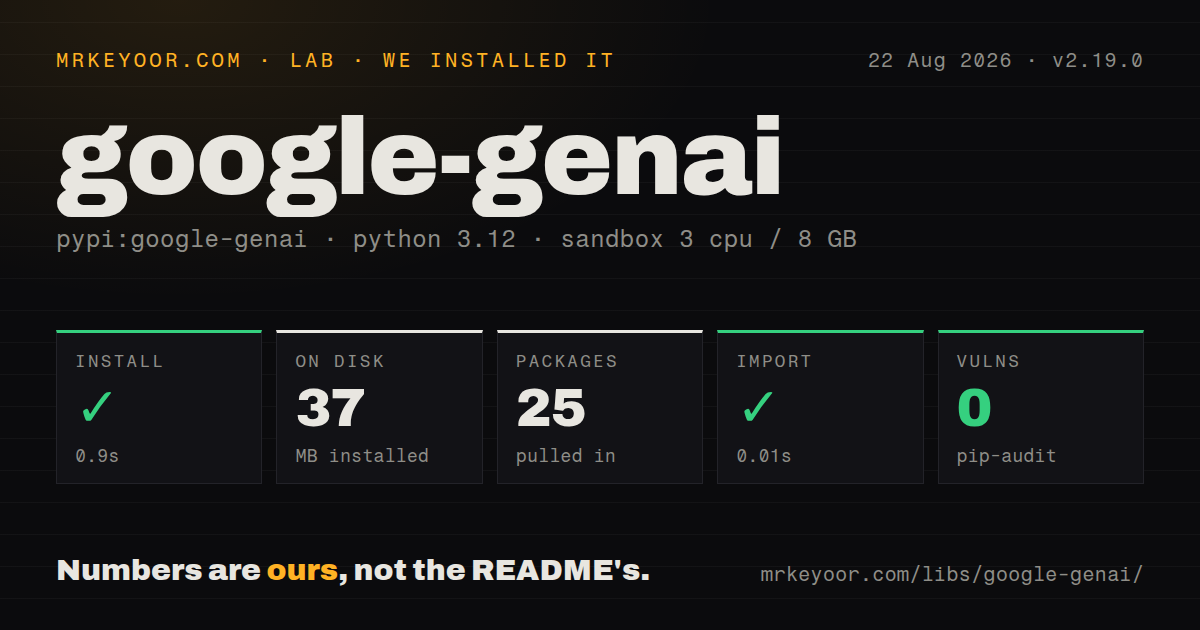
| Install | ✓ · 0.9s | 25 packages on disk · 37 MB |
| Import | ✓ | import google in 0.01s · pure Python · py.typed · requires Python >=3.10 |
| Known vulns | 0 | (pip-audit) |
Answers from our run
Does google-genai install cleanly?
Yes. In a fresh container with an empty cache, pip install google-genai finished in 0.9s, leaving 25 packages and 37 MB on disk. pip-audit reported no known vulnerabilities.
What does google-genai need to run?
Python >=3.10, and nothing compiled: it is pure Python. In our run import google succeeded in 0.01s, and the package ships py.typed for type checkers.
google-genai or google-generativeai: which should you use?
google-generativeai: Only for maintaining legacy code; it is deprecated and new work should not start on it. Choose google-genai for direct Gemini access when you need Google's full API rather than a provider-neutral subset.
When should you not use google-genai?
You might switch model providers later; this SDK is Gemini-only by design, and a call layer like litellm keeps you portable
Discussed on
- hnGemini Flash 2.0 Thinking Experimental4 points
Use it if
- You call Gemini directly and want the SDK Google actually maintains, not the deprecated google-generativeai package your older tutorials show
- You need one codebase serving both an API-key prototype and an enterprise Google Cloud deployment; the same client switches with a constructor flag
- You want function calling where you pass a plain Python function and the SDK runs the call-and-respond loop for you
- You need the full multimodal surface: files, context caching, embeddings, Imagen, Veo, and live audio
- You might switch model providers later; this SDK is Gemini-only by design, and a call layer like litellm keeps you portable
- You dislike moving targets: the README itself warns of breaking changes in the next major (automatic function calling moves to Chats, Live API methods removed) and tells you to pin below 3.0.0
- You expect stable endpoints by default; the SDK targets Google's beta API unless you explicitly set api_version to v1
- You maintain legacy google-generativeai code you cannot migrate yet; the two packages have different imports and call shapes, and snippets do not transfer
Setup reality
Our clean Python 3.12 install of google-genai 2.19.0 completed in 0.9 seconds. It left 25 packages using 37 MB, and pip-audit reported no known vulnerabilities. import google worked in 0.01 seconds. The distribution declares 18 direct dependencies, requires Python 3.10 or newer, is pure Python, and ships py.typed. The measured metadata did not identify a license.
Choose the service before configuring credentials. Gemini Developer API accepts an explicit API key or GEMINI_API_KEY and GOOGLE_API_KEY; GOOGLE_API_KEY wins when both exist. Enterprise mode needs enterprise=True with project and location, or GOOGLE_GENAI_USE_ENTERPRISE plus the Google Cloud project and location variables. File uploads belong to the Developer API, while enterprise examples commonly pass Cloud Storage URIs. Mixing examples across the two services produces confusing authentication or unsupported-method failures.
The client targets beta endpoints by default. Set HttpOptions(api_version='v1') when the stable endpoint is required, then verify that each requested feature exists there. Sync and async clients hold HTTP connection pools. Close them explicitly or use with Client() and async with Client().aio. Proxy discovery follows environment settings, and custom client arguments can supply certificates or SOCKS support after installing the matching HTTP extra.
Pin the 2.x line if your application depends on automatic execution of Python tools through models.generate_content. The repository warns that 3.0 moves that loop to Chats and removes or renames several Live and video-generation members. Automatic tool execution runs application code, so expose narrow functions, validate their arguments, and keep side effects behind your own authorization checks. Streaming, chat history, uploaded files, and cached context also have service lifetimes that your application must track rather than treating the client object as durable storage.
Patterns
Create a client (Developer API) create-client
from google import genai

# explicit key from Google AI Studio
client = genai.Client(api_key='GEMINI_API_KEY')

# or rely on the GEMINI_API_KEY / GOOGLE_API_KEY env var
client = genai.Client()
If both env vars are set, GOOGLE_API_KEY takes precedence over GEMINI_API_KEY, a classic source of wrong-project confusion.
Client for the enterprise platform enterprise-client
from google import genai

client = genai.Client(
    enterprise=True,
    project='your-project-id',
    location='global',
)
This is the product formerly called Vertex AI. The env-var route is GOOGLE_GENAI_USE_ENTERPRISE plus GOOGLE_CLOUD_PROJECT and GOOGLE_CLOUD_LOCATION.
Generate text basic-generation
response = client.models.generate_content(
    model='gemini-2.5-flash',
    contents='Why is the sky blue?',
)
print(response.text)
contents accepts a string, Parts, or full Content lists; the SDK normalizes everything to list[types.Content] before sending.
Tune generation via config generation-config
from google.genai import types

response = client.models.generate_content(
    model='gemini-2.5-flash',
    contents='Why is the sky blue?',
    config=types.GenerateContentConfig(
        temperature=0,
        top_p=0.95,
        top_k=20,
    ),
)
Sampling knobs live inside config=, not as top-level kwargs; plain dicts work in place of the typed config if you prefer.
Stream a response streaming
for chunk in client.models.generate_content_stream(
    model='gemini-2.5-flash',
    contents='Tell me a story in 300 words.',
):
    print(chunk.text, end='')
Streaming is a separate method (generate_content_stream), not a flag on generate_content as in some other SDKs.
Async calls through client.aio async-client
response = await client.aio.models.generate_content(
    model='gemini-2.5-flash',
    contents='Tell me a story in 300 words.',
)
print(response.text)

async for chunk in await client.aio.models.generate_content_stream(
    model='gemini-2.5-flash',
    contents='Tell me a story in 300 words.',
):
    print(chunk.text, end='')
client.aio mirrors every sync module. Note the extra await before iterating the async stream; forgetting it is the most common async mistake here.
Multi-turn chat session multi-turn-chat
chat = client.chats.create(model='gemini-2.5-flash')
response = chat.send_message('tell me a story')
print(response.text)
response = chat.send_message('summarize the story in 1 sentence')
print(response.text)
The chat object keeps history in process memory only; persist and replay it yourself if conversations must survive restarts.
Structured output from a Pydantic model structured-json
from pydantic import BaseModel
from google.genai import types

class CountryInfo(BaseModel):
    name: str
    population: int
    capital: str

response = client.models.generate_content(
    model='gemini-2.5-flash',
    contents='Give me information for the United States.',
    config=types.GenerateContentConfig(
        response_mime_type='application/json',
        response_json_schema=CountryInfo.model_json_schema(),
    ),
)
print(response.text)
Do not repeat the schema or example JSON in the prompt; Google's docs warn output quality drops when you duplicate it.
Pass a Python function as a tool automatic-function-calling
from google.genai import types

def get_current_weather(location: str) -> str:
    """Returns the current weather.

    Args:
        location: The city and state, e.g. San Francisco, CA
    """
    return 'sunny'

response = client.models.generate_content(
    model='gemini-2.5-flash',
    contents='What is the weather like in Boston?',
    config=types.GenerateContentConfig(tools=[get_current_weather]),
)
print(response.text)
The SDK calls your function and feeds the result back, up to 10 remote calls by default. The 3.0 release moves this behavior to Chats, so avoid building new code on this exact path.
Upload a file and ask about it file-upload
file = client.files.upload(file='a11.txt')
response = client.models.generate_content(
    model='gemini-2.5-flash',
    contents=['Could you summarize this file?', file],
)
print(response.text)
The Files API exists only on the Gemini Developer API; on the enterprise platform you reference Cloud Storage URIs with types.Part.from_uri instead.
Opt out of beta endpoints stable-api-version
from google import genai
from google.genai import types

client = genai.Client(
    api_key='GEMINI_API_KEY',
    http_options=types.HttpOptions(api_version='v1'),
)
The default is the beta API surface so preview features work; production services that want stability should pin api_version to v1 explicitly.
Migrate from google-generativeai migrate-from-old-sdk
# old, deprecated package:
# import google.generativeai as genai
# genai.configure(api_key='...')
# model = genai.GenerativeModel('gemini-pro')
# response = model.generate_content('hi')

# new SDK:
from google import genai

client = genai.Client()
response = client.models.generate_content(
    model='gemini-2.5-flash',
    contents='hi',
)
print(response.text)
The module paths differ (google.generativeai vs from google import genai), so both packages can coexist while you migrate file by file.
Alternatives
| Package | Registry | Pick it when |
|---|---|---|
| google-generativeai | PyPI | Only for maintaining legacy code; it is deprecated and new work should not start on it |
| litellm | PyPI | You want Gemini as one option behind an OpenAI-format interface you can point at other providers |
| langchain-google-genai | PyPI | You are in the LangChain ecosystem and want Gemini wired in as a chat model there |
More ai / ml guides
@modelcontextprotocol/sdk · openai · mcp · huggingface-hub · @anthropic-ai/sdk · openai · the whole shelf →
How this guide is made: grounded in the library's documentation, release notes, changelog, and issue history, on a fixed rubric — not a hands-on install of every release. The 50 most-downloaded entries are additionally install-verified in clean containers. Corrections: contact the desk.