node-html-parser review
`node-html-parser` turns an HTML string into a small mutable tree with CSS selectors, attributes, classes, parent and sibling navigation, text extraction, source ranges, and serialization. It intentionally implements a simplified DOM and prioritizes parse speed over browser-perfect recovery of broken markup. Version 9.0 changed the packaging build, and 9.0.1 switched declaration generation back to TypeScript after the new bundler produced bad types. Our Node 22 checks loaded its CommonJS and ESM entries, but a full browser import was 108.4 KB minified and 47.3 KB gzipped. Use it for trusted extraction and rewriting jobs whose input behavior you test; use an HTML5 parser when the exact browser tree matters.
Our node-html-parser 9.0.1 install used 4 MB across 10 packages with 0 audit findings, while its full browser import reached 47.3 KB gzipped. Install it for fast Node-side extraction or controlled HTML rewrites; do not install it for sanitizer duty, browser emulation, or conformance-critical malformed HTML.
We installed it
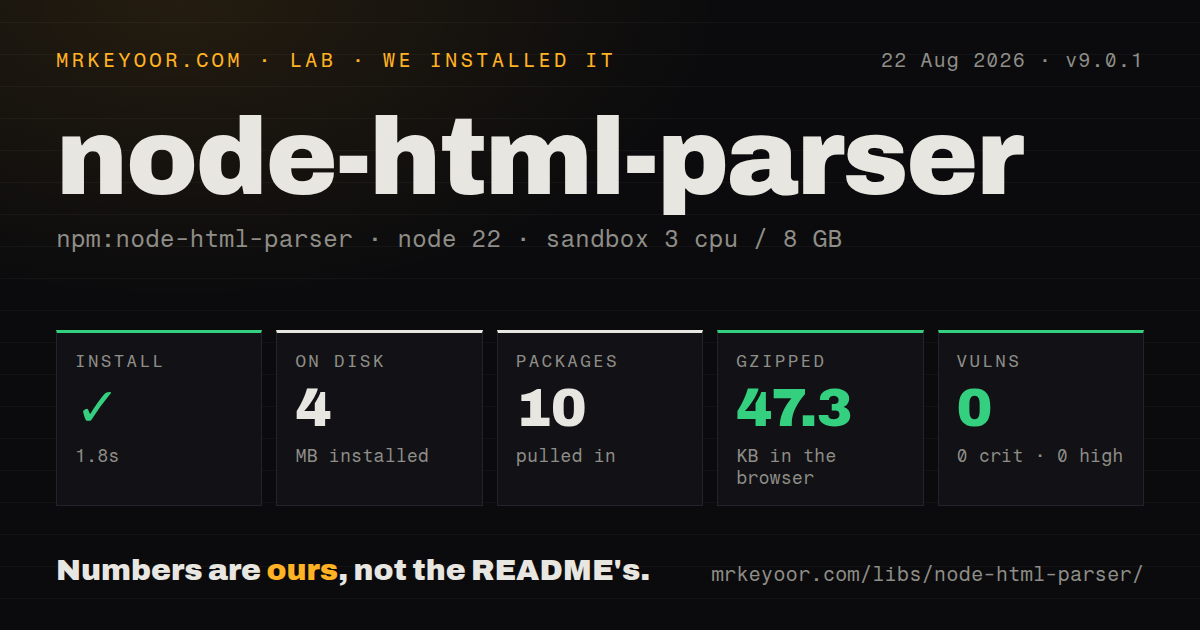
| Install | ✓ · 1.8s | 10 packages on disk · 4 MB |
| Import | ✓ | ESM import works · require() works · CommonJS package with exports map |
| Browser | 47.3 KB | gzipped (108.4 KB minified), bundled with esbuild |
| Types | ✓ | TypeScript types bundled |
| Known vulns | 0 | 0 critical · 0 high · 0 moderate · 0 low (npm audit) |
Answers from our run
Does node-html-parser install cleanly?
Yes. In a fresh container with an empty cache, npm install node-html-parser finished in 2 seconds, leaving 10 packages and 4 MB on disk. npm audit reported no known vulnerabilities.
How much does node-html-parser add to a browser bundle?
47.3 KB gzipped (108.4 KB minified) when the whole package is bundled for the browser with esbuild. Importing only part of it is usually smaller.
Does node-html-parser work with both ESM and CommonJS?
Yes. Both import 'node-html-parser' and require('node-html-parser') worked in Node 22 in our run. The package is published as CommonJS with an exports map.
Does node-html-parser include TypeScript types?
Yes, type declarations ship inside the package, so no @types install is needed.
node-html-parser or parse5: which should you use?
parse5: Choose it when WHATWG HTML parsing and browser-like malformed-markup recovery matter more than a compact mutable query API. Our node-html-parser 9.0.1 install used 4 MB across 10 packages with 0 audit findings, while its full browser import reached 47.3 KB gzipped.
When should you not use node-html-parser?
Correct HTML5 tree construction for arbitrary malformed pages is a requirement. The README says some malformed HTML may parse incorrectly; parse5 is the safer conformance choice.
Use it if
- A Node process must query and edit HTML fragments with familiar selectors but does not need layout, scripts, events, or browser globals.
- Inputs come from a controlled template or a known set of pages whose malformed-markup behavior can be covered with fixtures.
- Source ranges, mutable nodes, text extraction, and serialization are needed in one small in-memory parser.
- Both CommonJS and ESM consumers need documented entry points and bundled TypeScript declarations.
- Correct HTML5 tree construction for arbitrary malformed pages is a requirement. The README says some malformed HTML may parse incorrectly; parse5 is the safer conformance choice.
- You need a browser environment with script execution, events, layout, styles, cookies, or navigation. This is a tree parser, not jsdom or a headless browser.
- Untrusted HTML will be rendered after mutation and you expect parsing to make it safe. The library is not an XSS sanitizer; use DOMPurify or sanitize-html with a deliberate policy.
- A frontend bundle cannot absorb 108.4 KB minified and 47.3 KB gzipped for the complete import we measured. Parsing on a server or choosing a smaller browser-specific path may be cheaper.
- Documents are too large to hold as one mutable tree. `parse()` consumes a complete string and builds nodes in memory; a streaming tokenizer or SAX-style parser fits bounded-memory work better.
Setup reality
We installed node-html-parser 9.0.1 in a clean Node 22 Bookworm container. npm took 1.8 seconds and left 10 packages using 4 MB on disk. npm audit found 0 vulnerabilities at all four severities. The package itself declares 2 direct dependencies and 0 peers and is 716 KB unpacked. It is CommonJS with an exports map, includes TypeScript declarations, and passed both our require() and ESM import checks.
No credentials or configuration file are involved. Parsing returns a wrapper root, so the first input element is usually root.firstChild, not the root itself. querySelector() can return null and getAttribute() can return undefined. Comments are discarded unless enabled. Script, style, pre, and noscript text behavior is configurable. Recovery flags such as fixNestedATags, parseNoneClosedTags, and preserveTagNesting change the tree and need fixture tests against your actual inputs.
A full esbuild browser import measured 108.4 KB minified and 47.3 KB gzipped in our sandbox. Version 9 exposes separate import and require targets through one exports map. The package has no engines declaration, so npm does not enforce a Node floor. TypeScript 4.1.2 or newer is the README's stated minimum. Version 9.0.1 exists specifically because declaration generation in 9.0 needed repair, making 9.0.0 a poor pin for typed consumers.
The tree is mutable and serialization is not a byte-preserving round trip. Attribute quoting, entity decoding, tag repair, whitespace removal, and inserted HTML can change output. set_content() parses strings as markup; use a text-oriented assignment when user input must remain text. Source range values refer to the original input and are not a patch map after mutation. Extracted URLs and JSON-LD remain untrusted data. Parse, validate, sanitize where appropriate, and only then use or render the result.
Patterns
Parse a fragment and find an element parse-and-query
import { parse } from 'node-html-parser';

const root = parse('<ul id="list"><li>Hello</li></ul>');
const list = root.querySelector('#list');
console.log(list?.text, list?.tagName);
`parse()` creates a wrapper root, and `querySelector()` may return null. Default tag names are uppercase.
Open the CommonJS entry require-commonjs
const { parse } = require('node-html-parser');
const root = parse(html);
Version 9 declares separate require and import targets. Both loaded successfully in our Node 22 sandbox.
Collect text and href values extract-links
const links = root.querySelectorAll('a.result').map(node => ({
  href: node.getAttribute('href'),
  label: node.text.trim(),
}));
A missing attribute produces `undefined`. Resolve and validate each URL before using it for another request.
Enable selected recovery options configure-recovery
const root = parse(html, {
  comment: true,
  fixNestedATags: true,
  parseNoneClosedTags: true,
  preserveTagNesting: false,
});
Each option changes the resulting tree. None promises the same error recovery as a conforming browser parser.
Read a JSON-LD script extract-json-ld
const script = root.querySelector('script[type="application/ld+json"]');
const data = script ? JSON.parse(script.rawText) : null;
`rawText` avoids HTML entity decoding. Catch JSON errors and validate the object before trusting embedded metadata.
Change attributes and child markup mutate-element
const price = root.querySelector('.price');
if (price) {
  price.setAttribute('data-checked', 'yes');
  price.set_content('<span>19.99</span>');
}
console.log(root.toString());
`set_content()` interprets a string as HTML. Do not pass unsanitized user text when the result will be rendered.
Move from a cell to nearby rows walk-relatives
const cell = root.querySelector('td.total');
const row = cell?.closest('tr');
const nextRow = row?.nextElementSibling;
const elements = row?.children ?? [];
`children` returns elements only; `childNodes` also includes text and any retained comments.
Slice an element from the source read-source-range
const target = root.querySelector('#target');
if (target) {
  const [start, end] = target.range;
  console.log(html.slice(start, end));
}
Ranges index the original input. Mutating the tree does not update them into coordinates for the serialized output.
Run the parser's validity check validate-html
import { valid } from 'node-html-parser';

if (!valid(fragment)) {
  throw new Error('Fragment failed parser validation');
}
This check reflects node-html-parser's grammar and recovery rules, not full WHATWG conformance or sanitization.
Drop script and style nodes remove-elements
for (const node of root.querySelectorAll('script, style')) {
  node.remove();
}
const text = root.structuredText;
Removing two tag types does not sanitize HTML. Event attributes, dangerous URLs, and other active content remain.
Edit a copy of one subtree clone-node
const card = root.querySelector('.card');
const copy = card?.clone();
copy?.classList.add('preview');
Clone before applying mutations that should not affect the original tree. Serialize the copy separately.
Read retained comments preserve-comments
const root = parse(html, { comment: true });
const comments = root.childNodes.filter(node => node.nodeType === 8);
Comments are omitted by default. Enabling them costs work and exposes comment nodes through `childNodes`.
Alternatives
| Package | Registry | Pick it when |
|---|---|---|
| parse5 | npm | Choose it when WHATWG HTML parsing and browser-like malformed-markup recovery matter more than a compact mutable query API. |
| cheerio | npm | Choose it for a jQuery-style traversal and manipulation surface with a wider scraping ecosystem. |
| htmlparser2 | npm | Choose it for event-driven parsing, lower-level DOM handlers, or large inputs that should not start as one string tree. |
| jsdom | npm | Choose it when tests or tools need broader browser DOM APIs, URL handling, events, and optional script behavior. |
More utils guides
lru-cache · type-fest · ajv · zod · p-limit · find-up · the whole shelf →
How this guide is made: grounded in the library's documentation, release notes, changelog, and issue history, on a fixed rubric — not a hands-on install of every release. The 50 most-downloaded entries are additionally install-verified in clean containers. Corrections: contact the desk.