ajv review
Ajv 8.20.0 compiles JSON Schema and JSON Type Definition documents into JavaScript functions, then returns a boolean and a structured error list for each value checked. It supports JSON Schema drafts 06, 07, 2019-09, and 2020-12; draft 04 lives in a separate package. Current code can resolve registered $ref documents, run custom keywords, and optionally coerce values, insert defaults, or remove unwanted properties. Version 8.20.0 updates supported Node lines to 18 through current releases and adds the ES2022 RegExp type needed for match indices. Our package check found bundled declarations and working CommonJS and ESM entry paths.
We measured a 0.7-second install and 3 MB disk footprint for Ajv 8.20.0 in our sandbox, with bundled types, working require and import, and 0 audit findings. Install it when JSON Schema or JTD is the shared contract; choose a code-first validator when TypeScript inference and friendly messages matter more than schema interchange.
We installed it
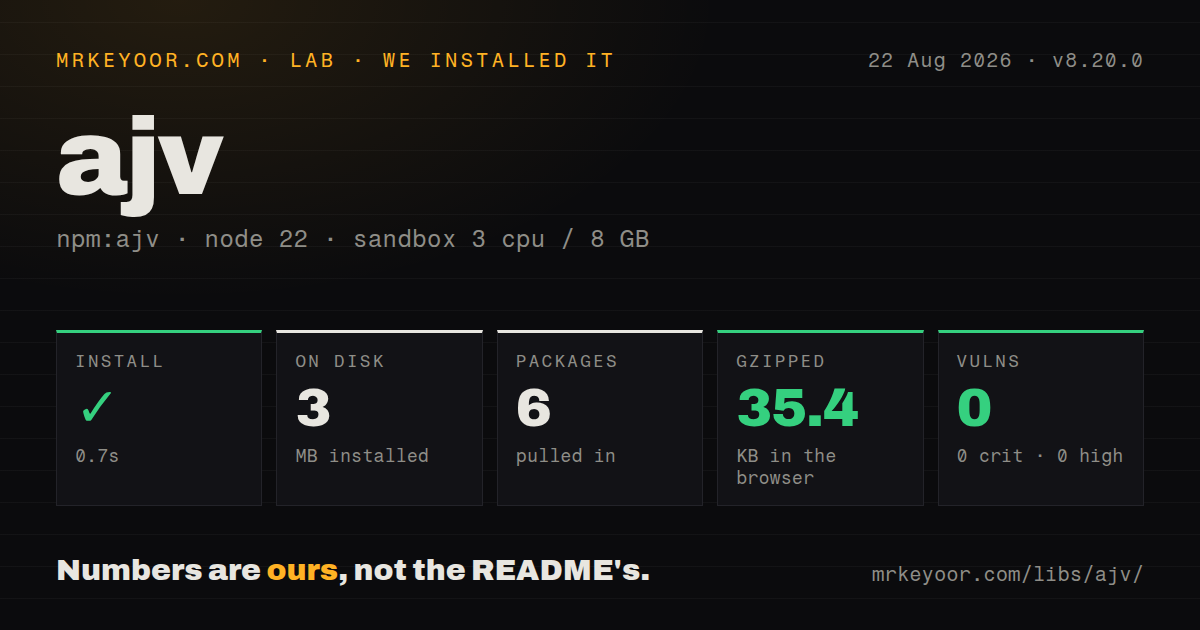
| Install | ✓ · 0.7s | 6 packages on disk · 3 MB |
| Import | ✓ | ESM import works · require() works · CommonJS package |
| Browser | 35.4 KB | gzipped (115.3 KB minified), bundled with esbuild |
| Types | ✓ | TypeScript types bundled |
| Known vulns | 0 | 0 critical · 0 high · 0 moderate · 0 low (npm audit) |
Answers from our run
Does ajv install cleanly?
Yes. In a fresh container with an empty cache, npm install ajv finished in 0.7s, leaving 6 packages and 3 MB on disk. npm audit reported no known vulnerabilities.
How much does ajv add to a browser bundle?
35.4 KB gzipped (115.3 KB minified) when the whole package is bundled for the browser with esbuild. Importing only part of it is usually smaller.
Does ajv work with both ESM and CommonJS?
Yes. Both import 'ajv' and require('ajv') worked in Node 22 in our run. The package is published as CommonJS.
Does ajv include TypeScript types?
Yes, type declarations ship inside the package, so no @types install is needed.
ajv or zod: which should you use?
zod: Use it when TypeScript inference from a code-first schema matters more than sharing standard JSON Schema. We measured a 0.7-second install and 3 MB disk footprint for Ajv 8.20.0 in our sandbox, with bundled types, working require and import, and 0 audit findings.
When should you not use ajv?
The declaration should be the source of a TypeScript type; Zod or Yup gives a more direct code-first workflow than synchronizing a standard schema and interface
Discussed on
- hnAjv JSON Schema Validator3 points
Use it if
- Your service publishes JSON Schema or JTD as a contract that clients in other languages must understand
- A busy request path can compile each schema once at startup and call the finished validator many times
- Schemas need recursive $ref links, custom keywords, several JSON Schema drafts, or OpenAPI nullable and discriminator support
- An input boundary should deliberately coerce scalar query values, apply defaults, or remove properties rejected by the schema
- The declaration should be the source of a TypeScript type; Zod or Yup gives a more direct code-first workflow than synchronizing a standard schema and interface
- Your Content Security Policy forbids generated functions and the build cannot emit Ajv standalone validators ahead of time
- Users need polished messages from the validator itself; Ajv exposes paths, keywords, and parameters, while wording and localization require application code or plugins
- Schemas rely on email, hostname, URI, date, or time formats without extra packages; version 8 expects ajv-formats to register those common definitions
- The project carries Ajv 6 assumptions such as ignored unknown keywords or draft-04 defaults; strict compilation in version 8 can turn those assumptions into startup errors
Setup reality
We installed Ajv 8.20.0 in a fresh Node 22 Bookworm sandbox without a cache, and npm finished in 0.7 seconds. The result was 6 packages and 3 MB on disk, with 4 direct dependencies and no peer dependencies. npm audit found 0 known vulnerabilities. The 2,544 KB package includes TypeScript declarations. It is CommonJS without an exports map, and both require() and ESM import worked in our sandbox. A full-package browser import measured 115.3 KB minified and 35.4 KB gzipped.
Version 8 does not bundle familiar formats such as email and date-time, so install ajv-formats and call it before compiling a schema that names them. Strict mode reports unknown formats, misspelled keywords, and ambiguous constructs while the application starts. Schemas copied from Ajv 6 examples often need changes at this step.
Compile 1 validator for each schema and keep it instead of calling compile inside every request. Standard $ref URLs are identifiers, not network requests: add referenced documents with addSchema, or provide loadSchema and use compileAsync when references must be loaded. Runtimes that reject new Function need standalone code generated during the build.
Three mutation options change the supplied value: coerceTypes can turn query strings into numbers or booleans, useDefaults inserts missing members, and removeAdditional deletes properties. Clone data first when later code needs the original. allErrors is helpful for forms, though an untrusted object can produce a longer and more expensive result than the default first failure path.
Patterns
Compile and reuse an object validator validate-object
import Ajv from 'ajv'

const ajv = new Ajv()
const validateUser = ajv.compile({
  type: 'object',
  properties: { id: { type: 'integer', minimum: 1 }, email: { type: 'string' } },
  required: ['id', 'email'],
  additionalProperties: false,
})

if (!validateUser(input)) console.error(validateUser.errors)
compile() generates the function once. The errors array belongs to the most recent call, so read or copy it before another validation runs.
Add email and date formats register-formats
import Ajv from 'ajv'
import addFormats from 'ajv-formats'

const ajv = new Ajv()
addFormats(ajv)
const validateEmail = ajv.compile({ type: 'string', format: 'email' })
Ajv 8 keeps common format implementations in ajv-formats. Strict compilation rejects an unknown format instead of silently treating it as annotation text.
Check a schema against a TypeScript type type-schema
import Ajv, { type JSONSchemaType } from 'ajv'

type Job = { id: number; label: string }
const schema: JSONSchemaType<Job> = {
  type: 'object',
  properties: { id: { type: 'integer' }, label: { type: 'string' } },
  required: ['id', 'label'],
  additionalProperties: false,
}
const validateJob = new Ajv().compile(schema)
JSONSchemaType checks this declaration during TypeScript compilation, and a successful validator call narrows unknown input to Job.
Return every form error report-all-errors
const ajv = new Ajv({ allErrors: true })
const validate = ajv.compile(schema)

if (!validate(formValue)) {
  return validate.errors?.map(({ instancePath, keyword, params }) => ({ instancePath, keyword, params }))
}
allErrors keeps checking after the first failure. Put a size limit on public input before using it to prevent a large error array.
Coerce query strings at the boundary coerce-query-values
const ajv = new Ajv({ coerceTypes: true })
const validate = ajv.compile({
  type: 'object',
  properties: { page: { type: 'integer', minimum: 1 }, archived: { type: 'boolean' } },
  required: ['page'],
})
const query = { page: '2', archived: 'false' }
validate(query)
The call mutates nested values in query. After success, page is 2 and archived is false rather than their original strings.
Insert schema defaults insert-defaults
const ajv = new Ajv({ useDefaults: true })
const validate = ajv.compile({ type: 'object', properties: { limit: { type: 'integer', default: 25 } } })
const options = {}
validate(options)
console.log(options.limit) // 25
useDefaults writes into the object being checked. Treat the post-validation value as normalized data, or validate a copy.
Discard undeclared object members remove-extra-properties
const ajv = new Ajv({ removeAdditional: true })
const validate = ajv.compile({
  type: 'object',
  properties: { name: { type: 'string' } },
  additionalProperties: false,
})
const body = { name: 'Ada', admin: true }
validate(body)
removeAdditional deletes data. Its interaction with oneOf and anyOf can surprise callers, so test union schemas with unwanted fields.
Register a document used by $ref resolve-schema-reference
const ajv = new Ajv()
ajv.addSchema({
  $id: 'https://schemas.example.test/address',
  type: 'object',
  properties: { city: { type: 'string' } },
  required: ['city'],
})
const validate = ajv.compile({
  type: 'object',
  properties: { shipping: { $ref: 'https://schemas.example.test/address' } },
})
The $ref URI identifies a schema; compile() does not download it. addSchema makes that document available synchronously.
Compile references with an explicit loader load-remote-schema
const ajv = new Ajv({
  loadSchema: async (uri) => {
    const response = await fetch(uri)
    if (!response.ok) throw new Error(`schema ${response.status}`)
    return response.json()
  },
})
const validate = await ajv.compileAsync(rootSchema)
compileAsync uses loadSchema for missing references. Restrict allowed hosts and response sizes before resolving a URI from an untrusted schema.
Register a boolean keyword add-custom-keyword
const ajv = new Ajv()
ajv.addKeyword({
  keyword: 'even',
  type: 'number',
  schemaType: 'boolean',
  validate: (enabled, value) => !enabled || value % 2 === 0,
})
const validate = ajv.compile({ type: 'number', even: true })
Strict mode accepts the keyword only after registration. A plain validate callback is simpler than emitting custom validator source.
Run an asynchronous keyword validate-async-rule
const ajv = new Ajv()
ajv.addKeyword({
  keyword: 'userExists',
  async: true,
  type: 'integer',
  validate: async (_schema, id) => Boolean(await users.findById(id)),
})
const validate = ajv.compile({ $async: true, type: 'integer', userExists: true })
await validate(userId)
A schema using an async format or keyword must set $async: true. Failed validation rejects the returned promise instead of returning false.
Parse and validate JSON with JTD use-jtd-parser
import AjvJTD from 'ajv/dist/jtd.js'

const ajv = new AjvJTD()
const parse = ajv.compileParser({
  properties: { id: { type: 'uint32' }, name: { type: 'string' } },
})
const value = parse('{"id":7,"name":"Ada"}')
if (value === undefined) console.error(parse.message, parse.position)
A compiled JTD parser returns undefined on invalid JSON or data and exposes message and position for that failed call.
Alternatives
| Package | Registry | Pick it when |
|---|---|---|
| zod | npm | Use it when TypeScript inference from a code-first schema matters more than sharing standard JSON Schema. |
| joi | npm | Use it for a server-side builder API with application-oriented validation rules and messages. |
| yup | npm | Use it for object and form validation built around casts, transforms, and a fluent schema API. |
More utils guides
lru-cache · type-fest · zod · p-limit · find-up · uuid · the whole shelf →
Related reading
How this guide is made: grounded in the library's documentation, release notes, changelog, and issue history, on a fixed rubric — not a hands-on install of every release. The 50 most-downloaded entries are additionally install-verified in clean containers. Corrections: contact the desk.